



Most reviewed app projects sit between $10,000 and $49,999, with common agency rates of $25 to $49 per hour. At that price point, vague scopes are exactly what create rework, missed requirements, and enterprise-grade technical debt.
A mobile application development company should not be judged as a code shop. In enterprise work, it owns the full lifecycle, strategy, prototyping, engineering, QA, launch, and post-release maintenance, because the market is too large and too active for one-off thinking to survive contact with reality. Grand View Research estimates the global mobile application market at USD 252.89 billion in 2023, with a projected rise to USD 626.39 billion by 2030 at a 14.3% CAGR source, and users now spend most of their smartphone time inside apps, not on the device itself. If you're building for regulated sectors, that makes mobile delivery a governance channel, not a creative brief.
Practical rule: if the vendor only talks about screens, they're not talking about risk.
What a Mobile Application Development Company Does at Scale
A serious mobile application development company operates across the whole product chain. It takes responsibility for design decisions, engineering, testing, release, and post-launch maintenance, because enterprise mobile work fails when leadership buys coding hours but expects lifecycle ownership. Ollo's software development company perspective frames that split clearly, delivery only works when the team owns the consequences of what it builds.
The scale of the market makes that mistake expensive. Analysts at Grand View Research place the mobile application market in the hundreds of billions, which is enough to show this is no longer a niche spend bucket. Users also spend most of their smartphone time inside apps, so your app is competing with every other product that wants attention. A second industry compilation says trillions of hours were spent in mobile apps in 2024, and nearly a thousand new apps were added to Google Play each day, which tells you how crowded the operating environment is.
Why lifecycle ownership matters
Most failed programmes start with a narrow vendor brief. The team builds the interface, ships a pilot, then discovers that support, telemetry, OS changes, permissions, and compliance controls were never owned.
That gap is where enterprise mobile projects go off the rails. If a vendor cannot explain how the app will still be supportable after release, the buyer is not purchasing delivery, it is taking on a future recovery project.
Analytics belongs inside that lifecycle, not beside it. A guide to app analytics solutions is useful because it shows how teams see where users drop off, where integrations fail, and where governance starts breaking down. In enterprise apps, analytics is a control surface, not a vanity layer.
The right mental model is simple. A mobile app company should behave like a delivery partner that owns design decisions, engineering consequences, and operational drift. If the team can only talk about screens, it is not discussing risk.
Comparing Engagement Models That Actually Work in Enterprise Contexts
Fixed price looks safe until the first integration surprise lands. Time-and-materials looks flexible until nobody polices scope drift. Outcome-based pricing sounds elegant, but it only works when your acceptance criteria are precise enough to survive procurement, legal, and technical scrutiny.
Clutch's July 2026 pricing guidance, as summarised by Lucent Innovation, says most reviewed app projects fall between $10,000 and $49,999, with common agency rates of $25 to $49 per hour source. At those levels, the wrong engagement model doesn't just distort cost, it distorts accountability. That's why the model has to match the kind of uncertainty you face.
Where each model breaks
Fixed price works when scope is stable, integrations are few, and the compliance surface is small. It breaks when the vendor underestimates identity work, legacy data shaping, or approval chains, because change orders then become project.
Time and materials fits discovery-heavy work and rescue engagements. It breaks when governance is weak, because a team can keep billing while the client keeps discovering missing requirements.
Outcome-based is powerful for mature organisations with strict acceptance criteria. It breaks when the buyer can't define “done” in operational terms, because the vendor will optimise to the contract language, not the business outcome.
The contract format won't save you from a bad scope. It only changes where the pain shows up.
For a practical comparison of platform strategy versus bespoke delivery, see Power Apps vs custom development.
What usually works in practice
For enterprise mobile, a hybrid model is usually safer. Use clear milestone gates, documented acceptance criteria, and explicit control over integrations and compliance work. If the vendor resists that structure, they're telling you they want billing flexibility more than delivery discipline.
You should also look at the agency's ability to cover the full lifecycle, not just the build. A vendor that can't explain QA ownership, release management, and post-launch support will give you partial execution, and partial execution is how enterprise programmes drift into avoidable rework.
Vendor Selection Checklist for Regulated-Sector Buyers
A credible vendor review starts with risk, not polish. A mobile application development company that serves regulated sectors should be able to explain how it handles identity, audit trails, approval chains, and handoffs between mobile, backend, and compliance teams. If the vendor cannot describe those controls clearly, you are not buying delivery discipline, you are buying a presentation.
Shortlists should force proof, not promises. Ask how they handle regulated-sector constraints, what happens when the backend team changes the schema, and who owns release readiness when a compliance review adds another gate. Those questions expose whether the team understands enterprise migration risk or only knows how to talk about features.
Checklist for the meeting room
| Evaluation Criterion | What to Verify | Red Flag |
|---|---|---|
| Full lifecycle ownership | Strategy, UX, engineering, QA, launch, support | “We can hand over after build” |
| Regulated-sector experience | Energy, finance, or healthcare references with real constraints | Generic consumer app work only |
| Platform breadth | Android, iOS, and cross-platform awareness | One-OS bias disguised as expertise |
| Compliance-aware architecture | Logging, access control, retention, review gates | “We'll deal with security later” |
| Migration support | Data mapping, identity, permissions, and rollback planning | No mention of migration at all |
| Risk communication | Clear escalation paths and issue reporting | Vague status updates and happy talk |
A useful way to price the advisory side of that effort is to review consultant pricing and engagement before you sit down with vendors. That gives you a practical baseline for whether you need a build squad, a delivery lead, or a thin layer of outsourced labour that will disappear when the first governance issue lands.
What good vendors prove
Good vendors show how they test, how they document decisions, and how they manage handover. They also explain where their process stops, because honest teams know exactly where enterprise risk shows up first.
Practical rule: if the vendor cannot describe the failure path, they probably have not built for it.
Cross-check their delivery posture against a broader web development company operating model so you can see whether they think in components or in whole systems. Enterprise buyers need the second mindset.
Technical Risks Most Buyers Don't See Until Deployment Fails
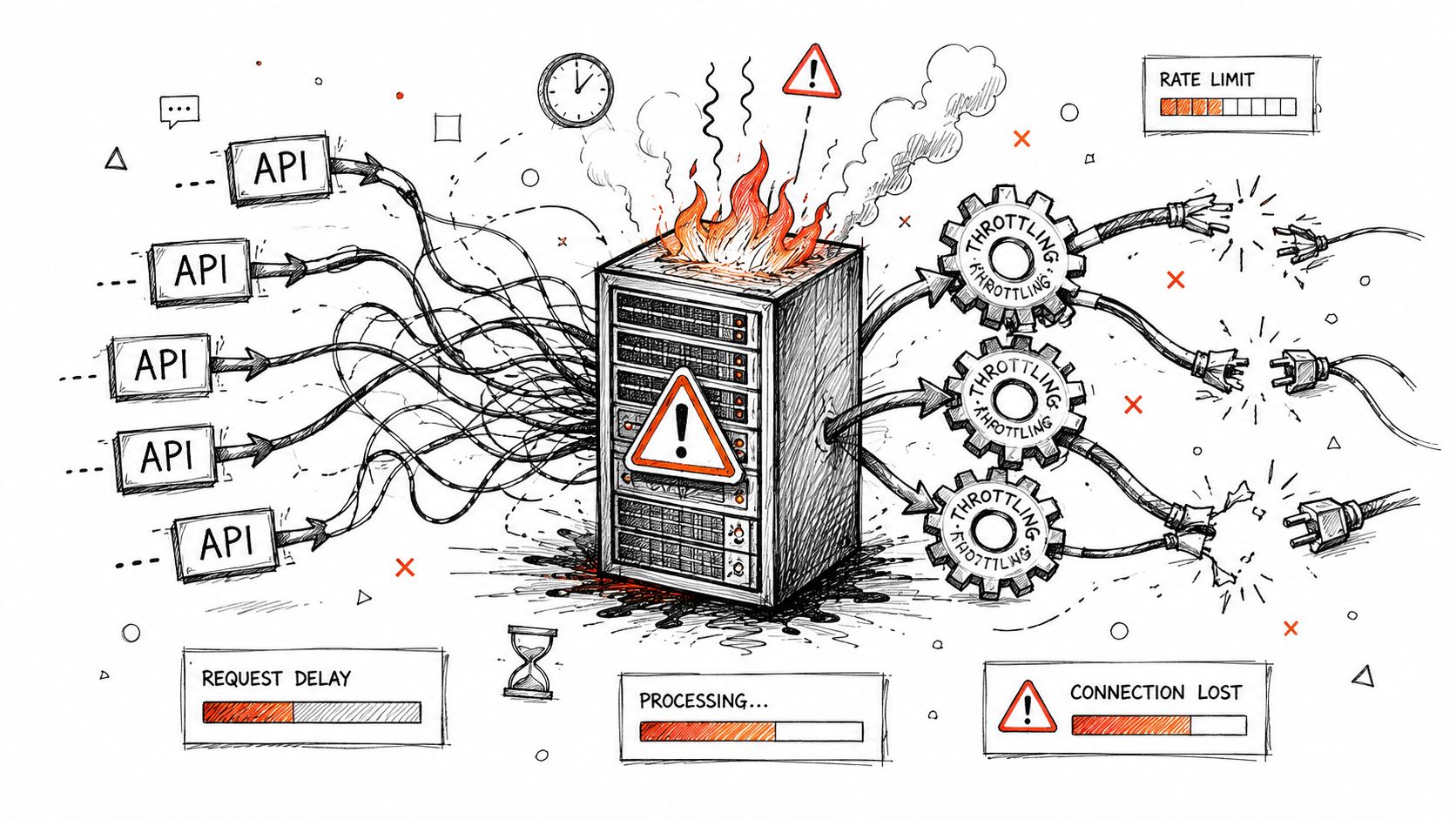
The most expensive mobile failures usually surface after the build looks finished. The app installs. The demo works. Then it starts hitting the systems underneath it, and those systems begin refusing the load, the shape of the data, or the way the app expects to sync.
Microsoft Learn documents platform constraints that enterprise teams still underestimate, including throttling behaviour, the 5,000-item list view threshold, and path-length limits in SharePoint Online migration work source. These limits are easy to dismiss during planning. They become outage multipliers when the app depends on constant sync, inherited permissions, or large-scale content movement.
The failure modes that hurt most
API throttling is usually the first warning sign. The team sees slow sync, then partial batches, then retry logic that keeps firing while nothing completes.
Broken inheritance strips permissions in ways that are hard to spot during testing. That matters when app access has to mirror business structure, because the wrong user can lose access or gain too much.
GUID conflicts show up during tenant-to-tenant work or schema remapping. They can break relationship integrity, which means records no longer point where workflows expect them to point.
Long-path limits cut off file references. The failure is often partial, not clean. Users only notice later, when content is missing and the migration report still looks acceptable at first glance.
The documentation says the limits exist. In practice, the incident starts when the app runs into them.
For testing discipline that catches this kind of breakage earlier, types of testing matters more than most buyers admit. Integration tests, permissions checks, and migration rehearsals belong in the plan when the backend is the system of record.
Why this shows up in mobile work too
Mobile teams often treat backend integration like plumbing. That assumption causes avoidable failures. If the app reads from Microsoft 365, Entra ID, or a legacy repository, the integration layer becomes part of the product, and the migration work becomes part of the risk profile.
We often see clients fail when they assume the build can wait until after the app is finished. It cannot. If identity, sync, or content structure changes under the app later, the team pays twice, once in engineering rework and again in business disruption. A specialist with real migration experience reduces that risk more effectively than a generic app studio.
Compliance Controls for Energy, Finance, and Healthcare Sectors
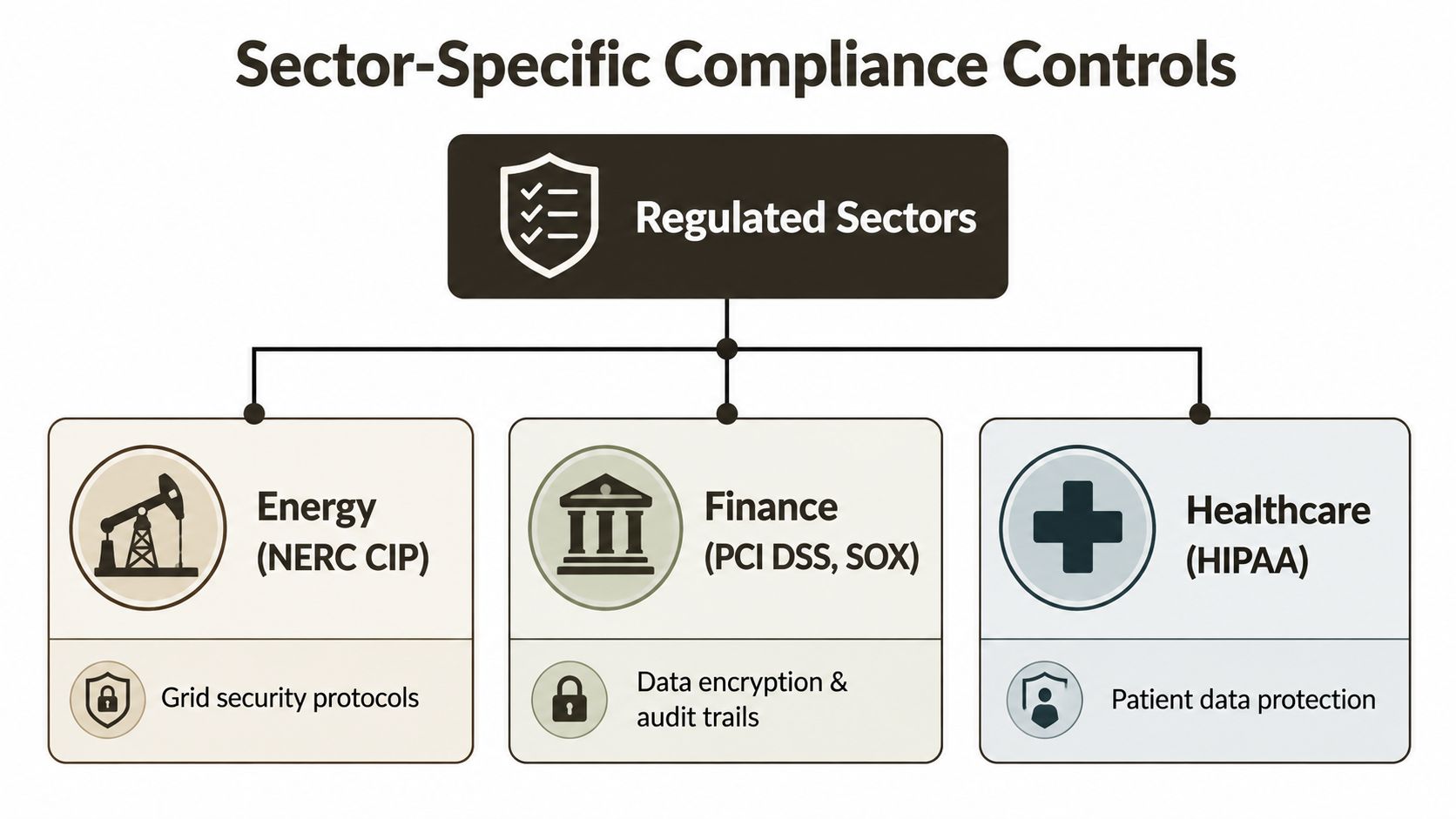
Regulated sectors do not buy apps for appearance. They buy controlled software behaviour, because the failure mode is usually governance, not design. Energy teams need protection around grid data and operational integrity. Finance teams need encryption, auditability, and controls they can defend in review. Healthcare teams need patient data protection, access boundaries, and clear rules for how protected information moves through the system.
A strong vendor should translate those obligations into architecture, not just policy language. That means encryption at rest and in transit, audit logging, retention policies, and identity controls that align with zero trust. The same controls matter whether the app touches Microsoft 365, Entra ID, or a connected back office. If those pieces are treated as separate projects, the compliance story falls apart fast.
Sector-specific control expectations
Energy environments need tight control over operational data, especially where infrastructure data and field access intersect. If the app cannot show who saw what and when, the governance gap is already there.
Finance work usually needs detailed audit trails and permission design. A good fit here is a vendor that understands regulatory technology for fintech, and for a practical example, see our analysis of money transfer application compliance.
Healthcare requires a heavier focus on patient data handling, access boundaries, and retention discipline. If your vendor treats that as a generic content app, the result is usually rework after review finds the missing controls.
The app company also needs to understand how Microsoft 365 and Entra ID shape the security boundary. When identity is wrong, every downstream control weakens. Buyers in regulated sectors should ask for evidence-based guidance on access control, auditability, and migration support, not polished portfolios that stop at screenshots.
What to ask for in the design review
- Encryption design: Ask where data is encrypted, which systems hold keys, and how transport protection works.
- Audit logs: Ask what gets logged, where the logs live, and who can review them.
- Retention and deletion: Ask how records survive migration without violating policy.
- Identity boundaries: Ask how the app maps to Entra ID and whether conditional access will still function.
- Change control: Ask how compliance changes get reviewed before release.
If you want a migration partner that handles identity redesign alongside app work, Ollo can support that conversation as part of a broader Microsoft 365 programme. The point is not feature delivery. It is keeping the controls intact when the app starts moving real data.
Integration and Migration Pitfalls That Derail App Projects
The same pattern shows up in rescue work again and again. The app looks fine in a demo, the build passes review, and production integration exposes the parts the team never tested against real data, real identity rules, or real governance. At that point, the project is no longer a build. It is recovery.
Most failures start in the migration layer, not the interface. Sync jobs slow down, record updates arrive late, and the business sees stale data before anyone can explain why the app is behaving correctly in test but badly in production.
Identity work creates its own failure mode. If the app was designed around older authentication patterns while the organisation shifts to Entra ID, sign-in breaks, access policies stop lining up, and users blame the mobile app even when the problem sits in the identity handoff. That is a governance failure, not a presentation issue.
Legacy content mapping is usually the next problem. Permissions do not carry cleanly, parent-child relationships change during migration, and GUID conflicts leave records pointing to the wrong place. By the time users report missing documents or broken approvals, the engineering team is already untangling a mess that should have been caught before cutover.
The sync layer fails first in many enterprise migrations. Batch updates hit limits, retries stack up, and the app starts showing behaviour that looks random to the business but is predictable once you understand how the target system handles write volume and permission checks.
Identity migration needs the same discipline. A vendor that treats authentication as a checkbox usually misses conditional access, role mapping, and session behaviour after the move. The result is a support incident that looks like an app defect and turns into a cross-team blame exercise.
The fix is to test the whole chain, not just the app in isolation. Migration plans need to validate record mapping, permissions, error handling, and rollback steps before production sees a single batch. If a partner cannot explain how they will prove those controls before go-live, they are selling delivery theatre, not risk reduction.
We often see clients fail when they assume the app and the migration are separate projects. They aren't.
The commercial lesson is plain. A low-cost build that falls apart during integration costs more than a harder upfront engagement with specialists who understand migration risk, identity governance, and system boundaries. Hiring the wrong partner is expensive because the failure does not stop at code. It shows up in rework, business disruption, and a control environment that no longer behaves the way the organisation expects.
RFP Template and Decision Framework for Your Next Vendor Review
Your RFP should force specificity. Ask for proof of full-lifecycle ownership, regulated-sector work, migration methodology, and support after launch. If the vendor answers with a portfolio and a generic capabilities list, they haven't answered the question you asked.
Use this structure in the next review meeting:
- Delivery model. Ask who owns discovery, build, QA, release, and post-launch support.
- Risk controls. Ask how they handle API throttling, GUID conflicts, broken inheritance, data residency, and encryption gaps.
- Compliance architecture. Ask how the app aligns with identity, logging, retention, and access governance.
- Migration method. Ask how they validate mappings, permissions, and rollback steps before production.
- Proof of sector fit. Ask for examples from energy, finance, or healthcare, not generic app launches.
Tie every answer back to accountability. If the vendor can't explain what happens when production rejects a batch, you'll be the one owning the incident later.
The market is too large for casual buying. With the mobile app development segment valued at USD 145.05 billion in 2025 and projected to reach USD 553.57 billion by 2033 at an 18.25% CAGR source, bad vendor selection is no longer a small budget mistake. It becomes rework, compliance exposure, and loss of trust inside your own organisation.
Ollo handles complex Microsoft 365 migrations, tenant-to-tenant consolidations, Entra ID redesign, and rescue work where data loss, throttling, and permissions drift are already in play. If your next mobile programme depends on SharePoint, Microsoft 365, or regulated content movement, visit Ollo and bring the hard questions before your vendor shortlist turns into an incident report.

















