



You’re probably in the same place as half the IT directors we speak to. Your team has spent months comparing monday.com, Asana, Smartsheet, Planner, Wrike, or Microsoft Project. Procurement likes the feature matrix. The business likes the demos. Someone says the Microsoft 365 integration looks “good enough”. Then the migration starts, and that’s where the actual project begins.
The ugly truth is simple. Project management software enterprise decisions usually fail at the integration layer, not at the feature layer. The board view can look brilliant in a sales demo and still collapse the minute your tenant consolidation hits broken inheritance, throttled APIs, orphaned audit history, or a SharePoint library that behaves nothing like the vendor’s clean test tenant.
That’s why generic buying guides are so often useless in regulated environments. They compare capacity planning, dashboards, and automation. They barely touch the engineering reality of moving years of project data, permissions, workflows, metadata, and identity mappings into a live Microsoft 365 estate without breaking compliance. If that sounds familiar, the real reason enterprise Microsoft 365 projects fail usually isn’t the shiny platform decision. It’s the bad assumption that migration is just an admin task.
The Enterprise Project Management Software Lie
Your users don’t care that the new platform has a better timeline view if they can’t open the project workspace on Monday morning. Your compliance team doesn’t care that the tool has strong native permissions if your migration process remapped access incorrectly during the move. Your PMO doesn’t care about AI summaries if task history and approval context no longer line up with the underlying records.
That’s the lie. The industry sells enterprise project management software as if the product itself solves enterprise complexity. It doesn’t. It gives you a new container. Your real risk sits in the data, identity, and governance model underneath it.
What the comparison guides leave out
Most reviews of project management software enterprise platforms focus on collaboration, reporting, templates, and integrations. They largely ignore how these products behave inside Microsoft 365 tenant consolidation, Entra ID governance, and zero-trust security design. They also provide zero guidance on API throttling constraints, GUID conflict resolution, or path length limitations, which creates a serious blind spot for regulated sectors, as noted by The Digital Project Manager’s enterprise software coverage.
That omission isn’t academic. It’s exactly how teams walk into preventable failures.
We often see clients fail when they treat project data like a pile of files. It isn’t. A project site or work management environment carries role mappings, version chains, task relationships, and inherited permissions from Microsoft 365 groups, SharePoint groups, Teams-connected sites, and external access policies. If you move the visible content and lose the logic underneath, the migration may look successful for a day or two. Then users start finding access gaps, missing context, and corrupted project timelines.
Reality check: If your software shortlist never included a migration and governance workstream, your shortlist is incomplete.
The problem isn’t the software you picked
Wrike, monday.com, Smartsheet, Asana, Planner, and Microsoft Project all have valid use cases. That isn’t the issue. The issue is that these are often evaluated as products and underestimated as data ecosystems.
A tenant-to-tenant move in Microsoft 365 turns every “simple” decision into a dependency chain. Rename a team. Merge a department. rebuild Entra ID groups. standardise sites. archive legacy workspaces. Each choice affects how permissions reapply, how links resolve, how version history behaves, and whether your audit evidence still means anything after go-live.
That’s why feature-first procurement keeps producing post-launch chaos. The software didn’t fail. The integration did.
Why Enterprise PM Software Integrations Fail in Microsoft 365
Enterprise architects get sold an integration story that sounds tidy. Connect the platform to Teams, SharePoint, Outlook, and Power Automate. Migrate the legacy content. Map users. Test a pilot. Go live. In reality, that story skips the one thing that matters. Project management data is not flat content. It is a structure of relationships.
When those relationships break, the platform still opens. That’s what makes these failures so dangerous. The interface looks healthy while the data underneath starts lying to your users.
| Integration risk | What generic guides assume | What actually breaks in Microsoft 365 |
|---|---|---|
| Permissions | Access will map cleanly between tenants | Inheritance chains break when groups, sites, and identities change |
| Metadata | Columns and labels are easy to recreate | Custom metadata loses context when content types and dependencies don’t align |
| Task relationships | Boards and lists can be rebuilt later | Dependencies, links, and references often lose meaning after migration |
| Auditability | History exists somewhere in the destination | Audit trails, approval context, and version lineage can fragment |
| Governance | Native security features will cover the gap | Zero-trust design fails if Entra ID and SharePoint governance weren’t redesigned first |
The data structure problem
A standard migration tool sees documents, folders, lists, and libraries. Your PMO sees projects, milestones, approvals, dependencies, stakeholders, and controls. Those are not the same thing.
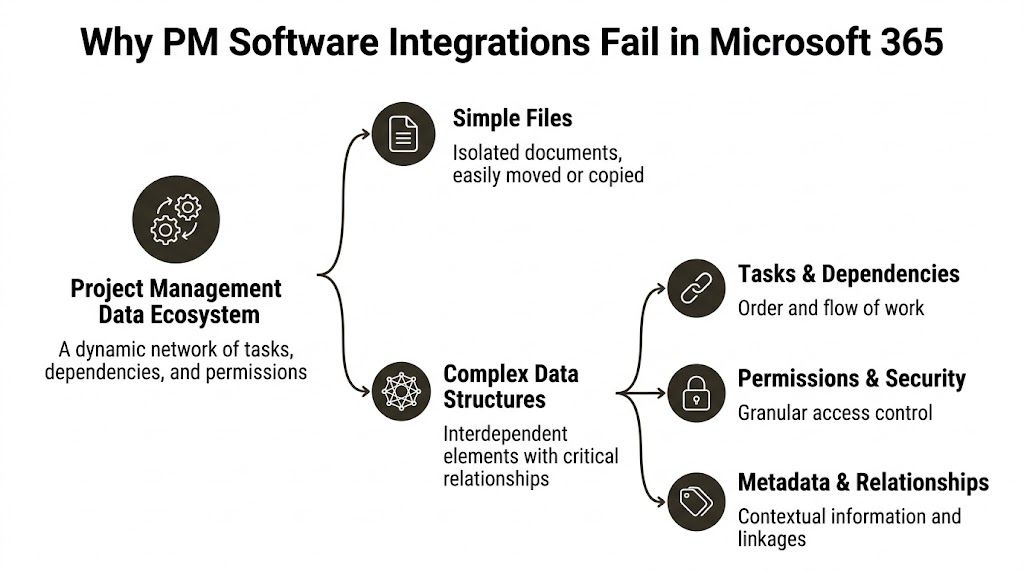
The moment you connect enterprise project management software to Microsoft 365, your project records start inheriting complexity from several places at once:
- Identity systems: Entra ID groups, guest access, role assignments, and conditional access rules
- SharePoint architecture: site structures, list schemas, content types, version history, and retention behaviour
- Collaboration tooling: Teams-connected sites, channel files, Planner data, and workflow triggers
- Compliance controls: audit expectations, access reviews, and data handling rules in regulated business units
Most migration failures don’t happen because somebody forgot to copy a file. They happen because the team copied content without preserving meaning.
The implementation gap is the real failure point
Project management software is already firmly embedded. Eighty-two percent of companies use project management software to improve efficiency, yet only 50% of projects succeed, leaving a 32-point gap that points to implementation and data integrity failures rather than tool choice, according to APMC’s 2025 project management statistics.
That gap should change how you evaluate every platform discussion. Don’t ask only whether the software has the right features. Ask whether your architecture can absorb it without damaging the underlying data model.
If your estate includes regulated workloads, you also need to test the security model before migration, not after it. A practical primer on O365 security compliance helps frame the governance side properly, especially if your compliance team still thinks licensing alone equals control. It doesn’t. Configuration, identity design, and migration handling decide whether the environment remains defensible.
Your project data can survive a mediocre interface. It won’t survive broken identity mapping.
For teams already dealing with hybrid estates, cross-tenant collaboration, or platform sprawl, the integration layer usually needs more architectural attention than the PM tool itself. If that sounds backward, that’s because the vendor narrative has trained people to look in the wrong direction. The difficult part sits inside the Microsoft stack, not on the product comparison page. A proper Microsoft 365 integration strategy starts there.
The Technical Debt of a DIY Migration
Your internal team may be excellent. That still doesn’t make a DIY migration a good idea.
The problem isn’t competence. The problem is exposure. Microsoft’s documentation tells you what the platform supports. It doesn’t tell you how ugly enterprise behaviour gets when you push those limits with live project data, mixed legacy structures, custom metadata, and a deadline attached. That’s where the “we’ll script it” plan usually turns into a rescue engagement.
API throttling kills your timeline first
DIY teams usually start with SPMT, PowerShell, PnP scripts, or a mixture of all three. On paper, that sounds efficient. In practice, unoptimised scripts hammer SharePoint Online until the tenant gets throttled.
Microsoft’s API throttling limit caps requests at 600 per minute per tenant, and DIY migrations in Ireland’s finance sector often hit that ceiling, causing 72-hour delays on datasets over 500GB, as referenced in QSM benchmark material. The documentation describes throttling as temporary. In practice, the situation is more severe. Repeated abuse from poor scripting patterns can lead to blocked activity that stalls the entire programme.
That’s not a minor inconvenience. It shreds your cutover window.
Practical rule: If your migration plan depends on “we’ll just rerun the script”, the plan is already broken.
A proper enterprise runbook controls request rates, phases workloads, separates high-churn libraries from static content, and validates incremental behaviour before the cutover event. DIY migrations usually skip that discipline because the team starts with tooling instead of architecture.
SPMT is useful. It just isn’t an enterprise answer.
SPMT has a place. If you’re moving a small, low-risk document set, it can do the job. But project management software enterprise migrations rarely involve only documents. They involve permission models, cross-linked records, list-heavy project sites, and governance expectations that SPMT doesn’t understand.
That’s why so many teams get seduced by the price tag of “free” and ignore the operational cost of what breaks later. SPMT copies content. It does not redesign governance. It does not resolve complex identity mapping. It does not preserve the semantic structure of a work management platform.
If your team still sees it as the default answer, read this assessment of the SharePoint Migration Tool and its real limits before you let it anywhere near a regulated project estate.
The 5,000-item threshold punishes lazy planning
SharePoint’s 5,000-item list view threshold isn’t a theoretical nuisance. It changes how libraries, lists, and views behave under load. Project sites hit this constantly because nobody archives aggressively enough, and because workspaces accumulate years of tasks, documents, approvals, and supporting records.
DIY teams often test with a tidy sample library, then discover the environment contains oversized lists, ugly folder depth, and inconsistent metadata. Best case, the migration slows down and the views need remediation. Worst case, users get a destination that technically contains the data but can’t function cleanly in daily operations.
You don’t need a product demo at that point. You need an architect who can reshape the destination information architecture before the move.
Long paths and legacy baggage never stay in the old system
The documentation likes to imply path support is manageable if you follow the rules. That advice falls apart once you bring in file server history, Google Drive exports, nested project folders, or inherited naming chaos from acquired business units.
The issue isn’t only the published path limit. It’s the encoded characters, the renamed destinations, and the extra URL depth introduced by the target structure. DIY scripts report errors. They rarely tell you the business consequence clearly. The skipped files tend to be discovered after go-live, when somebody can’t find the signed engineering change note or the compliance attachment tied to an approval.
Here’s what usually causes the damage:
- Legacy naming habits: Old folder structures create excessive depth before migration even starts.
- Overbuilt project sites: Teams nest documents under workstreams, regions, phases, and vendors until the structure becomes brittle.
- Late remediation: Admins try to clean paths during cutover instead of months earlier, which creates mismatches and missing references.
- Bad exception handling: Scripts log failures but don’t produce a business-readable remediation list.
DIY creates hidden technical debt in the destination
The most dangerous migrations are the ones that appear to succeed. Content lands. Users log in. The steering group signs off. Then the support tickets start.
Search returns the wrong versions. Team members lose inherited access. Automated flows point at stale objects. External sharing policies conflict with migrated groups. No single issue looks catastrophic on its own, so the organisation keeps layering fixes on top. That is technical debt in its purest form. You didn’t complete a migration. You imported future incidents.
The enterprise version of “good enough” is expensive because problems grow across security, productivity, and auditability. A better tool helps, but only if the operator understands exactly where Microsoft 365 breaks under pressure.
Governance Nightmares Broken Inheritance and GUID Conflicts
Most migration damage doesn’t look dramatic on day one. It looks administrative. A few users can’t access a project site. A document library behaves oddly. A workflow stops firing. Then somebody notices a confidential board is visible to the wrong audience, or a critical approval record no longer lines up with the version history behind it.
That’s where governance failures stop being technical and start becoming operational.
Broken inheritance is how access leaks happen
SharePoint and Microsoft 365 security rely heavily on inheritance. Sites inherit from parent structures. Libraries inherit from sites. Folders and items may then break inheritance for exceptions. Over time, enterprise project environments collect years of those exceptions.
DIY migrations rarely handle that complexity well. Teams map source groups to destination groups, assume the hierarchy will behave, and move on. But a tenant-to-tenant migration changes identities, group relationships, and often the site architecture itself. That’s exactly when inheritance fractures.
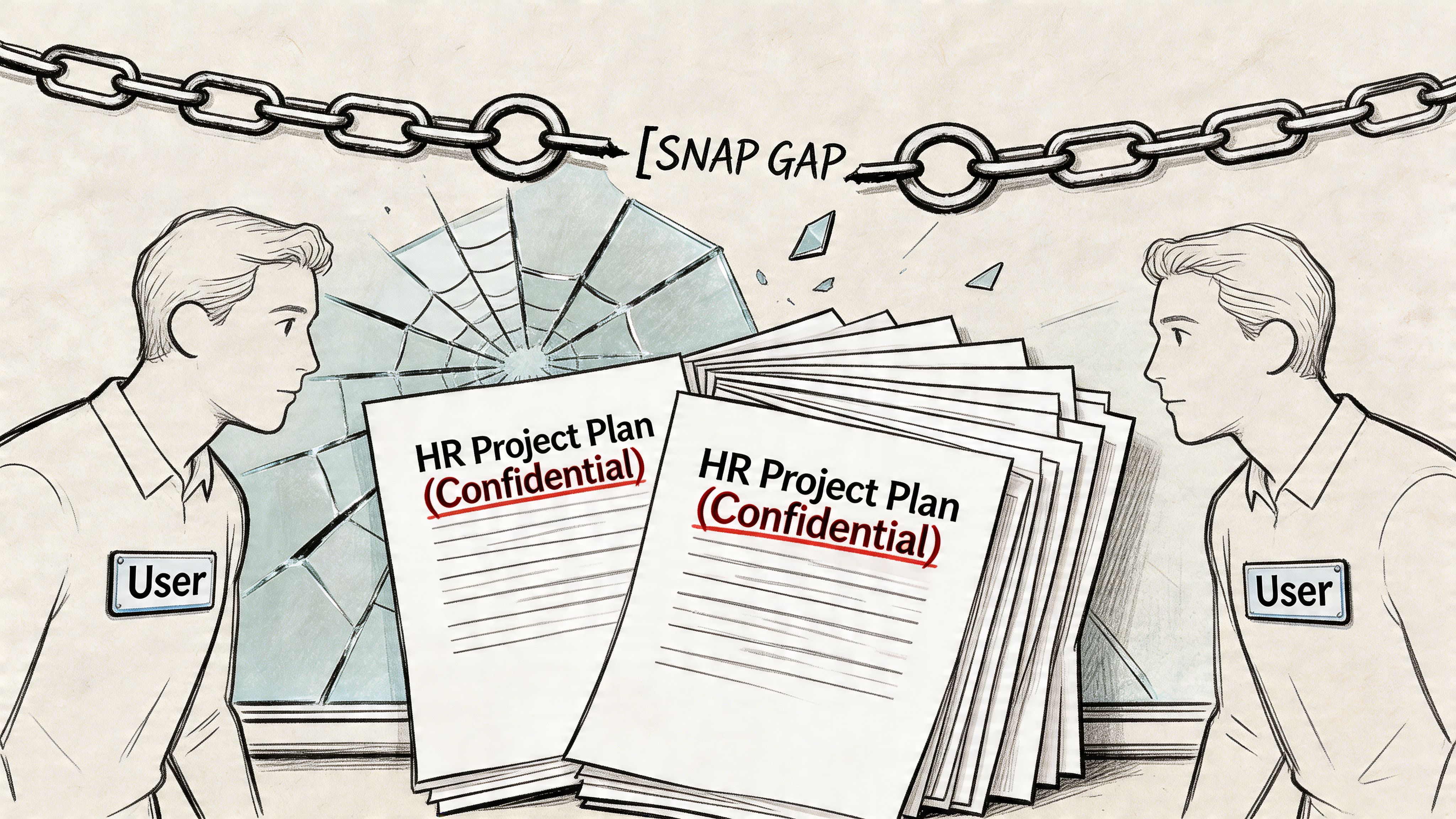
When inheritance breaks in the wrong place, one of two things happens. People lose access to material they need, which cripples delivery. Or they gain access to material they should never see, which creates a breach.
That’s why permission work can’t sit at the end of the project as a tidy validation task. It has to drive the design from the start. If your team needs a realistic view of what’s involved, this guide to SharePoint permission migration covers the problem properly.
Broken inheritance isn’t a nuisance. It’s how internal restructuring plans, legal reviews, and HR project records become visible to the wrong people.
GUID conflicts break trust in the data
A GUID is supposed to be unique. In enterprise migrations, bad processes still manage to create collisions, misreferences, and object confusion, especially when teams merge sites, rebuild structures, or replay content through multiple passes.
Users don’t describe that as a GUID conflict. They describe it as “the wrong task shows as linked”, “the timeline looks wrong”, or “version history doesn’t make sense anymore”. By the time those symptoms appear, the relational fabric is already damaged.
The nasty part is that many PM platforms and SharePoint-connected workspaces depend on those relationships staying intact. Once references point to the wrong objects, your audit trail loses credibility. In regulated sectors, that’s not just embarrassing. It can undermine the evidence chain behind decisions and approvals.
Version history breaks quietly, then hurts during audit
In healthcare migrations in Ireland, 15% data corruption rates show up from version history breaks in libraries over 100K items, often when teams ignore file path limits that Microsoft Learn warns about, according to PMI benchmark material. The documentation suggests long paths are supported in some contexts. Reality is harsher when legacy file server structures come into play and errors begin stopping migrations.
That matters because version history isn’t decorative. In regulated environments, it tells the story of who changed what, when they changed it, and what state the record held at the point of approval.
A short technical explainer helps here:
If your migration process strips that context or reconstructs it badly, the destination may be usable for day-to-day work and still fail the first serious audit review.
Governance work has to happen before the copy job
Teams frequently do this backwards. They migrate first, then clean permissions, tidy sites, and sort out access reviews after go-live. That approach guarantees rework because the copy process itself carries the bad design into the destination.
A safer pattern looks more like this:
- Rebuild identity logic first: rationalise Entra ID groups and remove legacy security shortcuts before migration.
- Classify sensitive workspaces early: HR, finance, legal, and regulated project areas need separate controls and testing.
- Validate inheritance chains in advance: don’t assume site, library, and item permissions will reconcile themselves.
- Test version history on ugly data: the polished pilot tells you very little about the actual situation.
Governance isn’t paperwork around a migration. It is the migration.
Comparing Migration Approaches The Ollo Verdict
Most organisations end up choosing between three migration paths. The first is DIY with SPMT and basic scripts. The second is a pro-tool approach with something like ShareGate. The third is a specialist-led service that combines tooling, architecture, governance redesign, and validation.
Only one of these is credible for high-risk Microsoft 365 estates.
Before the table, one point matters. If you’re still comparing products mainly on user experience and built-in features, a broad project management tools comparison can help narrow the shortlist. But that’s procurement groundwork, not migration strategy. Don’t confuse the two.
Migration approach risk profile
| Risk Factor | DIY (SPMT + Scripts) | Pro-Tool (ShareGate) | Specialist Service (Ollo) |
|---|---|---|---|
| API throttling handling | Weak. Easy to trigger tenant limits with poor scripting patterns | Better. Intelligent queuing helps reduce throttling pressure | Strong. Queuing plus workload design, sequencing, and exception planning |
| Permission migration | Fragile at scale, especially with broken inheritance | Capable, but depends heavily on operator skill | Managed as an architectural workstream, not a copy setting |
| GUID conflict handling | No dependable enterprise-grade answer | Better tooling support, still needs expert planning | Planned during consolidation and validated post-migration |
| Large lists and complex libraries | High failure risk | More resilient, but not magic | Re-architected where needed before and after copy |
| Long path and legacy structure remediation | Usually reactive | Better diagnostics, still operator-dependent | Handled as pre-migration remediation with business triage |
| Zero-trust redesign | Not addressed | Not addressed by tool alone | Built into Entra ID and SharePoint governance design |
| Auditability and validation | Limited and inconsistent | Better reporting, but still not a governance strategy | Validation, exception handling, and compliance-focused checks built in |
| Suitability for regulated sectors | Poor | Conditional | Strongest option |
DIY with SPMT and scripts
This path looks cheap because the licensing line is small. That’s why it keeps getting approved.
It fails because it treats an enterprise migration like a transfer job. SPMT can move files. PowerShell can automate tasks. Neither one turns a fragmented Microsoft 365 estate into a governed, cross-tenant project environment. They also don’t rescue you from bad identity design, ugly list structures, or permissions that nobody has reviewed in years.
DIY works only when the environment is small, clean, lightly regulated, and architecturally simple. Most enterprise project estates are none of those things.
The Ollo Verdict: Use SPMT for a small document move. Don’t use it as the backbone of a project management software enterprise migration.
Pro-tool with ShareGate
ShareGate is a serious tool. It’s part of many successful enterprise migrations for a reason. It handles throttling better, manages content movement more intelligently, and gives skilled operators far more control than native tooling.
But people still misunderstand what it is. It is not a one-click fix for architecture. It does not automatically redesign your Entra ID model, classify sensitive workspaces, rationalise broken inheritance, or decide how multiple project sites should merge into a controlled destination. It gives a good architect the right machine. It doesn’t replace the architect.
Many failed migrations used a good tool. They still failed because the team running it didn’t understand how the target governance model needed to change.
The Ollo Verdict: Use ShareGate for serious migrations. But if your team thinks buying the licence is the strategy, you’re still exposed.
Specialist service
This is the only approach that treats migration as a risk programme instead of a copy exercise. The tools matter, but the operating model matters more.
A specialist-led approach starts by identifying where the destination architecture must differ from the source. It maps identities properly. It redesigns zero-trust controls. It uses ShareGate where it fits, then fills gaps with controlled scripting, validation routines, and post-migration remediation. It assumes some source data is dirty and plans accordingly.
That’s what separates an enterprise migration from an expensive shuffle of bad decisions into a new tenant.
Where specialist work actually adds value
The value isn’t “extra hands”. It’s concentrated experience in failure modes your internal team may only encounter once.
A specialist team typically earns its place in four areas:
Pre-migration triage
They identify which sites, libraries, and project workspaces can move as-is and which need restructuring first.Identity and governance redesign
They don’t just map groups. They clean up the logic behind group membership, access boundaries, and sensitive workload separation.Controlled execution
They run migrations in phases that respect throttling, validation, and business windows instead of chasing an unrealistic big-bang cutover.Post-migration proof
They verify permissions, history, and functional behaviour in the destination so the business doesn’t become the test team.
The Ollo Verdict
Here’s the blunt answer.
- DIY is acceptable only for very small, low-risk, non-regulated moves where the data model is simple and nobody will care if manual cleanup follows.
- ShareGate is the right tool in many enterprise scenarios, but only when an expert configures and governs the work around it.
- Specialist service is the only sane option when your project environment sits inside a regulated Microsoft 365 estate, includes tenant consolidation, or carries any serious compliance burden.
If your migration includes complex permissions, Entra ID redesign, high-volume SharePoint content, or mixed PM platforms, you need more than a tool. You need a migration operator that plans for failure before it happens. That’s the difference between software movement and risk reduction. For a realistic view of where tooling fits, this breakdown of the best SharePoint migration tool approach is the better starting point than another generic software roundup.
Conclusion Your PM Software Choice Is a Risk Management Decision
By the time you reach vendor selection, most of the market wants you focused on features. That’s understandable. Features are easy to demo. Risk is harder to sell.
But your real decision has very little to do with whether one platform has the better dashboard, template gallery, or AI assistant. In a Microsoft 365 estate, the hard part is preserving the integrity of the data, permissions, identity mappings, and governance controls that give the platform operational value. Get that wrong, and the software becomes a very expensive wrapper around damaged records.
That risk is getting worse, not better. The project management software market is projected to grow at a 16.6% CAGR and reach USD 45.2 billion by 2034, according to Research and Markets. More vendors, more features, and more integrations mean more fragmentation. That increases migration complexity inside Microsoft 365, especially for organisations juggling mergers, tenant consolidation, legacy file shares, and regulated workloads.
Buy software for fit. Plan migration for survival.
If your team treats project management software enterprise selection as a procurement task, you’ll optimise for the wrong thing. If you treat it as a governance and risk management decision, your priorities change fast. You start asking whether permissions will survive, whether audit history will remain credible, whether identity design supports zero-trust, and whether your migration method can handle ugly real-world data instead of demo data.
That’s the right frame. It’s also the one generic buying guides keep dodging.
If your Microsoft 365 migration carries compliance exposure, cross-tenant complexity, or a history of failed attempts, talk to Ollo. We handle the ugly, often underestimated parts: SharePoint restructuring, Entra ID redesign, permission remediation, and rescue migrations where “good enough” already failed.

















