



Your finance team logs in on Monday, and the unattended bot that reconciles invoices has already failed. The desktop flow didn't crash loudly, it just stopped after a Windows update changed the Citrix session enough to break the screen sequence, and now your analysts are staring at a backlog, your audit trail has a gap, and your service desk is taking calls it can't answer. That's robotic process automation Microsoft in practice, a control problem wearing a productivity badge.
Microsoft Power Automate is not a niche tool anymore. Blueprint's 2023 State of RPA report says 60% of surveyed organisations use Microsoft Power Automate as their automation platform, and 50% have already implemented an RPA Centre of Excellence to govern and scale it, with average annual automation spend at $490,000 and enterprises with more than 5,000 employees spending nearly $550,000 a year (Blueprint 2023 State of RPA report). That's the backdrop for your estate, because once automation moves into regulated environments, the question stops being whether you can build a bot and becomes whether you can keep it alive under audit.
The Monday Morning Your Power Automate Bot Stops Working
A Dublin finance team expects the unattended bot to clear its queue before the first stand-up. Instead, a small UI change in a Citrix-hosted accounting app breaks the recorded steps, the bot waits for a window that never appears, and the reconciliation cycle stalls until someone steps in. Desktop flows can mimic mouse and keyboard actions, which means the process now depends on a screen state you do not control.
That failure is not just a missed run. It creates a backlog, forces manual rechecks, and leaves auditors asking why the trail is no longer clean. Microsoft's own framing of RPA is about Straight Through Processing and lower latency, so a bot failure turns straight into queue time, rework, and visible operational drag (Microsoft RPA guidance).
Practical rule: if your bot touches finance, healthcare, or energy data, treat every unattended run like a production change, not a low-code shortcut.
The common mistake is clear. Teams launch desktop flows without owning the host, the session, or the rollback plan. One UI break, and your service desk owns the incident, your operations team owns the backlog, and your compliance team owns the explanation.
Approval workflows fail in the same way. Use a controlled pattern like Ollo's Power Automate approval workflow, because approvals without governance only move risk faster. If your team still treats RPA as a clever shortcut, it is already behind the curve. You need an operating model, not a recording.
For a process comparison that shows where orchestration sits beside point automation, see Wisely workflow automation.
What Microsoft RPA Includes and How the Pieces Fit Together
Microsoft splits the stack into two distinct automation paths that teams keep mixing up. Cloud flows call connectors directly and fit API-based digital process automation, while desktop flows mimic mouse and keyboard actions for systems that do not expose APIs, including legacy applications and UI-only environments (Microsoft process automation guidance). That difference matters because API work lives or dies on endpoint contracts, while UI automation inherits every weakness of the screen, session, and host.
A finance team can feel that split on day one. An invoice lands in SharePoint, a cloud flow triggers, and Dataverse keeps the record structured for tracking and audit. If the final accounting step sits inside an older Windows application, Power Automate Desktop takes over and performs the clicks a user would normally perform. The flow looks tidy on paper. The failure points stack up fast in production, because every handoff opens another place for identity, permissions, or session state to break.
For a process comparison that separates orchestration from point automation, use Wisely workflow automation. That is the cleaner way to judge where Microsoft fits and where it does not.
Microsoft's platform pieces line up like this:
| Component | What it does | Best fit | Main failure mode |
|---|---|---|---|
| Cloud flow | Calls connectors and APIs directly | Modern SaaS and Microsoft 365 work | Connector or permission misconfiguration |
| Desktop flow | Repeats mouse and keyboard actions | Legacy apps, Citrix, UI-only systems | Screen drift and timing issues |
| Power Automate Desktop | Desktop RPA layer for Windows apps | Unattended and attended UI automation | Host state and session fragility |
| Process mining | Exposes rework and automation candidates | Prioritisation before bot design | Bad process selection |
ROI gets distorted when teams pretend every manual task deserves a bot. Use measuring process automation ROI as the reminder that automation should follow process clarity, not replace it. First identify the process. Then separate API work from UI work. Then decide whether automation or redesign is the safer move.
Tool choice still gets treated like a side issue, and that is how bad estates get built. Read Ollo's business process automation tools guide if your team still puts tooling ahead of architecture. Architecture comes first, because it decides whether Microsoft RPA becomes controlled automation or a long-term support burden.
Architecture, Integrations, and Where Things Break
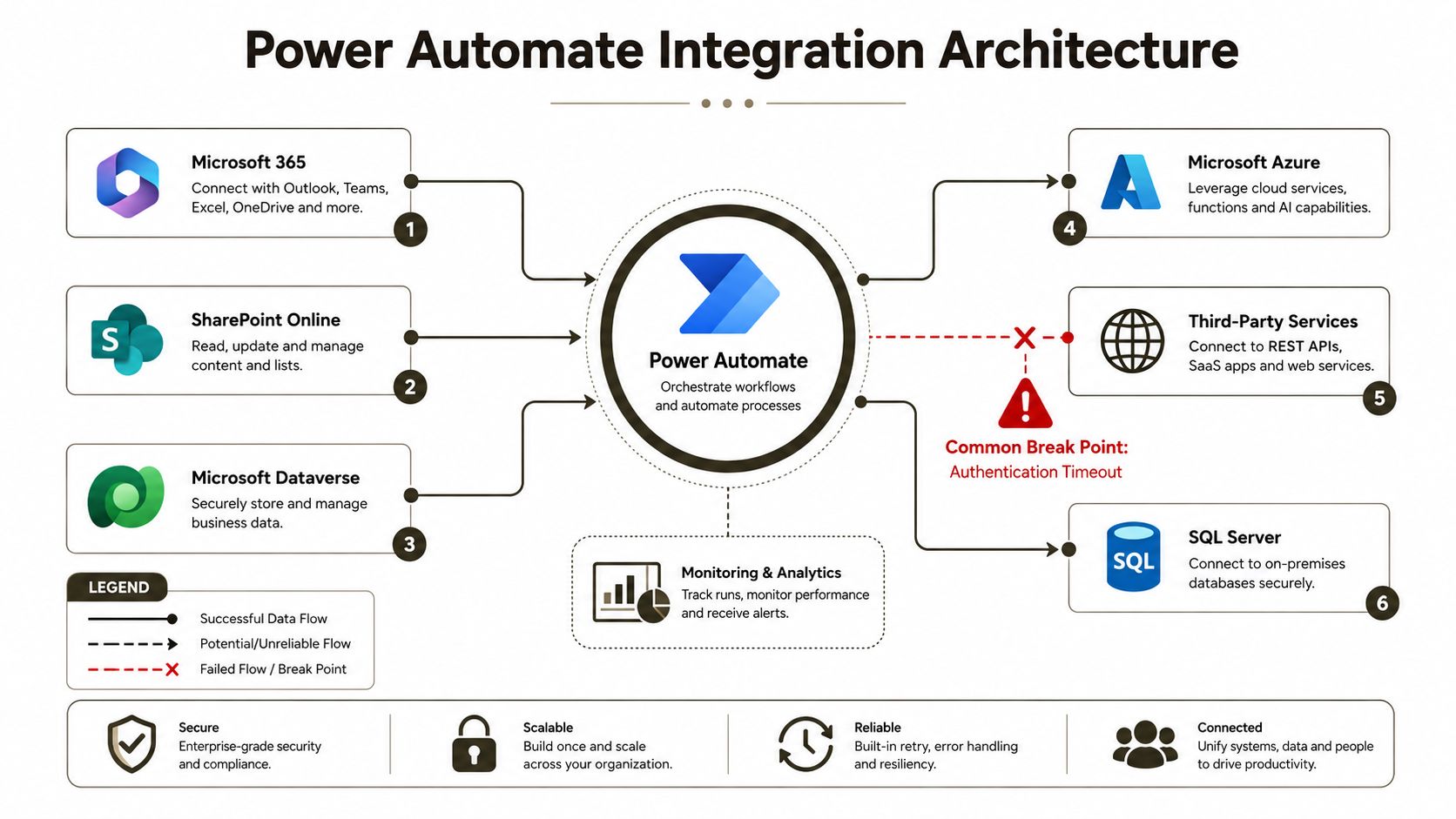
A Microsoft RPA architecture review starts with one blunt question. Where does Power Automate sit, what does it touch, and where does it hit the wall. The answer usually begins with Microsoft 365, SharePoint Online, Dataverse, and the on-premises data gateway, because the gateway is the bridge that lets cloud automation talk to line-of-business systems still trapped behind your firewall.
The handoffs that matter
Identity is the first boundary. If the bot uses the wrong account model, you lose traceability and create a privilege problem that security will not accept. Throttling is the second boundary, because connectors and services can slow or block requests when you hit them too hard, and a tidy workflow turns into a retry storm.
SharePoint makes this worse because the platform still enforces the documented list view threshold of 5,000 items, along with file and path constraints that can break bulk operations and long-file-set automations. Microsoft Learn confirms that RPA is UI emulation, so once your bot is clicking into lists or file libraries, it inherits those limits instead of escaping them (Microsoft RPA training). If you want to see why teams misread these projects, compare the technical overhead against Ollo's SharePoint Azure integration guidance, then look at how often a “simple” automation turns into a migration problem.
The documentation gives you the parts list. Your estate decides whether those parts work together.
Dataverse and Microsoft 365 add structure, but they do not erase platform boundaries. A bot that looks like it is “just moving data” is usually moving data through three systems, one gateway, and two permission models. Architecture matters more than the recording step, and any serious design review should include auditability, throughput, and exception handling before a single desktop action gets saved.
Official Limits and the Failure Modes That Hit Enterprise Migrations
The biggest mistake I see is this. Teams record a desktop flow, test it against a clean demo tenant, and assume the same script will survive an enterprise estate. It won't, because Microsoft Learn is explicit that RPA works by capturing UI steps and replaying them, which means it inherits the limits of the interface and the system behind it (Microsoft Learn RPA introduction). The bot is not magic, it is a mirror.
The limits your estate will feel first
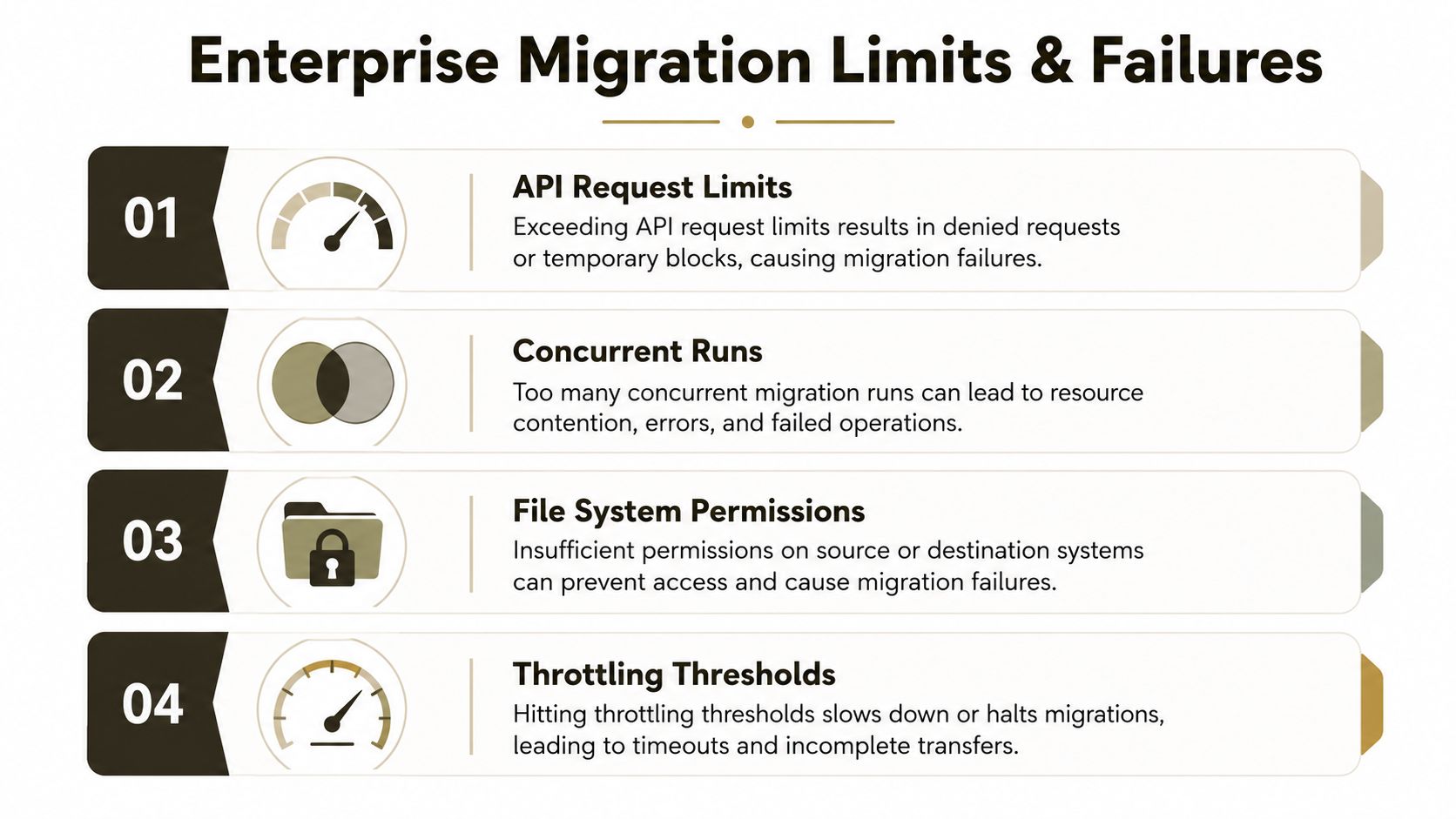
- API request limits and throttling can slow or stop cloud-side automation when your workflow hammers a connector or service too hard.
- Concurrent runs can collide when teams launch too many flows against the same app or account at once.
- File system permissions can break a desktop flow when the runtime account cannot read, write, or move the content it needs.
- Throttling thresholds can turn a stable-looking process into a retry loop, especially when the bot depends on SharePoint or another heavily used service.
Microsoft's own guidance also makes the distinction clear between API-based automation and UI-based RPA, and that is where the breakpoints hide. A cloud flow that calls a connector directly usually fails cleanly. A desktop flow can fail noisily, or worse, keep going with the wrong screen in focus and create silent data corruption. That's why unattended RPA in regulated estates needs stronger controls than a standard workflow project.
The failure modes get uglier when SharePoint or file-server content sits underneath the process. Broken inheritance during copy operations, GUID conflicts in tenant consolidation, and long path edge cases do not disappear because you added automation. They become harder to diagnose because the bot only exposes the symptom, not the architectural debt.
If a process already struggles with permissions, naming, or volume, RPA will not fix it. It will accelerate the failure.
Governance, Zero-Trust Controls, and Unattended RPA Licensing
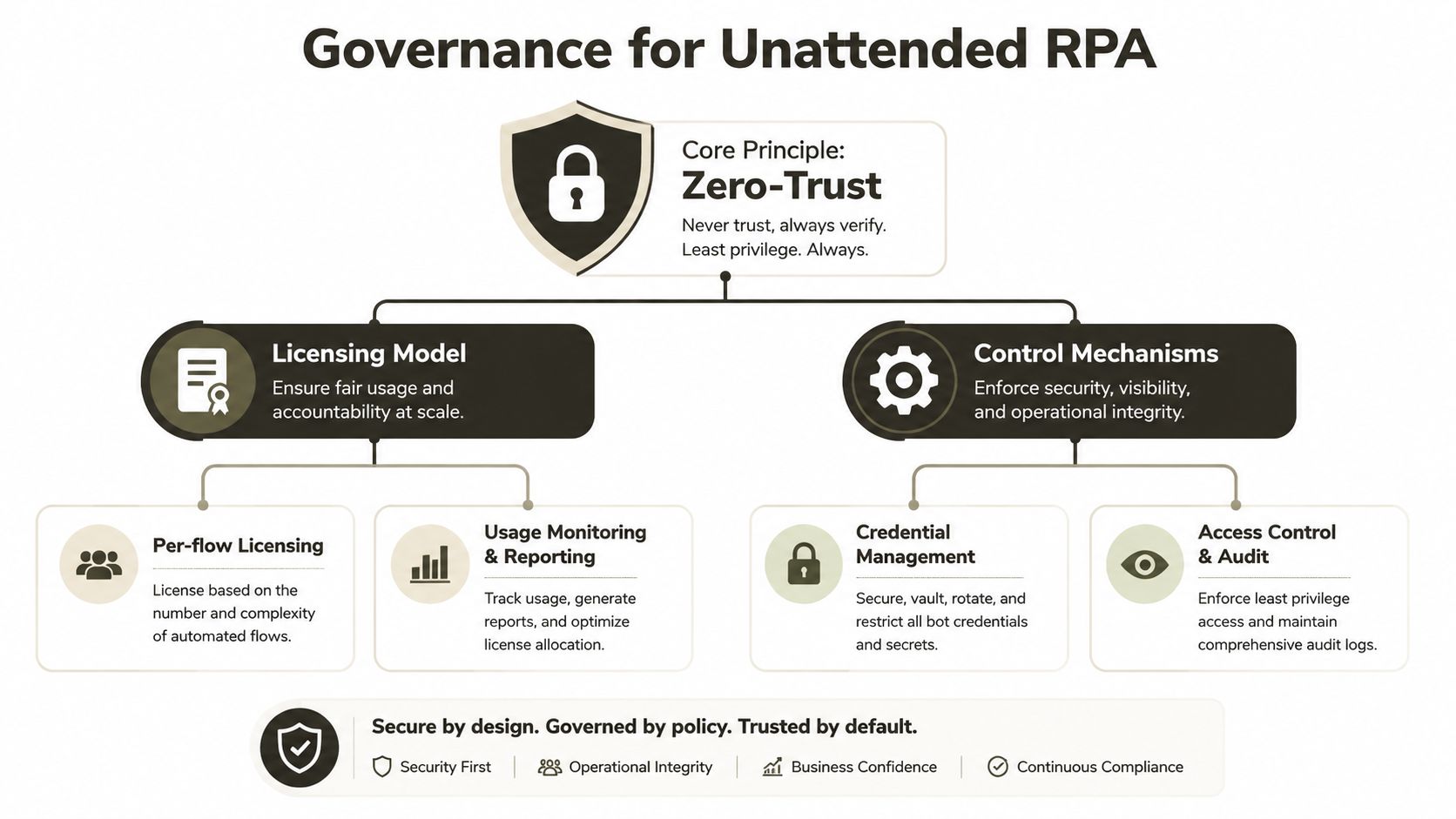
The control plane is where most Microsoft RPA projects fail in production. Microsoft's own documentation makes it plain that unattended RPA depends on a dedicated device plus specific licensing and registry configuration, which means you are not just buying a feature, you are operating a managed runtime with identity, device, and audit requirements (Microsoft unattended RPA licensing overview). That is a governance problem requiring operational discipline.
Minimum viable controls
- Dedicated bot identities. Do not let humans and bots share the same account. The audit trail loses value the moment credentials blur.
- Device hardening. Lock the runtime host down like any other production server. Patch control, session control, and local admin discipline all matter.
- Credential management. Store secrets properly and rotate them. A bot that depends on a spreadsheet password is an incident waiting to happen.
- Zero-trust access. Restrict what the bot can reach, and make sure every run is attributable.
- Centre of Excellence oversight. Ollo's Power Platform governance guidance is the kind of operational wrapper regulated teams need. It keeps automation decisions inside a control model instead of letting every maker improvise. Blueprint's report shows 50% of surveyed organisations already use a Centre of Excellence to scale automation governance, which is where that discipline belongs.
The documentation makes unattended setup look straightforward, but the hard part is proving who ran the bot, what it touched, and whether it stayed inside policy. In finance, healthcare, and energy, that is a compliance obligation. A missed control here turns into hours of incident response, audit rework, and a bot estate that nobody trusts.
You also need to treat unattended RPA as part of your zero-trust model, not a side project in Power Automate. Separate identities, bounded permissions, and explicit review of every connector and desktop target should be the default. Once those controls are missing, the failure is operational, and the clean-up cost lands on the infrastructure team, the compliance team, and the business owner at the same time.
When RPA Is the Wrong Answer and Migration Is the Lower-Risk Path
RPA is the wrong first move when the underlying estate is already sick. If your SharePoint environment carries broken inheritance, tenant consolidation debt, or GUID conflicts, automation just preserves the bad structure and makes it faster to fail. That is not modernisation, it is debt multiplication.
The decision criteria that should end the debate
Use RPA only when the process is stable, the UI is the actual constraint, and the data path is narrow enough to govern. Move to migration or API-led redesign when you see high data volume, complicated list and library structures, or regulated content that needs stronger controls than a desktop replay can provide. If a bot outage would stop payroll, client billing, or a regulated reporting cycle, the risk is already too high for casual DIY.
Microsoft's own materials confirm that RPA is UI emulation, not a magic integration layer, and that is exactly why it should stay a transitional tool. It is fine for targeted gaps on a stable estate. It is the wrong strategy for rescuing a broken one.
Ollo verdict: use RPA for short-lived UI gaps, not as your modernisation plan. For legacy SharePoint and file-server work, the safer path is migration first, automation second.
That is where our approach changes the risk profile. In regulated Microsoft 365 work, Ollo's AI automation services sit alongside migration work, not ahead of it, because the sequence matters. If you automate before you fix the architecture, you inherit every failure mode twice.
The Risk-Reduction Runbook and When Ollo Becomes the Safe Pair of Hands
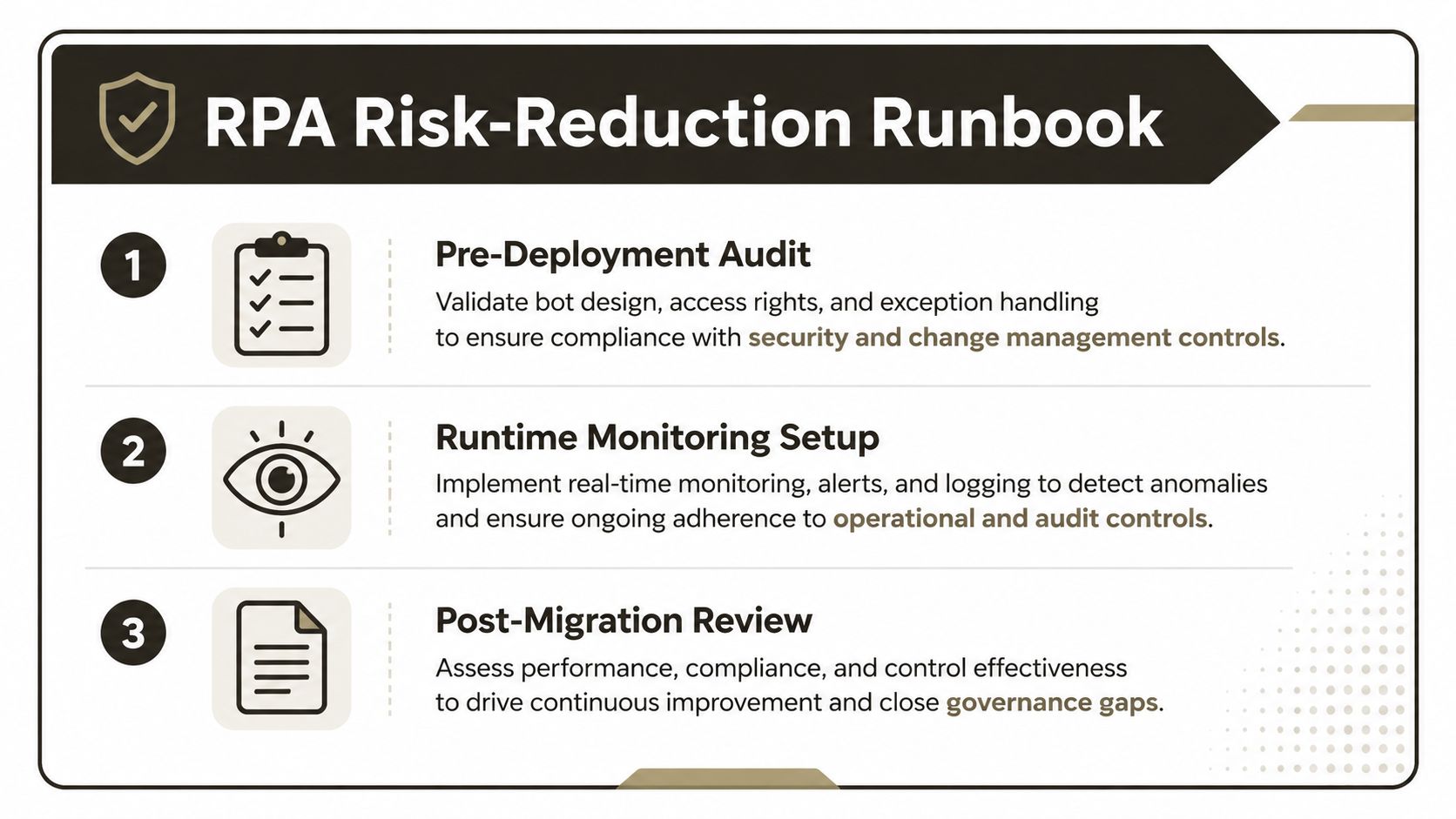
Your runbook should be blunt. First, audit the process and prove it belongs in RPA. Second, monitor runtime behaviour and alert on failures before users do. Third, review the migrated or automated state and remove any shortcut that creates governance debt. That sequence reduces the chance that a bot outage becomes a compliance issue, and it keeps your team from mistaking activity for progress.
When you should stop DIY
- Tenant-to-tenant consolidation. If the project touches identity, content structure, and user permissions at once, you need specialist control.
- Entra ID zero-trust redesign. If bot access and human access are both changing, the blast radius is too large for trial-and-error.
- Rescue migration with regulated data. If the estate already failed once, don't make the same team patch it with scripts and hope.
We often see clients fail when they try to combine migration, governance redesign, and RPA rollout in one effort. The result is predictable. You get a broken automation layer on top of broken content, and every incident pulls in more people than the last. For enterprise SharePoint work, Ollo's ShareGate plus custom PowerShell PnP approach avoids dragging the same debt into the new tenant.
If you are still weighing whether to buy another tool or call in a specialist, stop there. The cost of getting this wrong isn't just a failed bot, it's lost operating time, audit exposure, and another round of rework your team does not have capacity for.
If your estate is already carrying SharePoint debt, bot fragility, or a governance gap you can't explain in a steering meeting, talk to Ollo before the next automation project goes live. We handle regulated Microsoft 365 migrations, Power Automate governance, and rescue work where the downside of getting it wrong is too expensive. Visit Ollo and get a migration and automation review from people who've seen these failures before.

















