



A SharePoint 2019 end of life migration isn't some far-off project for your IT roadmap anymore. It's a rapidly approaching business emergency. With the hard deadline of July 14, 2026, your organisation is already working against the clock. This is about more than losing Microsoft support; it's about preventing the chain reaction of failures that will start breaking your critical workflows months before that final date.
The Reality of the 2026 Deadline
Let's be blunt. The July 14, 2026, end-of-life date for SharePoint 2019 is not a guideline. It's a full stop on security updates and technical support. As a Senior Cloud Migration Architect here at Ollo.ie, I've been burned by enough failed projects to know that too many IT Directors treat this as a problem for "future them." They think starting in Q1 2026 is plenty of time. It’s not. It's the perfect setup for a high-stress, high-cost emergency rescue.
Your real crisis actually starts much earlier. The retirement of classic SharePoint workflows on April 2, 2026, is the first real landmine on the path to the deadline. We often get calls from frantic clients when their undocumented, but absolutely vital, automations for things like document approvals and routing just stop. Dead.

This triggers a panicked scramble to rebuild years of business logic in Power Automate, all while trying to manage a complex migration. That cliff edge is much closer than you think.
The Countdown Is Already On
The clock isn't just ticking; it's accelerating toward several key failure points that go way beyond just losing support. Your team needs to understand this isn't a single event, but a domino effect.
- Mainstream Support Is Already Gone: Mainstream support for SharePoint 2019 ended back on January 9, 2024. You are now in the extended support window, which only provides critical security updates. Any new functionality bugs or performance issues are your problem to solve, alone.
- The Workflow Apocalypse: As I mentioned, classic workflows and their add-ins are turned off on April 2, 2026. This isn't a slow phase-out; they will simply cease to function. Any business process relying on them will break overnight, causing immediate operational chaos.
- The Final Cut-Off: After July 14, 2026, you're running an unsupported platform. This means zero security patches, creating a documented control failure that will get the immediate and undivided attention of your auditors and cybersecurity insurers.
The Ollo Verdict: In our experience, any organisation that hasn't started serious planning for their SharePoint 2019 migration by March 2026 is no longer performing a migration. They are funding a high-risk, high-cost emergency recovery mission with brutal timelines, inflated costs, and maximum exposure to data loss and compliance penalties.
Why Your Timeline Is Shorter Than You Think
The official Microsoft documentation rarely captures the practical reality of an enterprise-scale migration. The documentation says you have months; reality dictates that for businesses in regulated sectors, validation alone can take months, even after the technical work is done. The idea that you have hundreds of days left is a dangerous misunderstanding.
What many leaders don't grasp is that this deadline isn't just about a support contract ending—it’s about a cascade of operational failures waiting to happen. The window you have left is simply not enough for a properly planned migration, especially when compliance and validation add months to the timeline. As you can see from our comprehensive guide to SharePoint Server migration, the process involves far more than just lifting and shifting files.
This is not a future problem; it's an active crisis. Your SharePoint 2019 environment is a liability that grows riskier every single day. The cost of doing nothing isn't just technical debt; it's a quantifiable business risk that demands an immediate, strategic response.
Why a Simple Lift and Shift Will Fail
Let’s be blunt. The idea of a simple ‘lift and shift’ for your SharePoint 2019 end-of-life migration is a dangerous fantasy.
We get called in to rescue failed projects, and we see the catastrophic fallout of this thinking all the time. Your on-premises environment isn’t a tidy library of files; it’s a sprawling archaeological site. It’s packed with years of technical debt, undocumented customisations, broken inheritance, and fragile integrations that will shatter the moment they touch a standard migration tool.
A lift and shift assumes your data is clean, organised, and ready to go. The reality for any established enterprise is the polar opposite. Your environment is a minefield of undocumented third-party web parts, long path limits, and complex workflows with no cloud equivalent. This is precisely where DIY migration plans, built on the promise of simple tools, begin to unravel.
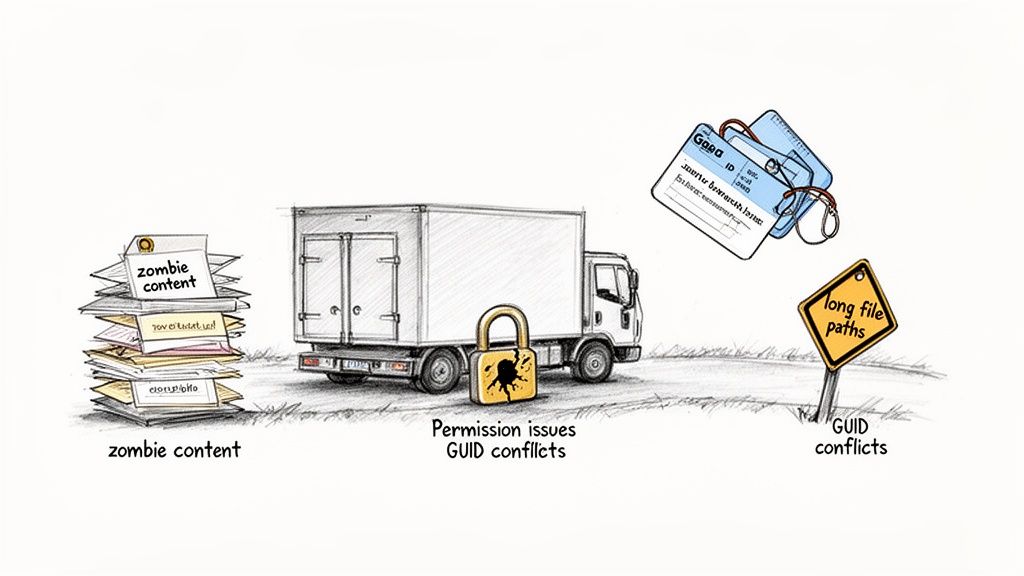
The Inevitable Failure Points of DIY Migration
We often see clients fail when they treat an enterprise environment like a small business file share. Your internal team, armed with Microsoft’s free SharePoint Migration Tool (SPMT), will hit these walls, and they will hit them hard.
These common failure points aren't just technical annoyances; they are project killers. Any organisation with an established SharePoint setup is sitting on 5 to 15 years of technical debt. In our work with clients in regulated sectors like finance and energy, we regularly find that 40-60% of on-premises content is effectively 'zombie content'—lacking any governance or ownership.
Here are the specific roadblocks that turn a "simple" migration into a complete disaster:
Broken Permissions: Your on-prem environment is riddled with thousands of uniquely permissioned files and folders. Basic tools can't map these intricate structures with broken inheritance correctly, often reverting to parent permissions. This inadvertently grants access to sensitive HR, financial, or legal data. It's not just a migration error; it's a data breach waiting to happen. Missing this step doesn't just fail the migration; it breaks legal compliance.
Corrupted Histories & GUID Conflicts: What happens when two documents from different site collections share the same unique identifier (GUID)? A basic tool will either overwrite one or fail the item. The documentation says it handles it; in reality, you get corrupted version histories and lost document integrity—a nightmare for compliance and a disaster for user trust.
The 5,000 Item List View Threshold: This is a hard limit in SharePoint Online that many on-prem environments casually exceed. The documentation says the tool migrates these lists, but the reality is your users will find their views are broken and data is inaccessible post-migration. This requires proactive architectural changes, not a simple data transfer.
The Ollo Verdict: Use SPMT for <50GB. For anything else, you need custom scripting. For any real-world enterprise workload involving terabytes of data, customisations, and compliance rules, you must use a combination of specialist tooling like ShareGate and custom PnP PowerShell scripts. Anything less is accepting failure as your baseline.
The Real Cost of a Failed "Lift and Shift"
The true cost of underestimating this complexity isn't just a delayed project timeline. We've documented cases where companies attempting this on their own face budget overruns of 2-3x the original estimate and project delays stretching over a year. The most critical cost, however, is the permanent loss of business-critical information and operational capability.
Thinking you can handle this migration with your existing IT team and a free tool is a massive gamble. These seemingly small technical issues quickly escalate into major business disruptions. We’ve seen it firsthand.
You can learn more about how these problems cascade by reading our analysis of the 5 SharePoint migration failures that cost enterprises millions. The question you must ask is not "can we afford specialist help?" but rather, "can we afford the fallout from getting this wrong?"
A Battle-Tested Migration Playbook for Enterprises
There are countless guides on how to handle a SharePoint 2019 end of life migration. This isn't one of them. This is a strategic playbook born from the trenches of failed and rescued projects—designed to help you avoid disaster, not just tick boxes on a project plan.
Forget the vendor slideshows promising a pain-free transition. A successful enterprise migration isn't a single event; it's a campaign fought on multiple fronts. We structure our approach around critical risk mitigation phases, shifting the focus from 'how-to' to 'how-to-survive'.
Aggressive Discovery and Remediation
Most IT teams fail before they even start by treating discovery as a simple inventory. They count sites and measure terabytes. This is dangerously naive. A proper discovery is a forensic investigation designed to hunt down the technical debt that will absolutely break your migration.
We often see clients fail because they failed to proactively identify these specific time bombs:
- Orphaned Sites and Data: Your on-prem environment is littered with sites belonging to former employees or defunct projects. Migrating this "zombie content" is a waste of time and budget, but more importantly, it pollutes your new environment and creates governance nightmares from day one.
- The 5,000 Item View Threshold: This isn't a recommendation; it's a hard limit in SharePoint Online that breaks list views. Your team must actively hunt for any list or library approaching this threshold and architect a solution before the migration—such as splitting lists or using indexed columns—not after users start complaining that their data is inaccessible.
- Unsupported Customisations: You need to ruthlessly catalogue every web part, custom solution, and third-party add-in. The documentation says they might not work; the reality is they will fail. Each one needs a remediation plan: rebuild in Power Apps, replace with a modern equivalent, or retire.
The Ollo Verdict: Discovery is not a passive audit. It is an active hunt for what will break. If your discovery report doesn't contain a detailed remediation plan for every large list, broken workflow, and customisation, it's not a discovery report—it's a future failure analysis.
Architecting for Performance, Not Just Capacity
Once you’ve identified what needs to move, the next rookie mistake is assuming you can just push the data across. SharePoint Online's APIs are not an open firehose; they are a metered resource governed by strict throttling limits. Ignoring this is the fastest way to bring your migration to a grinding halt. Hitting these limits doesn't just slow you down; it can get your migration accounts temporarily blocked.
A DIY approach using a basic tool will repeatedly hit this wall, extending your migration timeline by weeks or even months. You must architect your migration engine to respect these limits. The documentation says to implement exponential backoff; in reality, you need a multi-threaded migration process. By using multiple migration accounts and custom scripts, you can run parallel jobs that operate just under the throttling thresholds, maximising throughput without triggering a shutdown.
When planning your enterprise migration, understanding comprehensive strategies, such as developing A Modern Playbook for the Migration of Data Center Operations, can be invaluable. This disciplined approach ensures performance is a core architectural principle from the start.
The Pilot Migration Proving Ground
A pilot is not a simple test run; it is your full-dress rehearsal for war. Its purpose is to fail. You must select a representative slice of your data that contains all the worst-case scenarios you identified during discovery: a site with broken permissions, a library with long file paths, and a list that pushes the 5,000-item limit.
The goal is to intentionally break your process in a controlled environment. This is where you validate your remediation plans and prove that your migration engine can handle the pressure.
If the pilot runs perfectly, your data slice wasn't representative enough. Find a messier, more complex data set and run it again. Every issue you uncover here is one less emergency you'll face during the live cutover.
The Runbook and Rollback Plan
For any organisation, but especially those in regulated sectors, a documented runbook is not optional. It is a core compliance deliverable. This document is the minute-by-minute script for your cutover weekend. It details every step, every command, every contact person, and every go/no-go decision point.
Critically, it must also include a tested rollback plan. The documentation says you can move forward, but reality dictates you must be prepared to go back.
What happens if you discover a critical data integrity issue 12 hours into the final delta sync? Without a proven rollback plan, you are trapped. This doesn't just fail the migration; it breaks legal compliance and puts your business operations at severe risk. To learn more about this strategic approach, check out our guide on enterprise SharePoint migration. This playbook is your insurance policy against the chaos that derails so many projects.
The Post-Migration Compliance Time Bomb
Your SharePoint 2019 migration isn’t done just because the data has moved. For your compliance and security officers, that's precisely when the real work—and the real danger—begins. Too many see the migration as the finish line; it’s actually the starting gun for a whole new set of risks.
Most IT leaders I talk to have the July 14, 2026, deadline circled on their calendar as a technical cutoff. Your auditors and regulators see it very differently. In their world, continuing to operate on an unsupported platform isn't just a risk; it's a documented, wilful control failure. This isn’t a theoretical problem. It has severe, quantifiable outcomes.
We often see companies delay their migration decisions, only to discover that the 18-24 months needed for proper planning in regulated sectors has vanished. Kicking off the project in Q1 2026 gives you zero time for the critical discovery, governance, and validation that auditors demand.
Our four-step playbook is designed to give you that control back.
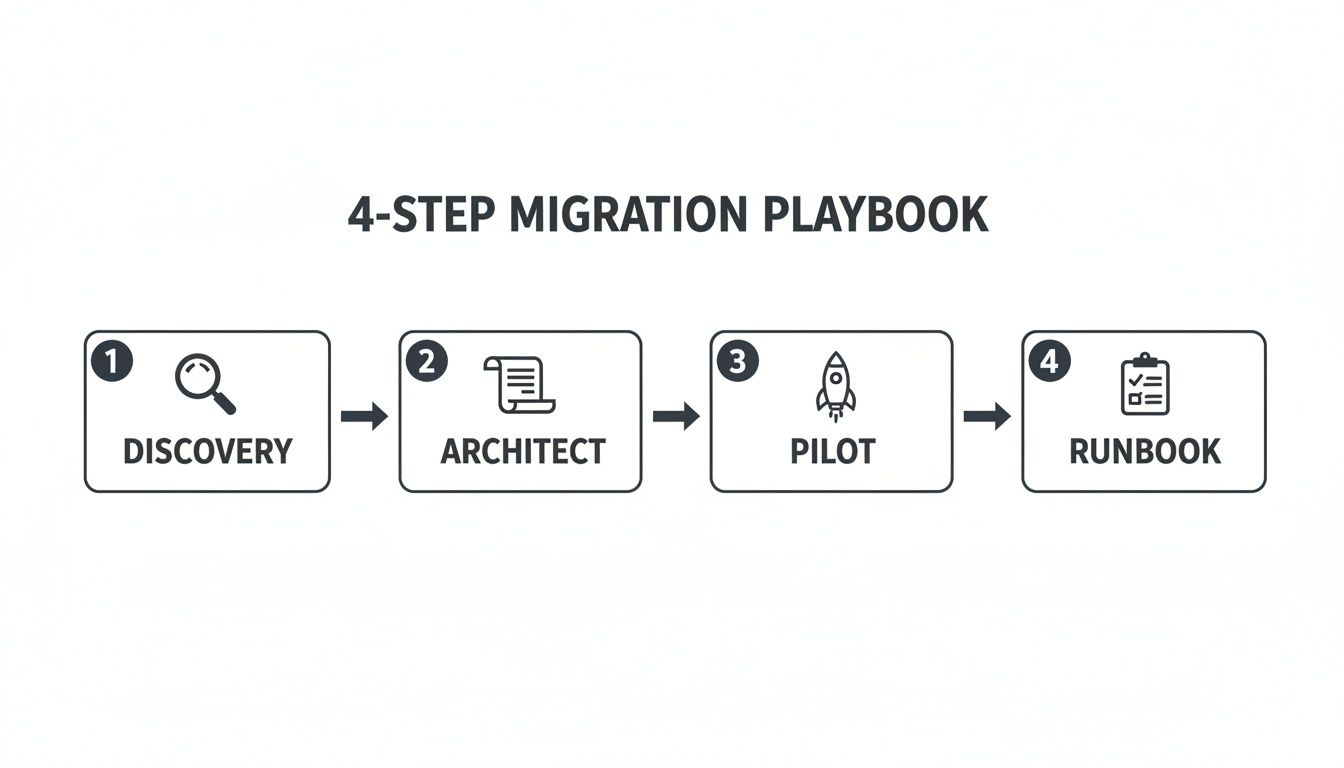
Think of this process—Discovery, Architect, Pilot, and Runbook—less as a project plan and more as a risk-reduction framework.
From Technical Risk to Documented Liability
The moment extended support ends, your on-premises SharePoint 2019 farm becomes a compliance black hole. Without security patches for newly discovered exploits, your organisation is knowingly exposed. I’ve seen firsthand how this plays out, and it’s always painful.
Failed Security Audits: Auditors in finance, healthcare, and energy actively hunt for unsupported software. Finding SharePoint 2019 running post-deadline is an automatic red flag. This leads to failed audits and mandated, high-cost remediation projects under intense regulatory pressure.
Denied Cyber Insurance Claims: Cybersecurity insurers are getting tougher. We've seen insurers demand proof of active support contracts for critical platforms as a condition of coverage. A breach that originates from your unsupported SharePoint server gives them a clear, contractual reason to deny your claim, leaving you to cover the full financial and reputational fallout.
Broken Data Integrity: A rushed migration that fails to correctly map retention labels, audit logs, and eDiscovery tags doesn't just lose a bit of metadata. It shatters your ability to prove data integrity to a regulator. This creates a compliance gap that can result in millions in fines.
The Ollo Verdict: A botched migration is worse than no migration at all. It creates a dangerous illusion of compliance while hiding a catastrophic failure of controls. Missing the mapping of a single retention label can break legal compliance for thousands of critical documents.
The Compliance Black Hole
The real danger lies in what you can't see. A poorly executed migration creates a compliance blind spot. If your team cannot prove that a specific document's retention policy was correctly migrated and is actively enforced in SharePoint Online, you have lost the chain of custody. It's gone.
Imagine a legal discovery scenario. Being unable to produce a complete, unbroken audit trail for a sensitive document is indefensible. The argument "we think we lost it during the migration" is a direct admission of negligence. You can find out more about how to navigate these challenges by reading our insights on SharePoint migration compliance.
This isn't a simple IT project. The SharePoint 2019 end-of-life migration is a high-stakes business continuity initiative, wrapped in a compliance and security mandate. Treating it as anything less is a direct gamble with your organisation's regulatory standing and financial stability.
Choosing Your Partner Is Your Biggest Risk Mitigation
We’ve just walked through the technical minefields of a SharePoint 2019 end-of-life migration. We’ve talked API throttling, broken permissions, and the compliance time bombs just waiting to go off. After all that, we’ve arrived at the single most critical decision you'll make.
It’s not about the tool you choose. It’s about the team you trust to wield it.
Your choice of partner isn't just a line item in the project plan; it's your primary risk mitigation strategy. I've laid out the risks in graphic detail: catastrophic data loss, crippling operational downtime, failed compliance audits, and budgets that spiral out of control. These aren't just hypotheticals. They are the predictable outcomes of a DIY attempt or trusting a generalist IT provider who treats this like another server upgrade.
The Generalist vs. The Specialist
A generalist partner will talk to you about "best practices" and "standard procedures." A specialist who has been called in to rescue failed migrations, like we have at Ollo, talks about breaking points. We know the exact moment a standard tool like the SharePoint Migration Tool (SPMT) will choke on your custom permissions. We know when a seemingly innocent list will grind your migration to a halt because of the 5,000-item view threshold.
A generalist sees your data as a collection of files and folders. We see it as a complex web of dependencies, metadata, and compliance rules, where a single broken permission inheritance can expose your entire company’s most sensitive information. That difference in perspective is the gap between a successful project and a career-defining failure.
When vetting external expertise for a high-stakes project, the first step in managing risk is to find the right kind of partner. This is true whether you're looking for one of the best managed security service providers or a migration specialist. Expertise is not a one-size-fits-all commodity.
A Partner as an Insurance Policy
Hiring a specialist isn't an expense; it's an insurance policy against disaster. Think about the cost difference this way:
- The Cost of a Generalist: You pay for them to learn on your project. They'll run into the same brick walls we’ve already solved dozens of times, but they’ll discover them on your live environment, during your cutover window, when the cost of a mistake is at its absolute peak.
- The Value of a Specialist: You pay for the scar tissue and experience gained from every other project that went wrong before yours. You’re paying for a battle-tested playbook that anticipates failure points and fixes them before they can derail your migration.
We are frequently called in after a generalist or an internal team has already failed, burning through months of time and budget. The project is already in chaos, user trust is shattered, and the business is bleeding money on a stalled initiative. Our first job in these cases isn't even to migrate data—it's to perform a full-blown rescue operation.
The Ollo Verdict: Don't bet your career on a "simple" migration. The choice is stark: gamble your data, compliance, and budget with a generalist who promises a smooth ride, or secure your project with a specialist team that has already seen everything that can go wrong and has built the custom scripts and processes to prevent it.
Choosing the right team is the only decision that truly matters. Your tools won't save you when you hit a GUID conflict that silently corrupts your document history. Your internal team, no matter how talented, simply doesn't have the repetitions needed to navigate the tricky API throttling limits of a terabyte-scale migration under pressure. To learn more about how we apply our specialised approach, explore our dedicated SharePoint migration services.
Frequently Asked Questions
As architects who live in the trenches of complex migrations, we hear the same questions from IT leaders facing the SharePoint 2019 end of life. Here are the direct, no-fluff answers based on our experience rescuing projects from the brink.
Can We Just Use the SharePoint Migration Tool (SPMT)?
You can, but you'd be consciously accepting a huge amount of risk. The free SharePoint Migration Tool (SPMT) is built for simple, "lift-and-shift" moves. Think of a small department with less than 50GB of data and zero customisations.
The moment you introduce any real-world enterprise complexity, the tool starts to break down. It can't handle granular permission models, has no sophisticated way to manage API throttling, and will absolutely choke on custom solutions or lists that are pushing the view threshold.
We’re often the ones called in after a failed SPMT attempt has already burned through months of your team's time and a chunk of your budget.
The Ollo Verdict: Using SPMT for anything beyond a small-scale, completely standard migration is like planning a project that’s destined to fail. It’s not a question of if it will break, but when.
What Is the Single Biggest Mistake You See Companies Make?
Grossly underestimating the discovery and remediation phase. Teams often treat it like a simple file count when it needs to be a full-blown forensic investigation. They don't actively hunt for the years of technical debt that will absolutely derail the migration mid-flight.
We see this happen over and over again. The real show-stopping problems only surface during the final cutover, when the pressure is at its highest. These are things like:
- Broken permission inheritance that was never addressed on-premise.
- Massive lists hiding just under the notorious 5,000-item view limit.
- Critical business workflows with dependencies on retired user accounts.
Skipping a deep, forensic discovery is the number one reason projects go off the rails. It guarantees the worst problems will emerge when it’s far too late and costly to fix them properly.
How Long Does a SharePoint 2019 Migration Really Take?
Forget what you hear from vendors promising a quick and easy transition. For a regulated enterprise with terabytes of data, complicated permissions, and strict compliance needs, you must realistically budget for 12-18 months.
That timeline isn’t padded. It’s based on the reality of what it takes to do this right.
It properly accounts for 3-4 months of deep-dive discovery and remediation, another 6-8 months for carefully managed pilot migrations and phased rollouts, and a final 2-3 months for validation and post-migration support.
Anyone telling you it can be done in a single quarter for an enterprise environment is either deeply inexperienced or not being entirely honest with you. If you’re only starting to plan your SharePoint 2019 end of life migration in 2026, you're already behind.
A successful migration isn't about avoiding risk—it's about confronting it head-on with expertise. At Ollo, we've built our reputation on navigating the complexities that cause other projects to fail. Don't bet your career on a simple tool; secure your project with a specialist. Contact us at https://www.ollo.ie to discuss your migration battle plan.

















