



Let’s be blunt. The title ‘365 office admin’ is dangerously misleading in an enterprise setting. It suggests your team is simply managing user accounts and resetting passwords. They are not. You are the custodian of your organisation's central nervous system—its data, its security, and its compliance posture. In reality, the role is less about administration and far more about high-risk project management where failure is catastrophic.
Your goal is not just to execute a project. It is to avoid disaster.
Your Role Is Not an Admin But a High-Risk Project Manager

If you’re an IT Director or Enterprise Architect, you’ve been burned by projects that promised the world and delivered a mess. The marketing brochures sell a vision of painless collaboration, but those of us in the trenches know the reality. Your actual job is to navigate a minefield of technical risks that vendors prefer not to advertise.
Forget the talk of 'seamless transitions'. That's marketing fluff for people who have never had to roll back a failed migration at 3 AM. Your focus must be on preventing disaster.
The Real Battlegrounds in Your Tenant
We often see clients fail when they treat major initiatives like tenant consolidations or complex migrations as simple administrative tasks. They aren't. Projects live or die on three core battlegrounds:
- Identity Management: Treating Entra ID as a simple user list is the first and most costly mistake. A botched identity strategy, especially during a tenant consolidation, doesn't just create login issues; it orphans terabytes of data, severs critical access, and invites security breaches.
- Tenant Governance: Without rigorous, pre-emptive governance, your tenant will spiral into chaos. This isn't about setting a few policies; it's about building architectural guardrails that prevent data sprawl and security gaps before they ever happen. The documentation says this is manageable; in reality, it's a full-time architectural discipline.
- Data Migration: This is the execution phase where all the theoretical risks become very real, catastrophic failures. A single misstep here—like hitting the 5k list view threshold or getting locked out by API throttling—can lead to irreversible data loss, broken business processes, and severe compliance breaches.
A mistake in one area triggers a cascade of failures across your entire digital estate. To manage these responsibilities, you must move beyond simple checklists and use modern business risk assessment tools that can model these complex dependencies.
The DIY Admin Reality vs The Ollo Architect Mandate
This table isn't an attack on admins; it highlights the strategic gap that leads to project failure. Your team's job is to manage the current state; a migration architect's job is to de-risk the future state.
The Ollo Verdict: The fundamental error we consistently see is a failure to reframe the role. Your team isn't just 'administering' M365. They are managing a portfolio of technical risk where the cost of failure is measured in data breaches and regulatory fines, not support tickets.
In regulated sectors, a 'minor' data leak during a flawed migration isn't minor at all—it's a reportable event with legal and financial consequences. Our comprehensive guide on Microsoft 365 migration details these enterprise-specific challenges. Anything less than anticipating these breaking points is just gambling with your company's most critical assets.
The Unspoken Risks in Identity and Tenant Governance
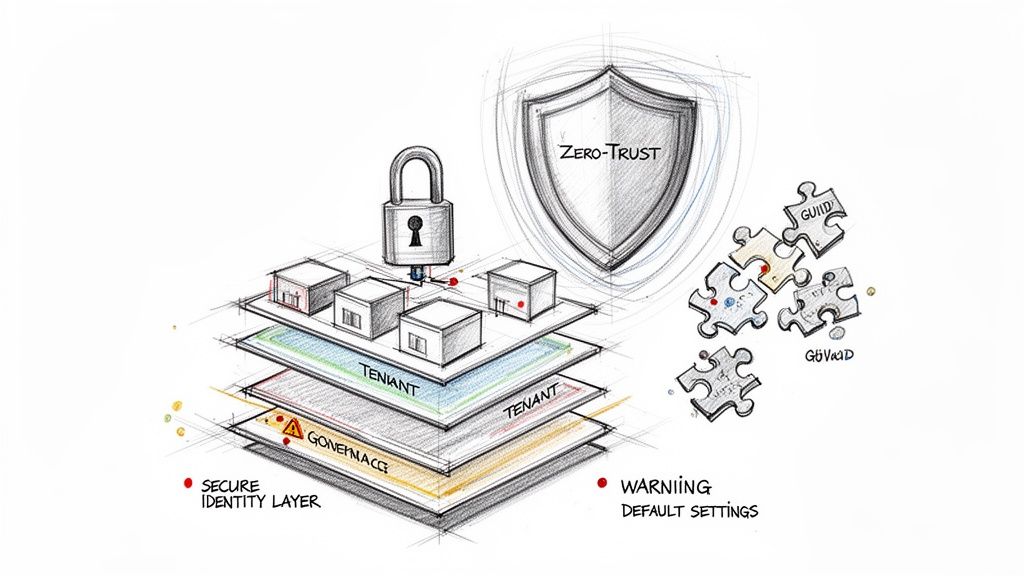
Before a single file gets moved, let’s talk about where projects truly fail. It’s not the firewalls. Your biggest vulnerabilities are buried deep within your identity layer.
We see companies treat Microsoft Entra ID like a simple address book. This is a catastrophic mistake. A poorly configured tenant isn’t just messy; it’s an open invitation for a breach. The default settings Microsoft provides are nowhere near sufficient for a real enterprise. A 365 office admin who just follows the setup wizard is, without knowing it, laying the groundwork for disaster.
That’s why every project, particularly a tenant consolidation, must start with a complete Zero-Trust redesign of your Entra ID instance. This isn't an optional add-on. It's the foundation.
The Myth of 'Good Enough' Adoption
Many IT Directors are led astray by the native Microsoft 365 Usage Analytics reports. They see a dashboard and assume it’s telling the whole story. It isn't.
In Ireland, we regularly see enterprises where active user rates for key apps have stalled at just 40–50%. Why? Because the reports miss the "why." They don’t show the 30% search abandonment rate we found in one client’s fragmented tenant—a clear sign users couldn't find anything. More importantly, they completely fail to report on real technical blockers that kill migrations, like SharePoint's notorious 5,000-item list view threshold—a hard limit that Microsoft details in its own guidance but that the dashboards conveniently ignore.
GUID Conflicts: The Data-Orphaning Nightmare
Here’s a technical horror story we see play out all too often in a Microsoft 365 tenant migration. Every object—every user, group, and site—has a Globally Unique Identifier (GUID). When you try to merge tenants without meticulous pre-planning, you inevitably get GUID conflicts.
This isn’t a minor glitch; it's a data-shredding event.
The result is pure chaos:
- Orphaned Datasets: Entire SharePoint sites suddenly lose their owners. They become digital ghost towns—inaccessible and unmanageable.
- Broken Permissions: Access rights evaporate. The finance director who had full control over sensitive M&A documents suddenly has no access. Business grinds to a halt.
- Compliance Failure: When data is orphaned, it instantly becomes non-compliant. Missing this step doesn't just fail the migration; it breaks legal compliance. You can’t respond to a data subject request for information you can't even access.
This is the exact scenario we get called in to rescue. An internal team, armed with basic tools and misplaced optimism, attempts a merge and ends up with a fractured, partially inaccessible mess.
The Ollo Verdict: Identity isn't a pre-flight check; it is the entire flight plan. Trying to run a migration without first resolving these identity and governance issues is like building a skyscraper on a swamp. It doesn't just fail; it collapses spectacularly, taking your data, compliance, and budget down with it.
Why Your Migration Tools Will Betray You
You’ve been sold a dangerous half-truth: that migration tools, from Microsoft’s free SharePoint Migration Tool (SPMT) to the powerful ShareGate, are the complete answer. They aren’t.
These are just tools, each with specific breaking points that will bring an enterprise migration to its knees. As a 365 office admin running a high-stakes project, simply relying on these tools out-of-the-box isn’t a strategy. It's a gamble you’re almost certain to lose. We are frequently called in to rescue projects built on this exact misunderstanding.
SPMT: The Free Tool That Costs You Dearly
Let’s start with Microsoft’s own SPMT. For a tiny business moving a few gigabytes, it can do the job. For an enterprise, it’s a liability. Its limitations aren't secret; they’re stated plainly, but they are consistently underestimated.
What this simple "Source" and "Destination" interface doesn't show you are the hard limits lurking just beneath the surface.
SPMT’s most glaring failures include:
- The 400-Character Path Length Limit: Microsoft’s own documentation confirms this hard wall. Your deeply nested file server structure will break, orphaning entire folder trees.
- Complex Permissions: SPMT has almost no capability to handle complex permissions. It flattens them, breaking inheritance and either granting access to everyone or locking everyone out. This isn’t an inconvenience; it’s a security incident waiting to happen.
- Zero Throttling Management: The tool makes no intelligent effort to manage its requests. When it inevitably hits Microsoft’s throttling limits, it simply fails and retries, often getting stuck in a cycle of failure.
The Ollo Verdict: Use SPMT for a single site under 50 GB. For anything else, you need custom scripting. It’s a free tool that will cost you dearly in remediation, data loss, and project delays.
ShareGate: The Power Tool That Still Needs a Pilot
This brings us to ShareGate. Let me be clear: ShareGate is an exceptionally powerful framework. We use it. However, buying a ShareGate licence is not the end of your planning; it is the beginning.
Even ShareGate, used straight out of the box, hits the same brick walls in an enterprise project—it just gets there at a much higher speed. The key difference is that ShareGate provides the underlying engine that can be expertly controlled with custom PowerShell scripting.
The real challenges are:
- API Throttling: Any large-scale migration will generate millions of API calls. Without expert scripting to manage the data flow, ShareGate will be throttled by Microsoft, slowing your migration to a crawl.
- GUID Remapping: Managing GUIDs during a tenant consolidation requires much more than the tool's GUI. You need custom scripts to pre-stage, validate, and correct identity mappings at scale to prevent data-orphaning chaos.
Our guide on choosing the right SharePoint migration software breaks this down. The tool provides the engine; the expert provides the control systems that prevent it from crashing.
Running The SharePoint Migration Gauntlet
SharePoint migration is where project budgets bleed out and years of company data go to die. Make no mistake: this is not a 'lift and shift'. It's a surgical restructuring of your organisation's most critical information.
As the 365 office admin tasked with this, your job is to see the traps before you step in them. Think of this section as a collection of war stories—the catastrophic, yet entirely predictable, failures we get called in to rescue week after week.
The 5,000 Item Limit Is Not A Suggestion
Let's start with the most infamous landmine: the 5,000-item list view threshold. In its documentation, Microsoft frames this as a mild performance recommendation. In the real world, it’s a hard wall that will stop your migration dead.
When a single SharePoint library blows past this limit, things don't just get sluggish; they break completely.
- Views become unusable: Your users will see error messages instead of their files.
- Filters and sorting fail: Any operation that needs to scan more than 5,000 items will crash.
- Automations break: Power Automate flows and custom scripts that query these large lists will just stop working.
We constantly see clients fail spectacularly here. This problem is especially damaging post-migration. A botched data structure, crippled by the 5,000-item limit, makes finding information impossible and craters user adoption.

It’s clear that while off-the-shelf tools hit predictable walls, a proper service wraps powerful tooling in the custom scripting and architectural strategy needed to navigate these obstacles.
API Throttling and The Nightmare of Broken Inheritance
Running into the 5,000-item limit creates a domino effect. During a migration, your tools are hammering SharePoint Online with thousands of API calls. When these calls start failing, you trigger Microsoft’s API throttling. This isn't a friendly warning. Microsoft's servers will actively start refusing your requests, effectively putting your tenant in a 'penalty box'. Your migration grinds to a halt, often leaving your data in a half-migrated, corrupted state. We cover this in depth in our guide to a proper enterprise SharePoint migration.
Another catastrophic failure we see all the time is broken permission inheritance. Your on-premises file servers have a tangled web of folder-level permissions. Basic migration tools cannot replicate this complex structure. They either flatten permissions, giving everyone access to everything, or they fail entirely, leaving inheritance chains broken and sensitive data exposed.
The Ollo Verdict: Underestimating data complexity is the number one cause of migration failure. Problems like the 5k item limit, API throttling, and broken inheritance are not edge cases; they are guaranteed outcomes in any enterprise migration attempted without expert planning and custom PowerShell scripting. Trying to fix this mess after the fact isn't just expensive—in many cases, it’s impossible.
The Illusion of Adoption Metrics and Generative AI
Your board is asking about AI. They’ve seen the headlines, heard the productivity promises, and now they want to know your Generative AI strategy. They’re looking at your Microsoft 365 Adoption Score and expecting a revolution.
This is where the real danger begins. Those dashboards tell a story that is often a complete fabrication, a vanity metric masking severe architectural failures. As the 365 office admin managing this estate, you are on the front line of this disconnect between executive expectation and technical reality. You must learn how to push back against unreasonable management expectations in the age of AI before they lead to disastrous decisions.
High Licence Count, Low-Value Output
A high Copilot licence count means nothing if your foundational data structure is a chaotic mess. We see this constantly. A company rushes a DIY migration, breaking permission inheritance and orphaning thousands of documents, then deploys Copilot on top of the wreckage.
The result is predictable. The AI, pointed at a swamp of untrusted, duplicated, and inaccessible content, becomes worse than useless. Your users get hallucinatory answers, incorrect data, and confidential information surfaced to the wrong people.
The Ollo Verdict: Deploying Copilot on a poorly structured tenant isn't an AI strategy; it's an investment in generating high-speed nonsense. You cannot build the future of work on a foundation of broken data.
An AI-ready data architecture is not an afterthought; it is a prerequisite. Learn more in our guide to AI-ready migration.
The Irish AI Paradox
The disconnect between metrics and reality is stark. For instance, Ireland is projected to lead AI diffusion with 41.7% working-age adoption, a figure from the global AI adoption report that sounds impressive in a boardroom. However, our on-the-ground audits reveal a different story for the admins in regulated sectors like finance and energy.
There, we see 50% adoption fatigue—a figure invisible in standard admin centre counters. We see clients crumble when they hit SharePoint's infamous 5k item limit during a migration, causing up to 25% content loss. The top-line analytics promise a rosy trend, but the reality is that Irish enterprises hit API throttling limits that crater their real collaboration scores.
This is our critical commercial pivot. Ollo doesn’t just migrate your data. We surgically restructure and secure it, transforming your chaotic file shares into a pristine, AI-ready information architecture. We fix the broken inheritance, resolve the GUID conflicts from failed tenant consolidations, and design a governance framework that ensures your AI investment delivers real value, not just a high score on a misleading dashboard.
Frequently Asked Questions From The Trenches
We hear the same tough questions from IT Directors whose backs are against the wall. They need straight answers, not marketing fluff. This is pragmatic advice, born from over fifteen years spent rescuing failed Microsoft 365 projects.
Our Pilot Migration Failed. Where Do We Begin The Rescue Operation?
First, stop everything. Don't try to 'fix' the failure by pushing forward with the same broken plan. A rescue starts with a full post-mortem to diagnose the root cause with forensic precision.
Was it API throttling? Did you slam into SharePoint’s infamous 5k list view threshold? Were permissions shattered by GUID conflicts during a tenant merge?
A rescue begins with deep analysis, using custom PowerShell scripts to map out exactly what broke and why. The starting point isn't retrying the same failed approach. It’s re-architecting a new strategy, armed with the painful knowledge of what failed.
Can't We Just Use ShareGate Out-Of-The-Box For Our Tenant Consolidation?
Absolutely not. Relying solely on the ShareGate GUI for an enterprise tenant-to-tenant migration is courting disaster. ShareGate is a powerful framework, but it is not a fire-and-forget solution. It is an engine that needs an expert driver.
Out-of-the-box, it will inevitably hit Microsoft's API throttling limits and struggle with nuanced permission transformations. We use ShareGate as the engine, but we drive it with our own custom PnP PowerShell scripts.
These scripts are what make the difference. They handle the critical tasks: pre-migration analysis, scripted delta migrations to manage throttling, and post-migration validation to fix the broken inheritance that the GUI-based approach always misses. The tool gets you 70% of the way; the final 30% is specialised code that determines success or failure.
How Do I Justify The Cost Of A Specialist Firm Versus My Internal Team?
You justify it by calculating the real cost of failure. This isn’t about comparing hourly rates; it's about quantifying business risk.
Model the financial damage of a data breach from a botched Entra ID redesign. Put a number on the productivity loss when critical documents become inaccessible due to broken links and orphaned data. Then, factor in the potential compliance penalties for failing a data integrity audit post-migration.
Your internal team are experts at maintaining the current state. We are specialists in major structural surgery on live, critical systems. Presenting this to your board isn’t a request for budget; it's a risk-reduction strategy. The cost of hiring Ollo is a fixed insurance policy against the open-ended risk of a DIY migration disaster.
Ready to de-risk your migration and build an AI-ready foundation? Ollo specialises in the complex, high-stakes Microsoft 365 projects others can't handle. Don't gamble with your data—let's build it right, the first time. Contact us for a consultation at https://www.ollo.ie.

















