



Most Azure migration advice starts with the wrong question. It asks how to move workloads, when the core question is whether your team can survive the cutover without breaking identity, access, audit evidence, or production operations.
That distinction matters because Azure cloud technologies sit inside a dense enterprise ecosystem, not a toy environment. Microsoft's own market and footprint figures show why the risk profile is real, with 24% of the global cloud infrastructure market in Q1 2024 and 135,187 customers in EMEA out of about 347,924 globally in 2024, the region that includes Ireland (HG Insights report). If your estate is regulated, multi-tenant, or already tangled in Microsoft 365, DIY migration is not a cost-saving exercise. It's a controlled burn.
Why Most Azure Migrations Fail Before They Start
The biggest mistake is treating Azure migration like moving files. That is the sales pitch. Real migrations involve tenant consolidation, identity redesign, permission inheritance, and compliance evidence, all under deadline pressure and user expectations that do not care how neat the workshop diagram looked.
The failure usually starts with three wrong assumptions. Teams assume tooling will clean up bad source data. They assume identity can wait until after cutover. They assume regulated workloads behave like ordinary file shares. Those assumptions break fast once API throttling, GUID conflicts, and broken inheritance hit the same project.
Practical rule: if your migration plan does not name the identity owner, the rollback owner, and the audit owner, you do not have a plan. You have a hope.
Microsoft's Irish cloud investment matters for another reason. Microsoft announced a €200 million investment in November 2014 to establish a major cloud region in Dublin, and that was enterprise infrastructure, not consumer convenience (Microsoft Azure research materials). That regional commitment changes how Irish teams should think about data residency, disaster recovery, and procurement. It also means the environment is mature enough to expose every weak assumption in your migration design.
Read more on on-premise to cloud migration for the blunt version of why lift-and-shift thinking fails under real enterprise conditions.
When DIY stops being sensible
The threshold is simple. If your project includes regulated data, tenant consolidation, or any Entra ID redesign, the blast radius grows faster than most internal teams can control. The documentation says migration is possible. In reality, the failure mode is governance drift, identity sprawl, and access loss that only appears after users complain.
If your team still believes Azure migration means copying content to a new home, stop there. That mindset produces outages, not outcomes.
Core Azure Services and Their Hidden Constraints
Azure gives you real capacity, but capacity isn't the same as design. Microsoft documents global infrastructure across 60+ regions and 140+ countries, and that matters because the wrong region choice can create latency pain, failover confusion, or a residency problem that turns technical work into legal work (Azure statistics summary). In Ireland, that choice is rarely cosmetic.
Compute and memory sizing
Microsoft's VM series pages show memory-optimised E-family VMs provide 8 GiB of RAM per vCPU for most sizes (Azure VM series pricing). For migration tooling, that's the difference between a host that can keep up and one that chokes under metadata-heavy processing. If you undersize memory, you don't just slow down. You push jobs into queueing, retries, and timeout loops that make cutover windows unpredictable.
Storage and concurrency
Microsoft has also pushed Azure storage performance much higher. Its engineering blog says Azure Boost reached 800K IOPS / 16 GB/s for remote storage and 6.6M IOPS / 36 GB/s for local storage (Azure Infrastructure Blog). That headroom is useless if your copy process is single-threaded or your script can't checkpoint cleanly. The platform can take the load. Your implementation might not.
The bottleneck is usually not Azure. It's the migration logic you wrapped around Azure.
Service scope and workload fit
Microsoft Learn and Azure guidance recognise that Azure spans IaaS, PaaS, SaaS, and serverless functions across compute, analytics, storage, and networking services (Azure service model overview). That breadth creates a trap. A file share migration, a SharePoint remediation, and a serverless integration do not fail in the same way. If you treat them as one bucket, you'll miss hidden dependencies until cutover day.
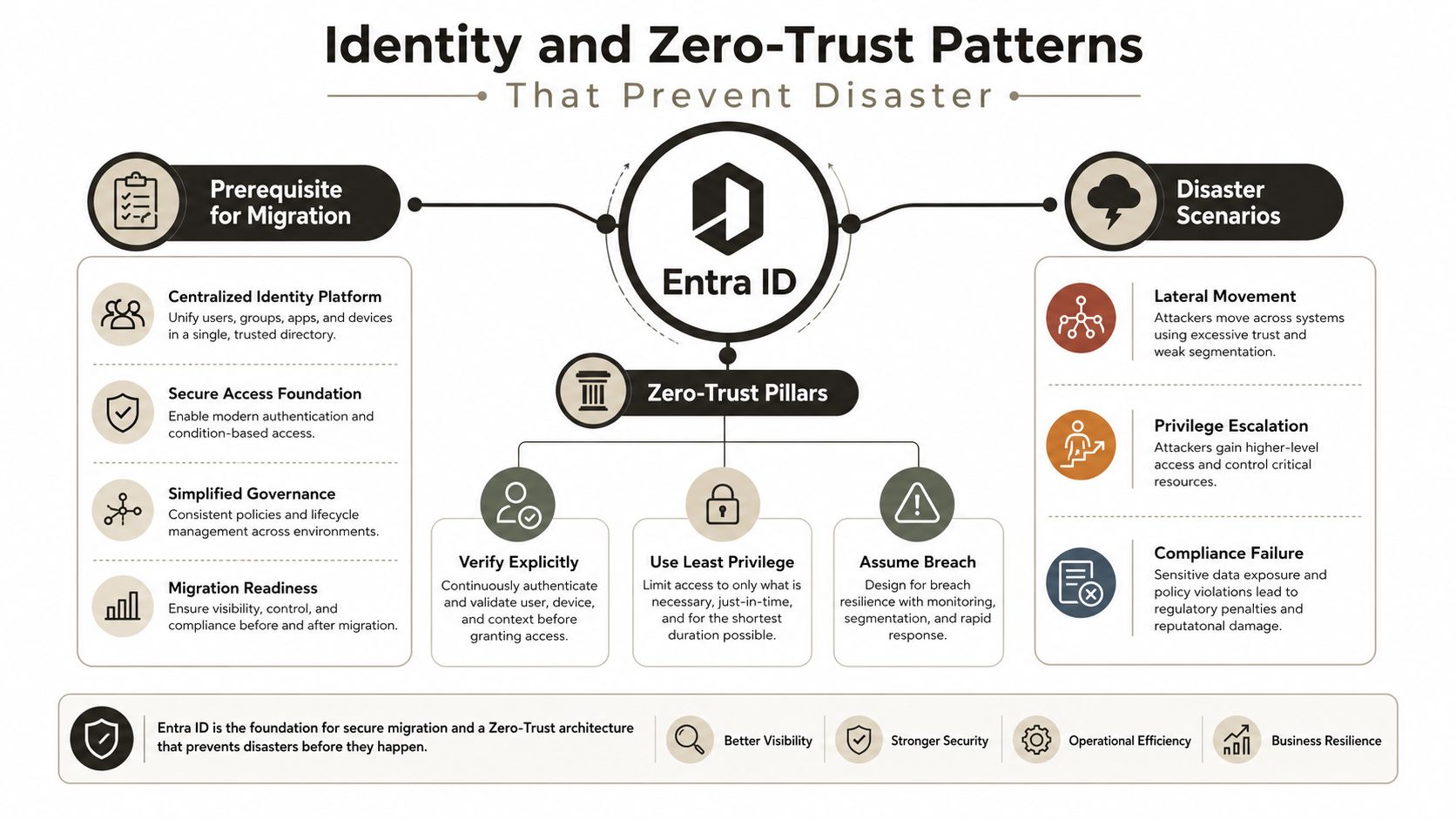
Identity and Zero-Trust Patterns That Prevent Disaster
Redesign identity first, or expect the migration to inherit yesterday's access mistakes. A cutover can look successful while broken permissions, duplicate groups, and stale assignments carry the old tenant's risk into the new one. The problem shows up later, when a user gets access they should not have, or when an audit asks who approved what and the answer is messy.
We see this all the time. Teams preserve old permissions because “the migration worked,” then discover that broken inheritance, overlapping group membership, and leftover role assignments create access drift across SharePoint sites and Microsoft 365 workloads. Once those identities are consolidated, the mistakes spread faster because every connected workload trusts the same flawed model.
Zero trust has to come first
Set the sequence as identity, access policy, then content migration. If you move content before you control access, you create a security gap that will cost you downtime later when someone has to clean up the mess by hand. Use our zero-trust and conditional access guidance as the baseline, then adapt it to your tenant structure, admin boundaries, and compliance rules.
Microsoft's Azure Confidential Computing is built to encrypt data in memory and process it only after the cloud environment is verified as trusted, while attestation services verify the integrity of trusted execution environments (Confidential Compute). That matters in finance and healthcare because data-in-use risk does not vanish just because storage encryption is turned on. If your design stops at rest encryption, the sensitive part of the workload is still exposed.
Audit evidence is part of the design
Microsoft's government and public-sector documentation calls out Microsoft Azure Attestation, Azure Confidential Ledger, and a 72-hour breach notification commitment after incident declaration. Those controls only work when identity, logging, retention, and escalation already line up with them. Otherwise, you end up with a compliant-looking shell and non-compliant operations inside it.
The government overview is useful for seeing how Microsoft frames regulated deployment boundaries and control expectations, but the document does not replace your own identity design and enforcement. The practical test is simple. Can you show who has access, why they have it, how long that access lasts, and how zero-trust enforcement is applied after consolidation? If the answer is unclear, the tenant is not ready for cutover.
Common Migration Failure Points and Their Real Costs
The failure patterns are boring because they repeat. Teams underestimate the technical constraints, then spend days trying to recover from a problem Microsoft documented from the start. That's why migration disasters feel avoidable in hindsight. They are.
Microsoft Learn documents constraints around API throttling, filename and path length limits, and large-list and item scale boundaries in SharePoint and migration scenarios (Azure architecture guidance). The docs are there. The pain comes when teams only read them after the errors start.
The cutover that turns into a week
I've seen cutovers planned as tight weekend jobs turn into long, messy recoveries because the scripts ignored throttling. When retry storms start, every failure adds more load, more logs, and more confusion. The result isn't just delay. It's an inconsistent cutover window where nobody can tell which items moved cleanly and which ones failed.
The hidden file and metadata traps
Long path limits don't always announce themselves loudly. Files just stop landing where you expected them to land, or their metadata arrives incomplete. Filename restrictions can corrupt the shape of the migrated library. List view thresholds can break workflows when migration jobs or post-migration validation tries to process too much at once.
Why performance headroom still gets wasted
Azure has the horsepower, but single-threaded copy logic wastes it. Legacy upload tooling collapses under peak load because it can't manage concurrency, backoff, or checkpointing properly. Microsoft's own platform performance numbers don't save you if your implementation remains serial and brittle.
War room truth: the cost of a bad migration is not just technical debt. It can mean broken legal compliance, lost productivity, and stakeholder trust that you won't get back quickly.
Specialist handling matters. A rescue team doesn't just move data, it controls blast radius, verifies data integrity, and keeps the project from becoming a compliance incident with a migration label on it.
Migration Tools Compared Where Each One Breaks
Tool choice matters, but only if you're honest about the breaking point. SPMT, ShareGate, and custom PowerShell PnP scripts all solve parts of the problem. None of them is magic.
Our third-party SharePoint migration tools notes should be the starting point if you want the blunt view, not the vendor version. The right tool depends on scope, permissions, throttling, and how much failure your team can absorb.
| Migration Tool Capabilities vs Enterprise Requirements | Tool | Best For | Breaking Point | Throttling Handling | Checkpoint Recovery |
|---|---|---|---|---|---|
| Migration Tool Capabilities vs Enterprise Requirements | SPMT | Small, straightforward moves | Enterprise complexity and deep permission work | Limited | Limited |
| Migration Tool Capabilities vs Enterprise Requirements | ShareGate | Most SharePoint and Microsoft 365 scenarios | Complex permission inheritance and large remediation jobs | Better, but still bounded by project design | Stronger than basic tools |
| Migration Tool Capabilities vs Enterprise Requirements | Custom PnP scripting | Special cases, rescue work, and tailored logic | Requires engineering discipline and testing | Depends on your implementation | Depends on your implementation |
The Ollo verdict
Use SPMT for small, contained jobs where the permissions model is simple. Use ShareGate when you need broad coverage and disciplined migration reporting. Use custom scripting when the source estate, identity model, or governance requirements make packaged tools too blunt.
If you want the hard truth, the tool never saves a broken plan. It only exposes it faster.
For teams on a tight budget, browse Azure perks for startups from Credit for Startups to understand what's available, but don't confuse credits with control. Credits lower spend. They do not lower migration risk.
Governance and Compliance Controls for Regulated Sectors
Governance has to come first. If you leave compliance design until after the move, old process gaps will follow you into Azure, and auditors will spot them faster than most project teams do. Energy, healthcare, and finance teams in Ireland need more than a technical migration. They need proof that control still exists after consolidation.
Public-sector guidance already shows the control areas that matter, including Microsoft Azure Attestation, Azure Confidential Ledger, and clear incident notification expectations. Those controls help, but only if the operating model changes with them. Logging, retention, escalation, and access review all have to match the new architecture.
What to put in place before cutover
Start with data residency. It is not just a latency decision. It affects contractual obligations, retention handling, and where your evidence sits after the move.
Then align legal hold and retention policy to the new tenant structure, so you do not lose the ability to defend a record after migration. If your legal and records teams are still working from the old environment, you will create gaps the first time a regulator asks for a chain of custody.
The next step is incident handling. If the breach process still depends on the source tenant, the response team will waste time figuring out who declares an incident, who verifies scope, and who signs off on notifications. Those roles need to be agreed before any content moves.
Use the audit trail as a design input
Azure Confidential Ledger gives you a stronger audit model than scattered exports and improvised logs, but only if you know which evidence auditors will ask for. That includes access reviews, retention enforcement, and control ownership after the migration. The platform can support it. Your process has to close the loop.

If you are also checking team capacity, browse DevOps engineer Azure jobs to see the skills an internal team needs to own this properly. For regulated environments, our NIS 2 and Microsoft 365 guidance goes further into why security evidence and operational discipline matter more than migration slogans.
When to Hire Specialists Versus Attempting DIY
DIY works only in narrow conditions. The moment your migration touches regulated data, complex identity, broken inheritance, or multi-geo design, the failure modes get expensive fast. Microsoft's own research materials and the HG Insights report point to a platform built for enterprise scale, not a weekend cleanup exercise.
Use this test before you commit
- Internal SharePoint expertise exists, but only for simple content moves.
- The scope is standard, meaning limited permissions, limited dependencies, and no major identity redesign.
- The data is non-regulated, so a mistake doesn't create legal or audit fallout.
- Your team can absorb retry work, because a failed validation run won't stall the business.
If those conditions do not all hold, internal execution becomes a liability. That is where scope turns from manageable to brittle.
Where specialists change the outcome
Specialist support makes sense when the migration includes tenant-to-tenant consolidation, Entra ID redesign, broken inheritance, API throttling, GUID conflicts, or regulated evidence requirements. Those are the jobs that fail in the gaps between theory and execution. Ollo handles that kind of work with ShareGate and custom PowerShell PnP scripts for complex migrations, not generic tooling for simple moves. If you want a clear view of the governance trade-offs, our Microsoft 365 admin versus consultant comparison lays out where internal administration stops and specialist consulting starts.
A capable internal team can learn the hard parts. The problem is not intelligence. The problem is the cost of learning them while live users, compliance owners, and cutover deadlines are all waiting on the same tenant.
Ollo verdict
Use DIY only when the tenant is small, the permissions model is clean, and the compliance burden is light. Hire specialists when the migration touches identity, regulated data, or evidence-heavy governance. Hiring specialists for identity, regulated data, or audit-heavy control work is how you reduce risk.
If your Azure plan includes Microsoft 365 migration, tenant consolidation, or zero-trust redesign, talk to Ollo before you cut over. We handle the parts that break projects, from identity cleanup to rescue migrations, and you can start that conversation at Ollo.

















