



The most expensive mistake in this debate happens before procurement gets involved. Teams frame Azure OpenAI vs Microsoft Copilot as a feature comparison, then act surprised when critical failure arrives through audit, access control, or residency review.
I have seen this play out the same way too many times. A business unit buys into a polished pilot. Security is told to “catch up later.” Six months after launch, legal asks a simple question: where was sensitive content processed, who could retrieve it, and which controls were inherited versus custom built? That is the moment a promising AI initiative turns into a containment exercise.
This choice sits in the architecture stack, not the demo script. It decides who owns model behavior, integration risk, operational monitoring, incident response, and policy enforcement when AI starts touching contracts, case files, financial records, or internal knowledge scattered across Microsoft 365.
Treat these two options as interchangeable and you create two different kinds of trouble. With Azure OpenAI, you can build exactly what the business wants, then discover too late that your team also signed up to secure it, govern it, log it, test it, and defend it. With Microsoft Copilot, you inherit a managed product experience, but you also inherit every weakness already hiding in your Microsoft 365 estate. Bad permissions do not become safer because an AI layer sits on top of them.
Irish and wider European buyers usually learn this faster because residency and control questions show up early. That is the right instinct. The wrong instinct is assuming a familiar Microsoft label answers those questions for you.
You do not need another vendor-flavoured summary. You need a decision that survives procurement, survives audit, and survives first contact with production.
The First Mistake You're Already Making
The first mistake is the phrase itself: Azure OpenAI vs Microsoft Copilot.
It sounds like a straight product comparison. It isn't. It's a category error. You're not choosing between two chatbots. You're choosing between a governed productivity product and a programmable AI platform.
That bad framing leads directly to bad decisions. We often see clients fail when they start with demos instead of architecture. Someone likes how Copilot drafts an email in Outlook. Someone else wants a custom document analysis workflow in Azure. Then the organisation tries to force one tool into both jobs and acts surprised when governance breaks.
What actually matters
Feature lists don't matter first. These questions do:
| Decision area | Microsoft Copilot | Azure OpenAI |
|---|---|---|
| Primary model | Managed product inside Microsoft 365 workflows | Build-your-own platform inside Azure |
| Who configures behaviour | Mostly Microsoft, within tenant controls | Your team, your developers, your cloud admins |
| Best fit | User productivity in Word, Excel, Outlook, Teams | Custom apps, workflows, APIs, private integrations |
| Main enterprise risk | Existing Microsoft 365 permissions expose too much context | Weak architecture creates security, cost, and compliance failures |
| Core buying question | Is your Microsoft 365 estate governed well enough? | Are you capable of running an AI platform properly? |
That table is the essential opening move. Not “which one is better?” but “which failure mode can your organisation control?”
Practical rule: If your Microsoft 365 permissions are messy, Copilot will surface that mess faster. If your Azure governance is weak, Azure OpenAI will industrialise that weakness.
The war story most teams don't spot early enough
A pilot usually starts in good faith. One business unit wants productivity gains. Another wants a bespoke assistant. Procurement asks for one preferred vendor choice. IT compresses two separate architecture tracks into one purchasing exercise.
That's where the rot starts.
The documentation may look neat. Reality isn't. SharePoint permissions drift. Old Teams content lingers. Sensitivity labels exist on paper but not in practice. Azure subscriptions multiply without clear ownership. Nobody agrees who owns prompt logging, content filtering, private endpoints, or retention boundaries.
Missing that step doesn't just create confusion. It creates liability with branding on top.
The Fundamental Divide Platform vs Product
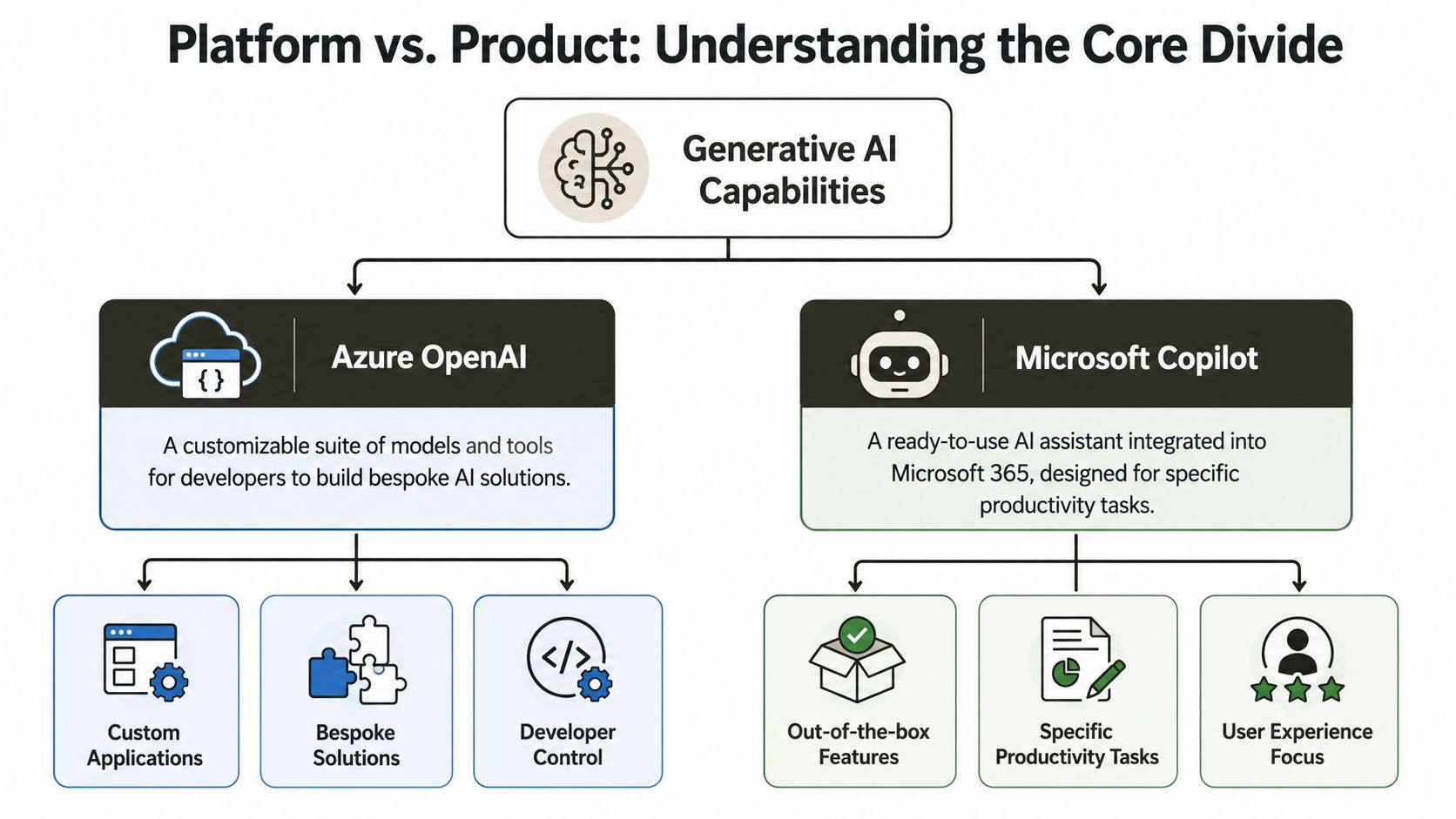
The simplest explanation is this. Microsoft Copilot is a product. Azure OpenAI is a platform. If you miss that, every downstream decision gets worse.
Copilot leases you the car
Copilot is the high-performance saloon you lease. It's already assembled. The controls are familiar. It sits inside the Microsoft 365 world your users already inhabit. That's why it gets attention from directors who want adoption without building a development programme.
But the convenience is also the boundary. You don't automatically get deep platform control because the user experience feels powerful.
Microsoft stated that Microsoft 365 Copilot was announced in March 2023 and that it uses Azure OpenAI for processing, but Microsoft 365 data is not collected or stored by Azure OpenAI. Instead, Copilot grounds prompts in Microsoft Graph content that the user already has permission to access, as explained in Microsoft's overview of how Azure OpenAI powers the Copilot ecosystem.
That sentence looks harmless. It isn't. It means your permission model matters more than your prompt quality.
For a useful non-sales overview of how organisations approach this in practice, especially around user-facing deployment, see Microsoft Copilot for UK businesses. The broad lesson carries across to Irish tenants as well.
Azure OpenAI hands you the workshop
Azure OpenAI is the workshop, the parts, the tooling, and the bill for whatever you break.
You deploy resources in Azure. You decide how applications authenticate. You wire up data sources. You handle API behaviour, application logic, private connectivity, operational monitoring, and all the ugly edge cases that sales decks skip. If your developers build a weak retrieval pattern, your answers degrade. If your identity design is sloppy, your exposure expands. If your observability is poor, incidents hide until users escalate.
We often see clients fail when they treat Azure OpenAI like a finished product. It isn't. It's a controlled blast radius only if you know how to build the walls.
If your team is evaluating custom integrations, grounded search, or application-layer AI workflows, this is the territory of Azure integration and Microsoft platform services.
The documentation says Copilot and Azure OpenAI are connected. In reality, that connection is exactly why confusing them causes design errors.
Responsibility sits in different places
Use this lens:
- With Copilot, Microsoft delivers the experience. Your job is to clean up identity, permissions, retention, and information architecture.
- With Azure OpenAI, Microsoft provides the capability layer. Your job is everything else that turns capability into a defensible enterprise service.
That's the divide. Not product naming. Not model hype. Responsibility.
Governance and Data Control The Real Battleground
Enterprise AI failures rarely start with the model. They start with lazy governance choices that looked harmless in a steering meeting.
A client in a regulated sector once insisted the AI decision was about features and speed. Six weeks later, legal froze the rollout because nobody could give a clean answer on residency, audit scope, retention, or who approved the data path into the model. The tool was not the problem. The missing control model was.
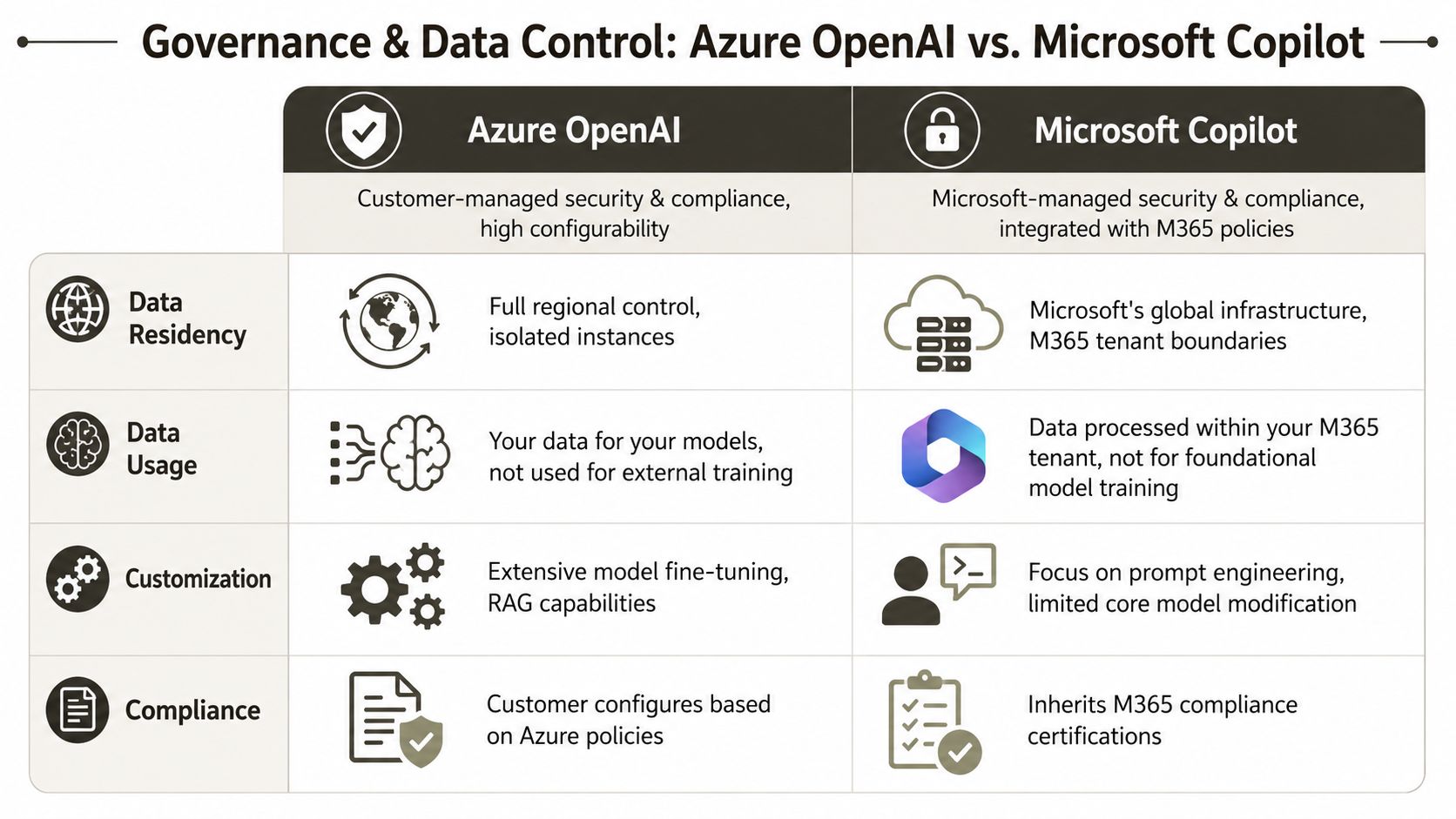
That is the main divide between Azure OpenAI and Microsoft Copilot.
The Irish context changes the risk discussion
Irish firms in finance, healthcare, energy, and the public sector should stop asking which option feels safer. Ask which one gives your organisation a governance model you can defend to auditors, regulators, and your own board.
Both services sit inside Microsoft's enterprise cloud estate, but they create very different control problems. Shared infrastructure does not give you shared accountability. It does not give you shared evidence either.
Copilot inherits the mess already living in Microsoft 365. Azure OpenAI inherits the design decisions your cloud and application teams make. One exposes permission debt. The other exposes architecture debt.
The comparison that matters in the real world
| Governance issue | Copilot reality | Azure OpenAI reality |
|---|---|---|
| Data context | Uses Microsoft 365 content the user can already reach | You choose what data enters the app, where it is stored, and how it is retrieved |
| Control model | Depends on existing Microsoft 365 controls, labels, retention, and permissions | Depends on Azure policies, identity design, networking, logging, and application guardrails |
| Residency discussion | Tied to tenant configuration and service scope | Tied to region selection, service architecture, and any connected data stores |
| Typical failure mode | Users surface content that was overexposed long before AI arrived | Developers create data flows, prompt paths, or storage patterns nobody properly constrained |
| Who carries the blame | Usually the Microsoft 365 owner and information governance lead | The platform owner, app owner, security team, and cloud team |
That table looks simple. The consequences are not.
Copilot respects existing Microsoft 365 permissions. Good. If your SharePoint estate has broken inheritance, stale groups, broad site membership, and years of casual sharing, Copilot turns that neglect into a search-and-discovery engine with natural language on top. Staff do not suddenly get new access. They finally get an easy way to find what should have been cleaned up years ago.
I have seen this movie before. A business sponsor calls it an AI exposure. Security calls it historic oversharing. Legal calls it a reportable incident. Everyone is correct, and the rollout still stops.
Governance work is boring right up to the point it becomes expensive
Watch this before you tell your board the rollout is under control.
The teams that stay out of trouble do the dull work first:
- Permission repair: Fix SharePoint inheritance, group sprawl, guest access, and legacy sharing links before broad Copilot use.
- Policy mapping: Match retention, DLP, sensitivity labels, and access rules to actual user behaviour.
- Azure control ownership: Set subscription boundaries, managed identities, secret handling, private connectivity, and logging responsibilities before developers start wiring in data.
- Audit evidence: Document decisions well enough that compliance teams can test them without chasing five different administrators for answers.
If your organisation is still building that foundation, start with a proper Microsoft 365 AI governance planning framework.
Risk call: Copilot can expose years of neglected permissioning. Azure OpenAI can create new risk paths faster than your governance team can see them.
Policy enforcement decides whether this works
Use a hard rule.
Choose Copilot if you trust your Microsoft 365 estate, your permissions model, and your compliance controls enough to let an assistant operate inside them. Choose Azure OpenAI if you need a tightly defined application boundary and you have the engineering discipline to enforce it in code, identity, network design, and operations.
Treating these as interchangeable products is how enterprises walk into preventable failures. One choice amplifies the controls you already have. The other forces you to build controls you may not yet be capable of running.
Deployment and Integration Realities
“Effortless integration” is one of those phrases that should make enterprise architects reach for the incident register.
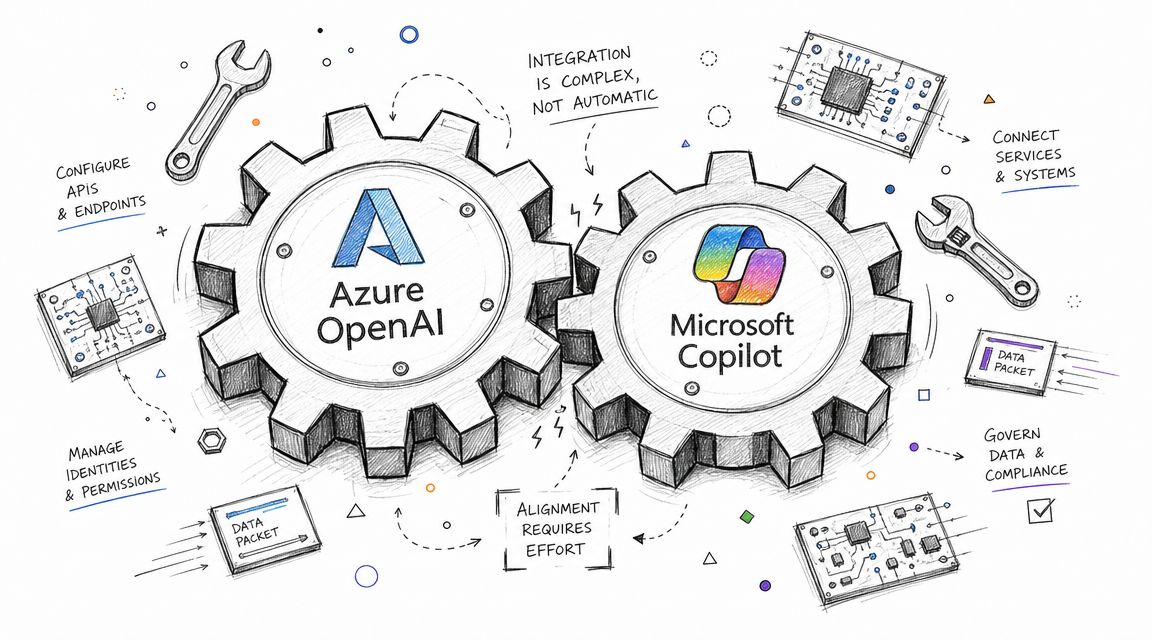
Copilot integrates natively with Microsoft 365 because that's the product's job. Azure OpenAI doesn't “integrate” in any meaningful enterprise sense until your team does the work. That work is where projects slow down, budgets drift, and weak assumptions get exposed.
Copilot starts fast and punishes dirty estates
With Copilot, deployment looks deceptively simple. You assign licences, configure controls, validate readiness, and turn on experiences in tools people already use. That simplicity is why business stakeholders assume Copilot is the safer shortcut.
Sometimes it is.
But there's a catch. Copilot sits on top of the Microsoft 365 estate you already have, not the one you wish you had. If SharePoint permissions are bloated, if Teams ownership is chaotic, if old sites still carry broad membership, then your rollout isn't blocked by AI complexity. It's blocked by your own platform hygiene.
That's why readiness matters more than activation. A lot of teams talking about Copilot should first be reviewing Copilot Studio and adjacent Microsoft automation patterns, because they haven't yet distinguished between native product use and custom extension work.
Azure OpenAI starts slow and punishes shortcuts
Azure OpenAI is where organisations underestimate effort. They assume they can bolt on a chat front end, point it at Microsoft Graph or SharePoint, and produce a governed enterprise assistant in a sprint or two.
That assumption is fantasy.
You need authentication flows that don't cut corners. You need retrieval logic that doesn't dump irrelevant content into prompts. You need application telemetry that tells you why outputs degraded. You need to deal with connector fragility, API throttling, token limits, and ugly retry behaviour. If you bring in SharePoint data, you also inherit all the old sins from that content estate.
The same pattern appears in migration work all the time. Microsoft Learn documentation confirms that API throttling, list view threshold constraints around large lists, long path issues, and permission complexity are real operational limits in Microsoft 365 and SharePoint. AI projects don't bypass those realities. They pile on top of them.
The ugly middle layer nobody budgets for
The hardest part isn't the model. It's the plumbing.
- Graph-aware grounding: Pulling in the right M365 content without flooding prompts with junk takes design work.
- Connector reliability: Custom integrations break at awkward moments and usually fail without user-friendly errors.
- Throttling behaviour: Heavy query patterns hit service limits. Then users call it “AI inconsistency”.
- Permission translation: App-layer access and content-layer permissions rarely align neatly.
- Operational support: Someone must own logs, retries, failures, prompt abuse, and change management.
Your team won't struggle because the model is weak. They'll struggle because the enterprise stack around it is messy.
Ollo Verdict
Use Copilot when the use case lives mainly inside Microsoft 365 and your tenant is already well-governed.
Use Azure OpenAI only when you need a custom application, private integration logic, or app-specific control, and you're prepared to run it like a production platform.
If you underestimate the integration overhead on Azure OpenAI, you won't get a clever pilot. You'll get a brittle internal tool that burns engineering time and loses stakeholder trust.
Unmasking the True Cost Model
Procurement likes neat numbers. Enterprise AI rarely behaves that way.
Copilot looks expensive to buyers who focus on licence cost. Azure OpenAI looks flexible to buyers who focus on pay-for-use consumption. Both views are incomplete, and both can lead you into financial trouble for different reasons.
Copilot is predictable until readiness work lands
Copilot's cost model is easier to understand because it maps to licensing. That's useful for budgeting. It's also why directors often prefer it. Predictability calms committees.
But the true cost often sits outside the licence. If your Microsoft 365 estate isn't ready, you'll pay in remediation effort. Permissions need review. Information architecture needs cleanup. Governance teams need to validate what users can surface. The licence isn't the expensive surprise. The estate repair is.
Azure OpenAI is flexible until your developers go live
Azure OpenAI looks attractive when a team wants to avoid broad end-user licensing and target one high-value process. That logic can hold up. But it breaks fast when nobody owns guardrails.
We've seen clients write application logic that makes too many unnecessary calls, retrieves too much context, or retries poorly under failure. You don't need a dramatic security incident to lose money. You just need weak engineering discipline and no real-time oversight.
The hidden cost stack is always larger than expected:
- Developer headcount: Someone has to build and maintain the application.
- Cloud operations: Monitoring, alerting, secret management, and incident handling don't happen by themselves.
- Security review: Custom AI apps trigger architectural and compliance scrutiny.
- Lifecycle burden: Prompt changes, model updates, connector changes, and data-source drift all need ongoing care.
The most expensive line item is failure
The worst cost isn't the invoice. It's the cleanup after bad governance.
If Copilot surfaces sensitive content because permissions were wrong, your problem isn't adoption. It's exposure. If Azure OpenAI gets deployed without clear data boundaries or operational ownership, your problem isn't innovation speed. It's an uncontrolled service handling business-critical information.
That's why pricing pages don't solve the Azure OpenAI vs Microsoft Copilot decision. Total cost of ownership includes the cost of proving control, the cost of monitoring behaviour, and the cost of fixing mistakes under pressure.
If your team is still treating this as a simple budget line, they need to read Microsoft 365 Copilot pricing in the wider context of deployment readiness and governance.
Cheap architecture is expensive once legal, security, and operations get dragged into the aftermath.
The Ollo Verdict An Enterprise Decision Framework
Most organisations don't need more AI options. They need a sharper filter for rejecting the wrong path.
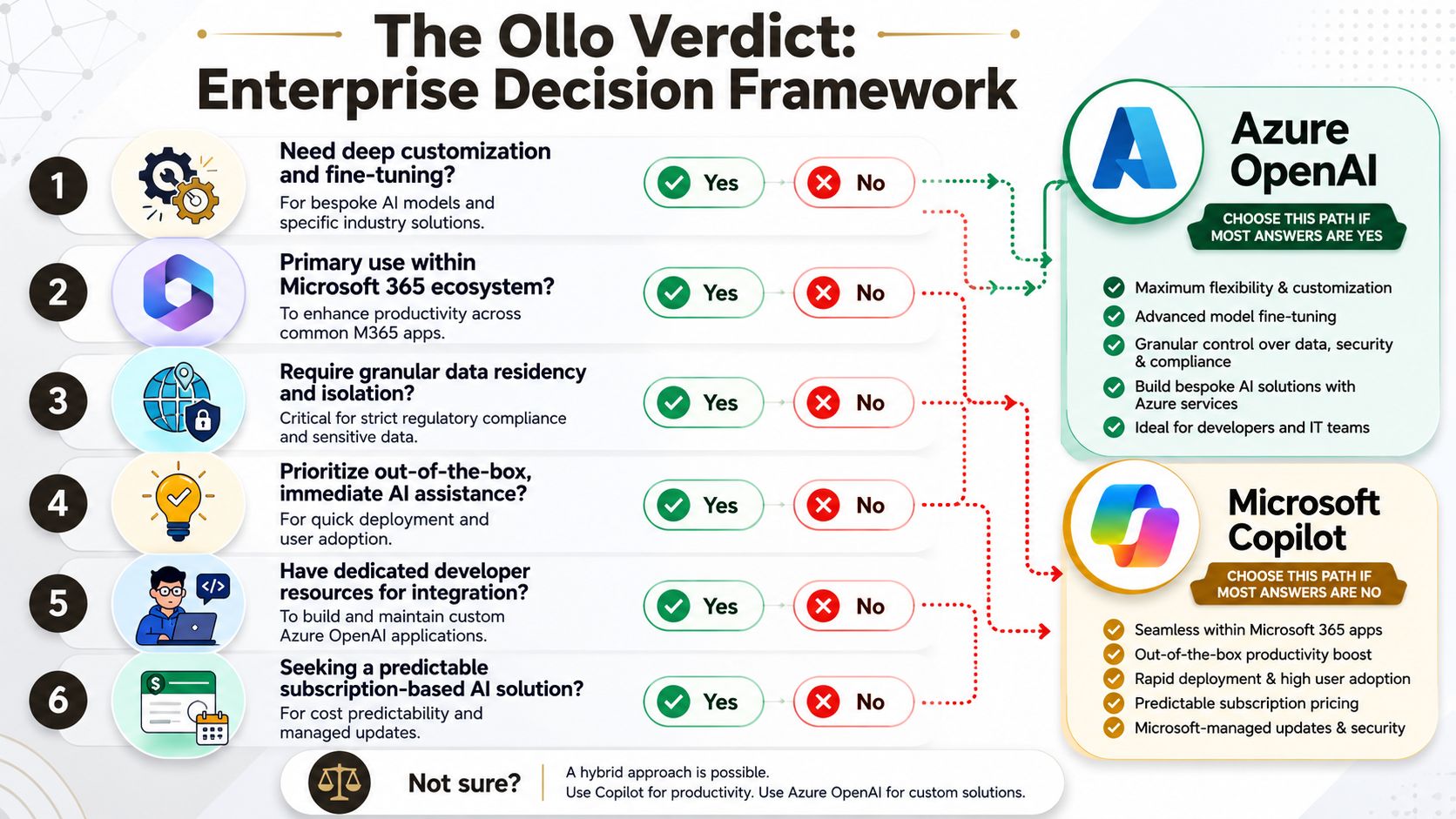
Choose Copilot when the estate is the product
Pick Microsoft Copilot if all of the following are true:
- Your users mainly work in Microsoft 365: Word, Excel, Outlook, Teams, and existing collaboration flows are the target.
- Your governance is already respectable: Permissions, retention, and access controls aren't a landfill fire.
- You want standardisation: You need a managed productivity layer, not a custom AI engineering programme.
- You value bounded complexity: The organisation can manage tenant governance more easily than application development.
If that sounds like your environment, your next step isn't more prompt tinkering. It's a proper Microsoft 365 Copilot readiness assessment.
Choose Azure OpenAI when the application is the product
Pick Azure OpenAI if your target outcome is not “help users work inside Microsoft 365” but “build a controlled AI capability inside a business process”.
That usually means one or more of these are true:
- You need bespoke logic tied to internal systems, proprietary workflows, or specialised decision support.
- You require app-level isolation and tighter control over how data is retrieved, processed, and exposed.
- You have engineers available to own the application lifecycle properly.
- You accept operational burden as the price of flexibility.
The blunt recommendation
Here's the call.
If your board wants broad productivity gains for knowledge workers, choose Copilot, but only after governance remediation.
If your business needs a custom AI application with explicit control over architecture and integration, choose Azure OpenAI, but only if you can fund and govern it like a serious platform.
If your team says, “Can't we just start with one and figure the rest out later?”, the answer is no. That's how organisations create shadow architecture with executive sponsorship.
There's one middle ground worth acknowledging. Some firms use a managed Microsoft 365 layer for end users and a separate custom platform track for specialised workflows. That can work. It only works if someone draws a hard line between product usage, platform development, and governance ownership. Ollo handles that split in Microsoft 365 and Azure environments where firms need controlled integrations rather than ad hoc pilots.
How to Avoid Disaster Call the Experts
Enterprise AI projects rarely fail because nobody bought the right licence. They fail because teams minimise architecture risk until it turns into a governance problem, an operational problem, and then a board-level problem.
You've seen the pattern before. A pilot launches without proper permission review. A custom app goes live without ownership of monitoring. A leadership team hears “it uses Microsoft” and assumes the control model is settled. Then security finds overexposed content, legal asks where processing happened, and the original sponsor discovers that “proof of concept” became production.
That's the lesson in Azure OpenAI vs Microsoft Copilot. You are not choosing a feature set. You are choosing where complexity sits, who owns it, and how badly your organisation suffers if that ownership is vague.
What to do before you approve anything
- Force an architecture decision: Product-led productivity and platform-led application development must be treated separately.
- Audit your current mess: SharePoint permissions, Teams ownership, retention posture, and Azure governance need evidence, not assumptions.
- Define an operating model: Name the owners for security, compliance, cost control, support, and change management before rollout.
- Refuse vanity pilots: If the use case can't survive scrutiny on data residency, tenancy boundaries, and policy enforcement, kill it early.
DIY sounds cheaper until your team has to explain an avoidable exposure or an uncontrolled AI service to auditors.
This complexity isn't theoretical. It's what enterprise AI looks like when it collides with regulated data, legacy Microsoft 365 estates, and overconfident delivery plans. Trying to manage that without specialist experience isn't prudent cost control. It's a gamble with your data, your compliance posture, and your credibility.
If you want a hard-nosed assessment before your AI programme turns into a rescue job, talk to Ollo. We'll tell you whether Copilot fits, whether Azure OpenAI is justified, and where your governance model will break before the project does.

















