



Most advice about debt collection software starts in the wrong place. Buyers are told to compare feature lists, argue over licence models, and pick the prettiest dashboard. That works for low-risk SaaS. It fails fast in regulated collections, where the software itself decides whether your team stays compliant, keeps an audit trail, and avoids contact-rule violations that regulators can turn into a serious problem.
Treat debt collection software as a regulated workflow engine, not a back-office convenience. The market has already moved that way. Analysts now size the global market at roughly USD 5.2 billion to USD 5.57 billion in 2025-2026, with forecasts reaching USD 9.32 billion by 2034 and USD 11.3 billion by 2034, depending on methodology, and Mordor Intelligence says cloud platforms held 71.46% of the market in 2025 while software itself held 63.12% (Market Research Future). That's not a niche tooling story. It's a sign that the operating model is already cloud-heavy, software-first, and built around control, not admin.
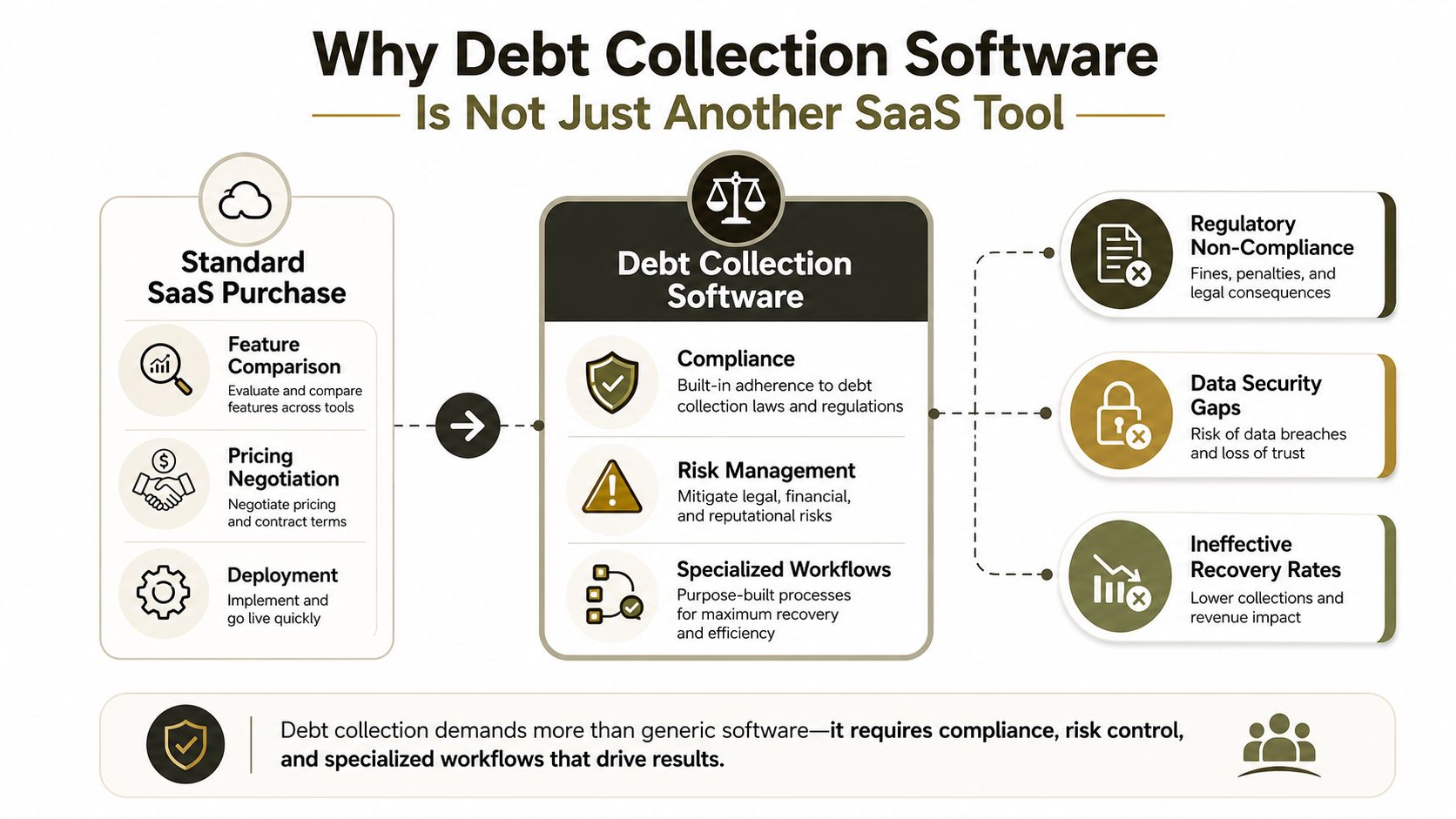
Why Debt Collection Software Is Not Just Another SaaS Tool
The first error many IT teams make is lumping collections in with CRM, case management, or task tracking. That shortcut fails in regulated enterprises. Debt collection software controls who can be contacted, when contact is allowed, which channel is permitted, and what evidence the organisation must retain after every interaction.
Collections is a control plane, not a contact list
A serious platform centralises account data and then applies workflow automation, behavioural segmentation, audit logging, RBAC, encryption in transit and at rest, and integrations into payment systems and third-party channels (CGI). That stack matters because collectors are enforcing time-of-day rules, opt-out logic, contact-frequency limits, and jurisdiction-specific treatment policies inside the software itself. If the system cannot stop a bad action before it happens, it is already failing the job.
Practical rule: if the platform can send messages but cannot block a non-compliant action in the UI and workflow logic, it is not ready for a regulated collections environment.
The cloud shift makes that harder to ignore. Analysts at Market Research Future note the market is moving toward cloud-heavy operating models with stronger traceability, segmentation, and automation. That is the direction enterprises have already chosen, because auditability and rule enforcement matter more than a pretty interface.
A proper deployment also needs the underlying cloud controls to hold up under scrutiny. If your team is standardising on Azure, Azure cloud technologies guidance should sit alongside the collections design, because hosting, access control, recovery, and logging are not side issues in this kind of rollout. Break those foundations and the collection workflow becomes brittle fast.
The wrong buying lens breaks projects before go-live
The projects that fail usually fail early. Teams buy debt collection software like it is an internal ticketing app, compare screens, ignore governance, and only discover later that the platform cannot produce a defensible history of who was contacted, why they were contacted, and under which rule set. Once that happens, the problem is no longer user experience. It is exposure.
The right question is blunt. Does the platform behave like a workflow engine with compliance controls, or like a messaging tool with a collections label stuck on it? If it is the second option, you are buying risk. If your operations need specialist handling, some enterprises also choose to improve collections with nearshore BPO instead of forcing a weak platform to carry the full burden.
Core Architecture of Enterprise Debt Collection Platforms
Enterprise collections platforms live or die on architecture, not branding. A polished demo tells you nothing about whether the system can survive volume spikes, channel sprawl, and regulatory pressure. The core stack has to decide, log, restrict, and integrate at the same time, or it will break in production.
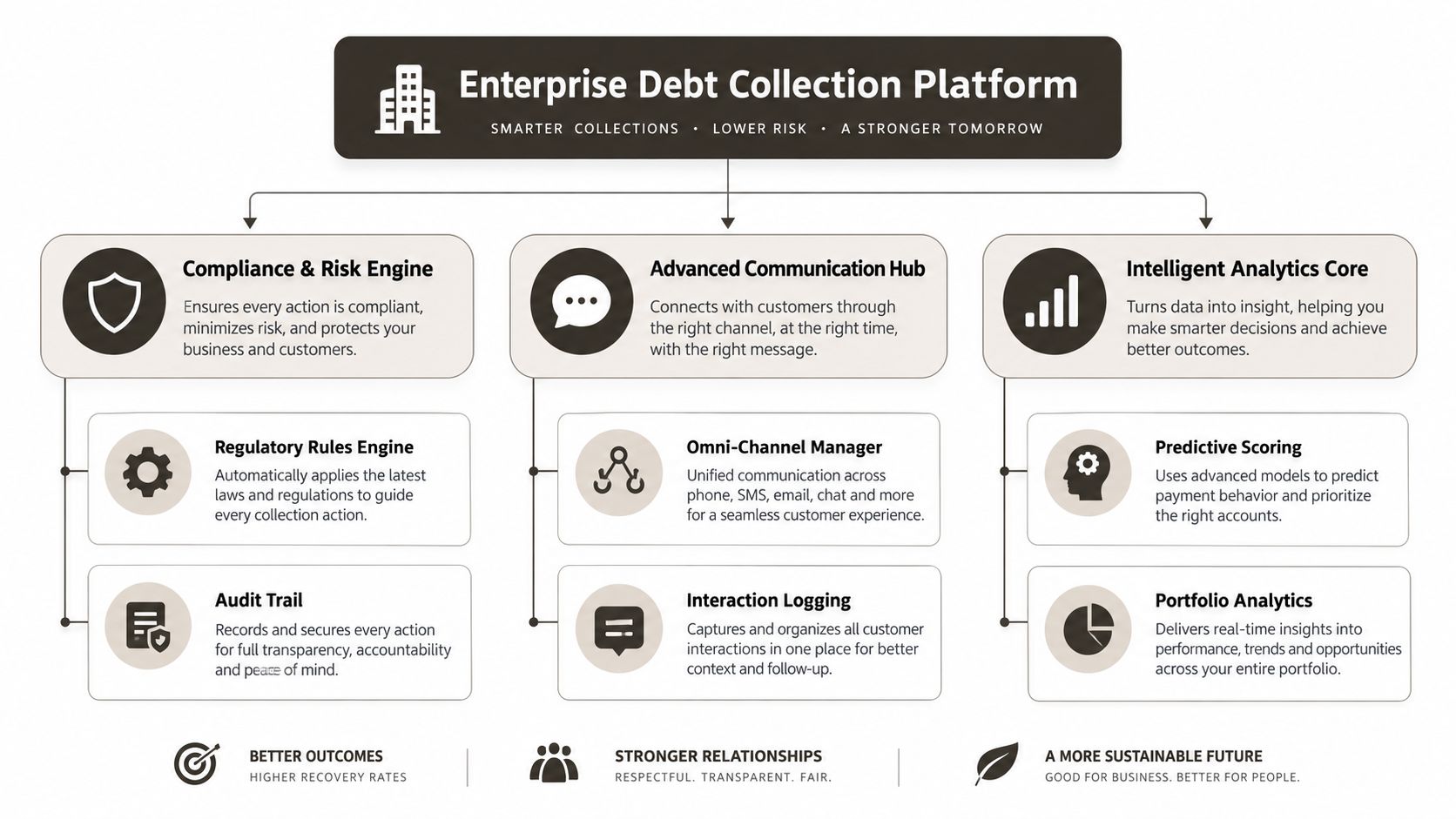
The compliance engine does the heavy lifting
The centre of a serious platform is the centralised decisioning engine. It pulls account data from CRM, billing, and payment systems, then applies the rules that determine the next allowed action. Segmentation by risk or propensity, contact throttling, escalation paths, and exception handling all sit here. If this layer is weak, agents end up acting as the policy engine, and that is how mistakes spread.
The architecture also needs role-based access control, retention-aware logging, and secure hosting with disaster recovery and failover protections. In regulated deployments, those controls are not decoration. They are the difference between a system that can defend its actions and one that cannot explain them when an auditor asks.
Integrations are where good platforms prove themselves
Enterprise buyers should inspect how the platform connects to CRM, billing, payment gateways, and dialer systems. These are not cosmetic links. They are the data paths that keep account status, payment history, and contact outcomes aligned. If the integrations are brittle, the audit trail fragments and the compliance posture weakens.
Technical failures usually show up at the seams. API throttling delays updates until the contact strategy is already wrong, GUID conflicts corrupt record matching during migration, and broken inheritance in access models gives the wrong users the wrong permissions. That is the kind of failure generic feature lists never mention, yet it is exactly what creates remediation work after go-live.
For teams that want to deepen the operating model around collections, a useful reference point is improve collections with nearshore BPO. It is a practical reminder that the platform and the operating process have to fit together, not compete with each other.
If your environment is already standardised on Microsoft infrastructure, the same discipline applies to the wider stack. Our internal reference on Azure cloud technologies sits in the same lane, because collections systems rarely fail in isolation. They fail inside the larger identity, hosting, and governance model.
Bottom line: the best platform is the one that refuses unsafe actions, logs the decision, and keeps the evidence usable later.
Compliance Requirements That Define Your Technical Specification
Compliance isn't a checkbox in collections software. It's a design constraint. If the platform can't encode the legal rules into its workflow, your agents end up doing policy work by memory, and that's where violations start.
Regulations should map to software behaviour
In the U.S., Regulation F requires collectors to track communication frequency and timing, and the CFPB's 7-in-7 contact cap is a concrete control the software must enforce automatically (Aktos). In the U.K., enterprise collections operations must map to FCA Consumer Duty, CONC contact-frequency controls, GDPR retention and deletion rules, and PCI-DSS payment handling (CR Software). Those requirements aren't abstract. They become fair-treatment rules, suppression windows, channel restrictions, consent management, and evidence exports.
For compliance teams, the critical test is whether the software enforces the policy before a call, message, or payment action happens. If it only reports on problems after the fact, it's too late.
| Regulation | Jurisdiction | Key Requirement | Technical Implementation |
|---|---|---|---|
| Regulation F | United States | Track communication frequency and timing | Automated contact counters, time-window controls, logged outreach events |
| CFPB 7-in-7 cap | United States | Limit repeated contact attempts | Contact throttling logic, suppression rules, exception review |
| FCA Consumer Duty | United Kingdom | Fair treatment and outcome control | Treatment rules, approved message paths, evidence exports |
| CONC | United Kingdom | Contact-frequency discipline | Channel-level restrictions, configurable frequency controls |
| GDPR | United Kingdom and Ireland | Retention, deletion, access control | Role-based permissions, retention-aware logging, secure hosting |
| PCI-DSS | United Kingdom and Ireland | Payment handling security | Payment flow isolation, encryption, controlled access |
Privacy controls are part of the product, not the project plan
GDPR-class privacy expectations require precise access control, traceability, and data minimisation implemented through role-based permissions, retention-aware logging, and secure hosting with disaster recovery and failover protections. That's why I reject any platform that treats compliance as a reporting layer bolted on later. Once you do that, every exception becomes manual work, and manual work becomes a liability.
If you want a broader framing on how governance belongs inside outsourced and vendor-led delivery, the compliance role in IT outsourcing piece from devPulse is worth a read. It aligns with what enterprise buyers already know. Compliance only works when the operating model and the controls are designed together.
For related context inside a Microsoft estate, our internal guide on Microsoft 365 financial services compliance reinforces the same point. The stack has to prove policy, not just promise it.
Where Migrations Fail and Data Gets Lost
Migration is where debt collection software projects break in ways that look small at first and turn expensive fast. In collections, a failed move does more than frustrate users. It can wipe out audit history, expose debtor data, and leave the business unable to prove what happened when a regulator asks for evidence.
The quiet failures are the most dangerous ones
API throttling is a common failure point during bulk transfers. Teams assume the migration tool will retry every record cleanly, then discover it did not. The job status says completed, but missing rows sit between source and target until someone manually compares exception logs. That is not a nuisance. It is a broken chain of evidence.
Microsoft's own SharePoint and Microsoft 365 behaviour creates hard limits that migration teams ignore at their peril. The 5,000-item list view threshold, long path limits, and broken inheritance issues do not wait politely for a cutover window. They surface when case history queries stall, attachments corrupt, or permissions drift across libraries. If debtor records sit in a structure built around clean inheritance and low-volume views, the migration will expose every weak assumption. The internal SharePoint migration data loss discussion covers the same pattern from the storage side.
GUID conflicts and permission drift create legal problems
GUID conflicts can orphan account records from their audit trails. You still have the account, but you cannot reliably tie the activity history back to it. Broken permission inheritance is worse, because it can expose sensitive debtor data to unauthorised users. At that point, the failure is not just technical. It becomes a GDPR issue.
Missing one mapping step does not just fail the project. It breaks legal compliance by creating gaps in the audit trail and uncertainty around who saw what.
For a related example in a heavily regulated workflow domain, the healthcare revenue cycle automation guide 2026 shows the same pattern. Once records move through a regulated operational flow, data integrity and traceability stop being optional.
The lesson from regulated migration work is straightforward. Standard tooling can move files. It cannot rescue a bad information architecture, and it cannot forgive sloppy validation.
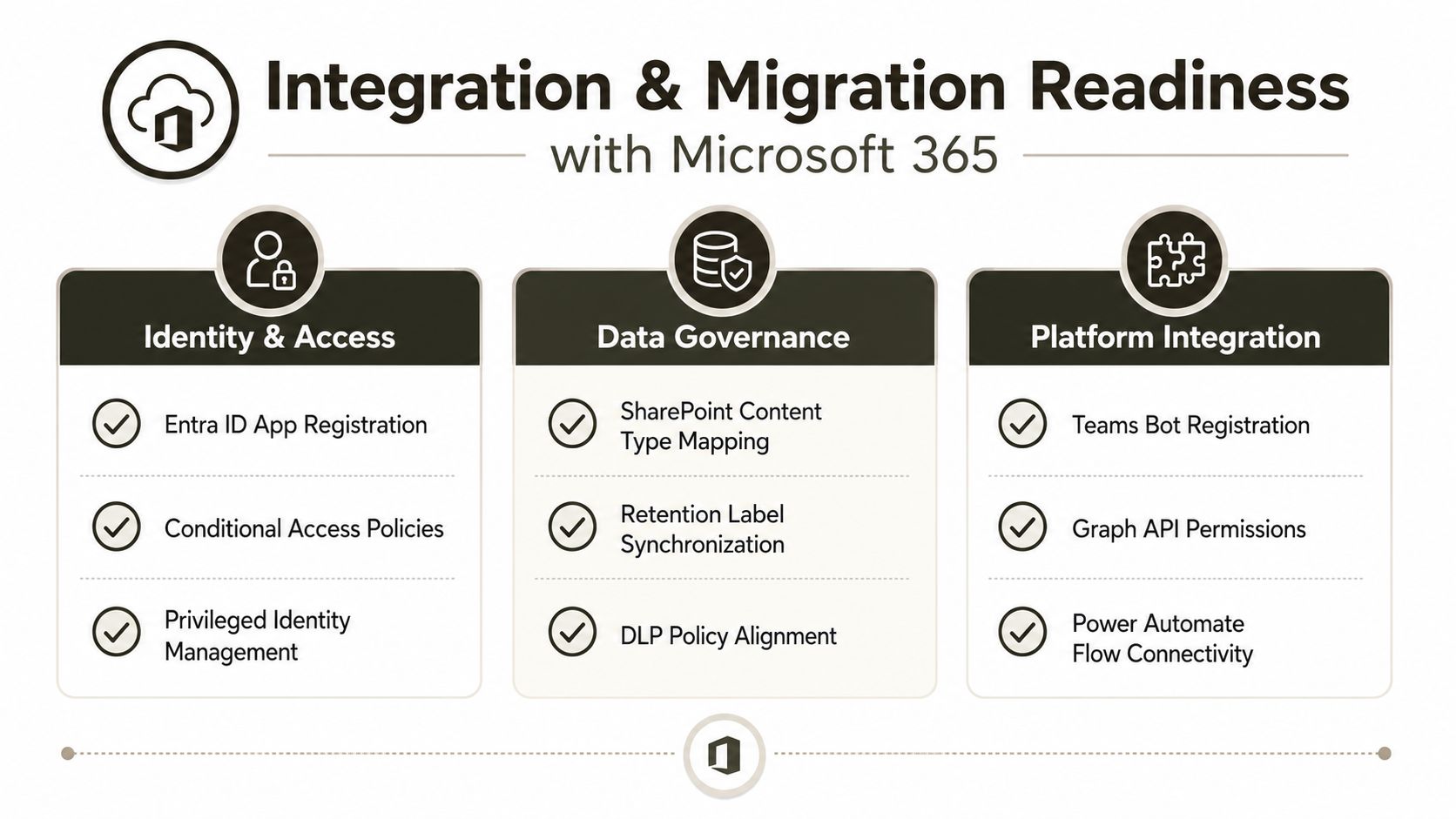
Integration and Migration Readiness with Microsoft 365
If your collections operation runs on Microsoft 365, SharePoint, and Entra ID, don't call it “just an integration.” You're dealing with identity, retention, governance, and case data at the same time. That means the environment either supports a regulated collections workload, or it gets in the way.
Start with identity and access, not the app
Your first job is to test whether Entra ID can support the access model the collections team needs. That means zero-trust redesign, conditional access policies for agents, and privileged access controls that don't assume everyone in collections should see everything. If you get identity wrong, the rest of the stack just automates the mistake.
SharePoint also matters more than many organizations admit. List and library design affects case management, attachment handling, and audit access. Our internal Microsoft 365 migration reference covers the broader mechanics, but the collections-specific point is sharper. If your libraries depend on brittle content types or oversized views, you're setting yourself up for support pain during migration and after it.
Tool choice should match the risk profile
SPMT has its place. Use it for under 50GB of straightforward file data. That's the Ollo Verdict, and I stand by it. For anything involving complex permissions, large lists, GUID-sensitive records, or compliance-sensitive case history, you need custom scripting, ShareGate, and a migration architecture designed by specialists who understand the failure modes.
Ollo Verdict: use SPMT for small, simple file moves. For regulated enterprise collections data, you need custom PowerShell PnP scripts, careful validation, and specialist migration design.
The documentation says tools can “move content.” In reality, your team needs the content to arrive with permissions, metadata, retention state, and auditability intact. That's a different problem entirely.
The Real Cost of DIY Versus Specialist Migration
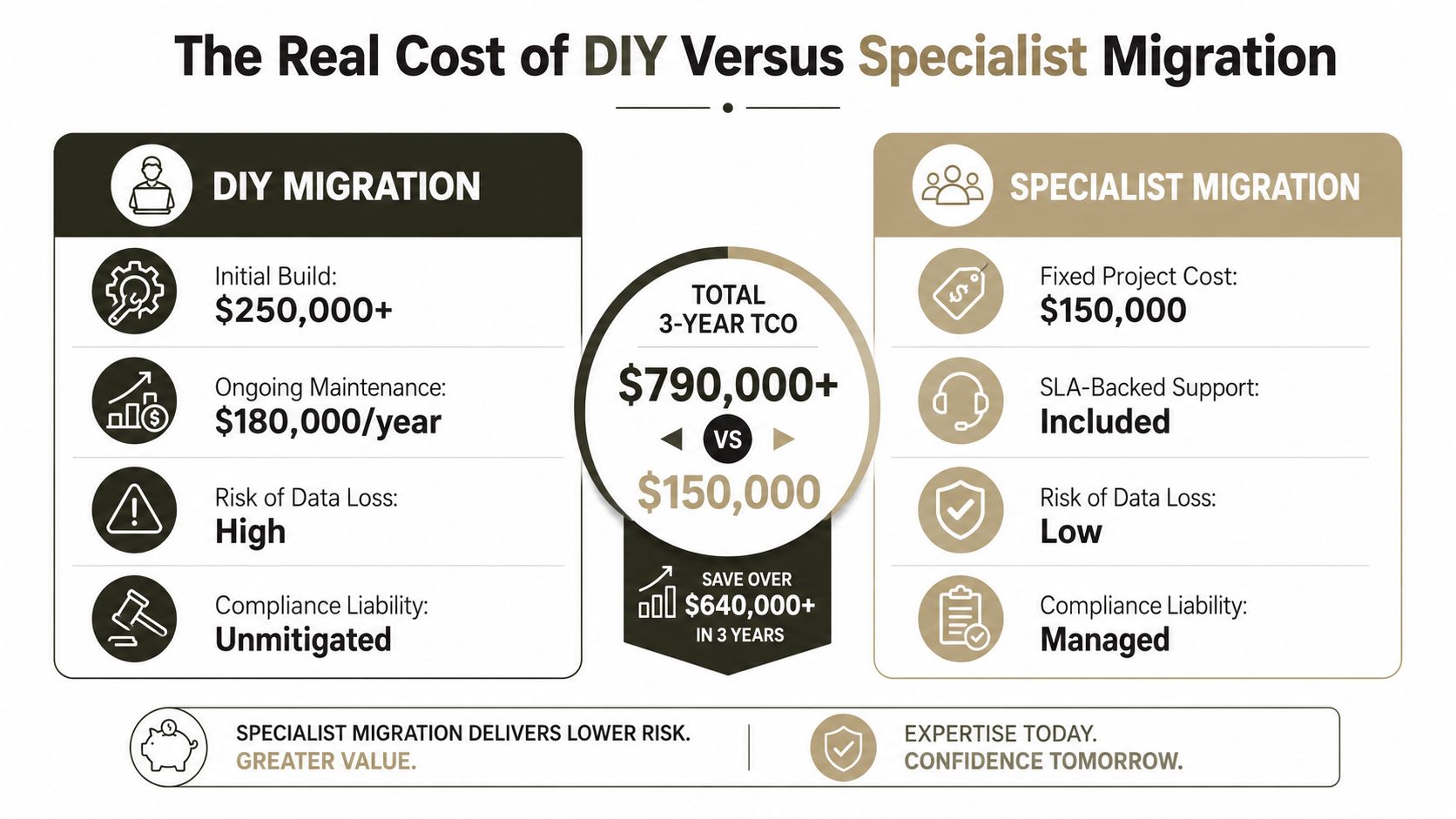
DIY looks cheaper on paper because it hides the expensive part. It ignores failed retries, exception handling, identity redesign, cleanup, and the compliance work that happens after go-live when users notice broken records. By then, the invoice has already grown.
The failure costs stack faster than the project team expects
A DIY approach often starts with standard Microsoft tooling and an in-house team that already has a day job. Then API throttling slows the transfer, permission issues force manual fixes, and list migration quirks stretch the timeline. At that point, the project is no longer a straightforward infrastructure task. It's a multi-team recovery exercise.
The compliance cost matters just as much. If you lose audit records, expose debtor data, or create unanswered gaps in contact history, you don't just have a technical defect. You have a breach notification problem or an examination problem. That's why the “cheap” path gets expensive very quickly.
Specialist-led delivery exists to reduce uncertainty
Specialist migrations use ShareGate, custom PowerShell PnP scripts, and proven sequencing because the point isn't movement, it's fidelity. They validate content, permissions, metadata, and auditability before users depend on the new environment. They also know where to stop trusting the defaults.
The middle ground usually hurts the most. In-house teams try to own the migration, then call for help once the failure modes show up. By then, you've already lost time, burned trust, and made compliance harder to prove. If you're a regulated enterprise, that's not a prudent experiment.
Here's the blunt version. DIY might work for a file share archive. It is a bad bet for collections data under regulatory pressure. This internal comparison explains why the consultant model wins when the blast radius is this large.
Your Decision Framework for Debt Collection Software Deployment
Start with the architecture, not the demo. If the platform can't enforce compliance rules, handle identity cleanly, and integrate with your real systems, it doesn't matter how polished the interface looks. Your decision has to survive production, not impress a sales call.
Use a hard gate, not a wish list
Ask four questions in order. Does the platform block non-compliant actions before they happen? Can it prove who did what, when, and under which rule set? Will it fit your Microsoft 365 and Entra ID model without weakening governance? Can your migration team move the data without breaking permissions, retention, or audit trail continuity?
If any answer is weak, stop. Don't “pilot” your way into a regulated mess.
Choose risk reduction over bargain pricing
For regulated collections, the cost of getting the infrastructure wrong far exceeds the cost of getting it right the first time. That's the part many organizations underprice. They see software subscription costs and ignore the operational cost of fixing a broken contact rule, a lost audit record, or a permission leak after deployment.
The right move is to treat the software selection and migration as one program. Separate them, and you'll create gaps that no vendor demo will expose. Keep them together, and you'll make better decisions about architecture, compliance, and delivery.
If you're planning a debt collection software deployment and you can't afford a failure in compliance, auditability, or data integrity, talk to Ollo before you cut over anything. We design regulated Microsoft 365 and SharePoint migrations for teams that can't gamble with debtor data, and we'll tell you plainly where the project will break. Visit Ollo and get the risk assessed before your team commits to the wrong platform or the wrong migration path.

















