



Most advice on Microsoft 365 financial services compliance starts in the wrong place. It starts with features. Purview. Retention. eDiscovery. DLP. Audit logs.
That's exactly how regulated teams get hurt.
Your licence doesn't buy compliance. Your tenant doesn't become defensible because Microsoft shipped the controls. The dangerous part isn't the feature list. It's the change event. Migration, consolidation, divestiture, tenant split, regional restructuring. That's where your labels drift, your inheritance breaks, your audit trail goes soft, and your regulator stops caring what the product brochure promised.
We see this constantly. Your team inherits an estate with years of SharePoint sprawl, multiple admins, inconsistent permissions, legacy file shares, half-documented records rules, and business owners who insist everything is critical. Then someone says, “We'll use the native tools and clean it up on the way.” That sentence has buried more compliance programmes than most firms admit.
If you're an IT Director in Irish financial services, a key question isn't whether Microsoft 365 has compliance capabilities. It does. A more important question is whether your organisation can preserve control, evidence, and chain-of-custody when the environment changes. If you can't, then your compliance posture is theatre.
The Compliance-in-a-Box Myth
Microsoft 365 gets sold as if compliance is something you switch on. Buy the right licensing. Enable Purview. Create retention labels. Run a few reports. Tick the governance box.
That view is wrong, and in financial services it's reckless.
Your licence gives you tools, not proof
A regulated tenant only matters if your team can prove control design, policy enforcement, and incident discipline. In practice, that proof lives in configuration quality, operational process, and evidence integrity. It does not live in a SKU name.
We often see clients fail when they assume a tenant is compliant because retention and audit features exist. The tools may be present, but badly mapped content, missing metadata, inherited access chaos, and partial migrations leave a tenant impossible to defend under review.
Practical rule: If your team can't show how a record kept its label, permissions, history, and retrieval path through a migration, then you don't have compliance. You have hope.
The documentation says controls exist. Reality says someone still has to design them properly, validate them, and keep them intact during change.
Migration is where compliance usually breaks
Most internal programmes focus on steady-state controls. They spend months discussing labelling taxonomies and policy wording. Then they hand the actual migration to a generalist admin, a rushed partner, or a tool operator.
That's the failure point.
A migration doesn't just move files. It rewrites locations, identities, inheritance paths, timestamps, references, and discoverability patterns. In a regulated environment, every one of those changes can affect legal hold, records supervision, auditability, and access control.
Here's what your team should assume before touching a regulated workload:
- Content won't behave consistently: SharePoint libraries, OneDrive estates, Teams-connected content, and legacy repositories all carry different metadata and permission histories.
- Policies won't survive by accident: Retention labels, DLP logic, and access rules need explicit mapping and validation.
- Partial success still counts as failure: If only some content migrates cleanly, your evidence trail fragments. Auditors don't grade on effort.
- Rollback plans are often fiction: Many firms discover too late that reversing a failed migration creates another chain-of-custody problem.
The myth is simple. Firms think compliance lives in the destination platform. It doesn't. It lives in the discipline around the move.
What a sceptical IT Director should care about
You don't need another article praising Microsoft's controls. You need a hard filter for project risk.
Use this one:
| Assumption | Reality |
|---|---|
| “We have Purview, so we're covered.” | Purview only helps if content arrives with intact structure, metadata, and policy mapping. |
| “Native tools are enough.” | Native tools are fine for simple jobs. Regulated estates aren't simple. |
| “We can remediate after cutover.” | Missing this step doesn't just delay the project. It can break legal compliance. |
| “Migration is an infrastructure task.” | In financial services, migration is a control-preservation exercise. |
If your team treats Microsoft 365 financial services compliance as a product feature exercise, you'll miss the only part that really matters. The point where systems change and evidence goes missing.
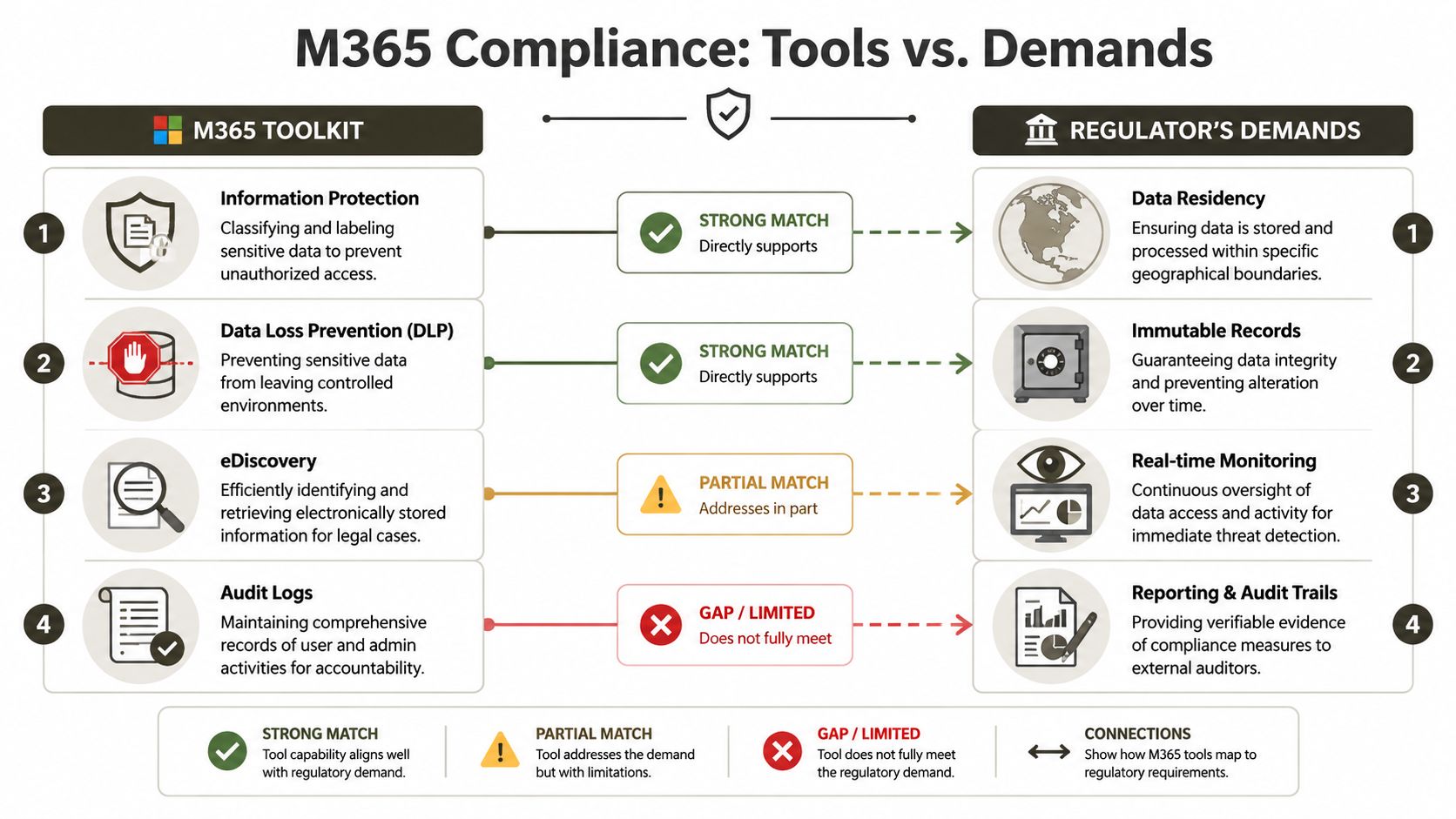
Your M365 Toolkit vs The Regulator's Demands
In Ireland and across EU-regulated financial services, Microsoft 365 isn't being judged against a vague idea of “good cloud security.” It's being judged against DORA, which entered into force on 16 January 2023 and became applicable on 17 January 2025. Microsoft's own financial-services guidance also says regulated institutions remain accountable for incident assessment, notification, governance, and documented oversight, even when they use Microsoft platforms. That's the part too many teams keep trying to outsource to a product.
What the toolkit actually does
Microsoft 365 gives your team real controls. They matter. But each control solves only part of the problem.
- Information Protection: Classifies and labels content. Useful when your data estate is already understood and your labels follow the content properly.
- Data Loss Prevention: Restricts risky movement of sensitive information. Useful until your migration creates blind spots or misclassified repositories.
- eDiscovery: Helps legal and compliance teams locate and preserve content. Useful only if the target environment still reflects the original record structure and custody path.
- Audit Logs: Capture administrative and user actions. Useful only if your migration hasn't introduced unexplained gaps, broken permission history, or object mismatches.
If your team needs a baseline hardening view alongside compliance design, our guide to Microsoft 365 security best practices covers the controls many firms assume were already in place.
What the regulator actually wants
Regulators don't care that a menu exists in the admin centre. They care whether your firm can show controlled operation.
That means your team needs to demonstrate things like:
| M365 capability | What it helps with | Where firms still fail |
|---|---|---|
| Purview labels and policies | Data classification and policy application | Labels don't map cleanly during migration or sit inconsistently across workloads |
| DLP | Controlled handling of sensitive data | Rules miss content moved into new locations or unclassified repositories |
| eDiscovery and holds | Preservation and retrieval | Data moves without preserving the original evidence context |
| Audit logging | Accountability and review | Logs exist, but they don't tell a coherent story after structural change |
That last column is where most programmes fall apart.
The regulator asks for evidence of governance and oversight. Your tenant responds with screenshots, partial logs, and a migration spreadsheet nobody trusts.
The gap nobody likes talking about
Microsoft gives firms the building blocks. It does not assume your firm's regulatory obligations. That means incident handling, materiality decisions, notification discipline, governance, and documented oversight stay with you.
This is why Microsoft 365 financial services compliance fails most often during change. The controls depend on the integrity of the content they govern. If a migration breaks chain-of-custody, strips metadata, rebuilds permissions badly, or leaves repositories partially processed, your nice control set stops being persuasive.
Your team should stop asking, “Do we have the tools?” Ask this instead:
- Can we prove controls remained effective during migration?
- Can we show why data landed where it landed?
- Can we explain every permission model change?
- Can we produce evidence without hand-built narratives after the fact?
If the answer to any of those is no, then your toolkit isn't the issue. Your operating model is.
Where DIY Migrations Create Compliance Black Holes
DIY migration tooling has a place. That place is not high-stakes regulated content.
SPMT is useful for basic jobs. ShareGate is a solid tool in experienced hands. But once your estate includes legal hold, retention obligations, complex permissions, or cross-tenant restructuring, the tool stops being the solution and starts becoming the delivery mechanism for your mistakes.
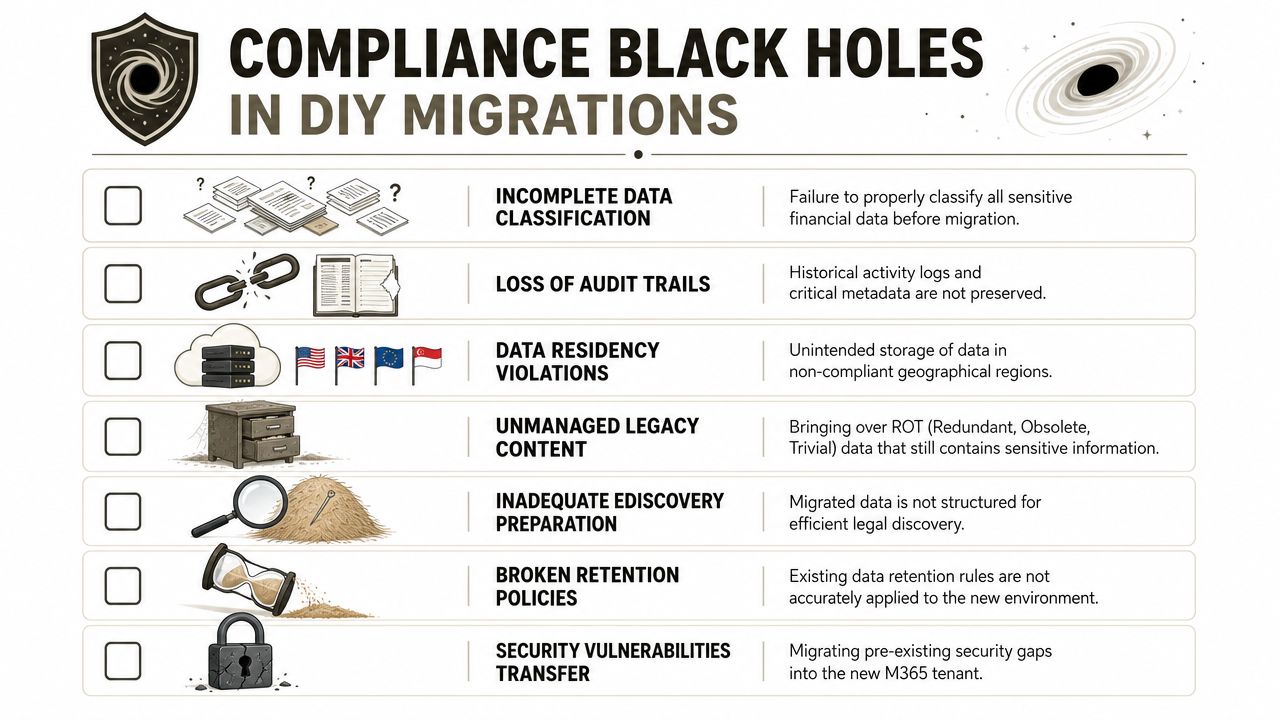
The failures we see most often
Microsoft maps Microsoft 365 capabilities to SEC Rule 17a-4, which requires certain records to be retained for at least six years, with the first two years immediately accessible, and Microsoft also makes clear that the organisation must configure and validate those controls correctly in its financial-services compliance guidance. That's where DIY jobs usually come apart.
We often see the same pattern:
- Metadata loss: “Modified by”, content type alignment, created dates, and related properties don't survive the move cleanly.
- Broken inheritance: A flat permission model gets rebuilt on top of content that originally relied on carefully broken inheritance. Suddenly too many users can see too much, or the wrong people can't access supervised records.
- Partial migration sets: API throttling interrupts long-running jobs. Teams discover days later that libraries look complete but key objects never arrived.
- GUID conflicts and identity mismatch: Holds, links, workflows, and user references don't line up the way your legal team thinks they do.
Official Microsoft Learn documentation confirms technical risks such as throttling, path-length constraints, and large-list behaviour in SharePoint and OneDrive workloads. Those aren't just engineering nuisances. In regulated estates, they become evidence problems.
Why the technical issue becomes a compliance issue
A sceptical IT Director shouldn't separate engineering risk from regulatory risk. They're the same thing during migration.
Take a simple example. Your team migrates a document library carrying retention obligations. The files appear in the target. Good news? Not if the retention mapping broke, the access model changed, and the historical context no longer supports audit review.
The migration “worked.” The compliance posture didn't.
For firms tightening controls around information handling, our overview of data loss prevention in Microsoft 365 is useful. It also highlights why DLP only works when the content estate underneath it remains structured and classifiable.
A few technical failures that matter more than are frequently recognized:
| Technical failure | What your team sees | What the auditor sees |
|---|---|---|
| API throttling | Jobs slowing or stalling | Incomplete preservation |
| Large-list behaviour | Scripts timing out or skipping items | Unreliable records transfer |
| Broken inheritance | Odd access tickets after cutover | Loss of access control evidence |
| Lost metadata | “Close enough” document history | Broken chain-of-custody |
If a record is retained but no longer immediately retrievable in the way your obligation expects, your team hasn't preserved the record properly.
Here's the hard recommendation. Use SPMT for small, low-risk moves. Use ShareGate only when experienced architects have already done the discovery, mapping, exception handling, and validation design. For anything more complex, your team needs custom scripting, forensic validation, and a compliance-led runbook.
The Ollo verdict is blunt. Use SPMT for sub-50GB, low-complexity content only. For regulated SharePoint and tenant restructuring, you need specialist design and custom scripting.
A short explainer on the risks is worth watching before anyone on your side approves a “quick” move:
Tenant Consolidation The High-Stakes Compliance Event
A standard migration can embarrass an IT team. A tenant consolidation can damage careers.
M&A, divestiture, jurisdictional separation, and operating-model redesign collide with records control. You're no longer moving content from A to B. You're trying to reconcile two policy models, two identity histories, two permission philosophies, and two legal realities without losing supervisory evidence.
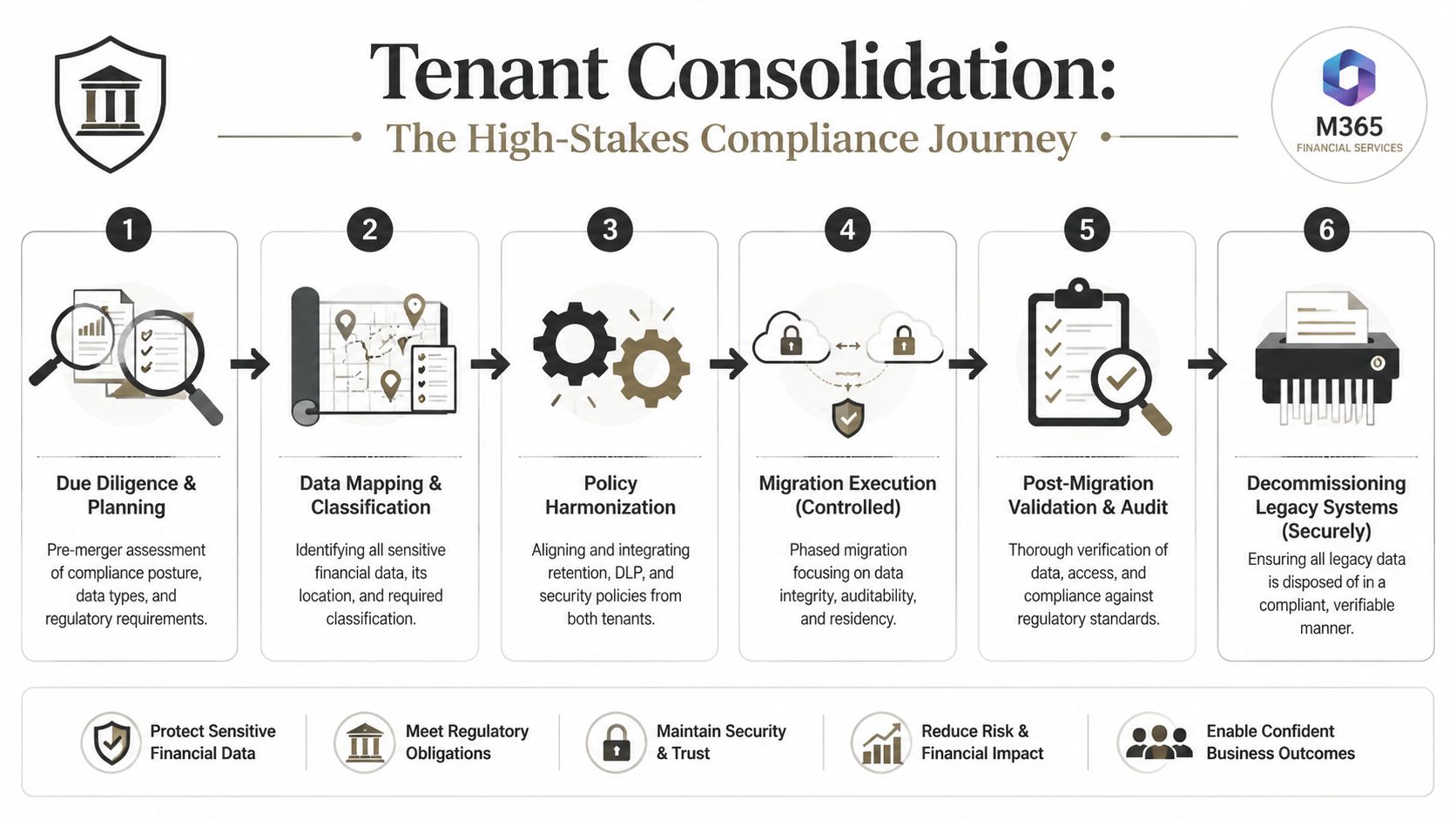
What goes wrong in the real world
Start with the due diligence fantasy. One side says their tenant is “well governed.” The other says their labels are “mostly standardised.” Legal says holds must remain intact. Security says identities will be rebuilt. The programme office says the timeline is fixed.
Then the technical truth shows up.
- The same departments use different retention labels for equivalent records.
- Group-connected permissions don't map neatly into the target operating model.
- Historical access context sits on user objects that won't exist after the move.
- eDiscovery cases rely on content relationships your migration tooling won't preserve cleanly.
We see clients fail when they treat this as an admin exercise. It isn't. It's a controlled evidence transfer problem.
Exit planning is not optional
Microsoft's resilience guidance explicitly frames concentration risk and exit requirements as core obligations in its guidance for financial institutions. Official Microsoft documentation also confirms technical risks such as throttling and large-list behaviour. In Ireland, that matters because firms increasingly have to show they can relocate or restructure data without losing supervisory evidence.
That changes the entire posture of tenant consolidation.
Your team shouldn't ask, “Can we merge these tenants?” Ask:
- Can we preserve legal and supervisory context while identities change?
- Can we prove retention and access controls remained coherent during the move?
- Can we evidence what was migrated, what was excluded, and why?
- Can we decommission the old estate without creating a records dispute later?
If your answer depends on manual spot checks and good intentions, you don't have a consolidation plan.
For organisations facing M&A or regional restructuring, a detailed tenant-to-tenant migration approach matters far more than another generic compliance checklist.
In regulated environments, tenant consolidation is never just integration work. It is an auditable transfer of control.
The practical line your team shouldn't cross alone
Consolidations amplify every weakness from ordinary migrations. Throttling hurts more. Large lists matter more. Permission drift becomes political. Identity remapping breaks more assumptions. The legal hold problem becomes much nastier once the source and target no longer share the same underlying references.
This is also the point where specialist services become operationally sensible. Ollo handles tenant-to-tenant migrations, Entra ID redesign, and rescue scenarios using ShareGate and custom PowerShell PnP scripting rather than basic-native tooling. That's not a branding point. It's a delivery model designed around evidence preservation.
The Ollo verdict is simple. If your consolidation affects regulated data, legal hold, or regional residency boundaries, don't run it like a standard project. Build it like a compliance event, because that's how your regulator will judge it.
Remediation and Adopting a Zero Trust Architecture
After a damaged migration, many teams make the same bad decision. They rerun the job.
That usually makes the evidence problem worse. More duplicate objects. More uncertain timestamps. More permission anomalies. More confusion over which dataset is authoritative.
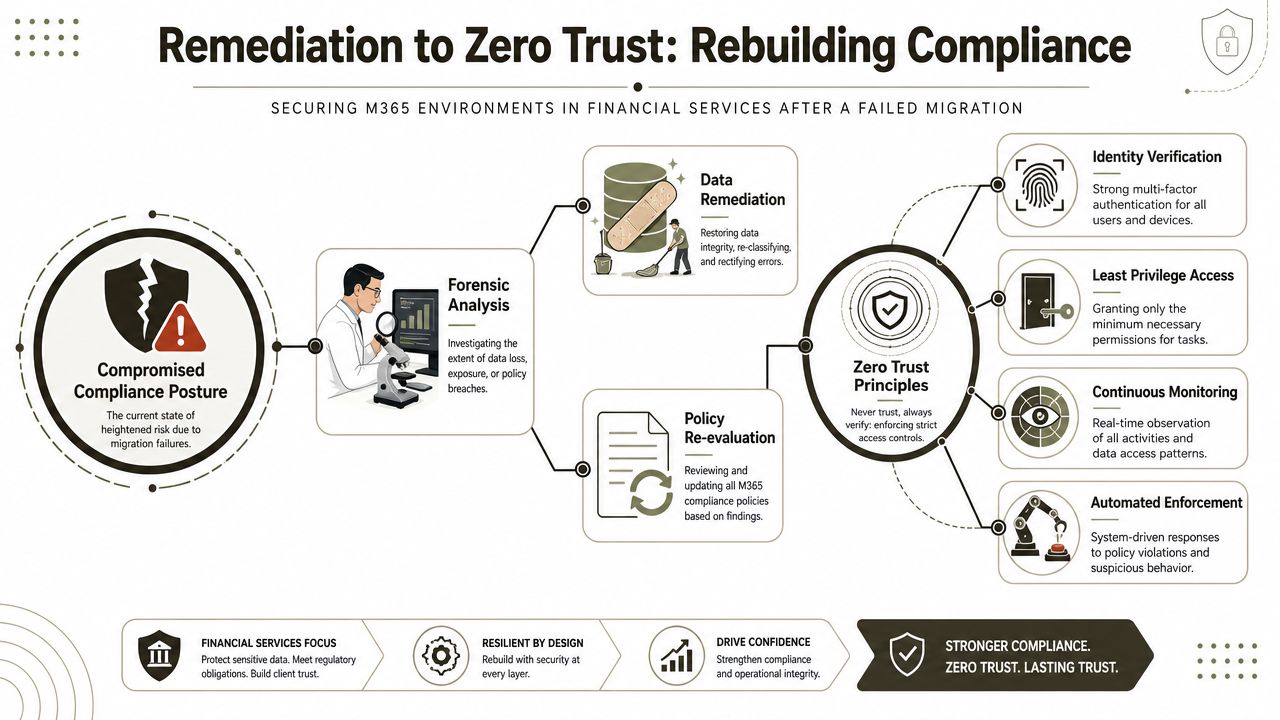
The first step is containment. Stop moving content blindly. Freeze the failure, assess the blast radius, and rebuild control from a position of distrust.
What remediation should actually look like
A proper remediation programme starts with evidence, not optimism.
- Contain the estate: Pause non-essential migration activity and stop admins from improvising fixes in production.
- Run forensic analysis: Identify where metadata drifted, where permissions changed, where policy application failed, and where content is incomplete.
- Rebuild policy intent: Re-map retention, DLP, and classification rules against the actual target structure, not the PowerPoint version of it.
- Validate retrieval and supervision: Make sure records can be found, reviewed, and held in a way compliance and legal teams can defend.
Zero Trust becomes useful. Not as a buzzword, and not as a product bundle. As a remediation discipline.
Zero Trust is the operating model after failure
When a migration has already damaged certainty, your team should assume breach conditions. Verify every identity. Re-check every privilege path. Re-test every access outcome.
That means:
| Remediation area | Zero Trust question |
|---|---|
| Identity | Who actually needs access now, and how are they verified? |
| Permissions | Which access grants exist only because of migration drift? |
| Devices and sessions | Where are sensitive records being accessed from? |
| Monitoring | Can your team detect policy violation quickly enough to contain it? |
For non-security teams trying to operationalise this without drowning in jargon, our guide to Zero Trust in Microsoft 365 implementation gives a practical starting point.
Assume the migrated state is untrustworthy until your team has revalidated identity, access, policy, and evidence.
Use Purview as an assessment engine, not a badge
Microsoft says Purview Compliance Manager includes over 360 regulatory templates and provides a compliance score plus recommended improvement actions in its industry compliance tools documentation. That matters because remediation needs formal assessment workflow, not ad hoc admin notes.
The useful move here is to map your tenant's controls into a documented assessment process with evidence trails. That lets your team show what failed, what was remediated, what remains under review, and which controls are now validated.
A few hard recommendations:
- Don't trust inherited policy state: Re-validate labels, DLP scope, audit settings, and role assignments after remediation.
- Don't rely on screenshots: Build exportable evidence packs and maintain a control ledger your auditors can follow.
- Don't leave privilege broad “for now”: Temporary access has a bad habit of becoming permanent access.
- Don't skip post-fix testing: Retrieval, hold, and auditability matter as much as successful file presence.
The Ollo verdict here is blunt. If a migration has already gone wrong, you are no longer doing delivery. You are doing control reconstruction. That requires architecture, forensic checking, and governance discipline. Anything less just hides the problem until the next audit.
The Verdict When to Abandon DIY and Engage a Specialist
Your team may be excellent. That's not the issue.
The issue is frequency. Internal teams do these projects rarely. Specialists do them repeatedly, under pressure, across ugly estates, with all the exceptions that never appear in the plan. That repetition matters when regulated content is involved.
The decision line is clearer than most firms admit
You should stop treating this as a standard internal project when any of the following are true:
- Active legal hold exists: Your move has evidentiary consequences.
- Retention obligations are in scope: You cannot afford metadata drift or retrieval failure.
- Multiple tenants are involved: Identity, permissions, and policy harmonisation get dangerous quickly.
- SharePoint complexity is high: Broken inheritance, large lists, long paths, and legacy customisation will punish generic tooling.
- The compliance team needs defensible proof: “The files are there” won't satisfy anyone serious.
For straightforward content moves, internal teams can manage with the right supervision. For regulated workloads, the risk profile changes. That's when SharePoint migration services stop being a delivery convenience and start becoming a risk-control measure.
A specialist is cheaper than a failed defence
The cost question gets asked the wrong way. Firms ask what expert migration support costs. They should ask what failure costs.
Failure means your team spending months reconstructing who had access to what. It means arguing over whether a retained record remained immediately accessible. It means legal and compliance teams trying to explain why a supposedly controlled migration produced uncertain evidence. It means project overrun followed by audit exposure.
That's why the DIY threshold in Microsoft 365 financial services compliance is lower than most IT leaders want to admit.
The Ollo verdict is direct. Use native tooling for simple, low-risk work. Use packaged tools with caution when the estate is moderately complex and fully understood. Once regulated records, tenant consolidation, legal hold, or audit defensibility enter the picture, abandon DIY. Bring in a specialist team and run the work as a compliance-preservation programme, not a file move.
If your team is staring at a Microsoft 365 migration, tenant consolidation, or compliance remediation programme and you don't trust the current plan, talk to Ollo. We help regulated organisations assess risk, map control gaps, and execute high-stakes Microsoft 365 changes with the level of evidence discipline these projects require.

















