



Your team probably bought digital transaction management as an e-signature decision. Procurement saw a subscription. Operations saw faster approvals. Legal saw cleaner paperwork. Then the rollout hit Microsoft 365 reality.
Now finance approvals stall because the workflow hammers SharePoint too hard. Legal asks for a defensible audit trail and gets a muddle of version history, broken permissions, and documents saved in the wrong library. Security discovers the signing platform uses access patterns that don't align with Conditional Access. Nobody says it out loud, but the project is already in trouble.
That's the pattern we see in rescue work. The vendor demo showed a tidy signing journey. Your production estate contains legacy file shares, messy metadata, exception-heavy approval chains, and users who still email attachments when the system annoys them.
Your DTM Project Is Already Failing
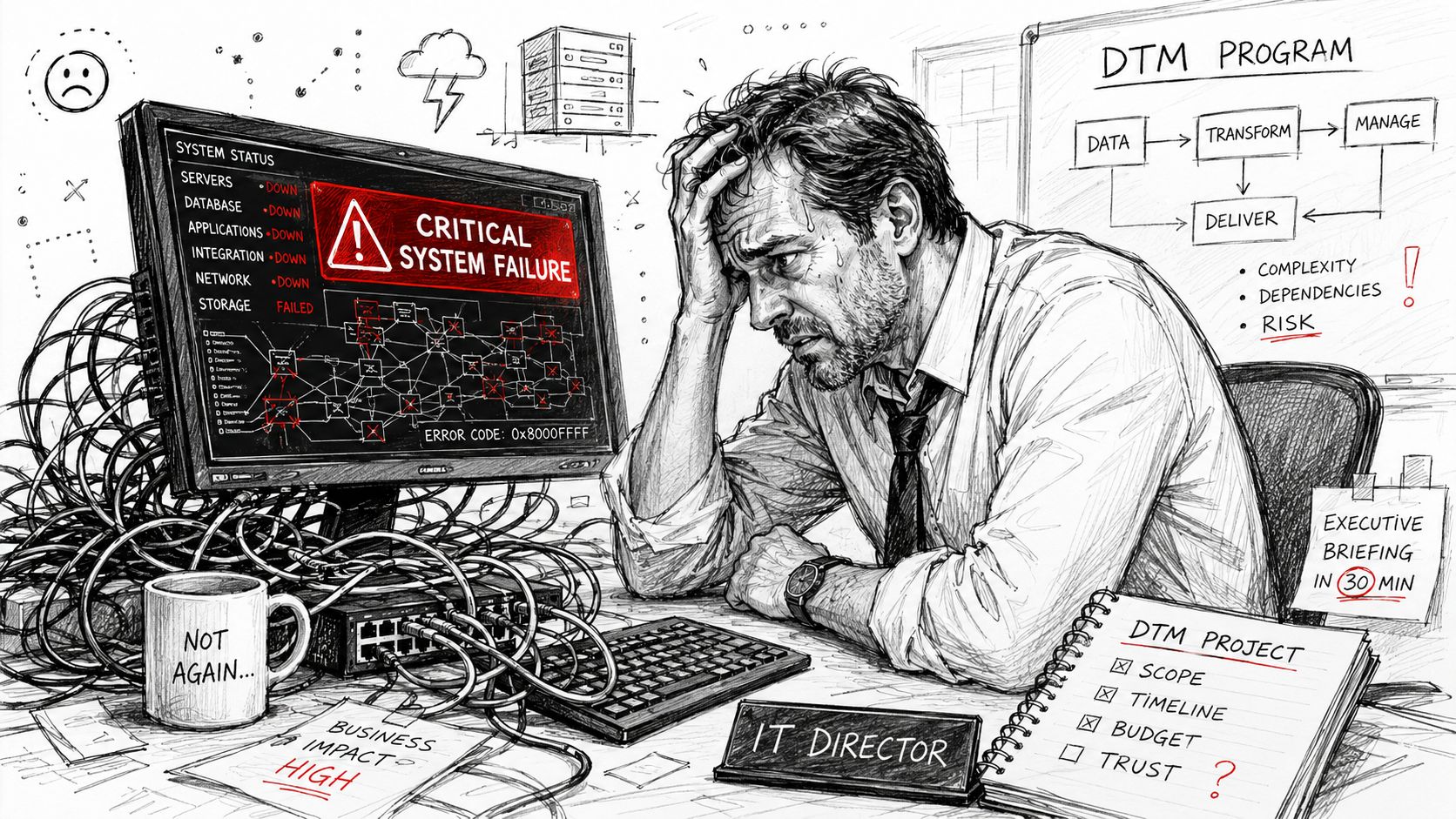
A typical failure begins subtly. Someone launches a “simple” contract approval flow. It writes documents to SharePoint, stamps metadata, routes an approval, then pushes a signed copy into a records library. It works in testing. It even works for the first department.
Then volume climbs. More teams join. Exceptions appear. Permissions need to vary by matter, customer, region, or case type. The neat workflow turns into a brittle chain of connectors, list operations, and document moves. Your staff start chasing failed runs instead of running the business.
What breaks first
The first visible symptom usually isn't the signature step. It's the plumbing around it.
- Approvals backlog: Transactions queue because the workflow design assumes ideal behaviour, not real-world concurrency.
- Audit confusion: Signed outputs exist, but the surrounding evidence trail is incomplete or stored in ways your compliance team can't defend.
- Access drift: Libraries inherit the wrong permissions, or unique permissions multiply until governance becomes guesswork.
- Operational workarounds: Users bypass the platform and send documents by email because the official process is too fragile.
You don't have a signing problem. You have a control problem disguised as a workflow project.
The market data tells you why this matters. Future Market Insights projects the global digital transaction management market will rise from USD 7.1 billion in 2025 to USD 100.5 billion by 2035, which signals that paper-based processes have become a serious operational liability and that getting the replacement wrong is a board-level risk, according to Future Market Insights on the digital transaction management market.
Why the stakes changed
Digital transaction management used to sit in the admin layer. Not anymore. It now touches revenue, legal evidence, records retention, identity, and regulated workflows. When it fails, it doesn't just annoy users. It interrupts business operations and exposes control failures you can't explain away in a steering committee.
If your plan still treats DTM like a lightweight productivity purchase, you're already behind. The software is only one piece. The risk sits in architecture, governance, and how your Microsoft 365 estate behaves under pressure.
DTM Is Not an E-Signature Subscription
If your team defines digital transaction management as “sending documents out for signature,” you've already made the first strategic mistake. E-signature is one component. It is not the system.
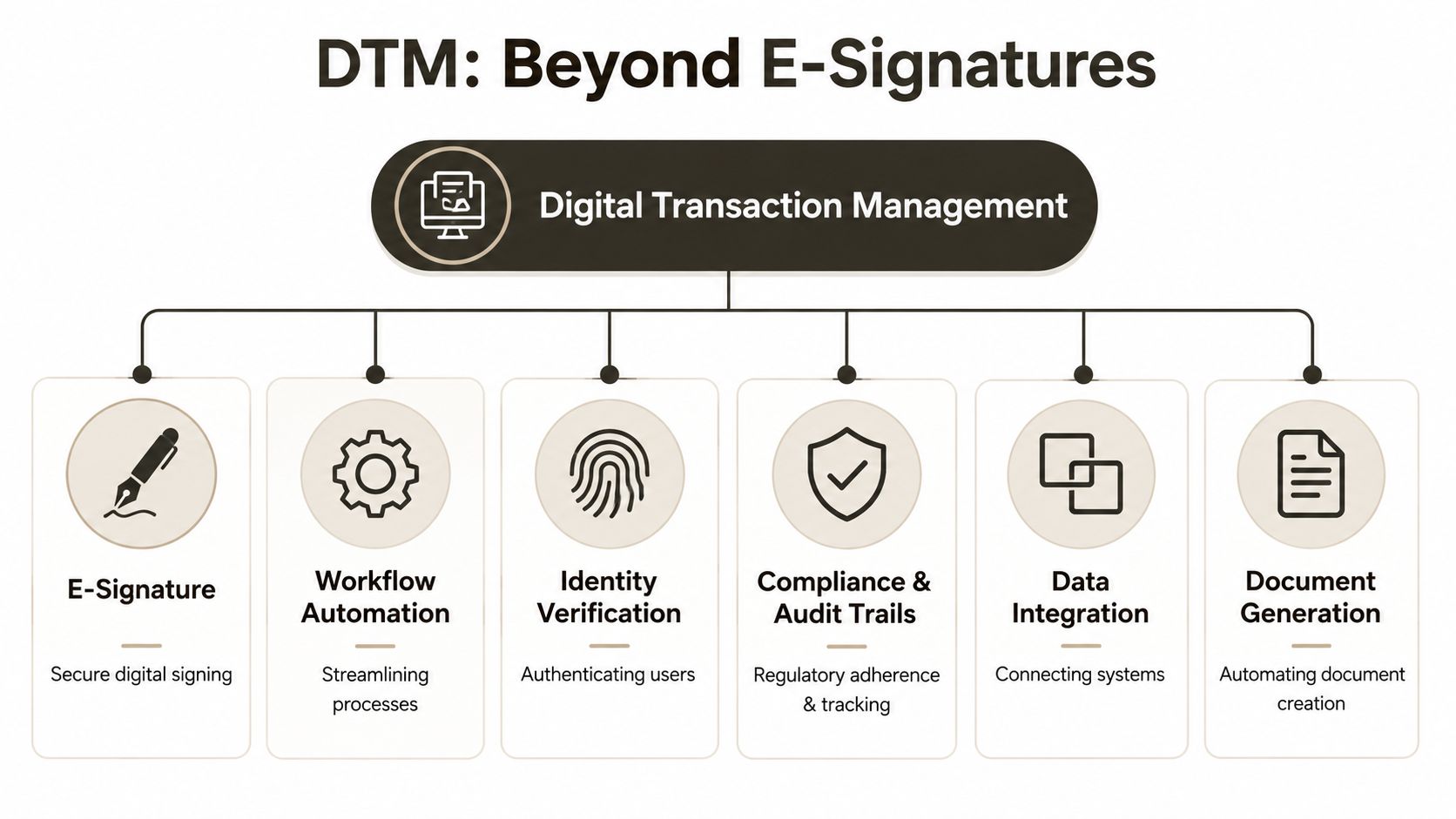
A real DTM estate in Microsoft 365 has to handle document generation, routing, approvals, identity, storage, auditability, and retention. Treat those as separate boxes and your controls will fracture. Treat them as one system and you might keep legal, security, and operations aligned.
The parts vendors undersell
Here's what matters.
- E-signature: Necessary, but not special. A signature event without context is weak evidence.
- Workflow orchestration: This decides who approves what, in which order, and what happens when a transaction fails halfway through.
- Audit trail: You need immutable, reviewable evidence of actions, timestamps, identities, and document state.
- Governed storage: Signed documents must land in the right location, with the right metadata, retention, and permissions.
- Identity and access control: If the system sits outside your access model, it becomes a side door into sensitive transactions.
Why these components can't be separated
A signed contract stored in the wrong place is an operational mess. A perfect workflow with poor identity control is a security incident waiting to happen. A good signature record with weak metadata is useless when legal needs retrieval by policy, customer, matter, or jurisdiction.
That's why teams often need upstream work before they touch rollout. They need document templates, clean metadata strategy, decision trees for exceptions, and proper approval design. If you're still drafting transaction documents manually, tools such as LegesGPT's free AI tool can help standardise document generation, but that only solves one slice of the problem.
Practical rule: If your DTM architecture doesn't define where documents live, who can access them, how exceptions are handled, and what evidence is retained, you haven't designed DTM. You've bought a button.
Workflow matters here too. Too many organisations bolt signatures onto a poor approval design and call it transformation. If your team still relies on ad hoc flows, review this guide to Power Automate approval workflow design before you pretend the signature platform will fix process debt by itself.
The Compliance Minefield for Regulated Industries
In regulated sectors, DTM failure doesn't stay technical for long. It becomes a compliance issue the minute the wrong person sees the wrong document, the wrong version gets retained, or the audit record stops making sense.

The public material around digital transaction management loves to talk about reduced errors and faster approvals. Fine. That language is harmless in a low-risk sales process. It becomes dangerous in finance, healthcare, and energy because the actual failure mode sits in governance.
How technical faults become legal problems
Take a common Microsoft 365 pattern. A workflow writes records into SharePoint, then applies item-level permissions because one part of the process requires restricted visibility. That sounds tidy. In practice, teams often break inheritance in uncontrolled ways, leave stale permissions behind, or expose data through a library structure that no longer matches the process.
That isn't a nuisance. It can become an unauthorised disclosure.
The point is sharper in Ireland and wider regulated environments because governance mistakes already carry a visible operational burden. Ireland's Data Protection Commission reported 1,570 valid personal data breach notifications in 2024, as noted in DocuSign's overview of digital transaction management. If your DTM design leaks access through bad permissions or poor records handling, you're not dealing with a workflow glitch. You're dealing with breach exposure.
Sector-specific pain
Different industries feel the same failure in different ways.
- Finance: Missing or disputed evidence around approvals, disclosures, or version history undermines defensibility.
- Healthcare: Failed hand-offs and incomplete records can leave critical documents in ambiguous states with no clean rollback.
- Energy and utilities: Cross-team workflows often span contractors, internal staff, and restricted records. Weak access design creates immediate governance risk.
For teams under continuous scrutiny, achieving continuous compliance for 2026 matters more than point-in-time box ticking. That's especially true when your transaction systems connect identity, content, and approvals across multiple platforms.
Compliance doesn't fail in the policy PDF. It fails in the permission model, the retention gap, and the workflow exception nobody documented.
If you're operating in a regulated estate, the right starting point is governance design, not vendor configuration. In this context, many firms should align DTM planning with broader Microsoft 365 compliance controls for financial services before they let another automated approval touch production data.
What compliance teams should demand
Ask your project team for these artefacts before rollout:
- A defensible access model that maps every transaction stage to real user roles.
- A records map showing where drafts, signed copies, evidence logs, and exception outputs are retained.
- A failure policy for partial completions, rejected signatures, and rollback conditions.
- An audit review method that proves the transaction trail remains intact after migration, automation, and retention actions.
If they can't produce those, they haven't built a compliant DTM platform. They've automated document movement and hoped nobody audits it closely.
Integrating with Microsoft 365 and Entra ID
Your Microsoft 365 estate is not a blank canvas. It already contains permission models, content sprawl, retention rules, sensitivity concerns, and half-finished automation. Any DTM platform that lands on top of that estate without deep integration will amplify disorder.
The first hard truth is simple. Microsoft 365 won't forgive lazy design just because the front end looks polished. Microsoft Learn documentation explicitly confirms SharePoint's file path restrictions, list threshold behaviours, and API throttling limits, and teams fail when they treat DTM as a simple signature tool instead of an identity-and-content redesign problem, as discussed in this explanation of Microsoft Entra ID and modern identity control.
SharePoint is not a dumping ground
A lot of DTM projects collapse because the implementation team treats SharePoint like passive storage. It isn't. It's an active content platform with rules, thresholds, and governance implications.
Your DTM documents need the right:
- Content types, so the platform knows what the document is.
- Metadata, so users and policies can find, classify, and retain it.
- Library architecture, so transaction volume doesn't create unmanageable structures.
- Retention alignment, so records survive long enough and disappear when policy demands it.
Ignore that, and your “signed document repository” turns into a digital attic. Search gets noisy. Retention becomes inconsistent. Legal retrieval becomes a scavenger hunt.
Identity is the real control plane
The second hard truth is even less comfortable. If your DTM tool has its own loose access model, you've built a shadow security system around your most sensitive business processes.
That's unacceptable in enterprise Microsoft 365. Your transaction process should align with Entra ID, not sit awkwardly beside it. If users can access approval steps, signed outputs, or transaction dashboards outside your Conditional Access logic, your security boundary is broken before the project goes live.
A DTM platform that doesn't respect your Entra ID control model is not an integration. It's an exception factory.
A proper design asks difficult questions early.
- Which transaction roles map to Entra groups or governed role assignments?
- What happens when an external signer participates in a process tied to internal records?
- Can the platform enforce access decisions that match device posture, location, and sign-in risk?
- How are service accounts, connectors, and workflow identities controlled and reviewed?
What good integration actually looks like
Good integration is boring in the best way. Documents arrive in the right libraries. Metadata lands cleanly. Access follows policy. Approval actions map to identifiable users. Records remain reviewable after the process completes.
Bad integration looks impressive in the demo and ugly in production. Users can sign, but records teams can't classify the output. Security can't explain who had access at each stage. Operations keep building exceptions because the original model never matched the estate.
Your design should assume friction, because real enterprises contain friction. That means modelling edge cases before go-live. Reassignments. Rejections. Delegated approvals. Department moves. Cross-border access. Records holds. External participants. If your implementation partner calls those edge cases, they're telling you they haven't done enough of these.
Why Your Migration Tools Will Fail You
This is the part many organizations don't want to hear. The tool that moved files in your last project will not safely deliver enterprise digital transaction management.
The documentation claims DTM functions smoothly. Reality is uglier. Unoptimised workflows trigger API throttling and hit the 5,000-item list view threshold confirmed in Microsoft Learn. That causes broken inheritance chains, GUID conflicts, and compliance failures. Basic tools like SPMT cannot handle this. Specialist methods and custom scripting are required, as reflected in Grand View Research coverage of the digital transaction management market.
SPMT is not your enterprise answer
SPMT has a place. It can move straightforward content into Microsoft 365 when the structure is simple and the governance expectations are low. That's useful. It is not a serious answer for complex DTM estates.
SPMT won't design your target information architecture. It won't resolve broken permission logic. It won't save you from poor metadata planning. It won't rescue workflows that depend on item structures that collapse under threshold pressure.
Use it for basic file relocation. Don't use it to support business-critical transaction controls.
ShareGate is stronger, but not magic
ShareGate is a better instrument. It gives experienced teams more control, better visibility, and more options for structured migrations. But people still misuse it by assuming a stronger tool eliminates architectural limits.
It doesn't.
At enterprise scale, you still have to account for:
- API throttling: Microsoft will protect the service whether your timeline likes it or not.
- 5,000-item threshold behaviour: Poor list and library design still breaks user experience and automation patterns.
- Broken inheritance: Unique permissions can multiply into chaos if nobody governs them.
- GUID conflicts: Badly planned moves and rebuilds can create integrity problems across linked processes.
- Path and naming restrictions: Legacy structures often fail when pushed into governed SharePoint patterns.
The risk profile in plain English
| Approach | Handles API Throttling | Respects 5k Item Limit | Preserves Permissions | Ollo Verdict |
|---|---|---|---|---|
| Manual upload and ad hoc scripting | No | Rarely | Unreliable | Fine for testing. Reckless for production. |
| SPMT-only migration | Limited | No design safeguard | Basic at best | Use SPMT for small, simple moves. Not for enterprise DTM. |
| ShareGate without architectural redesign | Partial | Only if the team designs for it | Better, but fragile at scale | Useful tool, insufficient strategy. |
| Custom migration runbook with governed tooling | Yes, if engineered properly | Yes, if the target structure is redesigned | Yes, with validation | The only safe path for complex environments. |
Ollo Verdict: Use SPMT for less than 50GB. For anything larger, more regulated, or more complex, you need architectural redesign and custom scripting. Basic migration tooling is not enough.
Before you trust any product comparison page, read a more grounded view of SharePoint migration software and where the tools actually break.
What teams get wrong
Most failed projects don't fail because the software was bad. They fail because the team treated migration as transport instead of redesign.
Your source estate probably contains all of this at once:
- Legacy folders pretending to be records models
- Inconsistent metadata
- Unique permissions no one can fully explain
- Workflow assumptions tied to old systems
- User behaviour that bypasses policy under pressure
If you pour that mess directly into Microsoft 365 and then bolt DTM on top, the platform will expose every weakness. That's why rescue work is so unpleasant. You're not just moving data. You're unpicking years of unmanaged decisions while the business still needs transactions to keep flowing.
A DTM Project De-Risking Checklist
Most checklists in this space are comfort blankets. They ask whether you picked a vendor, configured templates, and trained users. That isn't enough. You need questions that make your project team uncomfortable.
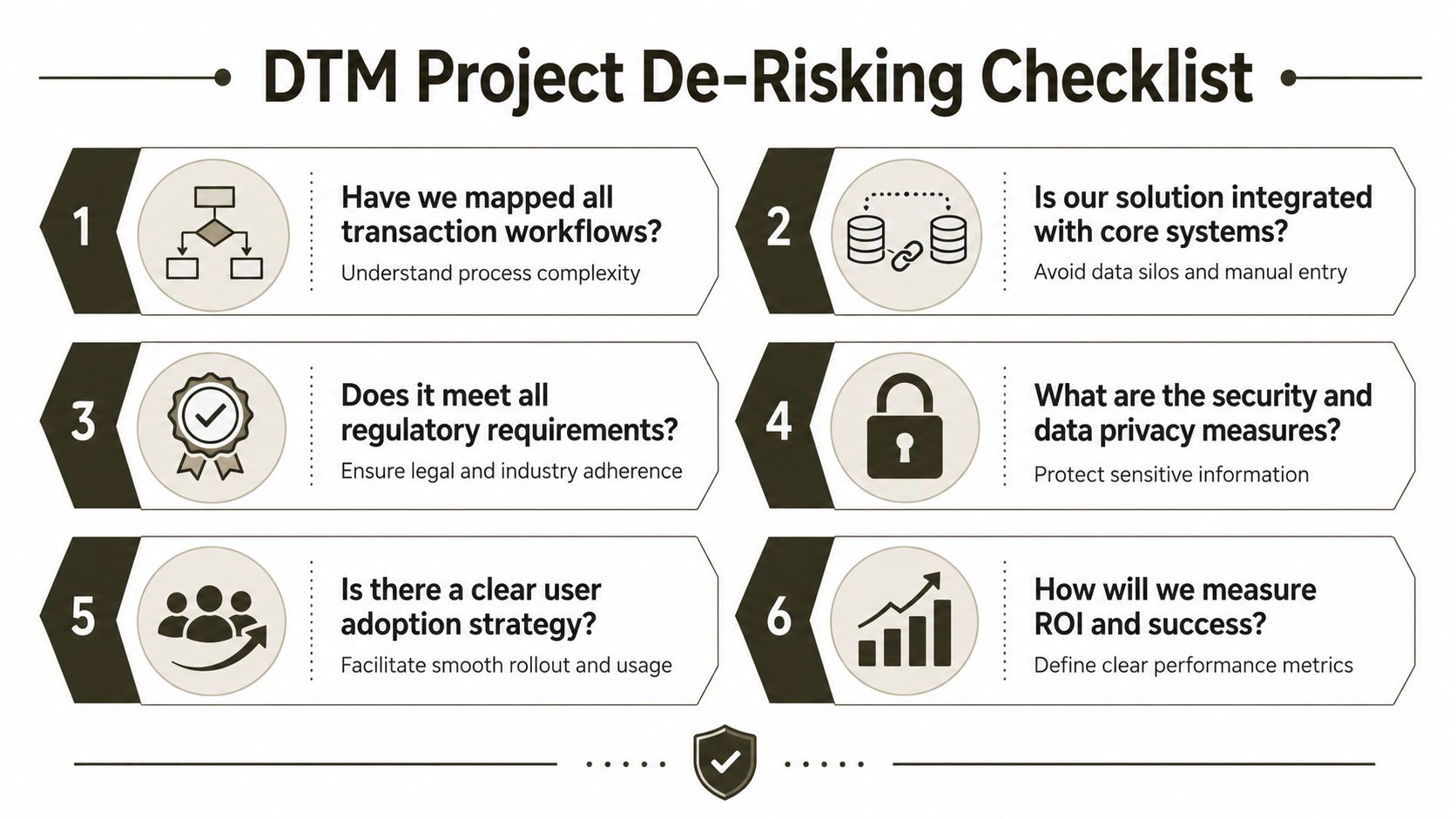
If your team can't answer the questions below with evidence, your DTM project carries hidden failure modes.
The questions that expose weak planning
Have you mapped every transaction path, not just the happy path?
Rejections, reassignments, delegated approvals, signer drop-off, expired links, and interrupted workflows all need defined behaviour.Have you stress-tested your target content model?
If your design depends on busy lists, overloaded libraries, or repeated item-level actions, you need to know where SharePoint behaviour becomes unstable.Can your access model be fully governed through Entra ID and Microsoft 365 controls?
If the answer is “mostly”, you have a security problem.Do you know where every signed artefact and supporting audit record will live?
Not just the finished PDF. The evidence around it matters too.
The questions operations and compliance should ask
What is your rollback procedure when a workflow fails at step three of six?
“We'll rerun it” is not a procedure.How do you validate permissions after migration and after go-live changes?
Broken inheritance doesn't announce itself. It quietly creates overexposure.What is your exception handling policy for external participants, unmanaged devices, and urgent approvals?
Users will hit edge cases in week one.How will you test the design under realistic business pressure?
Unit tests and tidy demos won't uncover production failure. Use a structured testing approach for complex Microsoft 365 projects before you trust a regulated workflow in live service.
The safest DTM projects spend more time on failure design than on vendor configuration.
What a credible answer looks like
A credible programme produces artefacts, not opinions. You should expect:
- A workflow map with normal, exception, and rollback paths
- A content architecture decision for libraries, metadata, retention, and searchability
- A permission governance model that security can review and enforce
- A test pack that includes load, failure, and recovery scenarios
- A cutover and support plan for the first weeks after launch
If your project only has a rollout deck and a training plan, it isn't ready. It's just scheduled.
Conclusion The Only Safe Engagement Model
Enterprise digital transaction management fails in predictable ways. Not because digital signatures are hard. Because identity, governance, records, permissions, and Microsoft 365 limits are unforgiving when people pretend the problem is smaller than it is.
That's why the DIY story keeps collapsing. Internal teams buy a licence, wire up a workflow, migrate a pile of documents, and assume production will behave like a demo tenant. Then throttling bites. Permissions drift. Audit trails weaken. Compliance teams start asking questions the implementation never prepared to answer.
The market itself points to the lesson. Independent research shows DTM services are the fastest-growing segment, expanding at a 27.62% CAGR, which reflects a blunt reality: implementation complexity, policy design, Entra ID control, and change management decide whether the project succeeds, according to Mordor Intelligence research on the DTM market.
The only sensible conclusion
If your DTM programme touches regulated data, legal evidence, or business-critical approvals, this is not a tool rollout. It's a control redesign inside Microsoft 365.
That changes the engagement model.
You need architects who understand SharePoint thresholds, API throttling, broken inheritance, path restrictions, records governance, and zero-trust identity design. You need a team that assumes your source estate is messy and plans around that fact. You need validation, rollback logic, and migration methods that survive enterprise scale.
Buying software reduces paperwork. Designing the operating model reduces risk.
That is the dividing line. One path gives you a subscription and a fragile process. The other gives you a governed transaction system your security, legal, and operations teams can live with.
If you've already been burned once, you know which one matters.
If your organisation is planning digital transaction management inside Microsoft 365, or trying to rescue a rollout that's already drifting into compliance and governance trouble, speak to Ollo. We handle the ugly part most providers avoid: tenant complexity, zero-trust redesign, regulated migrations, and the technical failure points that break DTM in practice.

















