



A global SharePoint migration is not an IT project. It's a high-stakes business transformation where one wrong move blows up your budget, your compliance posture, and your career. If your strategy is banking on standard Microsoft playbooks and the free migration tool, you're not just unprepared; you are actively planning for failure. This is especially true for regulated industries where data integrity and legal compliance are non-negotiable.
The official documentation describes a neat, orderly process. The reality of these projects—what we see in the trenches every week—is a war against a minefield of technical tripwires that can derail your entire effort before you've even moved a single terabyte.
Why Your SharePoint Migration Plan Is Already Failing
Let's be blunt. As a senior architect who has rescued countless failed migrations, I can tell you that most global SharePoint migration strategies are built on a foundation of dangerous assumptions.
Your team reads the Microsoft documentation, looks at the free SharePoint Migration Tool (SPMT), and sketches out a plan that seems logical. That plan is already broken.
The documentation tells a story of an orderly process. The reality, which we see in the trenches every week, is a war against years of accumulated technical debt and unforeseen complexity. Your biggest threats aren't the terabytes of data; they are the invisible tripwires that standard playbooks were never designed to handle at enterprise scale.
The Unspoken Technical Realities
We often see clients fail when they underestimate the deep technical challenges lurking beneath the surface-level file count. Your project's success or failure will hinge on how you handle these specific, unavoidable issues:
Crippling API Throttling: The documentation says to "plan for throttling." For a global business, there are no "off-peak" hours. Microsoft's APIs will slow your migration to a crawl to protect the service, turning your neatly planned timeline into a chaotic, multi-month slog.
The 5,000-Item List View Threshold: This isn't a friendly suggestion; it's a hard limit. We’ve seen entire departmental migrations grind to a halt because a single, oversized list wasn't identified and remediated before the migration started. It doesn't just fail a library; it breaks business processes that depend on it.
GUID Conflicts in Tenant Mergers: When merging tenants, it’s a guarantee you'll have duplicate Globally Unique Identifiers. Standard tools simply don't resolve this. This conflict doesn't just throw an error; it can corrupt entire data structures, rendering critical information inaccessible post-migration.
Broken Permission Inheritance: Lifting and shifting years of complex, nested, and often broken permissions is a recipe for a security incident. Tools like SPMT lack the sophistication to map these correctly, leaving sensitive data either exposed or locking out essential personnel. Missing this step doesn't just fail the migration; it breaks legal compliance.
It’s easy to be lulled into a false sense of security by simplified vendor promises. The disconnect between those promises and the on-the-ground reality is where projects go off the rails.
Vendor Promises vs Migration Realities
The gap between these two columns is where budgets are destroyed and careers are put at risk.
A superficial audit is the first step toward catastrophe. Failing to script a deep analysis of your source environment for issues like long path limits and broken inheritance doesn't save time; it guarantees you'll discover them during a live cutover weekend.
Understanding these risks is the first step. The next is accepting that a successful outcome requires a level of forensic analysis that goes far beyond a simple inventory.
To learn more about this crucial first step, you can review our detailed guide to conducting a proper SharePoint migration assessment. This isn't about ticking boxes; it's about building a plan based on the harsh realities of your specific environment, not on generic best practices that will inevitably fail you.
Architecting for Success, Not Just Survival
A global SharePoint migration is won or lost long before the first file ever gets copied. The discovery and architecture phase is precisely where most in-house attempts plant the seeds of their own spectacular failure. They treat it like a simple inventory—counting sites and terabytes—which tells them absolutely nothing about the real risks buried deep in their legacy environment.
Our approach is different. Think of it less like an inventory and more like a forensic investigation, designed to unearth every single potential point of failure. This isn't about counting things; it's about exposing the technical debt that will inevitably bring your migration to a grinding halt.
Beyond the Site Count: A Forensic Audit
We see it all the time: a project fails because the initial audit was tragically superficial. Your team has to go deeper, scripting a deep-dive analysis of your source environment to find the gremlins that standard migration tools will simply choke on. It’s all about identifying the landmines before you step on them.
Legacy Customisations: Every SharePoint Designer workflow, every InfoPath form, and every full-trust solution is a ticking time bomb. These are long deprecated and will not migrate. Each one must be inventoried with a documented plan for remediation—usually rebuilding it in the Power Platform.
Hidden Dependencies: Your audit has to map out the tangled web of complex lookups between lists, custom web parts with hardcoded dependencies, and other messy entanglements. Missing one of these doesn't just break a feature; it can corrupt data integrity across entire site collections.
Data Sovereignty Mapping: For any global migration, you must map your data's country of origin against regulations like GDPR. This isn't an IT task; it's a non-negotiable legal compliance requirement. Getting this wrong doesn't just risk the project; it risks millions in fines.
This process chart shows the all-too-common path from a standard, superficial plan, through the technical tripwires a proper forensic audit would have uncovered, straight to project failure.
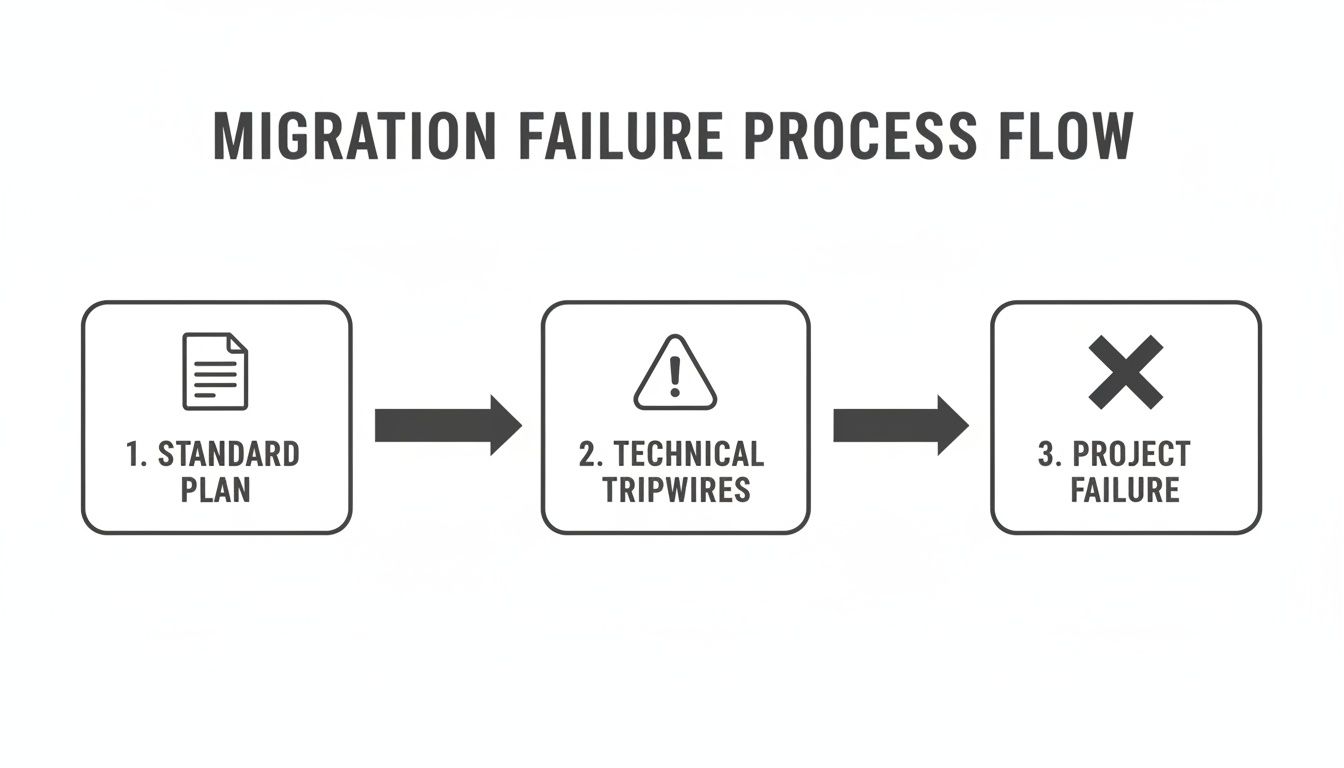
As you can see, without identifying those technical tripwires early on, a standard migration plan is a direct route to failure. This is why a superficial inventory is so dangerous—it gives you a false sense of confidence to proceed directly toward a disaster.
Designing a Defensible Target Architecture
Once you know exactly what you're up against, you can finally design a target architecture that doesn't just replicate old problems in a new tenant. This is another critical fork in the road where strategic decisions have massive long-term consequences.
The first big decision is often whether to consolidate multiple regional tenants into one global tenant or maintain separate, federated ones. The documentation makes this sound like a simple choice, but the reality is a complex trade-off between user experience, collaboration needs, and legal compliance.
A lift-and-shift of your old architecture is not a modernisation strategy. It’s just moving the mess. Your new environment must be designed around a modern, flat structure with hub sites, not the convoluted nested sub-sites of the past.
For many organisations we work with, properly understanding the nuances of a large scale SharePoint migration is the key to making this architectural decision correctly. It demands a careful balance between the need for global collaboration and the non-negotiable demands of data residency.
Architecting Identity as the Foundation
Finally, and most critically, we architect the identity foundation in Microsoft Entra ID. We see so many teams treat this as a post-migration task, which is a catastrophic error. Your security posture must be designed in from day one.
This means embedding Zero Trust principles as the core of your modern workspace before a single user ever accesses the new environment.
- Conditional Access Policies: These are non-negotiable. From the very beginning, we build policies that enforce multi-factor authentication, require compliant devices, and restrict access from untrusted locations.
- Identity Governance: We clean up and map your legacy Active Directory groups to modern Microsoft 365 Groups, eliminating the convoluted, overlapping permissions that created security gaps in your old system.
Failing to architect identity and security upfront doesn't just create technical debt. It leaves your brand-new, expensive environment vulnerable from the moment it goes live. This project isn't just about moving data; it's about building a secure, compliant, and functional workspace that will actually last. Anything less is just postponing the next crisis.
Choosing Your Migration Tools and Tactics
Let's talk about your arsenal. The choice of migration tool isn't a minor technical detail; it's the single biggest factor that will determine if your global SharePoint project is a success or a career-defining failure.
I’ve seen too many internal teams treat this decision lightly, assuming all tools are more or less the same. They are not. The gap between free, out-of-the-box tools and professional-grade solutions is enormous, especially once enterprise complexity gets involved.
The SharePoint Migration Tool: A Trap for the Unwary
Microsoft’s free SharePoint Migration Tool (SPMT) has its place. If you're moving a handful of small, clean file shares from a single server, it’s fine. But relying on it for an enterprise-scale global migration? Honestly, it's professional malpractice.
The documentation makes it sound capable, but in the real world, it has very specific and predictable breaking points that will grind your project to a halt.
- No Sophisticated Throttling Management: The documentation claims SPMT "handles" throttling. In reality, it has no intelligent way to navigate Microsoft’s aggressive API throttling. When it gets throttled—and it absolutely will be—it just fails or slows to a crawl, completely wrecking your migration timeline.
- Weak Permission Fidelity: It really struggles to map complex, custom permission levels or broken inheritance chains from older systems. Too often, it just gives up and defaults to simplified permissions that either expose sensitive data to the wrong people or lock out users who need access.
- Minimal Error Reporting: When a job fails, the logs are often cryptic. Your team will be left guessing why a critical dataset didn't move, wasting hundreds of hours troubleshooting an issue that a professional tool would have pinpointed in seconds.
The Ollo Verdict: SPMT is fine for small-scale moves, maybe under 50GB with simple permissions. For anything more complex, you need a professional tool paired with custom scripting. Using SPMT for a large-scale job is an unacceptable risk to your data's integrity and your project's budget.
We often see IT Directors in Dublin's financial hubs or Belfast's energy firms get blindsided by API throttling. The official Microsoft Learn documentation confirms these limits, yet teams trying a DIY migration with SPMT are shocked when submitting more than 5,000 jobs queues up the network, slamming databases and dragging throughput down to nothing. Our own telemetry shows that source-side bottlenecks from disk I/O and antivirus interference can easily double migration times, turning a 4-week project into 12 weeks of misery. A great breakdown from our partners at NGS Solution highlights more of these real-world migration challenges.
Professional Tooling: The Non-Negotiable Baseline
This brings us to professional-grade tools like ShareGate. Your team might see the price tag and hesitate, but you have to frame this as an investment in risk reduction, not a cost. These tools are engineered from the ground up to handle the enterprise pain points that SPMT simply ignores.
The dashboard below from ShareGate gives you an idea of the control and visibility you get with proper tooling.
This level of insight isn't a "nice-to-have"; it's your command centre for a complex operation. It lets you track progress, pinpoint errors, and manage permissions at scale.
But even a powerful tool like ShareGate isn't a magic wand. We often see clients buy a top-tier tool but fail to pair it with the necessary scripting expertise. The reality is that no off-the-shelf product can untangle every piece of technical debt your audit uncovered.
This is where custom PnP PowerShell scripting becomes essential. It’s the connective tissue that handles what the GUI tools can't:
- Remediating Broken Inheritance: Scripting allows you to surgically repair broken permission chains after the migration is complete.
- Managing Complex Metadata Transformation: Scripts are invaluable for handling intricate metadata mapping during tenant consolidations where tools might stumble.
- Automating Validation: Custom scripts are crucial for performing granular, post-migration checks to confirm data fidelity at scale, giving you confidence that everything arrived intact.
For a deeper dive into the specific limitations of the free tool, we've broken them down in our comprehensive analysis of the SharePoint Migration Tool. The takeaway is clear: enterprise problems demand enterprise-grade solutions. Relying on one without the other leaves a dangerous gap in your execution strategy.
Executing the Migration Cutover and Rollback Plan
Hope is not a strategy, especially not at 2 AM on a Sunday during a global SharePoint migration cutover. This is the moment where months of planning meet reality. Too often, we see projects stumble right at the finish line because their pilot tests were superficial and their cutover plans were based on best-case scenarios, not battle-hardened procedures.
You simply can’t treat this phase like another item on a checklist. It’s a minute-by-minute, meticulously choreographed event where a single misstep can lead to data loss or a full-blown rollback. Anything less than military precision is asking for trouble.
Structuring a Pilot That Matters
A pilot migration isn’t about proving your tools can copy files. It’s about stress-testing your process against the ugliest parts of your source environment. A successful pilot gives you hard data, not just a warm feeling of confidence.
We insist that clients select a representative dataset that includes their worst-case scenarios. Don’t pick the easy stuff. Go find the problems.
- The Oversized Legal Archive: Find the site collection with ridiculously long file paths (>400 characters) that you know will fail with basic tooling. This is how you test your remediation scripts and exception handling.
- The Finance Department's Nightmare List: Identify a critical list that blew past the 5,000-item list view threshold years ago. Migrating this successfully validates your approach to handling large lists without causing data corruption.
- The Site with Broken Inheritance: Select a site where permissions are a complete mess of unique assignments and broken inheritance. This is your acid test for permission fidelity and post-migration security validation.
Running a pilot with clean, simple data is a useless exercise. It teaches you nothing and builds a dangerously false sense of security for the main event.
The Minute-by-Minute Cutover Plan
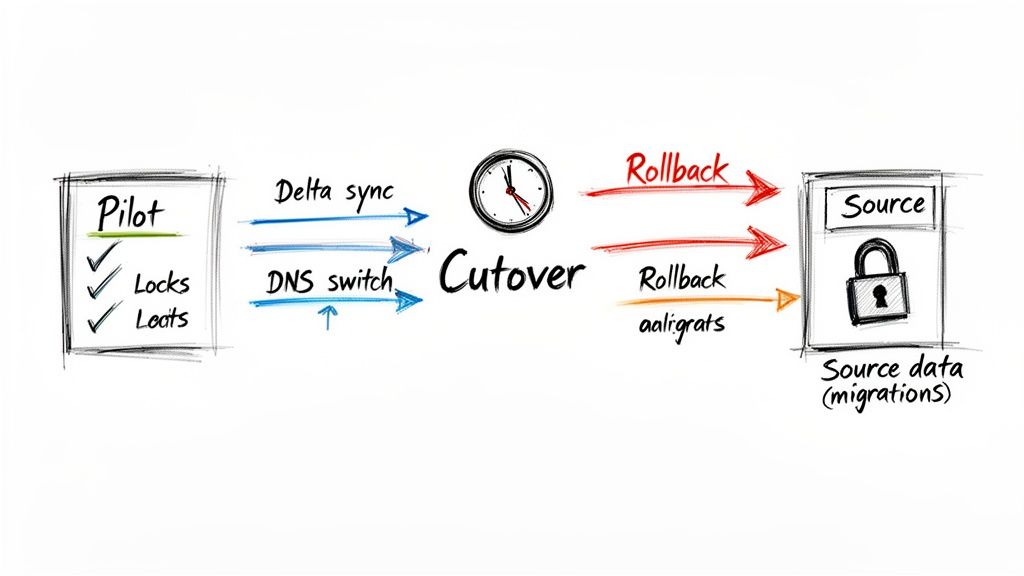
Your cutover plan must be a script, not a summary. It needs to detail every single action, every command, and every point of contact, timed down to the minute. The official documentation might say to "minimise downtime," but it won't give you the tactical guidance you need in the trenches.
Here’s what your plan absolutely has to account for:
- Source Lockdown: The very first step is making the source environment read-only. This prevents users from creating new content that will be missed by the final sync. Skipping this guarantees data loss.
- Final Delta Sync: Kick off the final incremental sync. This job should be small and fast because you've already moved 99% of the data in previous waves. This is a crucial step in keeping the outage window as short as possible.
- DNS and Network Changes: Execute the planned DNS updates to redirect users to the new SharePoint Online environment. This is often the point of no return.
- Initial Validation: Run your automated PowerShell scripts to perform a high-level validation. Check site collection counts, confirm critical permissions, and verify hub site associations.
This is not the time for improvisation. Every member of your team needs to know their exact role and the precise sequence of events. For organisations merging systems, understanding the nuances of a tenant-to-tenant migration is essential for building a realistic cutover plan.
We see projects collapse during the cutover because the team failed to rehearse. Your plan must be pressure-tested with the same team that will execute it live. A tabletop exercise is the bare minimum; a full dress rehearsal is better.
Designing a Practical Rollback Plan
The most critical document you will produce is the one you hope to never use: the rollback plan. What happens if validation fails catastrophically, or a core service in the target environment doesn't come online? Your team can't be debating options at 3 AM.
A viable rollback plan isn't a vague instruction to "revert changes." It's a documented, rehearsed procedure.
It must clearly define:
- Go/No-Go Criteria: What specific, measurable failures trigger the rollback? A certain percentage of failed files? A critical business application failing validation?
- The Point of No Return: At what stage of the cutover is a rollback no longer feasible without significant data loss? This is often after you’ve unlocked the source environment.
- Technical Reversal Steps: The exact sequence of commands and actions required to make the source environment primary again, including DNS changes and user communications.
Without this, you're not managing risk; you're gambling with your organisation's operational continuity. A failed cutover without a clear rollback path isn't just a project failure—it's a crisis that can take days to untangle.
From Migration to Modernisation and Governance
Getting your data across the finish line isn't the end of the project; it's the beginning of your ROI. I've seen it countless times: a client breathes a huge sigh of relief after a successful cutover, only to watch their new, expensive environment descend into the same chaotic mess they just paid a fortune to escape.
A migrated environment left unmanaged quickly becomes the new legacy problem. The real work starts after the migration. This is where you convert a technical project into a sustainable business asset and ensure the significant investment in your global SharePoint migration doesn't go to waste. Anything less is just postponing the next crisis.
Modernise or Stagnate
Let's be blunt. Your newly migrated environment is full of classic sites, outdated pages, and legacy structures. Leaving them as-is isn’t a viable option. Microsoft’s documentation might say you can "modernise" them, but in reality, this needs a surgical, scripted approach to avoid breaking critical business processes.
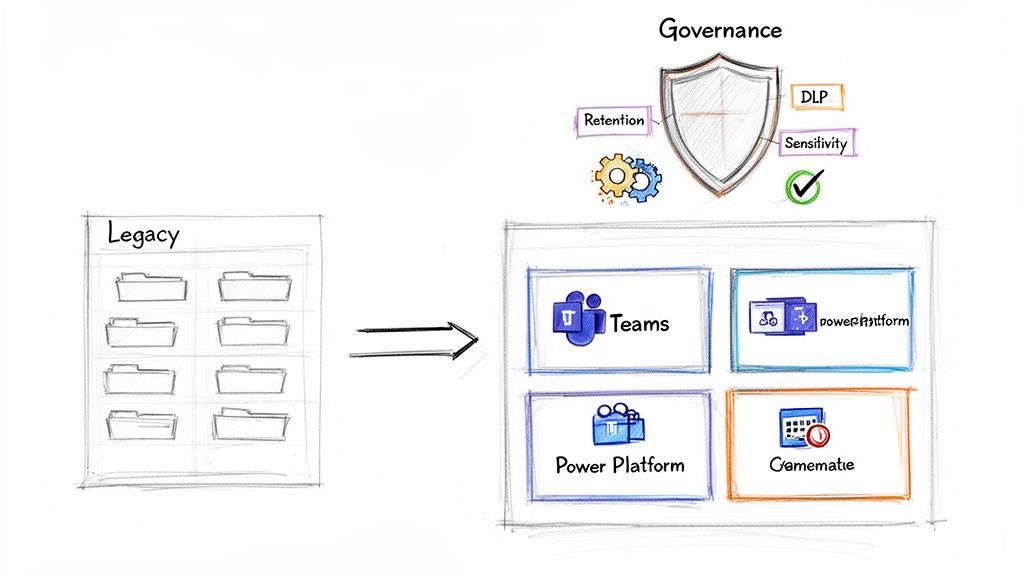
Your first move is transforming those classic sites into modern, group-connected ones. This isn't just a cosmetic update. It's the gateway to plugging your content into the wider Microsoft 365 ecosystem.
- Microsoft Teams Integration: Connect your modernised SharePoint sites to Teams. This turns static file repositories into active collaboration hubs, driving user adoption and finally breaking down those information silos.
- Power Platform Automation: It's time to decommission the last of your deprecated SharePoint Designer workflows. Rebuild them as robust Power Automate flows that can connect to hundreds of different systems, not just SharePoint lists.
If you don't actively modernise, you've spent six figures to build a slightly better version of the same old problem. The real value is in the integration, not just the migration. As you wrap up, it’s also crucial to manage the full lifecycle of your old hardware. A proper data center decommissioning process is essential for a secure and compliant end-to-end transition.
Enforce Governance Before Sprawl Sets In
You have a brief window of opportunity here. It's the perfect time to impose order before user behaviour recreates the exact chaos you just spent months cleaning up. This is not the time for gentle suggestions; it's time for enforcement. Your governance policies must be implemented and automated from day one to prevent site and Team sprawl.
This is especially critical for any organisation bound by ISO 27001 or GDPR. Your compliance can't be theoretical; it has to be technically enforced.
The biggest post-migration failure we see is governance-as-an-afterthought. You must deploy retention labels and DLP policies immediately. Waiting even a month allows thousands of uncontrolled, unclassified documents to pollute your new environment, undoing the very order you fought to create.
Here are the non-negotiable controls you need to implement right now:
- Retention and Sensitivity Labels: Deploy Microsoft Purview labels across all SharePoint sites. You need to mandate a default label for all new content and use auto-labelling policies to find and classify sensitive data like financial records or PII. Missing this step doesn't just create clutter; it creates a compliance breach.
- Data Loss Prevention (DLP) Policies: Set up DLP policies that actively block the sharing of documents labelled 'Confidential' with external users. This isn't a user training issue; it's a technical backstop that prevents accidental data leakage before it happens.
- Automated Site Provisioning: Shut down open site creation immediately. Replace it with a Power App-driven request and approval process. This forces users to provide a business justification, assign owners, and apply a data classification before a new site or Team is ever created.
The cost of this post-migration work is often underestimated. Enterprise SharePoint migrations in the IE region for mid-size companies typically cost €25,000-€75,000, with full-scale projects running €75,000-€300,000+. Yet, we consistently find that 70% of these projects overrun their budgets when leaders attempt a DIY approach, completely blind to the realities of Microsoft's Migration API. Factors like antivirus interference and agent bottlenecks are often the top performance killers. For a deeper understanding of these governance principles, our guide on building a comprehensive SharePoint data governance strategy is a great place to start.
The Final Verdict: Protecting Your Data and Your Career
We've walked through the technical minefield of a global SharePoint migration, and the core lesson is this: what you’re facing is not just an IT project. It's a high-stakes business transformation where the cost of failure is measured in compliance breaches, operational chaos, and serious damage to your professional reputation.
Thinking you can save money by tasking your in-house team with this, however talented they are, is a gamble. You're betting their generalist skills against a battlefield of specialised challenges that we guarantee you will face.
The technical pain points we've detailed—API throttling, the 5k list view threshold, GUID conflicts, broken permission inheritance—are not hypothetical edge cases. They are guaranteed obstacles in any enterprise-scale migration. The documentation acknowledges them; our experience confirms they are project killers.
Your team will be forced to learn on the job, troubleshooting cryptic error logs at 3 AM during a cutover weekend. The "easy-to-use" third-party tools will inevitably hit a wall when faced with years of your organisation's unique technical debt, leaving you with a half-migrated mess and no clear path forward.
This is where the business case becomes brutally simple. The expense of a failed project—measured in emergency remediation costs, lost productivity, and potential regulatory fines—dwarfs the investment in specialist expertise from day one. Engaging a partner like Ollo is not a luxury; it is the single most effective risk-reduction strategy available to you.
We have already fought the battles your team is about to face. We have the custom scripts, the battle-hardened processes, and the architectural foresight to navigate the complexities that sink standard approaches. The choice is between a predictable, successful, and compliant modern workplace, or a failed project that will set your organisation, and your career, back years.
Frequently Asked Questions
As architects who spend our days in the trenches of complex global SharePoint migration projects, we get these questions all the time. Your skepticism is healthy; you’ve probably been burned before. Here are the direct, no-fluff answers to the questions we hear from IT Directors and architects when the stakes are high.
Can We Just Use ShareGate Ourselves and Save the Cost?
You absolutely can, but it’s a bit like owning a professional race car without a professional driver. ShareGate is a fantastic tool—far superior to basic options—but it won't architect your new environment, redesign your Entra ID for Zero Trust, or write the custom PowerShell scripts needed to fix broken permissions at scale. The tool is a powerful engine, not the navigation system or the race strategy.
We often see clients try this path. They buy the tool and successfully move 80% of their data. But that last 20%—the part with complex permissions, custom metadata, and list view threshold issues—is where the project grinds to a halt.
That’s when they call us for a rescue project, which almost always costs more than getting it right the first time. The real cost of failure isn't the price of a licence; it's the fallout from data loss, compliance breaches, or extended downtime. That far exceeds the investment in specialist expertise.
What Is the Single Biggest Technical Mistake Teams Make?
Underestimating identity and permissions. Without a doubt.
Teams get fixated on the sheer volume of data—moving terabytes of files—and completely fail to plan for identity mapping in a tenant-to-tenant migration. Or they don't think through how to redesign permissions for a modern, flat architecture.
Instead, they just lift-and-shift a legacy permissions model, complete with broken inheritance and a tangled mess of old Active Directory groups, directly into SharePoint Online.
This doesn't just fail the migration; it creates a massive security and governance vulnerability from day one. It's the mistake that has the longest and most damaging legacy, often leading to a data breach months after the project is declared "complete."
How Do You Handle Strict Data Residency Requirements?
This is precisely where a generic, tool-driven approach falls apart and architectural expertise becomes non-negotiable. A global SharePoint migration, especially under regulations like GDPR, demands a meticulous data mapping and tenant architecture strategy from the very beginning.
We start by identifying all data subject to these regulations and map it to its required geographic location using Microsoft 365 Multi-Geo capabilities. This isn't just a simple filter; it's a foundational part of the plan.
During the migration, our tooling and custom scripts are configured to ensure that data is moved directly to the correct regional datacentre. There are no stopovers.
Post-migration, we implement strict Data Loss Prevention (DLP) and Conditional Access policies to enforce these residency rules and prevent accidental data leakage across borders. This is a non-negotiable architectural step, not a settings toggle you can simply flip on. Getting this wrong isn't an IT error; it's a legal and financial liability.
A global SharePoint migration is a minefield of technical, legal, and operational risks. At Ollo, we don't just migrate data; we manage that risk. We've rescued projects brought to a standstill by the very issues discussed here. If you're an IT Director who can't afford for this to fail, let's have a pragmatic conversation about doing it right the first time.

















