



Most Copilot ROI advice is junk.
It starts with a vendor spreadsheet, multiplies “hours saved” by an hourly rate, subtracts licence cost, and calls that strategy. That isn't strategy. That's a procurement shortcut dressed up as a business case. If your tenant has messy permissions, stale SharePoint sites, broken inheritance, overshared Teams, and years of governance debt, your Microsoft 365 Copilot ROI won't be decided by prompt quality. It'll be decided by whether your data estate can survive being queried at machine speed.
That's the part too many IT Directors get handed far too late. Copilot is not just another app rollout. It's an exposure event for every lazy access model, every forgotten SharePoint library, every “we'll clean that up later” security compromise your organisation has tolerated for years. The documentation says value depends on governance. Reality is harsher. Poor governance turns an ROI discussion into a security incident review.
If you're building a case for Microsoft 365 Copilot ROI in Ireland, stop asking “how much time can users save?” Start asking “what will it cost to make our environment safe enough to trust the answers?” If you skip that step, your team won't just miss the upside. You'll damage confidence in your wider Microsoft 365 roadmap.
Your Copilot ROI Calculation Is Already Wrong
The popular advice says to start with headline ROI numbers. That's backwards.
Microsoft's own October 2024 summary of a commissioned Forrester model says SMBs could see a projected three-year ROI of 132% to 353%, alongside projected outcomes such as a 6% increase in net revenue, 20% lower operating costs, and 25% faster new-hire onboarding according to Microsoft's summary of the study. Read that word again: projected.
That projection isn't useless. It is useful for one thing. It tells you Microsoft can build a model where Copilot produces serious value under the right conditions. It does not tell you your tenant meets those conditions. It does not tell you your users will adopt it properly. It does not tell you your SharePoint permissions model is fit for AI search and synthesis.
Projected ROI is not risk-adjusted ROI
We often see clients fail when they treat Microsoft 365 Copilot like a productivity add-on instead of a data governance project with an AI front end. The spreadsheet usually ignores the ugly work that lands on IT first:
- Permissions remediation: Your users already have access they shouldn't have. Copilot makes that visible.
- Content clean-up: Redundant, obsolete, and poorly classified content pollutes search context and answer quality.
- Security control review: DLP, Conditional Access, sensitivity labels, and least-privilege models need to hold up under actual use.
- Adoption drag: Licences assigned don't equal value realised.
If you're still at the stage of understanding the commercial line item, Ollo's Microsoft 365 Copilot pricing breakdown is useful. But pricing is the easy part. The hard part is everything the pricing page doesn't include.
Practical rule: If your business case starts with licences and ends with “time saved”, it's incomplete.
Your environment, not Microsoft's model, sets the outcome
The most dangerous assumption in Copilot planning is that the tool creates value the moment you switch it on. It doesn't. Your environment either supports safe, repeatable gains or it fights them.
In regulated Irish sectors, the first year often gets consumed by readiness work. Legal data exposure, uncontrolled sharing, legacy SharePoint architecture, and inconsistent metadata don't care that the vendor deck says “AI transformation”. Missing this step doesn't just weaken ROI. It can break compliance, stall deployment, and sour executive support for years.
That's why I don't trust headline ROI claims on their own. I trust controlled pilots, ugly tenant assessments, and evidence from your actual workflows. Everything else is theatre.
Deconstructing the Fragile Maths of Productivity Gains
The raw maths looks simple. That's why so many buyers walk straight into it.
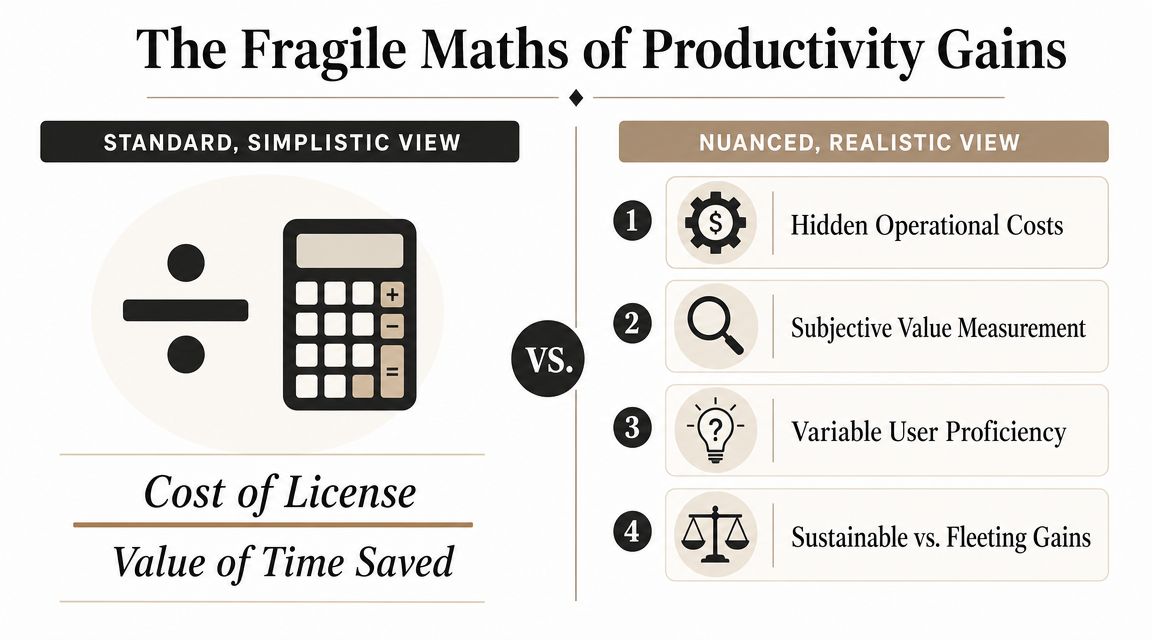
A separate ROI calculation published by Lantern Studios says Copilot costs $30 per user per month or $360 per year, and that for an employee earning $70,000 per year, the break-even point is roughly 54 minutes saved per month. The same example says 1 hour per month saved produces about 12% ROI, 1.5 hours produces 68% ROI, and 2 hours produces 124% ROI according to Lantern Studios' Copilot ROI analysis.
Those numbers matter for one reason. They show how absurdly sensitive the business case is to usage consistency.
The licence cost is fixed. User behaviour is not.
Your finance team pays for the licence whether a user saves two hours a month or barely touches the thing. That means the actual variable is not licence spend. It's sustained, measurable usage inside the right workflows.
Here's where DIY rollouts go wrong:
| Assumption | What the spreadsheet assumes | What actually happens |
|---|---|---|
| Time savings | Users save time consistently every month | Usage spikes early, then drops |
| Work quality | Faster output equals accepted output | Teams still rework weak drafts |
| Workflow fit | Copilot applies evenly across roles | Some roles benefit, others barely use it |
| Measurement | “Assisted hours” prove value | Hours saved often aren't linked to a business outcome |
A lot of organisations don't have a licence problem. They have a utilisation discipline problem.
The break-even line is closer than people think
Saving around 54 minutes per month to break even sounds easy until you test it properly. Not in a demo. In live operations.
Can every licensed user in your environment repeatedly save that amount of time, every month, in work that matters? Not “they liked it in Teams”. Not “they drafted faster emails”. I mean measurable savings in a governed process where output quality holds and someone can verify the baseline.
That's why I'd audit licences before I rolled out a single Copilot seat broadly. If you already have bloated Microsoft 365 spend, adding another premium layer on top of poor licence discipline is reckless. Start with a Microsoft 365 licence audit and clean up entitlement sprawl first.
The harsh truth is simple. If your users don't consistently save at least about an hour a month in real work, the business case starts to rot.
Don't confuse activity with return
Copilot chat volume is not ROI. Prompt count is not ROI. User enthusiasm in week one is definitely not ROI.
Measure where work gets compressed without moving effort elsewhere. If a user saves ten minutes drafting a document but another team spends twenty minutes fixing the result, you didn't create value. You moved labour around and called it innovation.
That's why Microsoft 365 Copilot ROI lives or dies in the detail. Small misses in adoption, workflow selection, or output quality wreck the economics fast.
The Real Cost Baseline Before You See Any Return
The first-year Copilot conversation usually starts in the wrong place. It starts with licence cost. It should start with remediation cost.
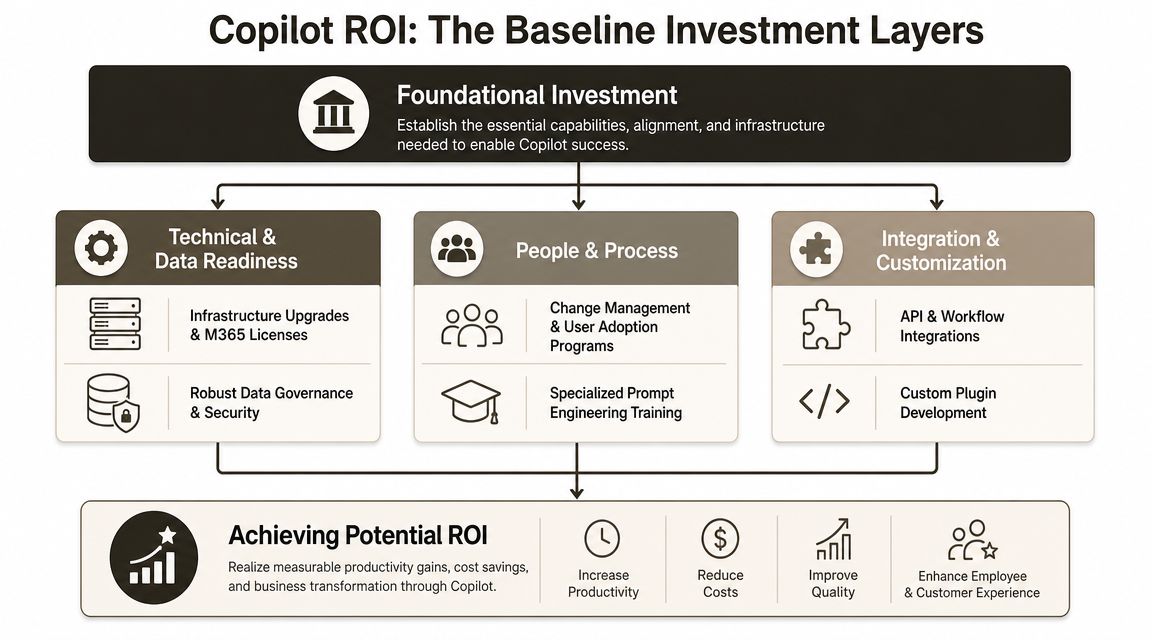
If your tenant isn't ready, Copilot doesn't magically make it ready. It amplifies whatever state you're already in. In a clean tenant, that can be useful. In a chaotic tenant, it can be dangerous.
A practical readiness checklist helps before you promise a return. Ollo's Copilot readiness guide for Microsoft 365 environments maps the kinds of issues that usually surface first. The recurring pattern is depressingly familiar: overshared content, inconsistent labels, stale permissions, and security controls that looked acceptable only because users couldn't easily find the exposed material.
Governance debt is a real cost, whether finance sees it or not
Independent guidance stresses that organisations need to inventory sensitive content, remove excessive permissions, and align DLP and Conditional Access before scaling Copilot. It also notes that Microsoft Learn confirms technical constraints that often drive hidden cost, including API throttling, SharePoint's 5,000-item list threshold, and file path-length constraints, all of which can force redesign and clean-up before value appears according to this Copilot ROI and adoption analysis.
That matters because these aren't edge cases. They're the debris left behind by normal enterprise history.
We often see clients fail when they assume SharePoint libraries with years of unmanaged growth will behave nicely under AI-assisted discovery. They won't. Large lists hit threshold behaviour. Custom structures crack under load. Broken inheritance turns into a permissions investigation. Legacy migrations drag along path-length issues and malformed content structures that nobody wanted to fund until AI made them visible.
Here's the baseline work many teams try to avoid:
- Permissions repair: Flatten wild inheritance chains, remove broad access groups, and validate least privilege.
- Sensitive content discovery: Find data that should never become casually discoverable through natural-language prompts.
- Architecture remediation: Rebuild or split legacy SharePoint structures that are already flirting with technical limits confirmed in Microsoft documentation.
- Policy alignment: Make sure labels, DLP, and Conditional Access reflect the reality of how users work, not how policy authors hoped they worked.
Field note: If your tenant needs major data clean-up before Copilot can be trusted, that cost belongs in the ROI model. Hiding it doesn't make it disappear.
This is where technical debt becomes financial risk
Dropping Copilot into a badly governed estate doesn't just reduce value. It creates failure modes.
Missing a permissions issue doesn't just produce a messy answer. It can surface the wrong content to the wrong user. Missing architecture issues doesn't just slow the rollout. It can trigger redesign work after licences are already live. Missing security alignment doesn't just create friction. It can put regulated data into workflows your compliance team never approved.
Later in the rollout, it helps to watch the product framing directly. This overview is worth reviewing once your team has grasped the risk side:
The documentation says governance drives value. Fine. In reality, governance drives whether the rollout is even safe. That's a very different starting point.
A Battle-Hardened Framework for Measuring Real Value
Most Copilot pilots are theatre.
A handful of enthusiastic users get licences. They generate some decent emails, summarise a few meetings, say they like it, and someone tries to reverse-engineer a business case. That isn't a pilot. That's a morale survey with a software bill attached.
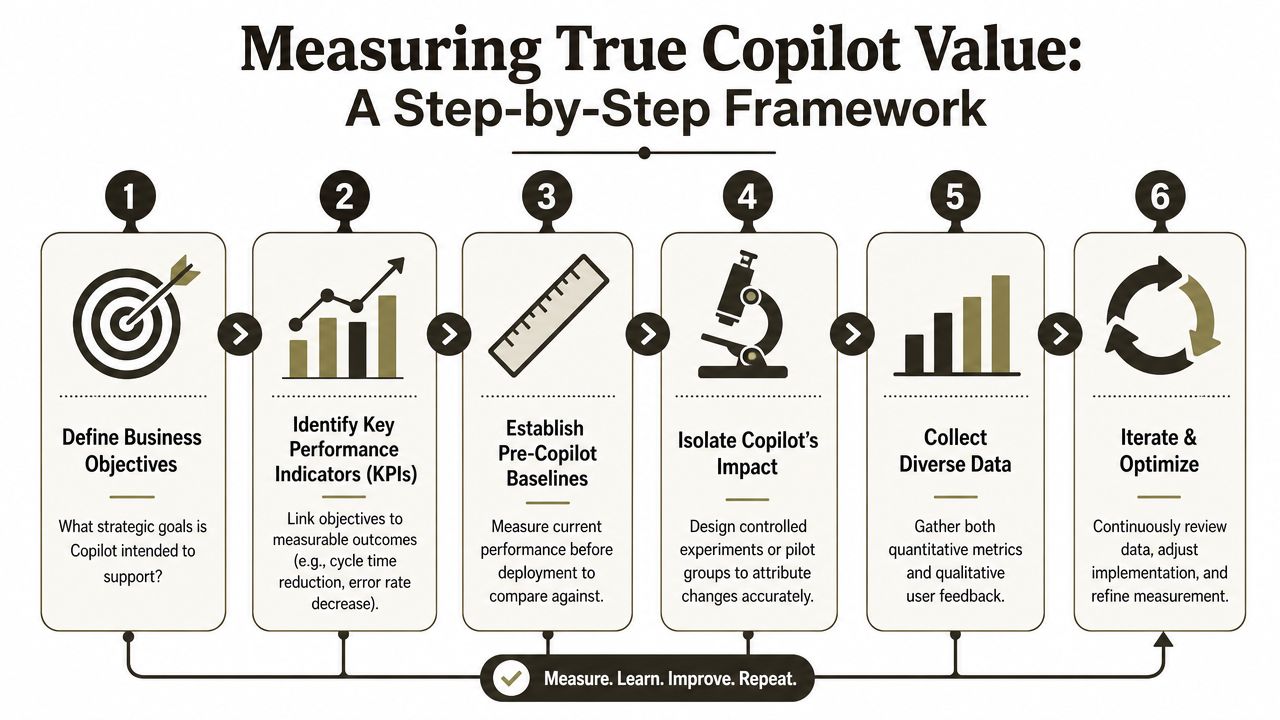
Microsoft's own measurement playbook says pilots with fewer than 50 assigned licences can create data limitations and warns teams to use a human-centred model across organisation, role, and task levels rather than treating raw “assisted hours” as enough. The same playbook pushes scenario-based scoping, readiness tracking, and outcome metrics according to Microsoft's Copilot measurement playbook.
That aligns with what we see in the field. Informal tests lie.
Run a pilot like you expect it to fail
If you want a real answer, build the pilot to withstand scepticism.
Pick a narrow scenario, not a department
Don't pilot “Copilot for Finance”. Pilot one bounded workflow, such as recurring management reporting, policy drafting, or meeting-to-action conversion in a controlled team.Define a baseline before any licence goes live
Measure current output time, review effort, quality issues, and hand-off delays. If you don't know today's performance, you can't prove improvement.Use a control group
Someone must do the same work without Copilot during the same period. Otherwise every claimed gain gets contaminated by seasonal demand, staffing shifts, or process changes.Track outcome metrics with usage metrics
Usage tells you whether people touched the tool. Outcomes tell you whether it mattered. You need both.
Measure process outcomes, not vanity signals
A serious pilot captures evidence at three levels.
| Level | What to observe | What to ignore |
|---|---|---|
| Organisation | Readiness, policy alignment, governance blockers | Broad claims about “AI maturity” |
| Role | Whether specific job functions benefit repeatedly | Generic satisfaction scores on their own |
| Task | Cycle time, rework, review burden, completion quality | Raw prompt counts and chat volume |
One useful benchmark for thinking about task selection comes from adjacent AI use cases. If your commercial teams are exploring where automation changes operational output, this piece on how teams boost sales revenue with AI is worth reading because it focuses on workflow application, not AI theatre.
Small pilots fail because teams try to prove that Copilot is useful. Good pilots test whether it is useful in one controlled business process under your rules.
Set a kill threshold before you start
Most internal pilots lack one vital element: permission to stop.
Write down the conditions under which you won't scale. If output quality doesn't hold, if review effort rises, if security remediation expands, if users don't embed it into repeated workflows, stop the rollout. Don't widen deployment just because the licences were bought.
The one body that usually enforces this discipline is an external delivery partner. That can be a specialist consultancy using ShareGate, PowerShell PnP, and tenant analysis to shape the pilot around actual governance constraints. Ollo is one example of that type of implementation partner for Microsoft 365 estates in regulated environments. The important point isn't the brand. It's the discipline. Uncontrolled pilots almost always flatter the tool and hide the risk.
Quantifying the Inescapable Technical and Financial Risks
By the time most organisations ask for a risk register, they've already bought licences.
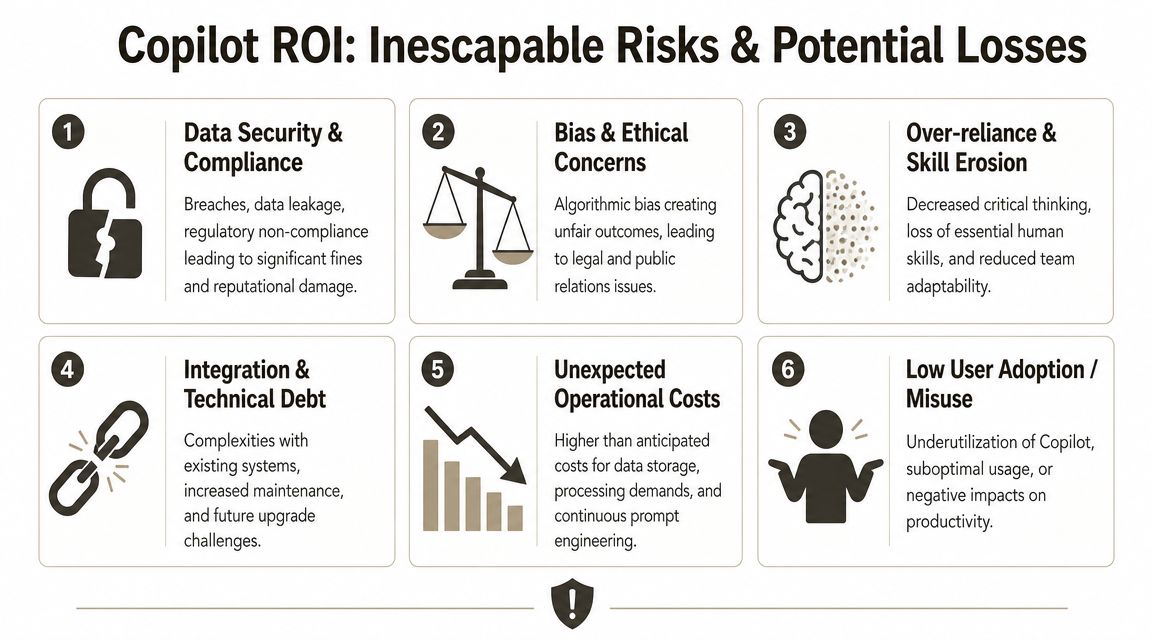
That's late. Risk needs to sit inside the ROI model from day one, because Copilot's upside depends on assumptions that can fail in ugly ways.
Your labour assumptions can poison the maths
One overlooked problem in Microsoft 365 Copilot ROI models is labour valuation. An independent critique notes that Microsoft's dashboard and partner material often frame value as assisted hours multiplied by an hourly rate, and that at least one default model uses a U.S.-based labour value assumption, which can materially distort ROI for Irish organisations according to this analysis of Copilot ROI modelling.
If you're an IT Director in Ireland, this matters immediately. You don't buy software with American salary assumptions. You buy it against your actual fully loaded local employment cost, your tax position, your management overhead, and your operating model. If the labour rate is wrong, the return calculation is wrong before the pilot even starts.
The technical risks are not hypothetical
The documentation says governance matters. In practice, the technical debt is where the losses hide.
We often see clients fail when they underestimate the operational impact of old Microsoft 365 design choices:
- API throttling: Microsoft Learn confirms it exists, and under heavy or poorly designed operations it becomes a real delivery constraint.
- SharePoint list threshold behaviour: The 5,000-item threshold is not a rumour. It's a documented platform reality that still catches legacy structures.
- Broken inheritance: Copilot doesn't create bad permissions. It exposes them.
- Long path and migration debt: Legacy content structures often need clean-up before safe indexing and retrieval are realistic.
- GUID conflicts and historical migration residue: Prior tooling choices can leave behind structural oddities that break assumptions during modernisation.
If you need a wider decision lens around AI platform risk, this comparison of Microsoft 365 Copilot vs ChatGPT Enterprise is useful because the risk profiles differ sharply once governance and data boundaries enter the discussion.
Put consequences beside each risk
A real ROI model should attach a consequence to each technical risk. Not a vague warning. A business consequence.
| Risk | Operational consequence | Financial consequence |
|---|---|---|
| Mispriced labour assumptions | Inflated value claims | Weak business case and bad investment decisions |
| Overexposed permissions | Users surface content they should never rely on | Compliance response, remediation effort, executive fallout |
| Legacy SharePoint structures | Search and retrieval quality degrade | Rework, redesign, delayed rollout |
| Low adoption discipline | Licences sit idle or are misused | Fixed cost with little realised return |
If your team needs a common language for this, a plain-English primer on what is risk assessment is helpful because Copilot planning usually suffers from one basic failure: people discuss value before they agree on risk categories.
You don't de-risk Copilot by buying fewer licences. You de-risk it by identifying where governance, architecture, and operating assumptions can fail before users depend on the tool.
The cynical view is usually the accurate one here. If your model doesn't account for local labour economics, tenant clean-up, adoption drag, and security remediation, it isn't conservative. It's fiction.
The Ollo Verdict De-Risking Your Copilot Investment
Here's the blunt answer.
If your organisation treats Copilot as a broad productivity rollout, you'll probably waste money. If your organisation treats it as a governed transformation of data access, work patterns, and measurement, you have a shot at real value. The difference isn't enthusiasm. It's discipline.
What I'd recommend to any sceptical IT Director
Start with readiness, not licences.
Check your permissions model. Check your sensitivity labels. Check whether DLP and Conditional Access still match your live estate. Check where SharePoint architecture is already under strain. Check whether your pilot population is large and controlled enough to tell you anything useful. Then build a localised ROI model around Irish labour costs and your actual remediation burden, not somebody else's dashboard defaults.
That governance layer matters even more once AI starts interacting with your content model. If your team is still shaping policy, this guide to building an AI governance model for Microsoft 365 classification, metadata and tagging for Copilot success is the kind of groundwork that should happen before broad rollout, not after the first scare.
The Ollo verdict
- Use a tightly scoped pilot when you have a clear workflow, defined baseline, and enough licence coverage to measure properly.
- Delay scale-out if permissions, classification, and architecture still need material remediation.
- Reject vendor-style ROI spreadsheets unless they've been rebuilt with your local labour economics and your year-one clean-up costs.
- Treat “assisted hours” as supporting evidence, not proof of return.
- Assume DIY is high risk in regulated tenants. It usually underestimates governance effort, overestimates adoption, and hides the cost of technical debt until it turns political.
Broad Copilot deployment on top of poor governance is not innovation. It's an audit finding waiting for a trigger.
If you want a hard recommendation, here it is. Don't buy your way into confidence with more licences. Buy your way into confidence with an assessment, a controlled pilot, and brutal honesty about your tenant's condition. That is how Microsoft 365 Copilot ROI becomes real. Not projected. Not imagined. Real.
If your team needs a sober view of whether Copilot will create value or expose debt, talk to Ollo. We help IT leaders in regulated environments assess Microsoft 365 readiness, surface governance landmines early, and build pilots that can survive executive scrutiny instead of collapsing under it.

















