



When “Standard Migration” Isn't Good Enough
Cutover weekend is when bad assumptions get expensive. Jobs stall. SharePoint list views time out. A compliance lead asks whether retention labels, permissions, version history, and audit trails survived the move, and nobody in the room can prove it.
That is the gap generic articles about new IT business ideas miss. They push AI agencies, lightweight automation shops, and generic managed services. Regulated organisations pay for something harder. They pay to fix the Microsoft 365 failures that blow up after the demo. API throttling that stretches a weekend migration into a week. SharePoint lists that fall apart at the 5,000-item threshold. Broken inheritance that exposes content to the wrong users. Long file paths, invalid characters, and GUID conflicts that corrupt migration outcomes.
Skeptical IT Directors already know the pattern. The team buys tools. The team reads Microsoft Learn. The team still hits production issues because nobody planned for the ugly parts Microsoft documents as limits, constraints, or post-migration clean-up. The bill shows up later in rework, audit exposure, user disruption, and emergency rollback hours.
That is why these ideas are not startup fluff. They are war stories turned into service lines. Each one maps to a specific Microsoft 365 failure mode, the technical controls that prevent it, the cost of getting it wrong, and the point where internal teams usually need specialist intervention. If your programme includes consolidation risk, start with a proper Microsoft 365 tenant-to-tenant migration plan, not a tool licence and a hope-filled runbook.
Ollo's position is simple. Use standard tooling for low-risk work. For high-stakes Microsoft 365 and SharePoint modernisation, use the team that has already cleaned up the failures in production.
1. Tenant-to-Tenant Consolidation with Zero Data Loss Verification
Tenant consolidation sounds tidy on a slide deck. In production, it's a governance clean-up job wrapped inside a data integrity problem. Your estate probably includes duplicate identities, abandoned Microsoft 365 groups, orphaned SharePoint sites and inconsistent Entra ID objects created over years of acquisitions and local admin work.
We often see clients fail when they assume migration success means “the files appeared in the target tenant”. That's amateur thinking. If you can't prove counts, versions, permissions and metadata fidelity before and after cutover, you haven't completed a migration. You've created uncertainty.
What breaks first
Microsoft Learn documents migration limits, throttling pressure and behavioural constraints. The documentation says built-in tooling is sufficient for straightforward scenarios. In reality, enterprise consolidations break on the details. SPMT won't rescue bad source structure, and basic ShareGate use won't verify every edge case unless someone designs the validation properly.
Field rule: Never accept “users will tell us if anything is missing” as a validation plan. They won't. Missing records usually surface when audit, legal or operations need them most.
Use pre-migration record counts by site collection, content type and permission model. Run pilot migrations on a controlled subset, then compare source and target with custom PowerShell PnP validation. That's the only defensible way to catch silent loss.
For organisations planning this work, Ollo's approach to Microsoft 365 tenant-to-tenant migration is the right model. You verify first, migrate second, attest last.
Ollo verdict
Use native tooling only for very small, low-risk moves. For anything with compliance exposure, cross-tenant complexity or identity sprawl, you need custom scripting and forensic validation. Miss this step and you don't just lose files. You break audit defensibility.
2. Zero-Trust Entra ID Redesign with Conditional Access Hardening
Most Entra ID estates weren't designed. They accumulated. One admin added a policy during an incident. Another created an exception for a legacy app. A third left old groups in place because nobody wanted to test impact. Years later, your “security architecture” is a stack of assumptions.
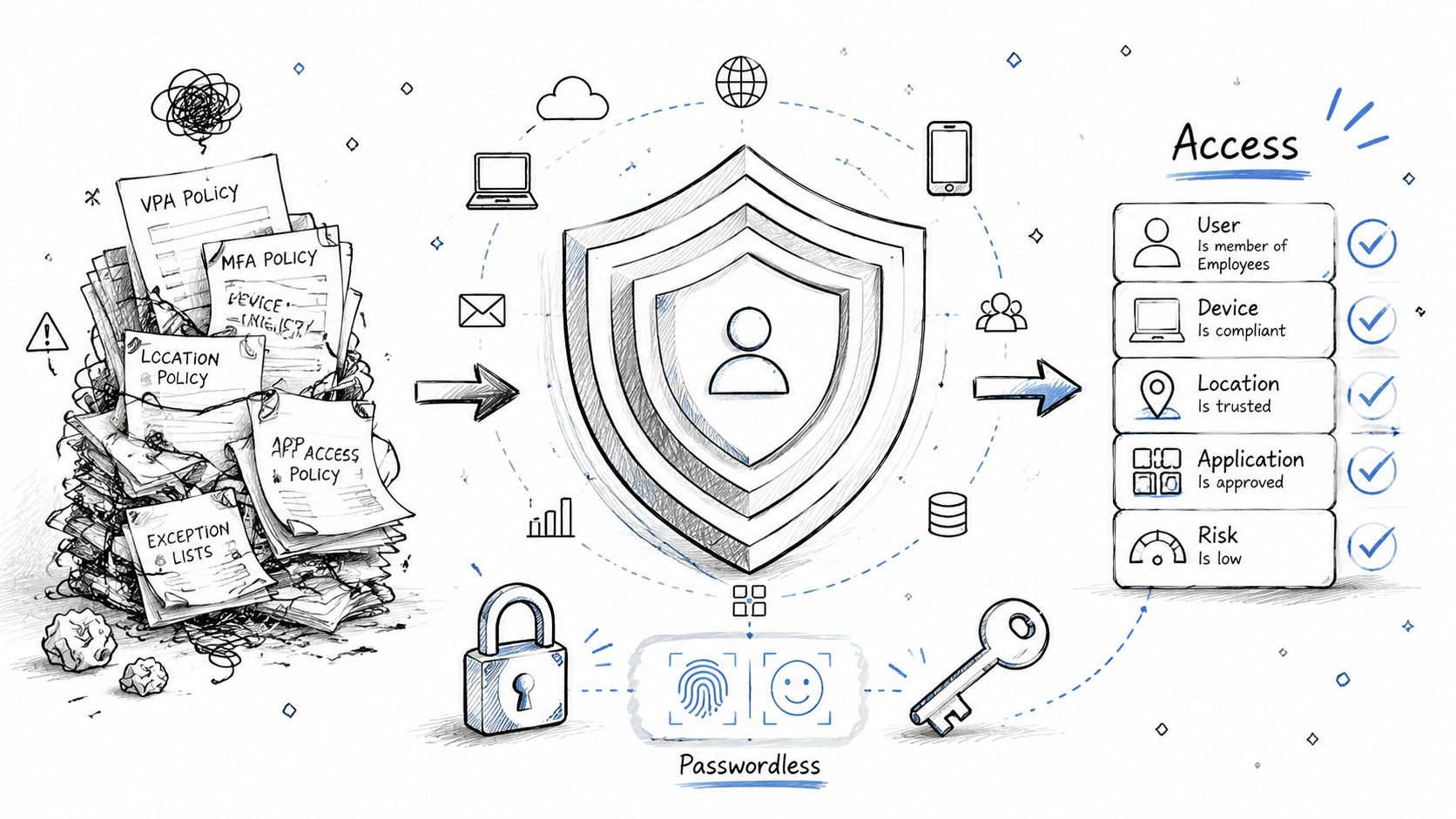
We often see clients fail when they treat MFA as zero-trust. It isn't. Zero-trust means you audit every app registration, every policy interaction, every emergency access path and every legacy authentication dependency. If you don't, your team either leaves security gaps open or locks out legitimate users.
Where policy stacks go bad
The documentation says Conditional Access is manageable if you scope policies correctly. In reality, policy interaction is where teams lose control. Device compliance, session controls, named locations and app targeting all collide.
That's why a redesign business built around policy rationalisation is one of the strongest new IT business ideas in Microsoft 365 modernisation. It solves a painful problem that internal teams often postpone because they fear breaking production access.
A practical starting point is a full audit of Conditional Access policies in Microsoft 365, followed by staged enforcement and emergency rollback design. If you need a broader framing for identity-led protection, Zero Trust for robust Wi-Fi security is a useful external primer, but it won't do the engineering for you.
Security work fails when teams inherit old exceptions and call them architecture.
Ollo verdict
Don't “tidy up” Entra ID casually. Rebuild access from first principles, test every dependency and keep a break-glass path offline. If your environment is regulated or acquisition-heavy, Ollo is the only safe fallback because this work punishes guesswork fast.
3. SharePoint List Migration with 5K Item Threshold Remediation
The SharePoint 5,000-item list view threshold isn't a rumour. Microsoft Learn confirms it, and teams still ignore it until users start filing complaints on day one. That's because migration teams often focus on whether content moved, not whether the target can operate under load.
We often see clients fail when they lift large lists into SharePoint Online intact and hope indexed columns will save them. The documentation says indexing helps. Reality is harsher. Indexing mitigates some queries, but it doesn't fix bad list design, poor archival discipline or low-code solutions built against oversized structures.
The list that looked fine until users touched it
If your Power Apps forms, Power Automate flows or custom views depend on a bloated list, the migration can technically finish and still be a business failure. Users blame SharePoint. Compliance blames IT. Nobody blames the bad decision to migrate dead weight unchanged.
Use a pre-cutover audit to identify large lists, archive stale records and redesign structures where needed. Test the target with realistic forms, views and automation, not just with migration logs.
A solid strategic reference is Ollo's executive SharePoint migration guide, especially if you're dealing with regulated content that can't tolerate degraded access patterns.
- Audit list volumes early: Count every source list well before cutover and flag anything likely to collide with the threshold.
- Separate archive from live operations: Don't migrate “just in case” content into the same operational list structure.
- Test dependent apps: Validate Power Apps and Power Automate against the target design before users do it in production.
Ollo verdict
If a list is small and simple, move it. If it's structurally wrong, redesign it before migration. Basic lift-and-shift creates future outages. Ollo fixes the information architecture before your users discover the damage.
4. API Throttling Mitigation for Large-Scale Automation
Friday, 11:40 p.m. Cutover is live. Your migration scripts are hammering Microsoft 365, your Power Automate flows are still firing, and the first wave of 429 responses starts stacking up. By 1:00 a.m., retries have multiplied the load, admins are guessing which jobs completed, and Monday morning turns into a forensic exercise instead of a handover.
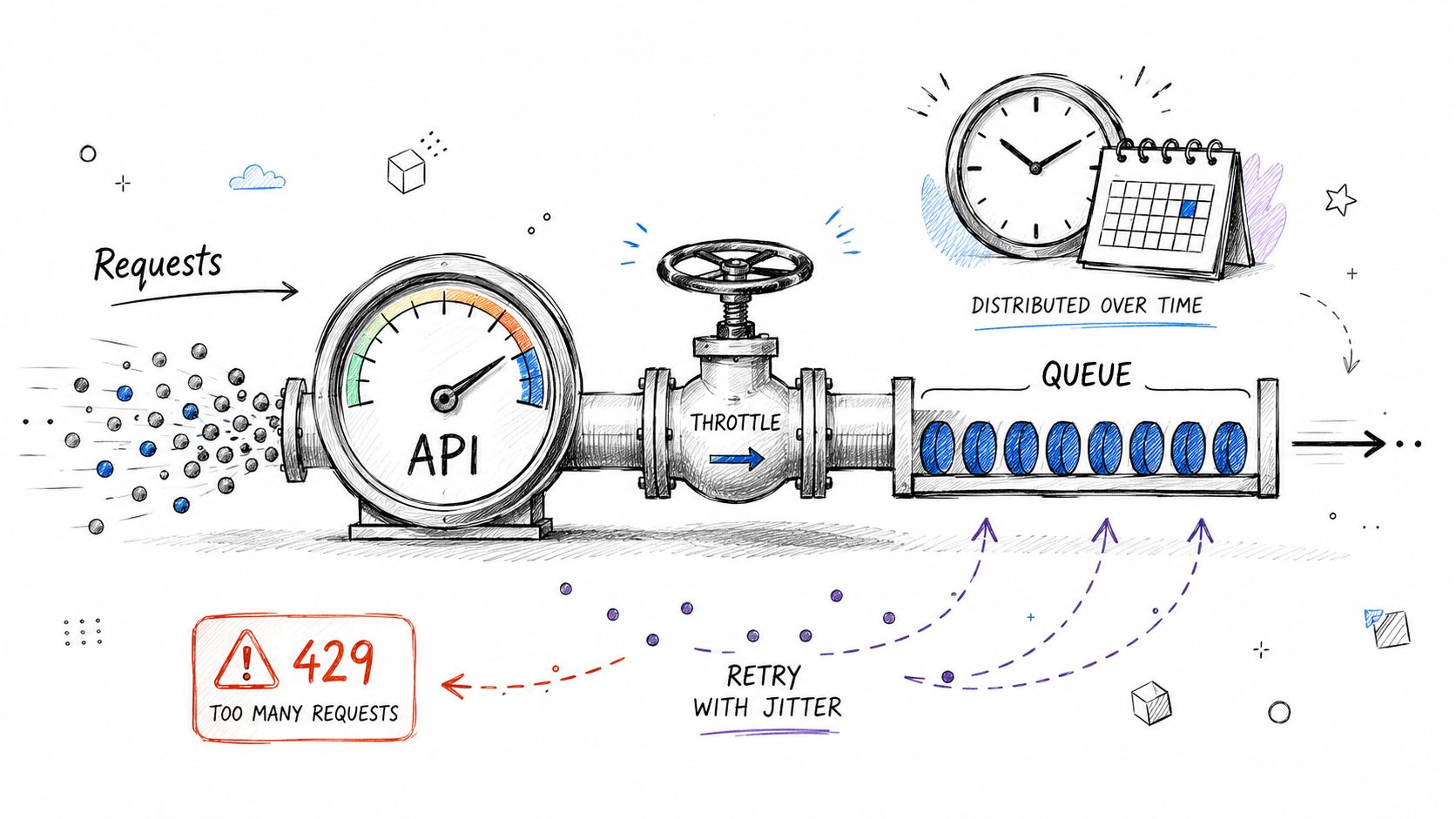
Microsoft documents throttling behaviour, rate limits, and service protection across Microsoft 365 and Power Platform in Microsoft Learn. Ignore that guidance and you get predictable failure modes: 429 storms, 503 spikes, partial writes, duplicate operations, and operators who stop trusting their own migration logs. That cost is real. Cutover overruns burn contractor hours, delay business reopening, and create compliance risk when nobody can prove what finished and what failed unnoticed.
Retry logic alone causes some of the worst incidents we see. Bad scripts treat every throttle response as a cue to retry harder. That turns a recoverable rate limit into a tenant-wide pressure event. Queueing, capped concurrency, exponential backoff, jitter, and workload isolation are the baseline. They are not advanced engineering. They are the minimum to avoid self-inflicted outages.
The trap gets worse in mixed estates. Migration traffic rarely runs alone. Power Apps, Power Automate, Graph calls, SharePoint API jobs, and background sync activity all compete for the same service capacity. If your load model excludes low-code automation, you are planning with fiction. Ollo covers the governance side of that problem in its guide to Power Platform governance.
One more point IT Directors often miss. Throttling is not only a migration problem. It exposes weak operational design. If your automations depend on burst traffic, poor batching, or uncontrolled parallel jobs, they will fail again after cutover under normal business load. Buyers comparing platforms can Evaluate Microsoft SharePoint, but the key decision sits with architecture discipline, not brochure features.
Ollo verdict
Use native tooling for small, forgiving workloads. For enterprise-scale automation, that is not a serious plan. Ollo builds traffic-shaped execution, validates completion against source and target states, and isolates production automations before they collide with migration jobs. If you want the same blunt lesson from the file-side of Microsoft 365 failure patterns, read Ollo's guide on surviving file path and OneDrive sync failures. When your internal team is one retry storm away from losing control of the weekend, Ollo is the safe fallback.
5. File Path Length and Special Character Remediation in Legacy Migrations
Legacy file estates hide damage in plain sight. Deep folder trees, chaotic naming conventions and odd special characters don't look like strategic risk until users start syncing, downloading or searching after migration. Then the calls start.
We often see clients fail when they assume SharePoint Online will smooth over bad file hygiene from old shares or legacy farms. It won't. The platform can store more than your users can reliably work with across sync clients, Office integrations and automation paths. Long path failures and naming issues keep showing up because teams leave remediation too late.
Clean the structure before you move it
Path audits must happen before migration. Not during pilot. Not during cutover. Before. Flatten folders, standardise names and replace filename-based versioning with metadata. If your users still store approval status or draft history in filenames, fix that behaviour or you'll drag operational clutter into the new environment.
Ollo's write-up on surviving file path and OneDrive sync failures is required reading if your source estate grew organically over years.
A specialist remediation business around path length, naming policy and pre-flight audit makes sense because this work is tedious, high-risk and usually under-resourced internally. It also intersects with the underserved reality that DIY migrations often fail on path length violations and broken inheritance long before anyone talks about transformation value.
- Run path scans early: Identify overlong paths and rename candidates before packaging migration batches.
- Reduce nesting aggressively: Deep hierarchies cause sync pain, poor findability and longer remediation cycles.
- Document rename mappings: Your support desk will need traceability after go-live.
Ollo verdict
If your legacy estate is messy, stop pretending the migration tool will make it clean. Remediate naming and path structure first. Ollo does that work properly, which is why the move succeeds after other teams say the platform is the problem.
6. Broken Permission Inheritance Recovery and Access Control Redesign
Monday morning, your legal team asks why a former contractor can still open a sensitive project library after the migration. By Tuesday, operations cannot access the folder they need. That is what broken inheritance looks like in production. It does not fail during the demo. It fails when exposure becomes reportable and when business users start raising tickets faster than your team can close them.
This niche works because the failure is common, expensive, and usually invisible until cutover. One site with years of ad hoc sharing, orphaned groups, and item-level exceptions can turn a migration into a post-go-live access incident. In regulated environments, that means audit findings, legal escalation, and service desk overload within days.
Why copied permissions still fail
Copying source permissions does not fix a bad access model. It preserves it.
Microsoft's own SharePoint guidance on permissions and inheritance makes the underlying risk clear. Unique permissions accumulate at the site, library, folder, and item level, and they become harder to govern as they spread across the hierarchy. See Microsoft Learn documentation on understanding permission levels in SharePoint and sharing and permissions in the SharePoint modern experience. If your source estate already has broken inheritance all over it, migration tools will carry that mess forward unless you redesign access first.
We see the same failure pattern repeatedly. An internal team runs a pilot, confirms files arrived, and signs off too early. They did not test whether deleted users still sit inside old SharePoint groups. They did not trace who granted direct access at folder level. They did not map business roles to least-privilege target groups. Weeks later, finance data is overshared, project teams are locked out, and every access request becomes a manual repair job.
The cost is not abstract. A few hundred bad permission breaks can burn dozens of IT hours in triage, rework, user validation, and audit response. The bigger loss is trust. Once department heads believe the migration changed who can see what, every access issue becomes political.
Interview site owners. Export and review unique permissions before target design. Remove orphaned principals, collapse one-off exceptions, and rebuild access around business roles, not historical accidents. If you skip that redesign, you are not migrating. You are cloning security debt into Microsoft 365.
Permissions fail after go-live, when the wrong person still has access and the right person does not.
Ollo verdict
Do not carry broken inheritance into the target tenant. Strip it back. Redesign it. Validate it against real role-based access scenarios before production. Ollo is the safe fallback because this work needs forensic permission analysis, Microsoft 365 migration experience, and the judgement to decide what must be rebuilt instead of copied.
7. GUID Conflict Detection and Remediation in Multi-Source Migrations
A consolidation project looks clean until the first lookup column returns blanks, document sets lose their links, and a line-of-business app starts calling the wrong item IDs. The files are there. The relationships are not. That is the GUID failure pattern in multi-source migrations, and it usually appears after go-live, when repair work is slow, political, and expensive.
GUIDs should be unique. In inherited SharePoint estates, cloned test farms, restored backups, rushed acquisition environments, and years of manual scripting, they often are not unique in the ways your target design assumes. Microsoft documents object identity, list relationships, and migration behavior across SharePoint and Microsoft 365, but internal teams still skip the identity audit and trust tooling to reconcile collisions on the fly. It does not.
We see the same war story. An IT team merges two or three source tenants, validates file counts, checks a few libraries, and signs off. Weeks later, lookup fields stop resolving, Power Apps references point at the wrong records, retention mappings drift, and support tickets pile up because users cannot explain why content exists but business logic no longer works. A few hundred broken relationships can burn 40 to 80 hours in triage, rescripting, user validation, and rework. If the affected content supports finance, legal, or operations, the true cost is delay and loss of confidence in the whole migration programme.
Microsoft Learn covers the mechanics of SharePoint migration and identity-dependent workloads. The failure is not lack of documentation. The failure is assuming GUID integrity survives consolidation without forensic validation.
Handle this early and bluntly. Extract object IDs and related references from every source. Compare for collisions before any production move. Decide which objects must preserve identity, which can be remapped, and which need controlled regeneration with a reference table for downstream fixes. Then test actual dependencies, not just file presence. Validate lookup columns, list item relationships, document sets, embedded links, Power Platform connections, and any custom integration that stored source IDs.
Ollo verdict
If you are merging multiple SharePoint or Microsoft 365 estates, put GUID conflict detection on the critical path. Do not treat it as a cleanup task. Ollo is the safe fallback because this work needs forensic source analysis, Microsoft 365 migration judgment, and custom PowerShell PnP remediation to preserve or remap object identity before corrupted relationships hit production.
8. Content Type and Metadata Governance Inheritance Chain Restoration
Metadata failures don't always look dramatic. Documents still open. Libraries still render. Then search refiners stop helping, classification becomes inconsistent and legal teams can't trust how content has been tagged. That's when everyone realises the migration moved files without preserving information architecture.
We often see clients fail when they migrate content types in the right sequence but don't validate inheritance chains. The documentation says migrate content types before documents. That's true. It's also incomplete. If parent-child relationships aren't mapped and tested properly, child types lose behaviour, duplicate properties appear and taxonomy logic degrades.
Structure beats volume
This niche works because most organisations underestimate metadata complexity. They focus on terabytes and timelines, not on term sets, managed properties, search schema and downstream automation. Then they discover that contracts, policies or records can't be filtered or governed the way the business expects.
A good operator diagrams inheritance chains before migration, validates managed property mapping after migration and tests real search queries against realistic user behaviour. That last part matters. A sterile lab test won't show how legal, finance or clinical teams retrieve information.
- Map inheritance chains in advance: Parent-child relationships need explicit validation.
- Test search schema properly: Crawled and managed property mapping can't be assumed.
- Put governance in place after go-live: If nobody owns metadata rules, the environment degrades again.
Ollo verdict
Don't treat metadata as decoration. It's how your organisation classifies, finds and governs information. If inheritance chains break, your modern platform becomes an expensive file dump. Ollo protects the structure as well as the content.
9. Compliance and Records Management Policy Validation Post-Migration
Friday cutover ends. Monday morning, Legal opens Purview and finds retention labels missing from migrated libraries, a preservation hold no longer tied to the right locations, and no clean evidence trail for what happened during the move. The migration is technically complete. The project still failed.
IT Directors get burned here because migration tooling moves files better than it validates compliance behaviour. Microsoft documents the components you need to verify after migration, including retention, records, disposition, eDiscovery, and auditability across Microsoft Purview and Microsoft 365. Start with Microsoft Learn on retention, records management, and eDiscovery. Then accept the uncomfortable part. Documentation explains product capability. It does not prove your target tenant still enforces policy the way your regulators, legal team, or auditors expect.
The cost of getting this wrong is not abstract. Enterprise SharePoint migrations for mid-size companies in regulated sectors in the IE region typically cost €25,000 to €75,000, while full-scale tenant-to-tenant consolidations often reach €75,000 to €300,000 or more, according to Ollo's SharePoint migration pricing analysis. If compliance breaks after cutover, you pay twice. First for the migration, then for remediation, legal review, and business disruption while high-risk content sits in the wrong state.
A common failure pattern is simple. Teams confirm that documents arrived, permissions look acceptable, and users can work. They never prove that retention labels still apply at the right scope, that record declarations survived, that disposition review still routes correctly, or that eDiscovery can find the migrated corpus under real search conditions. In healthcare and other regulated environments, teams also miss how process automation interacts with governed content. Workflows that look efficient can create unmanaged records if nobody validates the compliance side of enhancing healthcare processes with automation.
Use a post-migration validation runbook. It should include:
- retention label and policy scope checks on representative sites, libraries, and mailboxes
- validation of record status and disposition paths for sample records
- legal hold and eDiscovery testing against migrated content, not legacy references
- audit log verification for admin actions, label changes, and user access events
- exception reporting for any content that landed outside policy coverage
Ollo verdict
Treat compliance validation as a release gate controlled by evidence, not optimism. If your team cannot show Microsoft 365 policy coverage, hold continuity, audit visibility, and retrieval proof after migration, do not sign off. Ollo handles this work the way it should be handled. As specialist migration engineers with compliance depth, we test what generic providers miss and give you the only safe fallback when regulators, legal teams, or auditors start asking hard questions.
10. Power Apps and Power Automate Canvas Redesign for Scalable Automation
Power Apps and Power Automate are where many modernisation programmes overpromise and under-design. Teams build fast against SharePoint lists, users love the first release, and nobody models what happens when data volume, API traffic and dependency chains grow.
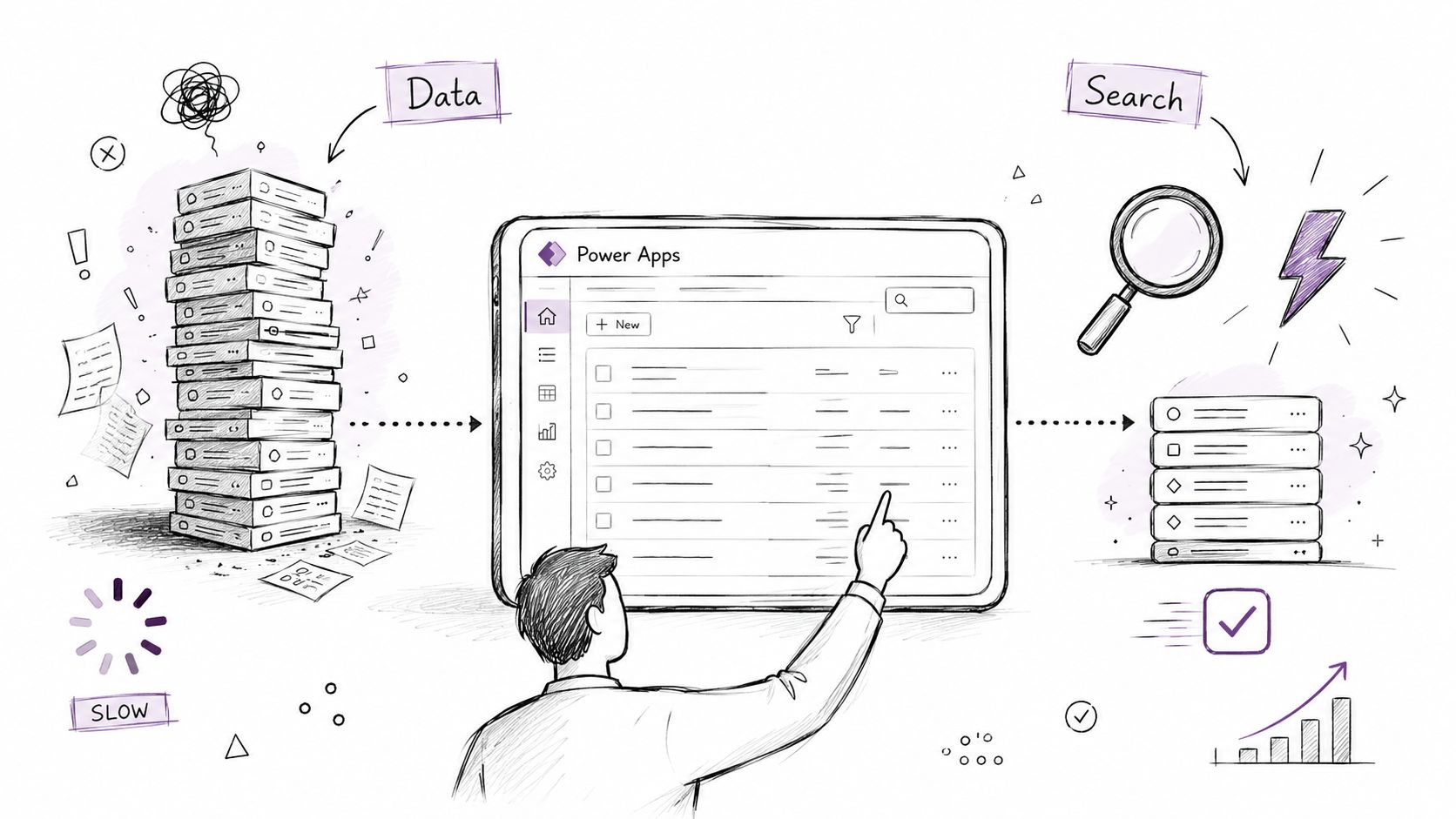
We often see clients fail when they call a low-code solution “done” once it works at pilot scale. It isn't done until it survives growth, delegation constraints, list threshold pressure and real automation load. Microsoft Learn confirms the underlying platform constraints. The app team usually discovers them only after the business depends on the app.
Build for scale or rebuild later
This is a smart business idea because organisations keep needing rescue work. Existing content pushes generic automation services. The better niche is redesigning failing Power Apps and Power Automate solutions around data architecture, search-led retrieval and controlled connector use.
Use search or pagination instead of massive galleries. Reduce direct list dependency where structures are already too large. Profile flows under realistic load. If healthcare teams are automating operational processes, enhancing healthcare processes with automation shows the appeal of workflow improvement. It doesn't replace the hard engineering needed to keep the solution stable in SharePoint-backed estates.
This niche also fits the underserved reality in the market. Generic “business idea” content ignores migration rescue, tenant consolidation and Entra redesign. That's where the serious money and real risk reduction sit.
Ollo verdict
Use Power Apps and Power Automate aggressively, but not casually. If the data model is weak, the app will eventually collapse under its own success. Ollo redesigns the underlying structure so your automation doesn't become the next system your users stop trusting.
10 New IT Business Ideas Compared
| Solution | Implementation complexity 🔄 | Resource requirements ⚡ | Expected outcomes ⭐ | Ideal use cases 💡 | Key advantages 📊 |
|---|---|---|---|---|---|
| Tenant-to-Tenant Consolidation with Zero Data Loss Verification | Very high, multi-stage validation; 4–8 weeks | High, PowerShell/PnP experts, migration engineers, validation infra | ⭐⭐⭐⭐⭐ Zero-data-loss proof and full audit trail | Multi-tenant merges, regulated data, post-acquisition consolidations | Prevents data loss; detects orphaned resources; validates permissions |
| Zero-Trust Entra ID Redesign with Conditional Access Hardening | Very high, 6–12 weeks design, pilots, policy tuning | High, identity/security architects, device management, pilot users | ⭐⭐⭐⭐⭐ Reduced lateral movement; stronger auth and auditability | Organizations adopting zero-trust, regulated sectors, tenant consolidations | Eliminates credential risk; enforces context-aware access; enables passwordless |
| SharePoint List Migration with 5K Item Threshold Remediation | High, list redesign, archival, view optimization | Medium–High, SharePoint architects, business stakeholders, Power Apps devs | ⭐⭐⭐⭐ Prevents performance degradation; preserves auditing | Large lists (>5k), Power Apps-backed apps, enterprise migrations | Improves user performance; reduces support tickets; maintains compliance |
| API Throttling Mitigation for Large-Scale Automation | High, rearchitect scripts with queuing/backoff; timing planning | Medium–High, devs, custom queuing infra, monitoring | ⭐⭐⭐⭐ Reliable migrations and automation; fewer outages | High API-volume migrations, bulk updates, compliance scans | Avoids throttling outages; predictable job completion; better monitoring |
| File Path Length and Special Character Remediation in Legacy Migrations | Medium–High, bulk renames and flattening; stakeholder coordination | Medium, scripting, user coordination, testing (may take months) | ⭐⭐⭐⭐ Prevents access failures; preserves automation and search | Legacy file server migrations, deep folder hierarchies, UNC paths | Ensures file accessibility; reduces 'file not found' incidents |
| Broken Permission Inheritance Recovery and Access Control Redesign | Very high, site-by-site audits and stakeholder interviews; 2–3 months+ | High, security specialists, business owners, automation for reviews | ⭐⭐⭐⭐⭐ Restored least-privilege and compliance-ready access controls | Large SharePoint estates, regulated data, long-unmanaged permission sets | Removes orphaned access; reduces insider risk; supports audits |
| GUID Conflict Detection and Remediation in Multi-Source Migrations | High, GUID inventories, collision mapping, controlled regeneration | Medium–High, PowerShell/SharePoint forensic expertise, pilot testing | ⭐⭐⭐⭐ Prevents lookup/list relationship corruption and workflow breakage | Multi-source consolidations, backup merges, acquisitions | Preserves relationships; prevents lookup corruption; maintains search integrity |
| Content Type and Metadata Governance Inheritance Chain Restoration | High, map inheritance chains, taxonomy alignment, governance. | High, taxonomy owners, search engineers, metadata governance team | ⭐⭐⭐⭐ Preserves metadata integrity and search refiners | Complex content-type estates, legal/records-heavy organizations | Maintains classification; enables accurate search; prevents orphaned metadata |
| Compliance and Records Management Policy Validation Post-Migration | Very high, policy mapping, hold validation, legal coordination | High, legal/compliance teams, migration tooling that preserves audit logs | ⭐⭐⭐⭐⭐ Compliance continuity; legal-hold preservation; audit evidence | Regulated industries (Energy, Finance, Healthcare), litigation holds | Avoids regulatory penalties; provides certified compliance evidence |
| Power Apps and Power Automate Canvas Redesign for Scalable Automation | Medium, performance profiling and delegation redesign; ongoing tuning | Medium, app developers, performance testers, UX designers | ⭐⭐⭐⭐ Scalable apps with improved UX and lower failure rates at scale | High-growth apps, apps against large lists, mission-critical workflows | Improved app performance; fewer support tickets; enables scalable citizen dev |
Next Steps to Bulletproof Your Microsoft 365 Modernization
Friday, 6:40 p.m. The cutover is "done," but the service desk is lighting up. Finance cannot open migrated records. Legal cannot confirm retention labels. A senior executive has just found a folder with the wrong inherited permissions. That is how bad Microsoft 365 projects get remembered. Not by the migration dashboard, but by the first business-critical failure after go-live.
The pattern is predictable. SharePoint list thresholds were ignored until views stalled. API throttling stretched a weekend move into the working week. Legacy file paths and illegal characters broke sync and user access. Multi-source migrations introduced GUID collisions that looked harmless until lookups, workflows, or app references failed in production. Security debt followed the content into the target tenant because nobody rebuilt access properly.
Skeptical IT Directors are right to distrust generic migration packages. The money is in specialist work because the risk is real, technical, and expensive. A failed tenant consolidation can trigger days of remediation. A weak Entra ID redesign can lock out users or leave privileged access exposed. A bad compliance migration can turn an audit into an incident review. Microsoft documents many of these limits and behaviors in Microsoft Learn. The problem is that reading the documentation is not the same as surviving the edge cases.
Use the tooling for what it is good at. SPMT works for smaller, lower-risk moves with clean structure. ShareGate can handle a lot, if the estate is well understood and the constraints are respected. Neither tool saves you from poor identity design, broken permission inheritance, list architecture debt, or post-migration compliance gaps. Those failures come from design decisions, not button clicks.
That is where projects usually go off the rails.
Ollo is the safe fallback because we treat every one of the ten service lines in this article like a failure investigation before it becomes one. We verify zero data loss during tenant-to-tenant consolidation. We rebuild Entra ID around zero-trust controls instead of copying old mistakes. We remediate 5,000-item threshold problems before users hit them. We design around throttling, path limits, special characters, GUID conflicts, metadata inheritance breaks, records policy drift, and Power Platform scalability limits. Then we prove the target state with validation, not optimism.
If your environment includes regulated data, multiple source tenants, custom permissions, long-lived SharePoint estates, or business-critical automation, do not hand it to a generalist and hope their standard runbook holds. It will not.
If your team is staring at a cutover plan and hoping the ugly parts will stay hidden, talk to Ollo. We handle the Microsoft 365 migrations other providers oversimplify, especially tenant-to-tenant consolidations, Entra ID zero-trust redesigns, and rescue projects in regulated environments. If data loss, broken permissions, and compliance gaps are what keep your stakeholders awake, bring in the team led by Dhruv with 15+ years of experience before your next standard migration turns into an incident.

















