



Your team already owns Microsoft 365. Someone in operations built a requisition form in Power Apps. Someone in finance asked for approvals in Teams. Someone in IT connected it to a SharePoint list and called it progress.
That's usually the moment the trouble starts.
I've seen this pattern too many times. A requisition process looks simple until you force it to carry real governance. Then the cracks show. Approval logic breaks when a manager goes on leave. Sensitive pricing ends up visible to the wrong department because item-level permissions were bolted on as an afterthought. Audit asks for a defensible history and gets a messy export with gaps, duplicate identities, and no confidence in who approved what.
The problem isn't that Microsoft 365 is weak. The problem is that too many teams treat purchase requisition software like a small workflow app when it is a spending control system. In regulated organisations, that mistake doesn't just slow procurement. It creates compliance exposure, budget leakage, and operational chaos.
The Anatomy of a Failed Procurement Project
It usually starts with good intentions. The business wants fewer emails, faster approvals, and less spreadsheet chasing. IT wants to avoid another software subscription. So the team builds a “lightweight” requisition tool with Power Apps, Power Automate, and SharePoint.
For the first few weeks, it looks clever.
Then usage grows. Departments add exceptions. Finance asks for cost centre logic. Procurement wants preferred supplier controls. Managers want delegation rules for leave cover. Nobody stops to ask whether the architecture can survive enterprise use.

How the collapse actually happens
We often see clients fail when they treat a governed business process like a departmental app. The documentation says SharePoint is flexible. Reality is that flexibility without architectural discipline becomes technical debt very quickly.
A typical failure chain looks like this:
- The list becomes the database: Requisitions, attachments, comments, approval states, and exception flags all land in one SharePoint list.
- Power Automate becomes the rules engine: Every edge case becomes another branch, condition, or timeout risk.
- Permissions become granular and fragile: Sensitive requisitions trigger broken inheritance all over the site.
- Reporting becomes an afterthought: Audit and finance need defensible history, but the data model was never designed for it.
Practical rule: If your requisition design depends on one “master list” and a handful of flows, you don't have enterprise software. You have a future incident.
The breaking point rarely arrives as one dramatic outage. It arrives as a sequence of smaller failures. An approval fires to the wrong user because delegation logic doesn't match the org chart. A cost centre filter stops working cleanly. A requisition with vendor pricing inherits the wrong permissions. Then somebody asks for a historical record across departments, and the whole thing turns into a manual reconstruction exercise.
Why sceptical IT leaders should care
This is the same pattern behind many low-code governance failures. The system works just well enough to get adopted, then fails the moment people rely on it. If your business still runs critical approvals through spreadsheets and improvised forms, you're already in the danger zone. That's the point where teams usually realise they've outgrown spreadsheets as a control mechanism.
Procurement systems fail unnoticed before they fail publicly. The public failure happens when audit, finance, or legal gets involved.
What Is Enterprise Purchase Requisition Software Really
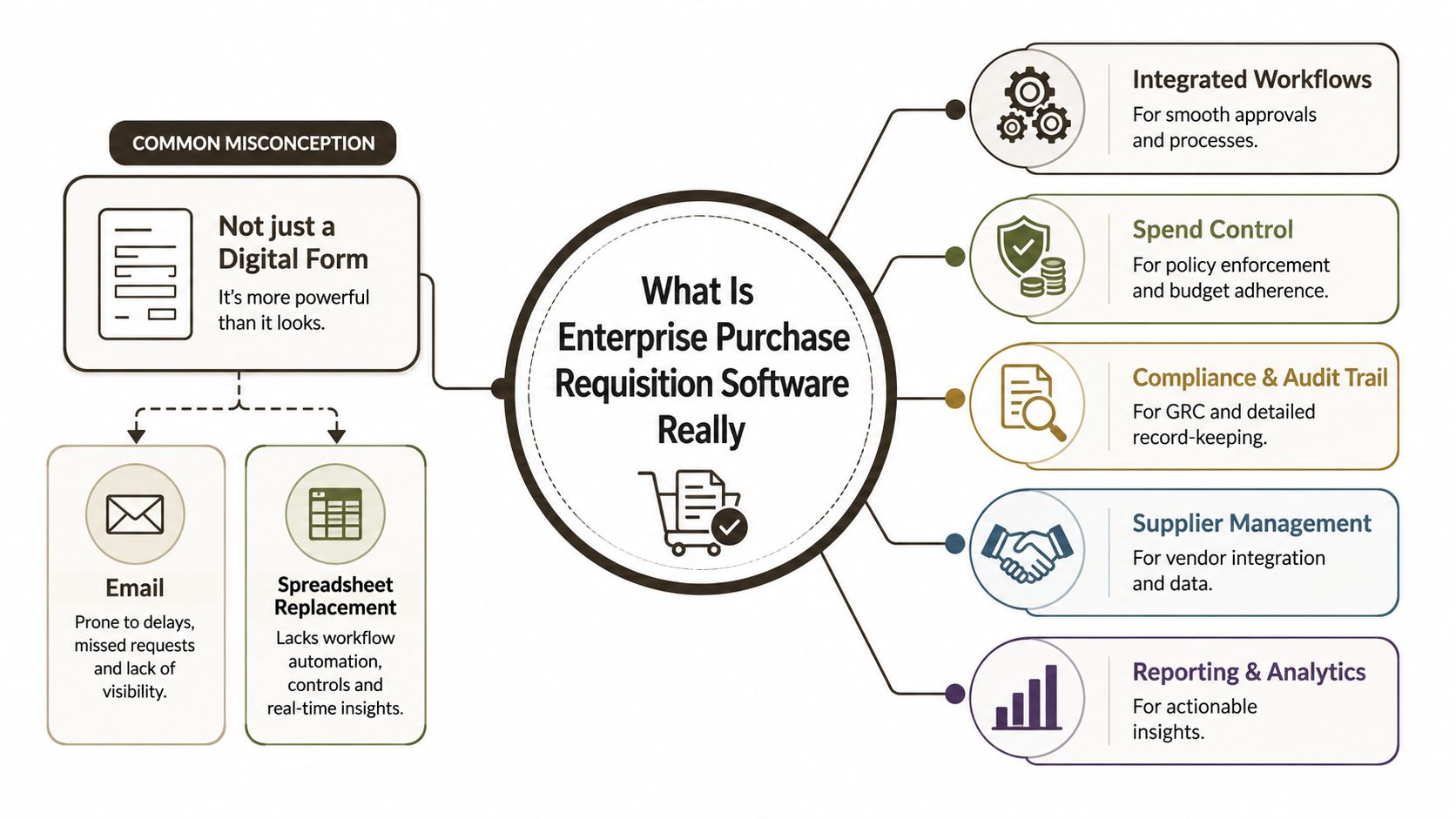
A lot of IT leaders still define purchase requisition software as a digital form with an approval route. That definition is wrong, and it's dangerous.
A form captures a request. A real requisition system enforces control before money leaves the organisation. That's a very different job.
It's a governance engine, not a form
Enterprise purchase requisition software sits at the front of spend governance. It should validate budget context, route requests according to policy, preserve an audit trail, and apply rules before procurement converts anything into a purchase order.
That means the system must do more than collect fields. It must answer hard questions in real time:
- Who can request this category of spend?
- Which approver owns this cost centre?
- What happens when that approver is absent?
- Can this request proceed without violating policy?
- Which identity record will stand up under audit scrutiny later?
If your design can't answer those questions without manual intervention, it isn't enterprise-grade.
The gap most mid-market firms ignore
The common misconception is that “centralised” just means everyone uses the same form. It doesn't. Centralised means one controlled request model with segmented rules, traceable ownership, and policy enforcement across departments.
According to Order.co's guidance on enterprise purchase requisition software, enterprise-grade tools must enforce configurable approval workflows tied to dollar thresholds and cost centers, and many mid-sized IE companies see 70% longer approval times and budget overruns because DIY solutions can't handle departmental segmentation. The same source says 65% of IE firms still lack this centralised request management.
A requisition system should behave like a control plane for organisational spending. If it behaves like a shared inbox with extra fields, it will fail under pressure.
That distinction matters most in Irish organisations with multiple business units, mixed oversight models, and regulated data handling. One department may need extra legal review. Another may require supplier validation. A third may have temporary delegated approvers because of project-based structures. A generic low-code form won't manage that complexity cleanly for long.
Non-Negotiable Features for Regulated Organisations
If you work in finance, energy, or healthcare, your requisition process sits inside your governance model whether you admit it or not. A weak design here creates an audit problem long before it creates a user experience problem.
That's why regulated organisations need hard controls, not “good enough” automation.
Approval logic must reflect real authority
“Manager approval” is not a control model. It's a placeholder.
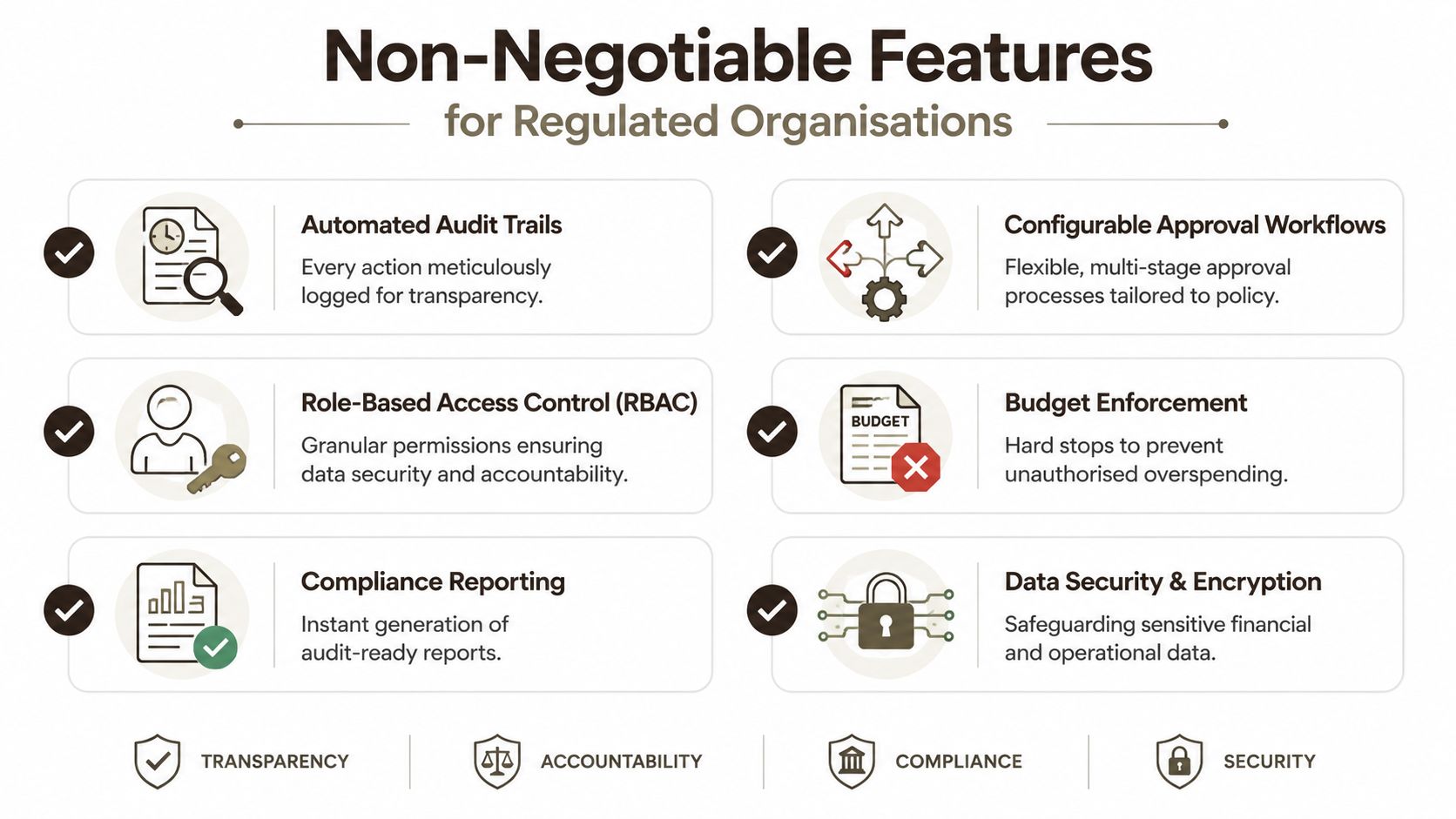
Real purchase requisition software needs configurable workflows that account for value thresholds, cost centres, departmental policy, temporary delegation, and escalation paths. The documentation for most platforms suggests this is straightforward. In reality, delegated authority is where amateur implementations fall apart.
When somebody goes on extended leave, your flow can't just stop or route to the wrong line manager. It needs defensible logic. If it doesn't, approvals become administratively convenient and legally weak.
Audit trails must be immutable and useful
An audit trail isn't a comments field and a modified date.
You need a record of who submitted, who viewed, who edited, who approved, what changed, when it changed, and which identity source backed that action. If your tenant has identity mismatches or inconsistent profile mapping, that record becomes questionable very quickly.
A proper audit trail also has to be reportable without forensic work. Auditors won't accept a story. They want evidence.
Access control can't rely on good behaviour
Sensitive requisitions often include vendor pricing, contract references, budget notes, or commercially sensitive justification. If your solution handles access through ad hoc SharePoint permissions, you're inviting broken inheritance and inconsistent visibility.
Your baseline should include:
- Role-based access control: Requesters, approvers, finance reviewers, procurement, and auditors shouldn't see the same data.
- Segregation of duties: The same person shouldn't request, approve, and confirm the same spend path.
- Controlled exception handling: Special access for urgent cases must be visible, temporary, and reviewable.
Teams that skip this usually create a permission estate nobody can explain six months later. If you're building governance on Power Platform, that's why Power Platform governance discipline matters before you automate anything sensitive.
Warning from the trenches: Missing access controls doesn't just weaken the system. It undermines the credibility of every approval captured inside it.
Retention and compliance reporting need automation
Most DIY systems obsess over submission and approval, then ignore retention. That's backwards.
A regulated requisition system needs records management built in. Retention rules should apply automatically, consistently, and defensibly. Compliance reporting should also be available without manual exports and spreadsheet stitching. If your team has to assemble an audit pack by hand, the system isn't doing its job.
The M365 and SharePoint Integration Minefield
Your team already pays for Microsoft 365, so the pressure to build requisition workflows on the stack is obvious. I understand the logic. I also know where it breaks.
The official Microsoft documentation describes platform limits clearly enough, but most internal project teams don't read those limits as architectural warnings. They read them after the solution is already in production.
The 5,000-item wall is real
The most dangerous misconception in DIY requisition builds is that SharePoint lists scale cleanly if you index enough columns. They don't. Microsoft enforces a hard architectural list view threshold of exactly 5,000 items in SharePoint Online, and tools or custom scripts that don't handle that properly can fail the migration or move data into a broken state, as noted in Ollo's analysis of SharePoint migration pricing and Microsoft Learn-confirmed limits.
That matters because requisition systems accumulate records quickly. Add attachments, comments, approval metadata, and permission complexity, and your “simple list” becomes a liability.
If a vendor tells you indexing solves the threshold problem on its own, they don't understand the platform well enough to build a governed system on it.
Throttling, inheritance, and identity mismatches
The second trap is API throttling. Power Automate looks forgiving in demos. Enterprise approval patterns are less forgiving. High transaction volumes, attachment handling, cross-list lookups, and permission updates create bursts of activity that hit service protection limits fast. When flows start timing out or retrying unpredictably, users lose trust in the whole process.
The third trap is broken inheritance. Teams often lock down individual requisitions because the content includes commercially sensitive pricing or legal notes. At small scale, item-level permissions look manageable. At enterprise scale, they become brittle and hard to audit.
Then there's identity. If you're migrating data from an older SharePoint estate, another tenant, or a legacy tool, mismatched user identities can wreck your audit chain. Entra ID accounts, historical approver names, and SharePoint user profiles don't always align neatly. Once that mapping goes wrong, your audit record starts answering the wrong question: not “who approved this?” but “who might this have been?”
Microsoft 365 gives you powerful building blocks. It does not protect you from bad architecture.
Where SharePoint still fits, and where it doesn't
SharePoint absolutely has a role in the surrounding solution. It can store controlled documents, surface supporting materials, and provide integration points. What it should not become is a careless substitute for a governed transactional architecture.
That's the distinction many teams miss when weighing Dataverse against SharePoint lists for business-critical applications. One is often treated as “already there.” The other is treated as “extra.” In practice, the wrong choice creates years of operational pain.
COTS vs DIY vs Specialist A Brutally Honest Comparison
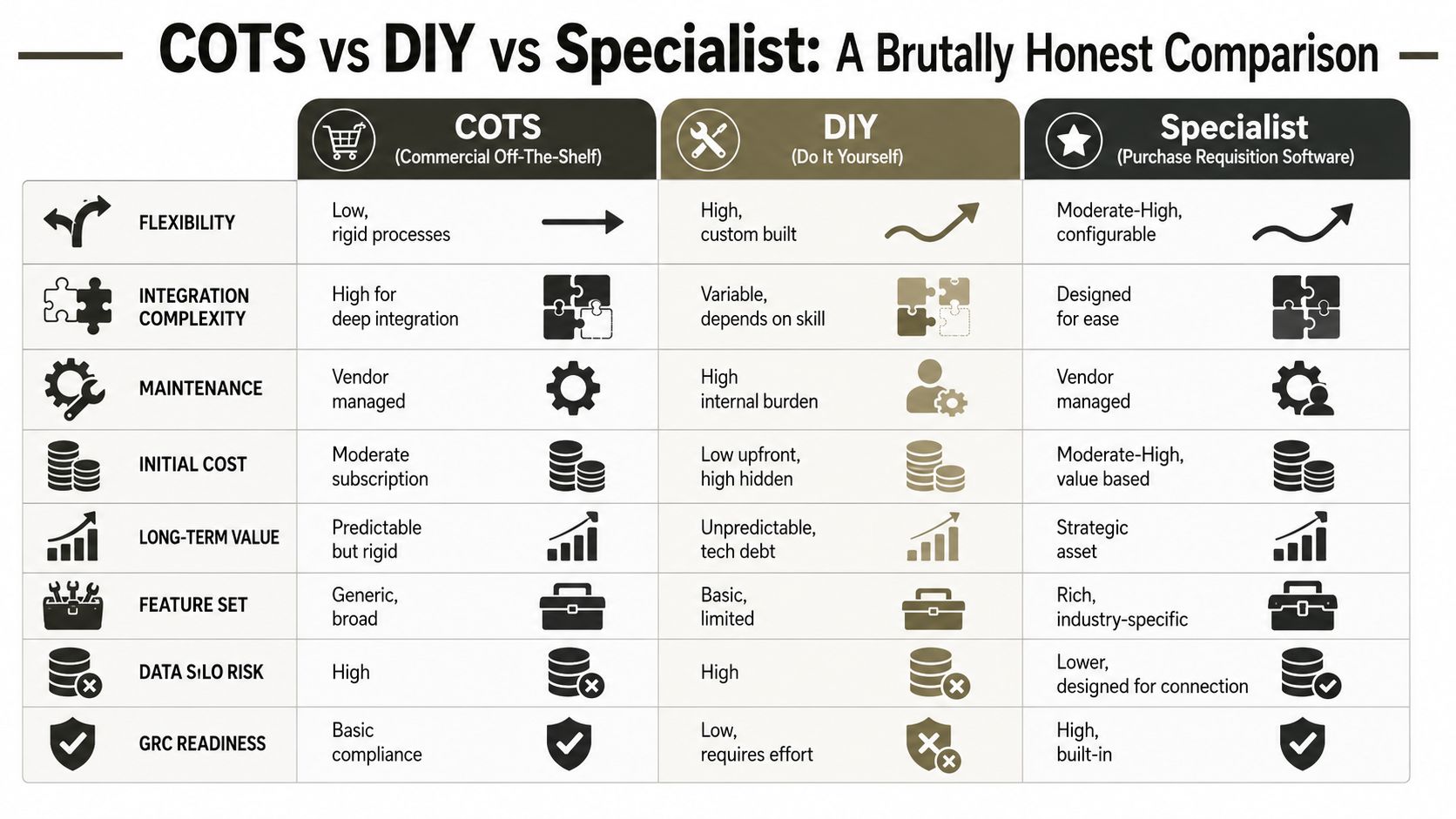
You have three realistic options. Buy a commercial product. Build it yourself. Or bring in specialists who know where Microsoft 365 breaks and how to design around it.
None of these paths is perfect. One of them is just far more dangerous than the others.
COTS gives structure, but often creates a silo
Commercial off-the-shelf procurement products usually start strong. They've got mature workflows, cleaner audit capabilities, and fewer rough edges than a rushed Power Apps build. If your process is fairly standard, that can work.
The trouble starts when you need deep integration with your Microsoft estate. Entra ID group logic, SharePoint document libraries, retention labels, Teams-based notifications, and bespoke finance approval rules often push COTS platforms into expensive customisation territory. Then you're stuck with a polished system that doesn't fit your operating model cleanly.
DIY gives control, then hands you the blast radius
DIY is seductive because it looks cheap and familiar. Your team already knows Microsoft 365. Power Apps and Power Automate seem configurable enough. SharePoint is already licensed. That stack creates the illusion that you're saving money.
What you're doing is taking ownership of every failure mode:
- Workflow fragility: One bad branch or connector issue can stall approvals.
- Security drift: Item-level permissions become impossible to govern at scale.
- Data model debt: Reporting, retention, and cross-department logic arrive late and hurt more.
- Platform limits: Thresholds, throttling, path issues, and identity conflicts don't care about your delivery deadline.
At this point, “low code” turns into “high consequence”.
Here's the embedded comparison video worth watching before you choose a path:
Specialist delivery is about risk reduction
A specialist build isn't just custom work with a nicer label. It means the architecture starts with the known failure points. It plans for approval delegation, access segmentation, record retention, identity mapping, API behaviour, and data growth before the first screen gets built.
That doesn't remove complexity. It contains it.
| Option | Best use case | Biggest weakness | Ollo verdict |
|---|---|---|---|
| COTS | Standard procurement processes with limited tenant-specific control needs | Deep Microsoft integration often becomes painful | Use COTS if your controls are generic and you can live with rigidity |
| DIY | Small, low-risk departmental workflows | Technical debt and governance failure in regulated use | Use DIY only for low-stakes scenarios |
| Specialist | Regulated, high-stakes requisition systems inside Microsoft 365 | Higher upfront scrutiny and design effort | Use specialist delivery for anything business-critical |
Tools matter less than the operator. ShareGate, Power Apps, PnP PowerShell, or Power Automate can all do damage in untrained hands.
The Ollo verdict is simple. Use basic Microsoft tooling only for small, low-risk scenarios. For anything with regulated approvals, sensitive pricing, or cross-department governance, you need specialist architecture, not enthusiasm.
A Vendor Evaluation Checklist That Exposes Weaknesses
Don't ask a vendor whether they can build purchase requisition software. Almost all of them will say yes. Ask questions that force them to reveal whether they understand architecture, governance, and failure modes.
If they answer with product features instead of design logic, keep looking.
Questions that separate builders from amateurs
Ask these directly in the room:
How will you architect around list scale and reporting complexity?
If they answer “we'll index the columns,” they've already failed the test.How will delegated approval authority work during leave, absence, or interim management changes?
You want a real control model, not a hand-wave about backups.How will you isolate commercially sensitive vendor pricing without creating an unmanageable permission estate?
This exposes whether they understand broken inheritance and access design.What's your strategy for API throttling during busy periods?
If they talk only about retries, they're thinking tactically, not architecturally.How will retention, deletion, and audit reporting be enforced automatically?
“We can export reports” is not a serious answer.
Why this matters commercially
The upside is real. Purchase requisition management software can reduce processing costs by up to 70% per transaction, according to Contract Corridor's analysis of purchase requisition management software. That gain comes from eliminating manual handling, routing, and compliance checking.
But you only get that value if the system survives contact with the actual organisation.
A badly architected platform doesn't just miss the ROI. It replaces one set of manual problems with a more expensive digital mess. Procurement chases approvals. Finance questions the data. IT inherits unstable flows and support calls. Audit gets nervous. Nobody calls that success.
Borrow a better evaluation habit
If you want a useful model for pressure-testing service providers, look at ADA Compliance Pros' questionnaire. It's aimed at accessibility vendors, but the underlying discipline is exactly right. Ask vendors to explain process, evidence, edge cases, and accountability, not just capability claims.
The same principle applies when writing your software RFP questions for procurement and governance-heavy projects. Weak vendors love broad requirements. Strong ones can survive specific scrutiny.
The right question isn't “Can you build it?” The right question is “How does your design fail, and what have you done to stop that?”
The Ollo Verdict Why DIY Is a False Economy
The biggest lie in Microsoft 365 projects is that building on software you already own is automatically cheaper. It isn't. It just hides the bill until later.
Organisations that skip a professional assessment phase before budgeting for complex SharePoint projects consistently underestimate costs by 30–50%, leading to severe budget overruns and timeline delays, according to SharePoint Support's migration cost guide. The same source says expert-led pilot projects can reduce timelines by exposing environment-specific issues early.
That pattern shows up in requisition projects all the time. Teams budget for forms and flows. They forget delegated authority, retention, audit evidence, permission sprawl, identity mapping, and platform constraints. Then the project stalls, gets rebuilt, or survives in production as a permanent governance headache.
What your team should do instead
Your internal team shouldn't have to become specialists in SharePoint internals, API behaviour, and procurement governance just to approve spend responsibly. That's not a sensible use of your time.
Use internal capability to define policy, ownership, and operational needs. Use external specialists when the architecture carries compliance risk. That's the difference between software delivery and risk management. It's the same distinction many IT leaders miss when comparing a Microsoft 365 admin with a specialist consultant.
The blunt conclusion is simple. DIY purchase requisition software is fine for toy problems. It is a false economy for regulated organisations with real controls, real audit obligations, and real exposure when things go wrong.
If your team is trying to modernise procurement inside Microsoft 365 without creating a compliance problem in the process, talk to Ollo. We specialise in high-stakes Microsoft environments where the core task isn't building forms. It's preventing architectural mistakes that turn into audit findings, budget overruns, and broken business processes.

















