



You're probably in one of two situations right now. Either your team is drafting an RFP for a Microsoft 365 or SharePoint migration and procurement wants a standard software template, or you already ran that process once and got burned. The vendor promised confidence, the plan looked tidy, and then the actual project started. API throttling hit. Permissions didn't map cleanly. Long paths failed unnoticed. Someone discovered broken inheritance after content had already moved.
That's the problem with most advice about RFP in software. It treats the document like a procurement artefact. For cloud migration work, it isn't. It's a technical control surface. If your RFP ignores the way Microsoft 365 behaves under load, you don't have a buying document. You have a delayed failure.
Your Software RFP is a Loaded Weapon Aimed at Your Project
A few months into a rescue engagement, we often hear the same sentence: “The vendor answered every question in the RFP.” That sounds reassuring until you inspect the RFP and realise it asked almost nothing that mattered.
The typical template asks about methodology, timeline, support model, and pricing. Fine. None of that stops a migration rollback. None of that protects your compliance posture when a permissions model mutates in transit. None of that tells you whether the vendor understands how SharePoint behaves when a document library crosses technical thresholds confirmed in Microsoft Learn documentation.
Gartner reports that 83% of data migration projects either fail outright or exceed their budget and timeline, and the cited causes include weak pre-migration profiling, deduplication, and checksum validation that DIY tools tend to ignore, as noted in this analysis of data migration failures. If you've seen a migration “finish” and still leave the estate in worse shape, that figure won't surprise you.
Your procurement team may also be comparing platforms and cataloguing software management tools. That's useful at a high level. It becomes dangerous when a migration gets treated like a normal software purchase rather than a high-risk engineering operation.
What failure looks like in the real world
We often see clients fail when they use a generic software RFP for tenant-to-tenant migration work. The shortlisted vendors all sound competent because the questions stay abstract. Then the project hits specifics:
- API throttling starts slowing ingestion and batching
- List view thresholds interrupt content movement
- Broken inheritance corrupts expected access patterns
- GUID conflicts appear after supposedly clean consolidation
- Path length issues leave straggler content behind
Your team doesn't lose this project because procurement asked the wrong commercial questions. You lose it because nobody forced the vendor to answer the dangerous technical ones.
A proper migration RFP needs architectural teeth. If you need a baseline on what that should look like, start with this guide to a request for proposal. Then harden it. Strip out fluffy vendor prompts and replace them with failure tests.
The real job of the RFP
Your RFP should do three things:
- Force technical specificity. If a vendor can't explain validation, rollback, and throttling controls, they shouldn't get shortlisted.
- Expose tool dependency. Vendors leaning blindly on SPMT or default ShareGate settings reveal themselves quickly when you ask edge-case questions.
- Protect your future state. Missing one requirement doesn't just slow delivery. It can break legal hold, retention, access control, and auditability.
That's the bar. Anything softer invites trouble.
The Static RFP in a Dynamic Cloud World
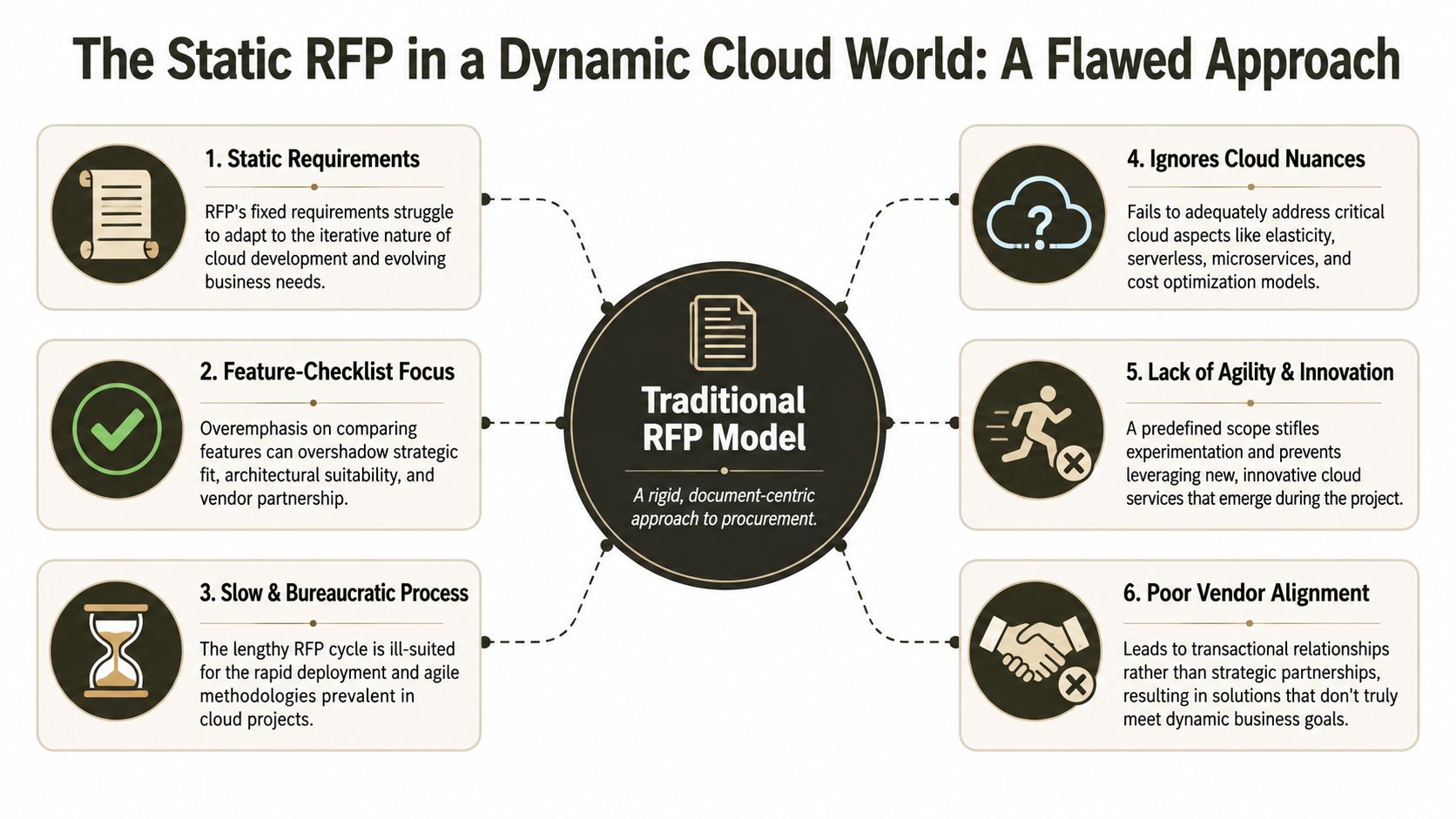
Traditional software procurement assumes you're buying something stable. A fixed requirement set. A defined implementation. A done deal. That logic collapses in Microsoft 365.
Documentation says an RFP selects a “done deal,” yet reality is that API Throttling, 5k item limits, and path length constraints shift after migration, and rigid RFPs often miss these operational realities, as discussed in this piece on fixing software RFPs. We often see IT Directors in Energy and Finance inherit that mistake from a procurement process that was built for static software, not a living cloud estate.
Why the old model breaks
A static RFP usually rewards the wrong behaviour. Vendors optimise for box-ticking. They mirror your language, repeat your assumptions, and avoid exposing uncertainty. That works for software licensing. It fails for cloud migrations because the platform keeps moving and your environment is never as clean as the source system claims.
Consider what happens in a normal Microsoft 365 programme:
- Entra ID policies evolve
- retention and compliance controls tighten
- inherited permissions reveal historic mess
- integrations surface undocumented dependencies
- throttling patterns change under production load
A fixed questionnaire doesn't capture that. It hides it.
What a dynamic RFP must do instead
Your RFP has to test for adaptation. Ask vendors how they redesign around changing conditions, not just how they execute a pre-written plan. If they can only describe a linear migration sequence, you've found a team that works well in PowerPoint and poorly in production.
A better approach is to write the RFP as an engineering document with review gates. Require the vendor to define decision points, exception handling, data validation, and remediation pathways. If your estate still carries on-prem baggage, this matters even more. A move from legacy platforms isn't just data transfer. It's architecture correction. That's why this guide on on-premise to cloud migration is more relevant than generic procurement advice.
Practical rule: If your RFP assumes the target state is static, your project is already behind reality.
The trap most teams walk into
The static RFP trap usually starts with a harmless assumption: “We know what we need.” In enterprise cloud work, you rarely do. You know the broad objective. You don't yet know every malformed permission, every dependency on file path structure, every hidden workflow coupling, or every library that will trigger service constraints.
That's why the RFP itself needs architecture. Not just administration.
The Technical Questions That Expose Unqualified Vendors
If you want a useful RFP in software for Microsoft 365 migration work, stop asking vendors whether they have a proven methodology. Every vendor says yes. Ask questions that force them to reveal whether they understand failure modes confirmed in Microsoft Learn documentation.
In enterprise Microsoft 365 migrations, the RFP must explicitly require validation of API throttling thresholds, because Microsoft Learn documentation confirms that unoptimised migration scripts can trigger 5,000-item ingestion limits and cause rollbacks. We often see clients fail when their RFPs omit throttling safeguards, which then leads to incomplete transfers in regulated sectors. The requirement appears clearly in this Office 365 migration RFP template.
Ask for data integrity controls, not promises
Start with validation. If a vendor can't describe how they prove data integrity before, during, and after migration, stop there.
Use questions like these in your technical schedule:
- Checksum and verification: How do you validate file-level and metadata-level integrity after each migration wave?
- Deduplication handling: What pre-migration profiling do you run to identify duplicate, stale, or malformed content before movement begins?
- Rollback trigger: Under what conditions do you stop or reverse a batch, and who approves that decision?
- Exception reporting: How do you classify and reprocess failed items without contaminating audit records?
A weak vendor will answer with generic words like “validation framework” or “best practice controls”. A serious one will describe sequence, tooling, thresholds, and evidence.
Force them to explain throttling behaviour
Most bad proposals hide behind product names. They say “we use ShareGate” or “we use Microsoft tooling” as if naming a tool solves rate limiting.
It doesn't.
Ask this instead:
| Question | What a weak answer sounds like | What a credible answer includes |
|---|---|---|
| How do you detect API throttling in production waves? | “Our tool handles that automatically” | Monitoring approach, retry logic, batch tuning, escalation path |
| How do you adjust when service limits affect throughput? | “We scale resources” | Backoff strategy, scheduling controls, batch segmentation |
| How do you avoid rollback conditions? | “We follow Microsoft guidance” | Specific pre-validation, item profiling, threshold-aware sequencing |
Use SharePoint-specific failure tests
SharePoint migrations fail in very specific ways. Your RFP should reflect that.
- List view threshold: Ask how the vendor handles libraries and lists that cross the 5k threshold without relying on wishful thinking.
- Long path handling: Ask how they identify and remediate path length issues before cutover.
- Broken inheritance: Ask how they map, preserve, or redesign unique permissions at scale.
- GUID conflicts: Ask what happens when legacy structures collide in consolidation scenarios.
We often see teams skip these questions because they think the migration tool will “figure it out”. It won't. The tool may expose the problem. It won't own the architecture.
Test identity and security maturity
Unqualified vendors typically falter at this juncture. They talk confidently about content migration and then get vague when identity enters the room.
Ask them:
- How do you handle Entra ID redesign when source tenancy contains legacy access patterns that violate zero-trust principles?
- How do you reconcile historical permissions with target-state governance?
- How do you detect broken inheritance chains before they create post-migration overexposure?
- How do you prove that access controls in the destination reflect approved security intent?
For a useful external checklist on commercial due diligence, these important considerations for outsourcing decisions are worth reviewing. Then make your own version much harder and much more technical.
If a vendor answers a hard migration question with a product brochure, they've already told you they're not qualified.
A practical companion to this is understanding where tools help and where they stop. This breakdown of SharePoint migration software helps frame the difference between software capability and delivery competence.
ShareGate and SPMT The Good The Bad and The Ugly
Your team will ask about tools. That's fair. Tools matter. But treating the tool as the strategy is how migrations go off the rails.
The Microsoft 5k item limit in SharePoint is a hard technical constraint confirmed in Microsoft Learn documentation, and it can cause failures when SPMT or Migration Manager tries to move content without custom scripting to work around the threshold, as covered in this analysis of Migration Manager in Microsoft 365. That's not a corner case. It shows up constantly in older estates with messy libraries and years of drift.
The good
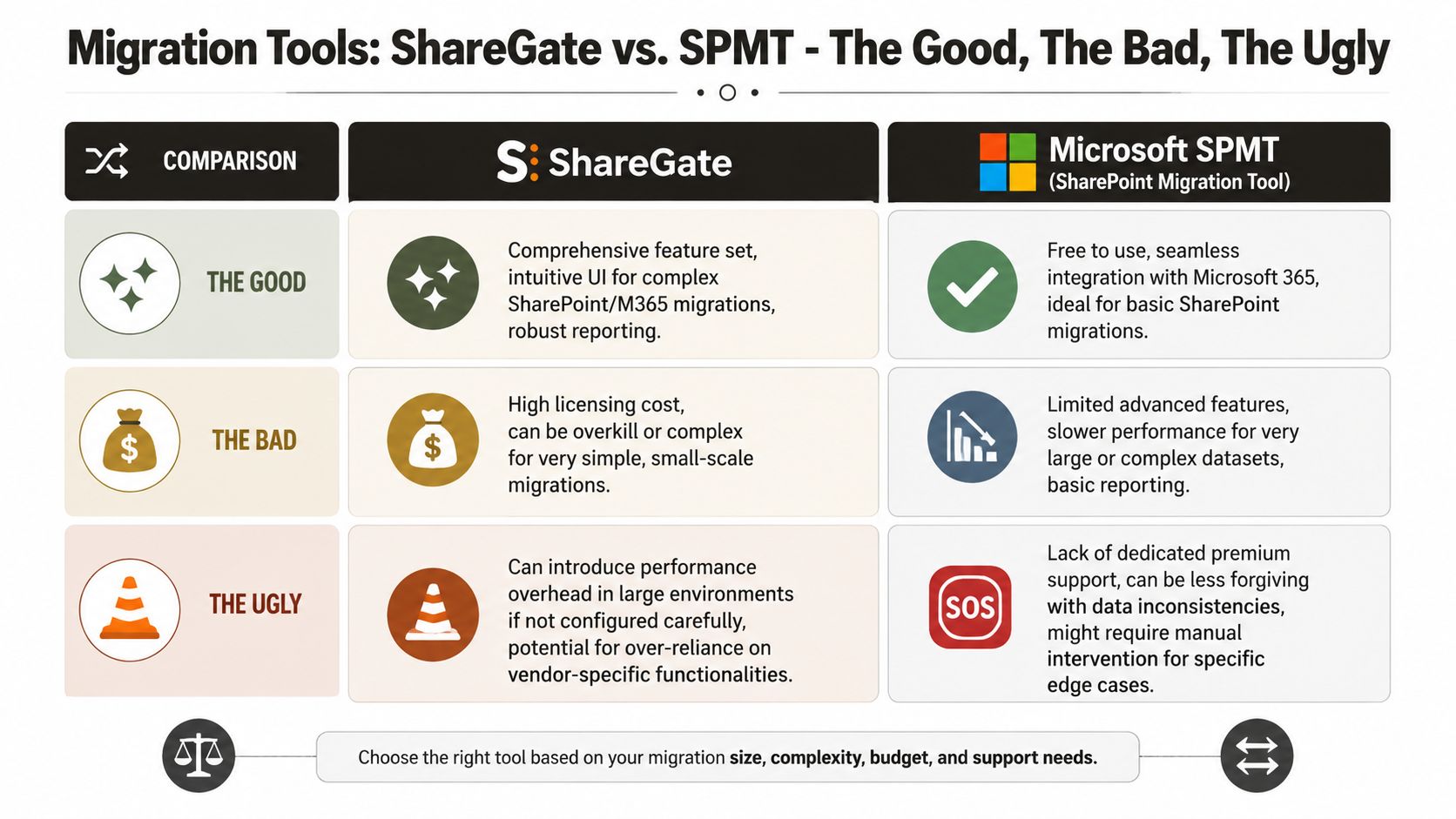
SPMT has a place. It's free, it integrates neatly with Microsoft 365, and it's acceptable for straightforward, low-complexity jobs.
ShareGate is stronger for serious SharePoint and Microsoft 365 work. It gives you better visibility, stronger reporting, and broader operational control.
That's the positive case. It's also where too many evaluations stop.
The bad
SPMT starts to creak when the environment isn't clean. It doesn't give you much tolerance for malformed structures, odd permissions, or threshold-heavy libraries. Reporting is basic. Recovery becomes manual quickly.
ShareGate is more capable, but capability isn't immunity. In complex estates, especially where permissions sprawl and inheritance is fractured, you still need someone who knows when to stop trusting defaults and start scripting around reality.
Here's the blunt version:
- SPMT works for small, basic moves
- ShareGate works for more complex jobs
- Neither tool replaces architecture
- Neither tool removes the need for validation, remediation, and controlled exception handling
The ugly
We often see clients fail when they believe the product demo. The vendor runs a polished pilot on tidy sample data. Then production starts and hidden structures appear. Libraries exceed practical thresholds. Permissions don't reconcile. The migration “completes” but leaves behind failed objects, inconsistent access, and a support mess nobody priced in.
That's the ugly part. The failure doesn't always look dramatic on day one. It shows up later as missing content, bad access, legal risk, and a second project to repair what the first one broke.
Tools don't fail projects on their own. Teams fail when they put enterprise risk into a toolchain without engineering judgement.
If you want a more detailed look at the platform Microsoft provides, review this guide to the SPMT SharePoint Migration Tool. Then apply the only sensible rule.
The Ollo Verdict
Use SPMT for very small, low-risk migrations. Use ShareGate when the estate is more complex but still controllable. For enterprise consolidation, regulated data, broken inheritance, or identity redesign, you need custom scripting and specialist oversight. Anything else is gambling with your data.
Quantifying the True Cost of a Failed Migration RFP
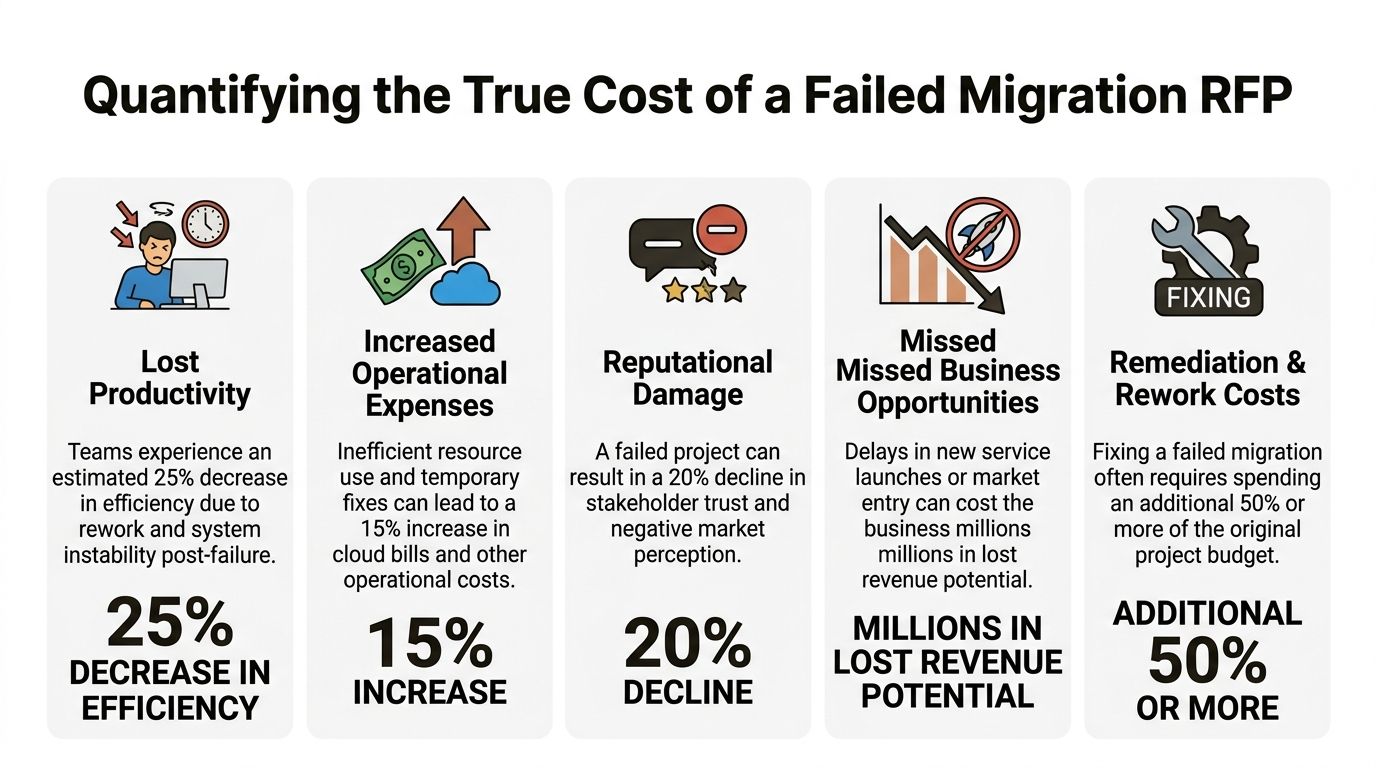
The financial damage rarely appears in the first steering committee slide. It lands later, after your team has reworked mapping rules, extended support windows, absorbed contractor overruns, and explained to leadership why the platform migration finished but the business outcome didn't.
People rarely ask how vague RFPs lead to $725,000 annual revenue loss due to incomplete proposals, and they almost never connect that to migration scope creep caused by unclear incumbent integration and missing technical clauses. That figure comes from this report on revenue loss from incomplete RFPs. In migration terms, the same pattern shows up when the document says “migrate SharePoint” but never defines throttling safeguards, broken inheritance treatment, or validation obligations.
A failed migration leaves technical debt behind. If you need a useful framing for the aftermath, this guide on managing technical debt is worth your time, because rescue work is usually debt repayment under pressure.
Early in the discussion, a visual helps leadership understand the blast radius.
Where the cost actually lands
A bad RFP drives loss in four places at once:
- Operational drag: Your admins and project team spend months chasing defects instead of moving the platform forward.
- Compliance exposure: Missing access controls and bad data integrity checks can break retention, audit, or legal requirements.
- Commercial rework: You pay twice. Once for the original project, then again for remediation.
- Political damage: Stakeholders stop trusting IT. That matters more than is commonly acknowledged.
Why rescue costs more than prevention
Rescue work is expensive because nobody gets to start clean. The target tenant already contains partial changes. Security teams are nervous. Business owners are angry. Every decision carries the burden of proving what did and didn't move correctly.
This video is useful if you need to explain that dynamic to non-technical stakeholders before approval turns into damage control.
A smart budget doesn't minimise migration planning effort. It funds the controls that stop failure from compounding. That includes proper discovery, realistic exception handling, and a technical RFP that names actual risks.
For planning purposes, it also helps to understand the components that drive SharePoint migration cost. The cheapest proposal on paper often becomes the most expensive project in production.
Red Flags in Vendor Responses You Cannot Ignore
You've sent a stronger RFP. Good. Now you need to score responses without getting seduced by polished language.
The average RFP win rate is 45%, which means a 55% failure rate for many organisations trying DIY responses, while top-performing teams reach 60%+. We also often see teams fail when they manually aggregate responses for complex Microsoft 365 migrations and end up with inconsistent evaluations and post-migration conflict, according to these RFP statistics. That's why your review process has to be as disciplined as the RFP itself.
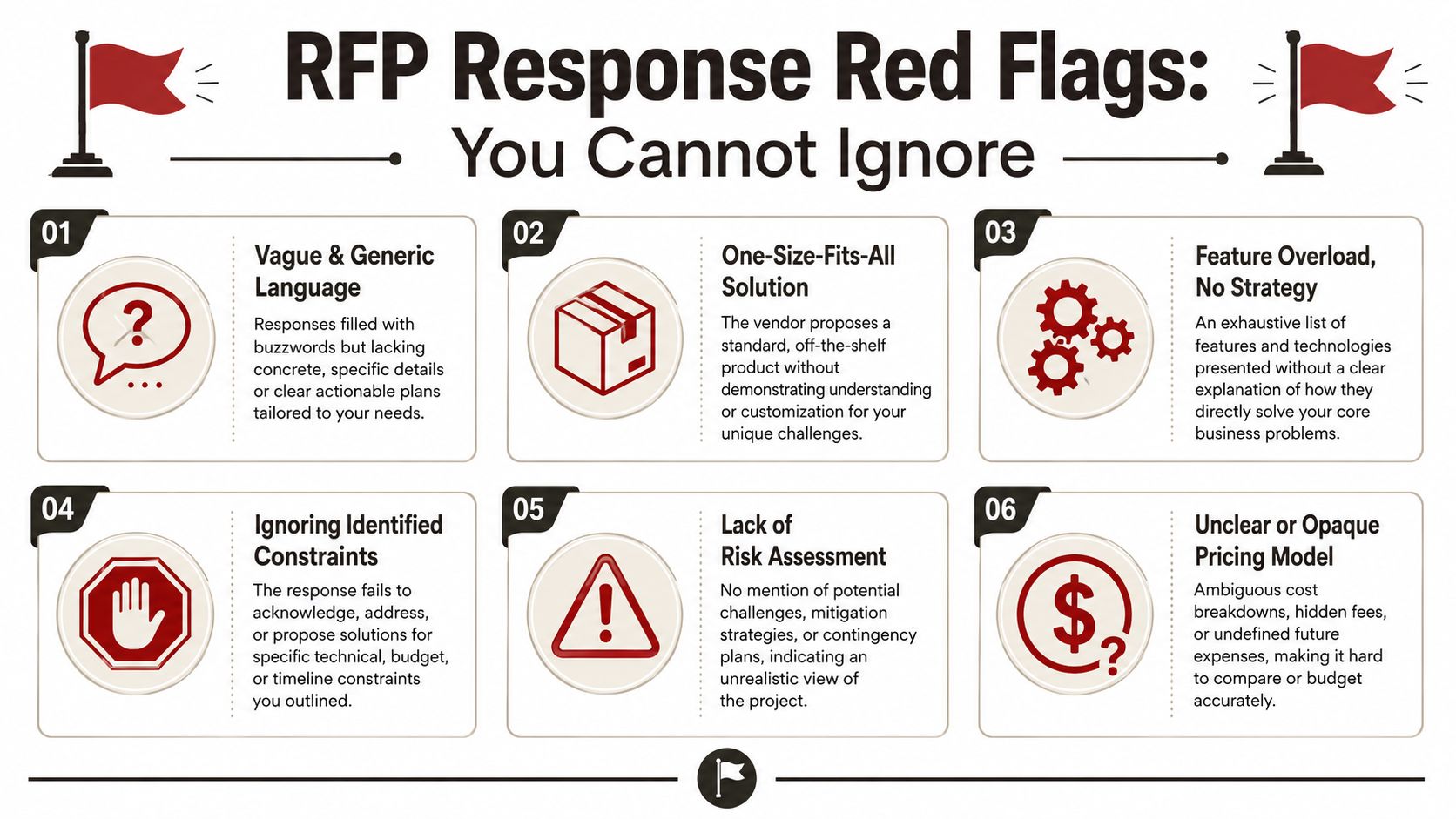
The tells that matter
Watch for these warning signs:
- Buzzword-heavy language: If the response says “fluid”, “accelerated”, or “best-in-class” but never explains throttling control, rollback logic, or validation evidence, bin it.
- Tool worship: If the proposal leans on SPMT or a named platform as the answer to every requirement, the team probably lacks engineering depth.
- No exception path: Serious migration plans include failure handling. Weak ones pretend every object migrates cleanly.
- Thin security detail: If Entra ID, broken inheritance, or target-state governance barely appear, the vendor hasn't understood the actual job.
- Opaque pricing: When costs stay abstract, change requests are already on the way.
What strong responses look like
A credible vendor response is specific, uncomfortable, and a bit annoying to read. That's a compliment. It should force decisions, expose dependencies, and make clear where your estate is risky.
Good proposals don't flatter your assumptions. They challenge them.
The best responses also admit constraints. If a vendor never says where a tool breaks, where a rollback threshold sits, or where business-side remediation is required, they're selling certainty they can't deliver.
The Ollo Verdict Your Next Move to De-Risk Your Migration
The market for RFP response management software is projected to reach USD 3.19 billion in 2026, yet 57% of CPOs cite poor data quality as a barrier to technology adoption, according to this market analysis of RFP response management software. That tells you exactly what experienced architects already know. Software helps organise process. It doesn't remove complexity. It doesn't repair broken permissions. It doesn't resolve GUID conflicts. It doesn't protect your estate from a badly engineered migration approach.
If your Microsoft 365 project involves regulated data, tenant consolidation, SharePoint sprawl, file server clean-up, zero-trust redesign, or ugly legacy structures, a standard software RFP is not enough. A generic implementation partner is not enough either.
Your team needs an RFP that acts like a technical gatekeeper. It must force vendors to answer for API throttling, threshold handling, path limits, broken inheritance, validation, rollback, and identity redesign. Those issues are confirmed in official Microsoft Learn documentation, and they don't care how confident the sales deck sounds.
Here's the blunt conclusion.
- Use generic software RFP templates for generic software.
- Use lightweight migration tooling for lightweight jobs.
- Use specialist-led architecture for enterprise Microsoft 365 migration work.
That's the only rational split.
The Ollo verdict is simple. If the migration is small and low-risk, basic tooling can do the job. If your environment is large, regulated, politically sensitive, or structurally messy, DIY is an avoidable mistake. Missing this step doesn't just fail the migration. It can break compliance, corrupt access control, and force a rescue under scrutiny.
If your team is drafting an RFP for Microsoft 365, SharePoint, or tenant-to-tenant migration work, get a specialist review before you send it to market. Ollo handles high-stakes migration architecture, rescue projects, and complex Microsoft 365 delivery for organisations that can't afford data loss, compliance failure, or a second attempt.

















