



The popular advice says a SharePoint migration is a content move. That advice causes expensive failures.
A real SharePoint migration CTO guide starts from a harsher premise. You’re not moving files. You’re moving identity, permissions, workflows, audit exposure, and years of bad governance decisions into a new environment that will expose every shortcut your team ever took.
That’s why internal teams get caught. The documentation tells them what the platform supports. It doesn’t tell them what breaks when two tenants have different security models, stale metadata, inherited permissions, and users who still expect Monday morning to work as normal.
Why Most SharePoint Migrations Secretly Fail
Most SharePoint migrations fail long before the first migration batch starts.
The core mistake is simple. Leadership treats migration as an IT delivery task instead of a business continuity and compliance exercise. That framing is wrong from day one. The enterprise collaboration market is projected to reach $85.8 billion by 2026, yet most SharePoint migrations fail because planning is weak, not because the data is too complex, as noted in this SharePoint migration consulting guide.
Success is not data moved
A migration doesn’t succeed because documents appear in the target site.
It succeeds when the right people keep the right access, legal retention still holds, search still works, workflows don’t collapse, and no auditor finds that confidential records became visible to the wrong group. That’s where weak projects die.
We often see clients fail when they define success as:
- Content volume transferred: They report completion because libraries copied across.
- Low downtime: They celebrate cutover weekend while ignoring broken permissions.
- Tool completion status: They trust a green tick from SPMT or ShareGate without business validation.
Those aren’t executive outcomes. They’re transport metrics.
Practical rule: If your migration dashboard can’t show permission fidelity, metadata accuracy, and business process continuity, you don’t have a migration programme. You have a copy job.
The second-order failure is the real failure
Migration teams plan for obvious errors. Failed batches. Missing files. Network delays.
They don’t plan for the second-order failures that surface after cutover:
- Security gaps: ownership assigned to the wrong account because source groups don’t exist in the target tenant
- Compliance exposure: broken inheritance on regulated content
- Operational paralysis: business units can’t find or trust migrated content
- Governance debt: users bypass controls because the target environment was never designed properly
That’s why the “lift-and-shift” mindset is dangerous. It reduces a governance problem into a transport problem.
If you want a blunt catalogue of how these projects turn into board-level incidents, review five SharePoint migration failures that cost enterprises millions and how to avoid them.
Tools don’t rescue weak strategy
SPMT has a role. So do commercial tools. Neither fixes bad sequencing, missing discovery, or unmanaged security redesign.
The documentation says tools can migrate content. In reality, enterprise failures come from what the tool doesn’t understand. Legacy permission models. Tenant boundary GUID conflicts. Hidden workflow dependencies. Unowned sites. Conflicting compliance rules.
Your risk doesn’t start when the migration runs. It starts when you approve a plan that assumes the migration is simple.
Beyond Lifting and Shifting Your Data
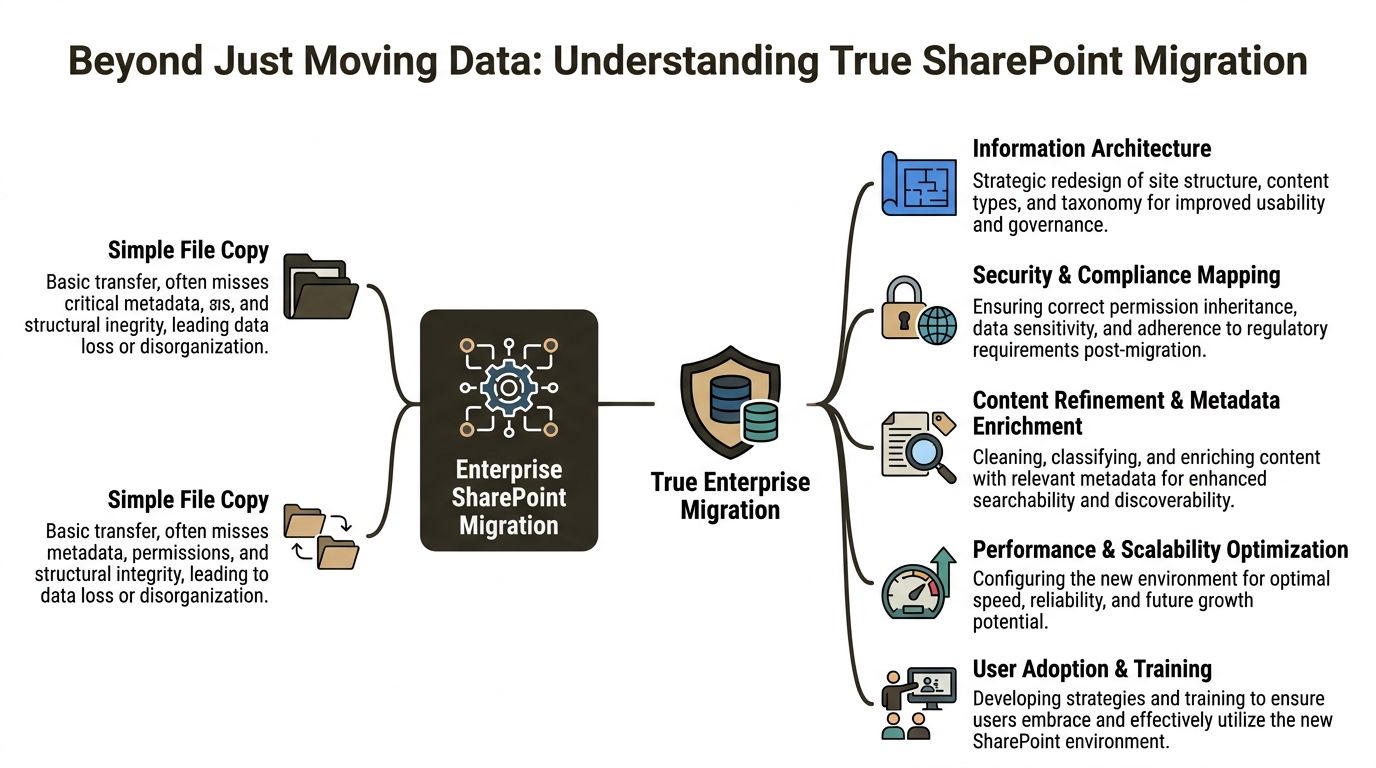
A file copy moves objects. An enterprise migration reshapes control.
That distinction matters because most estates don’t fail on raw transfer. They fail because the target tenant inherits the same chaos as the source, then adds modern Microsoft 365 complexity on top. If you’re consolidating tenants after acquisition, divestment, or regional restructuring, your migration is also an identity and security redesign.
A real migration changes architecture
Internal teams often ask whether they should “migrate everything as-is” and tidy it later.
That approach preserves bad site structures, duplicated libraries, obsolete content types, and years of ad hoc permissions. You don’t modernise by copying disorder into a new tenant. You institutionalise it.
A proper enterprise migration includes:
- Information architecture redesign: site hierarchy, hubs, content types, and metadata need to fit how your business operates now, not how it worked years ago.
- Security model redesign: Entra ID groups, access boundaries, and role-based access control must reflect current risk and regulatory obligations.
- Content rationalisation: orphaned, redundant, and contradictory content needs archiving, rebuilding, or controlled deletion before cutover.
- Dependency mapping: Power Automate flows, third-party connectors, embedded links, and custom forms have to be inventoried and assessed.
For a deeper view of how metadata decisions shape the whole programme, this guide to SharePoint metadata migration is worth reading before you lock your target design.
Tenant-to-tenant work is identity work
The most dangerous assumption in tenant consolidations is that permissions will “sort themselves out”.
They won’t. Source security groups may not exist in the target tenant. Naming may look familiar while object identity differs. Legacy inheritance may conflict with stricter modern governance. If your team doesn’t redesign group structure in Entra ID before migration, you’ll create access gaps at best and a compliance incident at worst.
The documentation says map security for continuity. In reality, continuity only happens when you rebuild the security model deliberately.
Here’s the practical sequence I’d recommend.
Audit the source estate properly
Catalogue sites, libraries, lists, pages, workflows, customisations, and external dependencies. Don’t just count content. Understand ownership and business use.Classify the permission debt
Identify broken inheritance, direct user grants, stale groups, and external access. This is the mess that will explode during cutover if left untouched.Design the target around zero-trust principles
Use explicit group-based access in Entra ID. Reduce one-off permissions. Make access reviewable and governable.Map metadata and content types before migration logic is built
Otherwise your users get a shiny new tenant with unusable search and weak retention alignment.Test with business-unit users, not just admins
Admin validation confirms that content arrived. Business validation confirms that the organisation can still operate.
The migration is your leverage point
Most CTOs treat migration as a cost. That’s too narrow.
A migration forces you to confront permission debt, taxonomy decay, uncontrolled sharing, and inconsistent retention. That pain has value if you use it. It gives you a rare chance to rebuild around security and governance instead of maintaining old compromises.
If you skip that redesign and just move content, you won’t save time. You’ll defer the work into a more dangerous phase, after users depend on the new environment and after auditors start asking questions.
Microsofts Documented Risks Your Team Will Underestimate
Your team probably reads Microsoft Learn as advisory material. That’s a mistake.
In enterprise migrations, Microsoft’s documentation is less a checklist and more an early warning system. When Microsoft says migration performance is affected by network infrastructure, file size, time of day, and API throttling, take that as a certainty, not a possibility. Microsoft also makes clear that SMAT only scans legacy on-premises farms, which leaves tenant-to-tenant complexity outside native pre-migration visibility, as stated in Microsoft’s guidance on SharePoint Online and OneDrive migration speed.
API throttling is not a nuisance
Teams often budget migration windows as if throughput will remain stable.
It won’t. API throttling changes the shape of the whole project. Batch timing slips. Retries stack up. Validation windows compress. Delta migrations become less predictable. If you’re also moving interdependent structures across phases, one throttled segment can delay downstream activities and create data inconsistency between source and target.
The documentation says throttling happens. Reality is uglier. Internal teams usually discover it halfway through a schedule they already promised to the business.
The business risk looks like this:
- Missed cutover windows: business units stay split across source and target longer than planned
- Inconsistent deltas: users create content in both locations while the team tries to catch up
- Escalating support load: IT spends time on retries instead of validation
- Poor audit confidence: you can’t prove migration completeness if batches remain unstable
The 5k list view threshold still breaks business logic
Microsoft has documented the list view threshold for years. Teams still underestimate it because they confuse “the platform stores it” with “the workload performs correctly”.
In practice, large lists break views, filtering assumptions, legacy forms, and custom app logic. Departments that rely on operational lists for tracking, approvals, or case handling often don’t notice the issue during pilot because test data sets are too small. They notice after cutover, when live usage hits the threshold and the process stalls.
We often see clients fail when they migrate the list structure but never test the actual operational behaviour.
Typical failure patterns include:
- Business forms timing out
- Views that no longer return expected results
- Power Platform dependencies behaving unpredictably
- Users exporting data to spreadsheets to work around the platform
That last one matters. Once people bypass SharePoint, your governance model starts bleeding out.
Path and naming issues stop whole departments
Long path limits and invalid characters sound trivial until a legal, finance, or engineering library refuses to migrate cleanly.
These aren’t cosmetic defects. They interrupt batches, trigger remediation work, and force manual decisions on live content. When this hits nested folders or long-standing shared areas, one problematic naming pattern can hold up an entire department’s migration wave.
If your discovery process doesn’t surface path, naming, and structural defects early, your migration won’t fail cleanly. It will fail slowly.
The same applies to tenant complexity. SMAT helps on older on-premises farms. It does not solve discovery for cross-tenant architecture, modern dependencies, or the hidden permission logic that matters most during consolidation. If your team wants a realistic view of what native assessment does and does not cover, review this analysis of the SharePoint Migration Assessment Tool.
Security risk expands beyond migration itself
A migration programme also changes your exposure surface. New temporary access, service accounts, shared tooling, and partner involvement all create additional risk pathways.
That’s why migration planning should sit alongside broader cyber discipline, including protecting against supply chain attacks. If you don’t control who touches the estate, what scripts run, and how credentials are handled, your migration can introduce risk even before cutover.
The pattern is predictable. Teams underestimate Microsoft’s documented limits, improvise around them, and then act surprised when technical debt turns into operational risk. You don’t need optimism here. You need engineering discipline and a plan built for the problems Microsoft already told you exist.
Evaluating DIY Tools vs Professional Migration Platforms
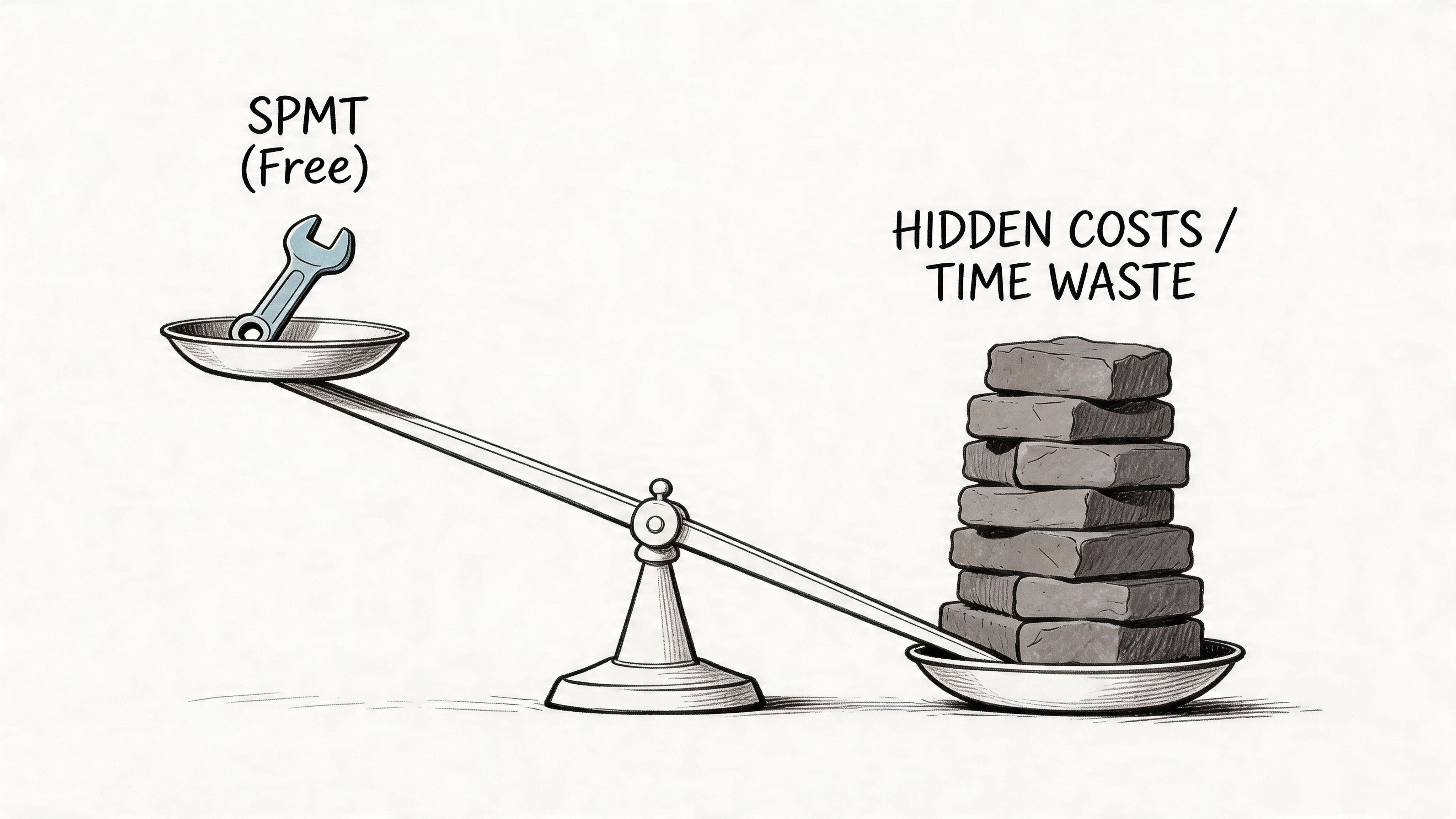
“Free” is expensive when the rollback is manual.
That’s the problem with DIY SharePoint migration tooling. CTOs see a Microsoft tool, assume it covers a Microsoft workload, and approve a project model that looks efficient on paper. Then the underlying complexities emerge. Broken inheritance. Odd metadata. Group mismatches. Custom workflows. Live business usage during cutover.
Where SPMT is adequate
SPMT does have a valid use case.
If you’re moving a small, simple workload from an older environment into SharePoint Online, with clean structure and no unusual permission logic, it can be serviceable. It’s native, familiar, and good enough for straightforward content relocation.
That’s where the good news ends.
Where DIY breaks
Microsoft Learn confirms SPMT’s supported scenarios, but it doesn’t address what happens when source and target tenants use different security models. In those cases, source groups may not exist in the target tenant, and SPMT can default to assigning ownership to the migrating account, which creates silent security gaps that often surface much later in audit or user access disputes, as described in this guide to SharePoint Online migrations.
That’s not a small issue. It’s the point where a migration stops being an IT inconvenience and becomes a security incident.
We often see three failure modes.
Permissions collapse quietly
Tool logs may still show a technically successful migration.
Users then report they can’t access records they previously owned, or worse, they can access content they never should have seen. Broken inheritance and tenant group mismatch are the usual causes. Internal teams miss this because they validate with admin accounts, not real user identities.
Metadata survives badly
A document that arrives without reliable metadata isn’t really migrated in business terms.
Search degrades. Retention logic weakens. Business classification becomes untrustworthy. If you need transformation rather than simple copying, off-the-shelf defaults won’t protect you. You need mapping rules, validation, and usually custom scripting.
Workflows and dependencies don’t follow the files
Power Automate flows, linked forms, embedded references, and custom list logic rarely behave well under a simplistic move strategy.
Tools can copy content. They don’t automatically preserve business process intent.
Here’s a useful walkthrough before choosing a tool path:
ShareGate is better, but expertise still decides the outcome
ShareGate is stronger than SPMT for many enterprise tasks. It gives better control, better visibility, and a more practical experience for serious projects.
But a strong tool in weak hands still creates weak results. If the team doesn’t understand permission remapping, delta validation, transformation design, or tenant boundary edge cases, better tooling only lets them fail more efficiently.
That’s why the tool decision isn’t enough. The operating model matters more.
A specialist-led approach typically includes:
- Pre-flight security auditing: export permission matrices and validate target group design before first batch
- Controlled metadata transformation: map content types and managed metadata deliberately
- Custom scripting: use PowerShell PnP and other automation where commercial tools stop short
- Delta validation after each wave: compare source and target continuously instead of waiting for the final cutover
- Business UAT by function: ask finance, legal, operations, and compliance users to test their own critical areas
If you’re comparing native and commercial options, this review of the SharePoint migration tool covers where each one tends to break. In more complex programmes, teams often pair ShareGate with custom PowerShell PnP scripts and an external delivery partner such as Ollo for discovery, permission mapping, and recovery planning.
The Ollo Verdict
Use SPMT for a single site under 50GB with no custom permissions. For anything else, especially tenant consolidation, you need commercial tooling plus custom scripting and enterprise-grade validation.
If you ignore that, you’re not reducing cost. You’re pushing risk into the future, where it becomes harder to diagnose and far more expensive to fix.
Defining Success KPIs and Your Migration Rescue Plan
If your main KPI is “data migrated”, your reporting is lying to you.
Migration success sits closer to service restoration than data transport. The business doesn’t care that a library copied. It cares that users can do their jobs, compliance rules still hold, and the support desk isn’t flooded on day one.
Start with the right measures
A lot of leadership teams mix strategic goals and operational measures. If your steering group needs a reset, this explanation of the distinction between OKRs and KPIs helps separate ambition from control metrics.
For migrations, the useful KPIs are operational and brutally specific.
Permission fidelity rate
Can the right people still access the right content, and only that content?Metadata accuracy
Did content types, managed metadata, and classification fields remain intact and usable?Time-to-productivity
How quickly did business users resume real work in the target environment?Workflow continuity
Did approvals, notifications, and dependent processes operate as expected after cutover?Issue containment
How fast did the team detect, classify, and isolate post-migration defects?
“Completed” is not a success metric. “Users can work without creating new risk” is.
Build a rescue plan before you need one
Most failed migrations get worse because the team keeps pushing forward after warning signs appear.
That instinct is destructive. A professional rescue starts with controlled interruption, not optimism.
Triage actions when a wave goes wrong
Stop additional batches
Don’t compound the damage. Freeze the wave and preserve evidence.Protect the source of truth
Confirm where authoritative content lives. If users are active in both environments, the problem will escalate quickly.Run validation scripts
Compare source and target for permissions, metadata, object counts, and failed items.Classify the failure type
Decide whether you’re dealing with transport failure, mapping failure, security failure, or dependency failure.Escalate to business owners early
Tell them what’s affected, what’s frozen, and what they must not change until remediation finishes.
Recovery discipline matters more than speed
Internal teams often try to “fix live” because they fear the optics of rollback.
That usually creates a worse outcome. Ad hoc remediation breaks chain of custody, muddies audit history, and makes it harder to prove what changed. If permissions are involved, improvised fixes can expose sensitive content while the team tries to tidy up.
A proper rollback and rescue motion needs clear criteria, scripted validation, and stakeholder control. If your programme doesn’t already include that, this guide to a SharePoint migration rollback covers the minimum operational discipline you should expect.
The hard truth is simple. Mature programmes don’t avoid every issue. They detect failure early, stop cleanly, and recover without turning technical errors into legal or operational damage.
An Executive Risk Register for Your Migration
Boards don’t fund migrations because APIs throttle.
They fund them because unmanaged technical risk turns into legal, financial, and operational exposure. That’s the language your migration programme should use from the outset.
One risk deserves special attention after cutover. Microsoft Learn guidance covers onboarding and validation, but it doesn’t address the post-migration governance decay many organisations experience. In practice, metadata taxonomies often degrade within months as users bypass controls, and DIY programmes regularly fail to budget for the ongoing governance model required to preserve compliance and any future AI readiness, including examples such as one governance officer FTE per 1,000 sites, as discussed in Microsoft’s Teams and SharePoint sites migration guidance.
The board-level risks that actually matter
Your executive team doesn’t need another technical deep dive. It needs a risk register that ties platform failure to business impact.
| Risk Category | Specific Threat | Business Impact | Mitigation Strategy |
|---|---|---|---|
| Compliance | Permission mis-mapping on regulated content | Audit failure, legal exposure, remediation cost | Pre-migration permission matrix extraction, target group validation, post-wave access testing by business owners |
| Security | Orphaned external shares and broken inheritance | Unauthorised data exposure | External sharing review, inheritance clean-up, zero-trust group redesign before migration |
| Operations | Broken workflows and list-dependent processes | Process stoppage, manual workarounds, service delays | Dependency discovery, workflow rebuild planning, operational UAT with live scenarios |
| Information governance | Metadata mapping failure | Poor search, weak retention alignment, record misclassification | Controlled metadata design, transformation rules, post-cutover taxonomy validation |
| Programme control | API throttling and unstable migration windows | Missed cutovers, cost overrun, stakeholder distrust | Wave-based scheduling, retry handling, throughput monitoring, contingency windows |
| User productivity | Poor navigation and unusable target structure | Low adoption, shadow IT, spreadsheet workarounds | Information architecture redesign, user-specific landing patterns, focused training |
| Post-migration governance | Taxonomy drift and permission creep after cutover | Compliance debt, reduced AI readiness, recurring clean-up cost | Ongoing governance ownership, access reviews, metadata stewardship, operational controls |
Governance decay is not an afterthought
A migration can pass every technical gate and still fail six months later.
That happens when nobody owns the target state after go-live. Users create shortcuts. Site owners reintroduce ad hoc permissions. Metadata becomes optional in practice. Departments bypass managed structures to meet deadlines.
We often see clients fail when they treat governance as a one-off design task instead of an operating function.
The migration doesn’t end at cutover. It ends when the target environment remains governable under normal business pressure.
What your register should force
A useful executive risk register should force four uncomfortable decisions.
- Who owns access governance after cutover
- Who signs off permission fidelity for regulated content
- Who monitors taxonomy drift and unmanaged site growth
- Who funds the operating model, not just the project plan
If your programme can’t answer those, your target tenant will decay fast. And once it decays, every future initiative gets harder. eDiscovery, DLP, records management, Copilot readiness, and user trust all deteriorate together.
That’s why this isn’t just a migration governance issue. It’s an executive control issue.
The CTOs Final Decision Hire or Hope
By the time a migration reaches executive review, the technical debate is mostly over.
You already know the risks. Permissions don’t magically reconcile. Metadata doesn’t stay clean on its own. Governance doesn’t survive without ownership. Native tooling doesn’t give you enterprise-grade certainty in the scenarios that matter most.
So the final decision is simpler than most CTOs want to admit.
Option one is hope
You can approve a lean plan, rely on basic tooling, and trust that your team will solve undocumented edge cases under pressure.
That means hoping the target tenant security model aligns closely enough. Hoping batch instability won’t affect cutover. Hoping business users won’t discover missing access in regulated libraries. Hoping governance won’t collapse after the project team disbands.
Hope is not a strategy. It’s an accounting trick. It pushes risk off the budget line and into the incident queue.
Option two is specialist intervention
Hiring a specialist isn’t a vote of no confidence in your internal team.
It’s a recognition that SharePoint migration, especially tenant-to-tenant work in regulated environments, behaves like a specialist engineering and risk programme. Your team may understand your estate. They may not have the pattern recognition that comes from rescuing failed consolidations, rebuilding broken inheritance, and validating metadata and permissions under audit pressure.
That’s the core commercial decision. Not tools versus tools. Predictable risk versus unmanaged exposure.
My advice is blunt
Use internal capability for business context, ownership, and validation.
Use specialist migration architects for discovery, permission redesign, tooling strategy, delta validation, rollback planning, and post-cutover governance control. That’s how you reduce the chance that a technical migration turns into a compliance event.
If you still think the cheaper path is doing it yourself, calculate the cost of one of these outcomes:
- confidential content exposed to the wrong audience
- legal records inaccessible during review
- business-critical workflows broken during cutover
- remediation work consuming the team for months after “completion”
That cost rarely appears in the original project estimate. It appears later, when fixing it is harder and explaining it is worse.
The responsible CTO decision isn’t whether the migration can be done. It can.
The question is whether you want to manage the risk properly, or whether you want to hope your organisation is the exception.
If your team is planning a complex SharePoint or Microsoft 365 migration and you want an expert-led review before you create a future security incident, speak with Ollo. They work on tenant-to-tenant consolidations, Entra ID redesign, migration rescue, and the permission and governance problems that basic project plans usually miss.

















