



Your SharePoint migration probably doesn't have a tooling problem. It has a stakeholder control problem.
You've got a licence for ShareGate. Someone has waved SPMT around in a planning meeting. The budget line exists. The project board says "approved". Then actual migration starts, and nothing moves because the wrong people still control the decisions that matter. Compliance won't sign off on the permission model. Finance won't approve retention or archiving. A business unit owner refuses to validate a pilot because nobody explained what breaks if they don't.
That's not soft-skills nonsense. That's SharePoint migration stakeholder management in its real form. Technical risk control.
I've spent enough time in rescue work to say this plainly. Most failed migrations don't collapse during cutover. They collapse months earlier, when teams treat governance input as optional, let hidden vetoes fester, and assume a migration tool can compensate for organisational indecision. It can't. A tool will copy files. It won't force a Head of Compliance to own a decision on broken inheritance, path limits, or Entra ID identity mapping.
Why Most SharePoint Migration Plans Fail Before Day One
Monday morning. The migration is "approved," the tool is licensed, and the delivery plan looks tidy. By Friday, legal has frozen the retention model, a site owner has challenged deletion scope, and nobody can tell you who owns the permissions design for three legacy business units. Your first technical failure has already happened. It just hasn't shown up in a log file yet.
I see this constantly in rescue work. Failed migrations do not usually collapse during cutover. They fail in planning, when organisations confuse project approval with decision control.
Approval does not reduce risk
A signed business case does not answer the questions that decide whether data can move safely. Who approves archive versus migrate? Who accepts changes to inherited permissions? Who signs off identity mapping rules? Who owns sites with no active business sponsor but active regulatory value?
If those owners are undefined, your architecture is undefined too.
That is why stakeholder management belongs inside technical risk management. Delay from compliance is not a "people issue." It leaves retention labels unresolved, keeps archive rules out of scope, and forces engineers to build migration waves against moving targets. Delay from business owners is not an engagement problem. It leaves content mapping unvalidated, so batches run with bad assumptions and rework becomes inevitable.
A proper SharePoint migration assessment exists to expose those decision gaps before the first batch is configured. If your assessment only inventories content and tools, it is incomplete.
Hidden ownership creates technical debt before a single file moves
Microsoft's pre-migration guidance pushes teams to inspect permissions and structure before cutover for good reason. Broken inheritance, stale groups, and site-level exceptions do not become easier after migration. They become embedded in the target estate, harder to trace, and more expensive to fix.
Here is the rule I enforce. Any stakeholder who controls permissions, retention, identity, records, or validation is part of the technical design authority. Treat them as optional and the platform will punish you later with access defects, failed validation, delayed cutover windows, and avoidable clean-up work.
That is also why soft advice about how to handle difficult employees misses the point in a migration programme. You are not managing personalities. You are removing veto points that can trigger data loss, audit exposure, throttling delays, or a broken permission model.
The warning signs are obvious if you know where to look:
- No named owner for permissions design. Legacy access chaos gets copied into the target and called "business complexity."
- No archive decision by a fixed date. Redundant content stays in scope, migration volume expands, and performance planning gets worse.
- No compliance gate before pilot execution. Audit and retention defects surface after data has moved.
- No business owner assigned to validate migrated content. Testing turns into vague reassurance instead of controlled proof.
- No decision maker for identity exceptions. Mapping errors survive into cutover and create access failures that look like tool defects.
Weak projects die early when nobody has made the decisions the engineers need. Engineers then start compensating with assumptions. Assumptions in SharePoint migrations turn into bad mappings, broken access, and rollback pain.
The right response is blunt. Force ownership early, attach deadlines to every governance decision, and block technical execution until those decisions exist in writing. That discipline cuts risk. Everything else is theatre. Ollo gets called in when teams learn that lesson the hard way.
Identifying Who Can Actually Sabotage Your Migration
Forget the org chart. It lies.
The people who can stop your migration are rarely the people with the cleanest titles. Some have formal authority. Some have practical control. Some know where the bodies are buried in the content estate and can stall you by withholding information, refusing sign-off, or letting bad assumptions survive into cutover.
This is why I don't recommend stakeholder mapping. I recommend a sabotage audit.
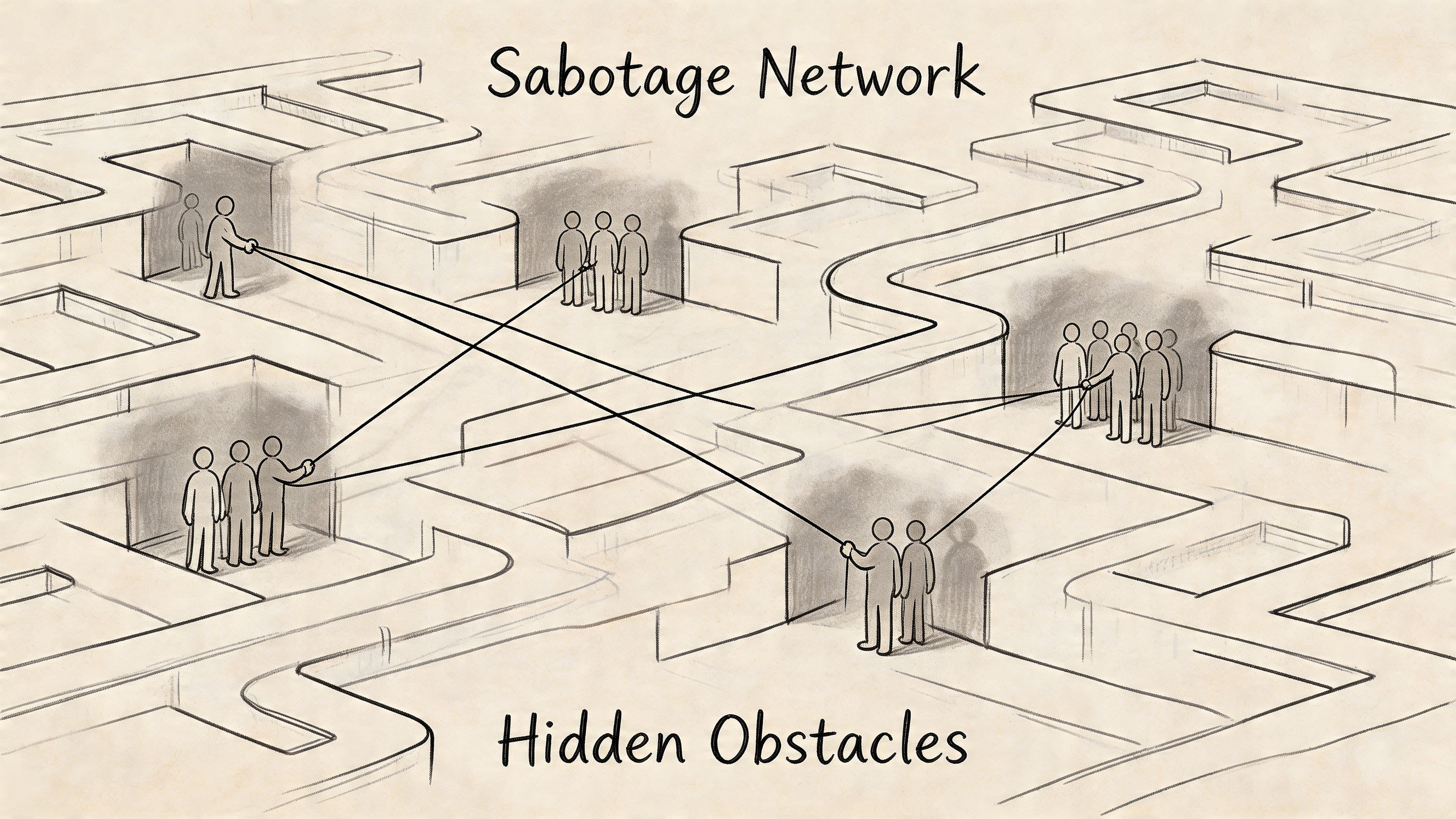
Start with obstruction power, not job titles
In regulated Irish sectors, resistance from compliance isn't hypothetical. The issue gets sharper when identity redesign enters the conversation. Existing guidance often talks about user involvement in broad terms, but it rarely deals with the people who block migrations because they fear Entra ID GUID conflicts will damage audit trails.
That fear matters because identity migration limitations are real, and the technical knock-on effects are ugly. The same IE-region analysis notes that the Central Bank of Ireland's 2024 Digital Resilience Report recorded 68% of regulated firms facing migration delays from stakeholder vetoes on zero-trust redesigns (discussion of stakeholder involvement in migration planning). That's the kind of delay that kills momentum and forces bad technical compromises.
The documentation says SPMT can handle migration work. In reality, enterprise jobs hit API throttling at 600 requests per minute per app and collide with the 5k item view limit if you haven't designed around them. When a stakeholder delays a decision, your technical window narrows and these constraints hit harder.
Use a simple sabotage matrix
You don't need a pretty governance poster. You need a working list of names scored against two variables:
| Stakeholder type | Ability to obstruct | Willingness to cooperate | What they can break |
|---|---|---|---|
| Compliance lead | High | Variable | Audit trail design, permission sign-off, retention approval |
| Content owner | High | Often low | Data mapping, archive decisions, site validation |
| Department admin | Medium to high | Variable | Hidden libraries, broken structures, tribal knowledge gaps |
| IT security lead | High | Variable | Identity model, zero-trust decisions, access model |
| Business unit sponsor | Medium | Low if under-briefed | Pilot participation, acceptance sign-off, adoption credibility |
This matrix forces honesty. It also shows you where to spend senior attention.
The people most teams miss
The obvious stakeholders aren't the dangerous ones. The dangerous ones are the people nobody officially assigns but everyone depends on.
Look for these:
- The compliance sceptic. Usually right about risk, often late to the table, always capable of stopping permission changes.
- The long-serving site owner. They know which "temporary" library became mission-critical.
- The shadow IT operator. They built a workaround that users prefer to the sanctioned platform.
- The overworked admin. They may be the only person who understands years of unique permissions and naming oddities.
- The absent executive sponsor. They won't block directly, but their silence leaves every hard decision ownerless.
Some of these people aren't difficult in the usual HR sense. They're difficult because the project threatens the local system they've built, defended, or depended on. If you need a practical refresher on dealing with entrenched workplace resistance, PeakPerf's guide on how to handle difficult employees is worth reading. Not because migration is an HR problem, but because unmanaged resistance becomes a delivery problem very quickly.
The person who says "I'm not technical" can still destroy your migration if they own the archive decision or the audit sign-off.
What to ask in the first interview
Don't ask whether they're supportive. That question produces theatre.
Ask these instead:
- What data can't move without your approval?
- What would make you block go-live?
- Which permission changes would create audit or operational risk?
- What content should have been deleted years ago but still exists?
- What breaks if your team doesn't validate the pilot?
You'll get more truth from those five questions than from three steering committee meetings.
If your current project still frames resistance as "change management", you're underestimating the threat. The underlying issue is control over decisions that affect permissions, identity, content structure, and validation. That's why so many enterprise projects fail for reasons that have nothing to do with raw tooling capacity. The deeper pattern is the one behind the real reason enterprise Microsoft 365 projects fail. Teams misdiagnose governance conflict as a communication issue and pay for it later.
Building Your Governance Framework Before It's Needed
Cutover is three weeks away. The migration team has mapped sites, tuned batches, and cleared the first pilot. Then legal asks who approved the retention exceptions. Nobody knows. Security spots broken inheritance in a sensitive library. The business owner insists an archive should have moved after all. Your technical plan just became a recovery exercise because governance was missing when the design decisions were made.
That is the point too many teams miss. Governance in a SharePoint migration is a technical control system. It decides what enters scope, what gets excluded, which permissions survive, which risks are accepted, and who carries the authority to stop a bad cutover. If those decisions are vague, your tooling gets forced to process bad inputs. That is how you end up with overscoped migrations, permission defects, failed validation, and emergency rework.
Governance forces technical decisions before the platform does
A weak RACI is worthless. You need named owners for decisions that can trigger data exposure, retention failures, repermissioning, and rollback.
Lock these down during discovery:
- archive scope
- purge approval
- target permission model
- pilot acceptance
- cutover authority
- exception handling for content that cannot move cleanly
Leave any of that unresolved and the migration team starts building on assumptions. Assumptions create technical debt fast. A compliance team that delays retention approval keeps obsolete content in scope. That increases volume, extends run windows, and raises the chance of throttling and validation drift. A business owner who refuses to sign off the permission model leaves engineers guessing at access mapping. That is how sensitive content lands with the wrong audience after go-live.
Build decision gates that block bad technical outcomes
Every gate needs one accountable owner. One name. One deadline. Committees do not own risk. They spread it around until nobody acts.
Use gates like these:
Pre-migration audit sign-off
Confirms the content inventory, identity dependencies, permissions review, and known constraints have been checked by people with authority.Archive and purge approval
Stops dead content, duplicated content, and retention-sensitive material from bloating scope and poisoning batch design.Permission model approval
Forces a decision on inheritance, unique permissions, M365 group design, and access exceptions before they hit production.Pilot validation sign-off
Requires named business validators to confirm that migrated content, metadata, and permissions work as expected.Cutover authority
Gives one person the right to halt go-live when unresolved technical risk is still on the table.
Field rule: if a decision can expose regulated data, break user access, or delay cutover, put a single owner beside it.
A RACI only matters if it controls the hard calls
Use the matrix as an operating document. Keep it tied to decisions, not activity noise.
| Decision Gate | Executive Sponsor (R/A) | IT Lead (R/C) | Business Unit Owner (C/I) | Compliance/Legal (C/A) |
|---|---|---|---|---|
| Approve migration scope | R/A | C | C/I | C |
| Sign off archive and purge list | I | C | R/A | C/A |
| Approve target permission model | I | R | C | C/A |
| Approve pilot validation outcome | I | R | R/A | C |
| Authorise cutover date | R/A | R/C | I | C/A |
If your RACI does not identify who can approve deletion, accept permission risk, or block release, it will not protect the project when pressure hits.
Your governance pack is evidence, not paperwork
When the migration goes wrong, nobody cares that the team had good intentions. They ask for proof. Who approved the scope? Who accepted the exception? Who signed off the pilot? Who ignored the warning?
Your governance pack should include:
- Stakeholder register with named decision owners
- Decision log with approvals, rejections, deferrals, and dates
- Risk log tied to actual technical issues such as broken inheritance, path limits, identity conflicts, throttling, and validation failures
- Pilot evidence with business sign-off and remediation outcomes
- Exception register for sites, libraries, or files that could not move under standard rules
Proper SharePoint data governance for migration control gives your team a defensible record when scope arguments, compliance disputes, or post-cutover defects start flying.
Workshops fail when nobody is forced to decide
Attendance means nothing. A workshop without decision papers, explicit questions, and a deadline for unresolved items is a calendar event dressed up as governance.
Run each workshop to produce only three outcomes:
- Approved
- Rejected
- Escalated with owner and deadline
Anything else pushes risk downstream into configuration, testing, or cutover. That is where failed governance turns into technical damage.
We see this constantly on rescue engagements. Internal teams hold polite workshops, record vague actions, then ask engineers to continue anyway. Engineers build around gaps in retention rules, access design, or ownership. The platform then exposes those gaps at the worst possible moment. Ollo prevents that by putting hard decision gates in place before migration tooling starts making irreversible changes. That is not project admin. It is risk containment.
Your Communication Plan Is Not About Newsletters
Most migration comms are noise. Weekly status emails. Cheerful updates. Bullets nobody reads. None of that helps when a delta sync fails at night or a compliance lead challenges the permission model two days before pilot sign-off.
Communication in a SharePoint migration is command and control.
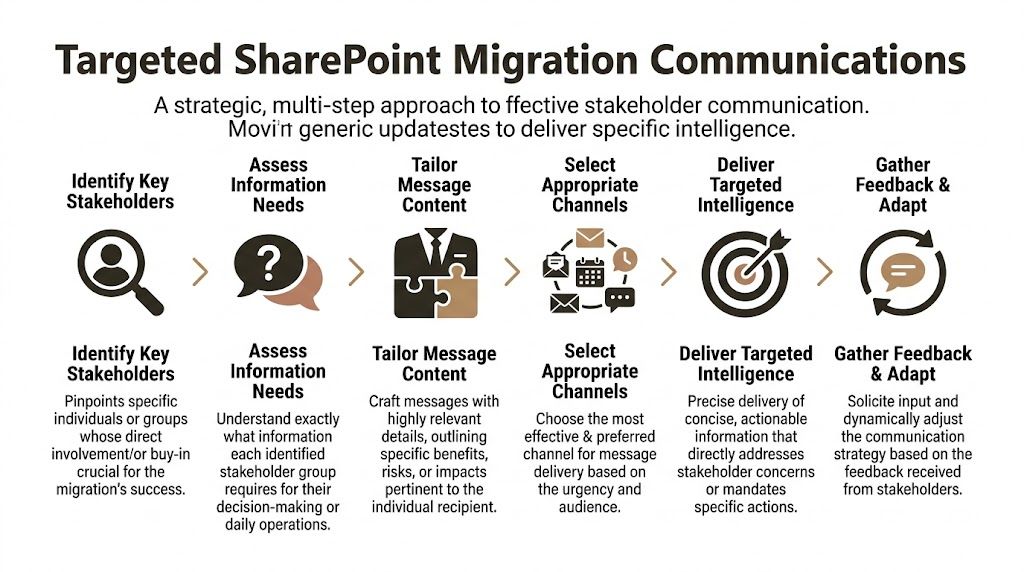
One audience, one message, one required action
The worst comms plans treat everyone the same. Your CIO, your migration engineer, your finance validator, and your end users do not need the same message.
They need different levels of operational intelligence.
The executive layer
Senior leadership needs a short decision brief. Keep it to one page.
Include only:
- Budget position
- Timeline deviation
- Critical risks requiring intervention
Don't send technical logs upstairs. Send decisions.
The engineering layer
Your technical team needs live operational detail.
That means:
- Throttling reports
- ShareGate error outputs
- Validation failures
- Remediation ownership
- Next-run timing
A dedicated Teams war room matters. Bad news must move in minutes, not in the next weekly meeting.
The business validator layer
Business unit owners need to know what changed, what to test, and what happens if they don't respond.
Send them:
- Exact pilot window
- Specific libraries or sites to validate
- Known differences from legacy
- Formal sign-off deadline
No jargon. No architecture diagrams. Just the operational ask.
What a real war room looks like
A proper war room isn't dramatic. It's disciplined.
Use a dedicated Teams channel with only core delivery staff and named decision owners. Pin the runbook. Pin the risk log. Pin the current blockers. Every issue gets tagged with an owner, severity, and decision deadline.
Send the ugly update first. If permissions validation failed, report that immediately. Don't bury it under three "green" workstreams.
Here's the pattern that works:
| Audience | Channel | Cadence | Purpose |
|---|---|---|---|
| Executive sponsor | Short briefing note | Weekly or on risk trigger | Decisions and escalations |
| Technical team | Teams war room | Daily, plus incident-based | Live coordination and remediation |
| Business owners | Targeted email and short calls | At validation milestones | Action and sign-off |
| End users | Just-in-time guidance | Before pilot and cutover | Behaviour change |
Stop writing status updates like marketing copy
A good migration update sounds like this:
- Finance validation blocked. Archive list not approved. Pilot date at risk.
- Path remediation incomplete. Affected content held from current batch.
- Permissions script produced exceptions. Security review required before rerun.
- Delta sync complete. Business validation opens at 09:00 Monday.
A bad one says "The project continues to progress well overall". That sentence has covered up more delivery pain than most IT directors realise.
End-user communication still matters, but only when it's precise
Users don't care about your migration phase names. They care whether their team site works on Monday.
So tell them:
- what changes,
- when it changes,
- what they must do,
- where to report issues.
Nothing else.
If your communication plan exists to make the project look calm, it will fail you. If it exists to move decisions, surface risk, and direct action, it becomes one of the few things keeping the project alive under pressure.
The Technical Breaking Points That Turn Migrations into Disasters
At this juncture, stakeholder failure stops being political and starts breaking production.
Every unresolved decision eventually collides with a technical limit. The platform doesn't care that a business owner was busy, that legal needed another review, or that the steering committee wanted to avoid conflict. SharePoint Online and the migration tools enforce their limits anyway.
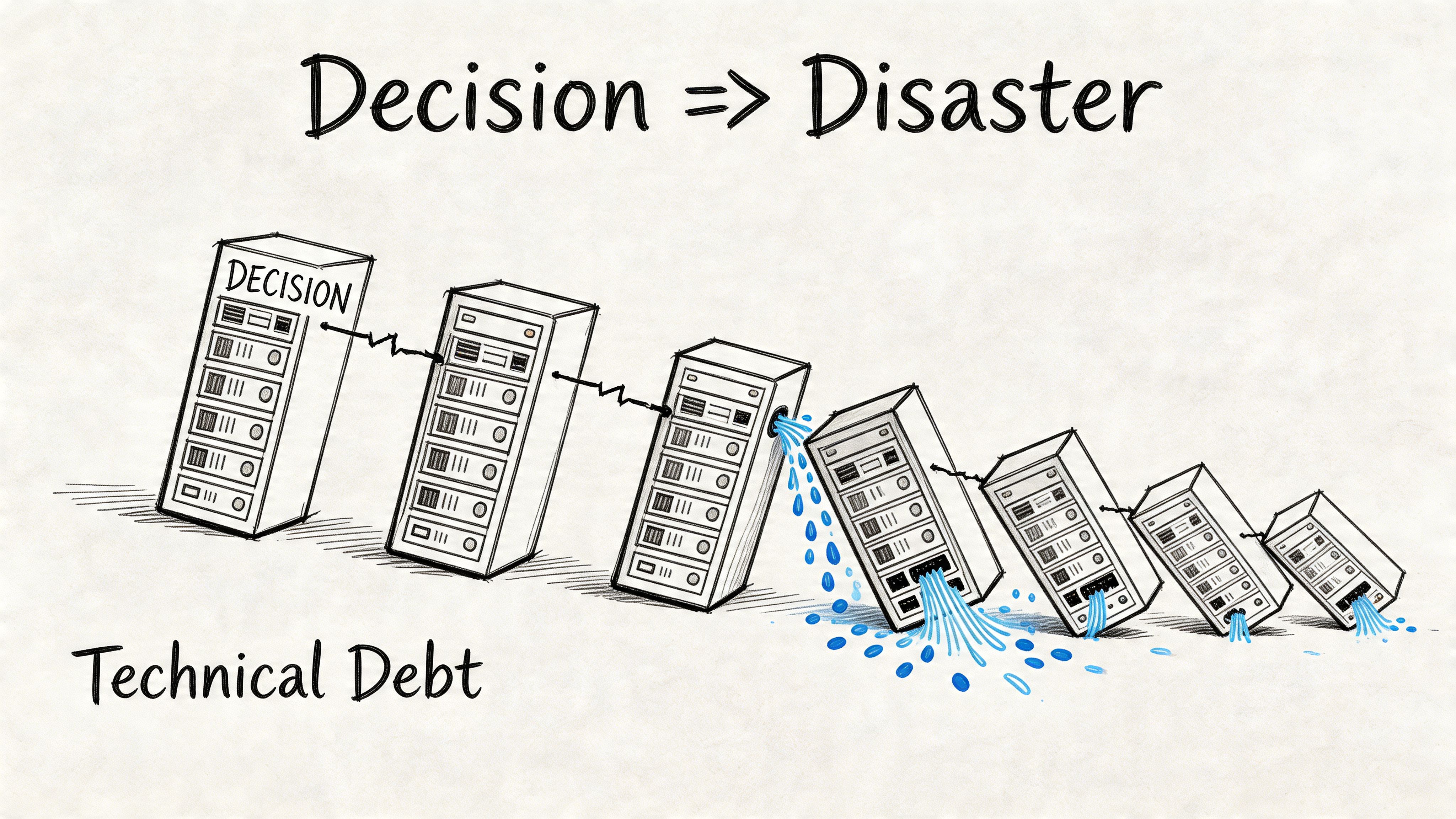
Where DIY teams usually break first
In IE SharePoint migrations, DIY stakeholder management success sits at 40% when governance input is neglected, while specialist-led, people-first approaches reach 90% by dealing with information architecture mismatches early (Ollo on SharePoint migration data loss). That gap exists because the technical traps are brutal when nobody has forced the right decisions in advance.
The same IE client data shows 75% of failures stem from unvalidated path length limits, and Microsoft Learn confirms the 400-character maximum can lead to 20% item skips. That's not a theoretical edge case. That's what happens when stakeholders insist on lifting old folder sprawl into the new environment without remediation.
The demand sounds business-led. The failure is technical
Here are the usual stakeholder requests that wreck migrations:
"Just lift and shift everything"
That instruction sounds decisive. It usually means nobody wants to own archive decisions or structural redesign.
Technical consequence:
- Long paths skip items.
- Legacy folder structures remain bloated.
- Search quality degrades.
- Validation becomes noisy and incomplete.
"Keep all the existing permissions"
That usually comes from fear. Nobody wants to upset a department.
Technical consequence:
- Broken inheritance spreads into the target.
- Unique permissions multiply.
- Governance becomes harder after cutover.
- Security review becomes reactive instead of designed.
"We can run the tool harder if we're behind"
The documentation suggests tools are capable. Reality is uglier.
Technical consequence:
- SPMT hits API throttling.
- Throughput drops unpredictably.
- Delta windows tighten.
- Retry logic turns into manual firefighting.
SPMT and ShareGate both have limits
To be clear,
| Tool | Good for | Breaking point |
|---|---|---|
| SPMT | Smaller, simpler migrations | Enterprise jobs with throttling pressure, tenant complexity, and validation demands |
| ShareGate | Strong migration engine and reporting | Still needs expert handling for GUID conflicts, complex permissions, and custom remediation |
SPMT isn't evil. It's just not enough for a serious enterprise migration. The documentation says one thing, but in reality IE enterprise environments often need custom multi-account scripting to sustain throughput around throttling constraints.
ShareGate is far stronger. It gives you reporting, control, and flexibility. But if your team doesn't know how to pre-audit permissions, handle identity edge cases, and interpret failure output properly, you'll still lose data or trust the wrong result set.
The decisions your stakeholders must understand
You need stakeholders to grasp the link between their indecision and your technical risk.
Use language like this:
- Archive delays don't just delay clean-up. They push bad content into scope and increase your exposure to path and view-limit failures.
- Permission ambiguity doesn't just create admin pain. It can expose sensitive data after cutover.
- Identity shortcuts don't just save time. They raise the risk of GUID-related mismatches and audit problems.
- Rushed pilots don't just reduce confidence. They let validation gaps hit production.
The platform will enforce the limit whether your steering committee acknowledged it or not.
For complex estates, that means large libraries, regulated data, tenant-to-tenant moves, or zero-trust redesign, tool-only thinking is reckless. You need pre-audits, scripted remediation, controlled validation, and explicit stakeholder sign-off tied to actual technical constraints.
If you're dealing with a broad estate, large-scale SharePoint migration planning has to start from those constraints, not from the fantasy that a tool wizard and a few workshops will carry you through.
The Ollo verdict
Use SPMT for under 50GB. For anything more complex, regulated, or operationally sensitive, you need ShareGate plus custom scripting and expert oversight.
That's the difference between a migration and a rescue operation.
Your Two Choices DIY Risk or Specialist Certainty
Cutover weekend arrives. The files move. The dashboard shows progress. Then compliance blocks access to a records library nobody remapped, legal finds broken retention labels, and your admins discover the target structure cannot support what users approved in workshops months earlier. That is not a communication failure. It is a technical failure caused by weak stakeholder control.
DIY migration programmes usually collapse after a chain of ordinary decisions goes unmanaged. A site owner ignores archive requests. Security never confirms the new permission model. Records teams arrive late and reject the destination design. Nobody resolves identity exceptions before testing. The tooling still runs, but it runs straight into avoidable failure states. Throttling rises, validation drifts, permissions break, and remediation work spills into production.
The worst part is what happens after the move. Sites land without accountable owners. Access requests pile up. Inherited permissions expose content that should have stayed locked down. Records sit in the wrong locations because nobody with authority signed off on the information architecture before migration scripts were built. Your service desk ends up absorbing a governance debt that should have been removed before the first batch ran.
Specialist delivery changes that risk profile because specialist delivery forces the right people to make binding decisions before the platform enforces them for you.
That means hard controls, not optimistic planning:
- Pre-migration audits that identify path, metadata, ownership, and permission defects before they poison wave planning
- Authority mapping so compliance, security, records, and business owners cannot disappear when sign-off is needed
- Identity-aware scripting to handle account mismatches, group changes, and target-state permission redesign
- Validation evidence that proves content, structure, permissions, and versions survived the move
- Post-cutover ownership controls so orphaned sites, broken inheritance, and access drift get handled fast
Internal teams commonly become trapped. They treat stakeholder management as meeting hygiene. It is engineering risk control. If compliance is missing, retention and access design will be wrong. If security is vague, the migration will recreate broken inheritance or expose data after cutover. If business owners do not make archive decisions, you migrate obsolete content into libraries already close to structural limits. Every one of those failures has a technical consequence.
You have two real options.
Run the programme internally and accept that your team must discover every hidden dependency, every stakeholder veto point, every tenant constraint, and every recovery path while the migration is already underway.
Or bring in a specialist who has already cleaned up failed estates, already built the remediation logic, and already knows when Microsoft tooling needs scripted control around it. If the project is politically jammed, technically unstable, or one pilot away from a rescue job, bring in a SharePoint migration consultant who treats stakeholder management as part of the technical design, not an admin side task.
Ollo is the rational choice when failure has a real cost. We do not run workshops and hope for alignment. We lock decision ownership to migration dependencies, force issues to resolution before execution, and protect cutover from the stakeholder failures that usually trigger data exposure, compliance breaches, and rollback pain.
DIY is exposure. Ollo gives you control.

















