



The dangerous part of Windows 10 support dates isn't the date. It's the false confidence around it.
A surprising number of IT teams still treat 14 October 2025 as a diary entry instead of what it is: the point where standard support for core Windows 10 editions ends, version 22H2 stands as the final Windows 10 release, and Microsoft's last baseline monthly security update for supported branches lands in the October 2025 cycle, after which customers are told to move to Windows 11 or replace the device, according to Microsoft's lifecycle and release information pages (Windows 10 lifecycle for Home and Pro, Windows release information).
If you run IT in finance, healthcare, energy, or any environment where auditors and insurers matter, this isn't a desktop refresh. It's an exposure event. One unsupported endpoint can sit on your network, still booting, still authenticating, still handling data, while your control framework drifts out of alignment.
We often see clients fail when they assume a Windows 11 project can be run like a broad hardware rollout with generic checklists and standard deployment tooling. That thinking works right up until procurement stalls, line-of-business apps behave differently under the new security model, or a regulated user group misses its migration window and keeps operating on unsupported devices.
The Date on the Calendar Is Not Your Real Problem
Your leadership team may fixate on the date. You shouldn't.
The board sees a milestone. Your auditors see a control failure waiting to happen. Your security team sees unpatchable endpoints. Your operations team sees a support queue that won't stay contained once a few edge cases turn into dozens.
That's the mistake. People search for Windows 10 support dates because they think the problem is scheduling. It isn't. The problem is what happens after the date if your estate is only partially migrated, poorly segmented, or held together with exceptions nobody properly documented.
Why regulated organisations get hit harder
In regulated environments, unsupported operating systems don't just increase technical risk. They damage trust in the controls around your estate.
A machine that still “works” after support ends can still fail governance. It can still undermine an audit narrative. It can still force your incident team to explain why a business-critical endpoint remained outside standard patch coverage.
Unsupported doesn't mean unusable. It means indefensible.
This is why broad advice about “upgrade planning” usually misses the point. The actual work sits inside dependency mapping, exception handling, user cohort sequencing, and proving that your fallback path won't create a worse compliance position than the risk you're trying to remove.
If you're revisiting wider strategies for modernizing legacy IT, treat Windows 10 retirement as one part of a larger estate modernisation problem, not a standalone desktop task. The same pattern appears elsewhere in Microsoft estates, especially where identity, collaboration, and endpoint controls overlap with platforms such as Microsoft 365 Online migration planning.
The war story most teams don't tell
We often see clients fail when they classify devices by hardware age and ignore business criticality.
The laptop on a trader's desk, the consultant's field device, the clinical workstation with one ugly legacy dependency, the executive machine full of local exceptions. Those are the devices that wreck tidy rollout plans. Not because Windows 11 exists, but because your business carries years of undocumented compromise.
DIY teams usually discover this too late. They build a nice deployment sequence, then hit policy drift, driver problems, blocked procurement, and application owners who suddenly remember a dependency no one tested.
The Official Windows 10 End-of-Life Timeline
Treat the date as a hard cut in vendor support, not a planning milestone.
Microsoft's position is already set. Windows 10 Home, Pro, Enterprise, and Education reached end of support on 14 October 2025. Version 22H2 was the final release. The last regular security servicing landed in the October 2025 update cycle, including for the Windows 10 branches Microsoft kept in scope through that point.
Windows 10 end of service dates by edition as of 2026
| Edition | Final Version | End of Servicing Date |
|---|---|---|
| Windows 10 Home | 22H2 | 14 October 2025 |
| Windows 10 Pro | 22H2 | 14 October 2025 |
| Windows 10 Enterprise | 22H2 | 14 October 2025 |
| Windows 10 Education | 22H2 | 14 October 2025 |
| Windows 10 Enterprise 2015 LTSB | Older 2015 LTSB branch | 14 October 2025 |
| Windows 10 Enterprise LTSB editions referenced on Microsoft's release page | LTSB editions listed there | Final update shipped in October 2025 cycle |
What those dates mean in practice
Here is the operational reality. After that point, any new Windows 10 vulnerability sits outside normal support. Your security team can isolate devices, tighten policy, raise monitoring, and build compensating controls. They still own an unsupported operating system, and every exception now needs a business defence, not a technical excuse.
I have watched this go wrong in regulated estates. A bank delayed final signoff because one treasury application owner insisted on another test round. The desktop team assumed they had local time to finish validation. They hit the support boundary during a change freeze, missed the patch window, and spent the next week explaining to risk and audit why a known unsupported cohort was still live on trading-adjacent devices. The problem was not confusion about the date. The problem was poor control over dependencies, approvals, and cutover timing.
The Pacific Time detail matters for that reason. If your Irish team plans against local midnight assumptions, your support window, CAB signoff, and rollback timing can drift from Microsoft's servicing clock. That sounds trivial until it collides with a freeze period, a regulator request, or an incident review.
Unsupported endpoints also create an asset problem. Devices that fail Windows 11 readiness do not disappear when the project board says "migrated." They need tracked retirement, chain-of-custody, and documented destruction or resale handling. If that process is weak, you create a second control failure after the operating system failure. This guide to end-of-life IT asset disposal for businesses is useful context.
Do not isolate this issue to desktops either. The same leadership mistake shows up across the Microsoft stack, especially where unsupported platforms pile up into one audit story. That is why many IT directors are also reviewing Exchange Server 2019 end of life planning.
Practical rule: If your team is still debating dates, you are late. Audit the remaining Windows 10 devices by business impact, control exposure, and retirement path. Then cut the unsupported tail fast.
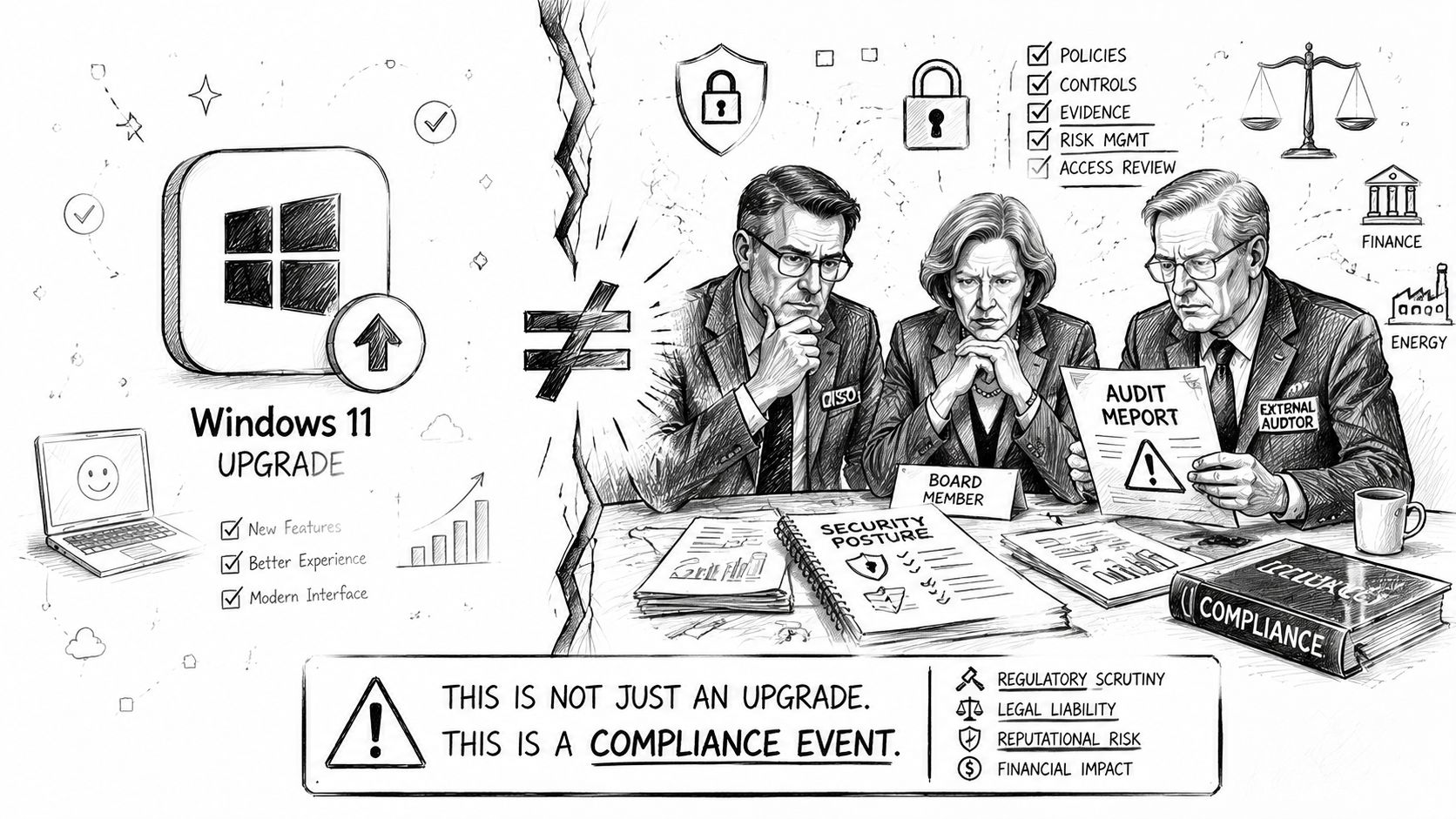
This Is a Compliance Event Not a Tech Refresh
Your engineers may see Windows 11 migration as packaging, deployment rings, and hardware readiness. Your auditors won't.
For organisations that can't complete a clean cutover, Microsoft's own support guidance makes the uncomfortable point plain enough: the device can keep working after support ends, but unsupported endpoints become a serious risk. In regulated sectors, they turn into audit liabilities and incident-response blind spots, especially when teams treat the issue as a technical upgrade instead of a compliance problem (Microsoft support guidance on Windows 10 support ending).
How auditors read your estate
Auditors rarely care that a machine still boots or that a legacy application owner asked for more time. They care whether you knowingly operated unsupported software in a way that weakens your control environment.
That changes the internal conversation. The question stops being “Can this device survive another quarter?” and becomes “Can we justify this exception under scrutiny?”
A regulated business can't shrug at that. If an endpoint remains in production without standard support, your team needs a documented exception, compensating controls, a retirement path, and evidence that the risk owner signed off. Anything less looks improvised.
Why incident response gets worse
Unsupported endpoints aren't just patch gaps. They muddy containment decisions.
When your SOC investigates suspicious activity, unsupported devices create ambiguity. Can you trust telemetry from the device? Can you safely reimage it without breaking a critical workflow? Does the business even know what local dependencies sit on that machine? Those delays are exactly what turn a manageable incident into a governance problem.
Security controls are strongest when they're boring, repeatable, and supported. Unsupported endpoints are the opposite.
This is also where endpoint strategy collides with broader obligations like resilience, supplier assurance, and zero-trust enforcement. If you're under pressure from European cyber resilience requirements, the overlap with NIS 2 and Microsoft 365 governance is immediate. Unsupported desktop estates don't live in isolation. They weaken the wider control story.
The ESU Deception Why Extended Security Updates Are a Trap
A lot of IT directors hear “Extended Security Updates” and think they've bought themselves safety.
They haven't. They've bought themselves breathing room, and only if they use it properly.
For organisations in the European Economic Area, reporting on Microsoft's ESU rules indicates the first year of Windows 10 ESU may be available for free and without the same cloud-sync friction seen outside the EEA. That matters for Ireland operationally. It removes one barrier. It does not move the retirement date, and it does not turn Windows 10 back into a normal, supported platform (Windows 10 ESU FAQ coverage for the EEA).
What ESU does not solve
At this stage, teams talk themselves into trouble.
ESU may extend security coverage for a limited period. It doesn't remove upgrade debt. It doesn't fix application compatibility risk. It doesn't make old hardware suddenly suitable for long-term support. It doesn't erase procurement bottlenecks, refresh delays, or the governance burden of keeping an ageing estate alive.
The documentation says ESU extends security coverage. In reality, it's a narrow stopgap. If your user base stays broadly on Windows 10 because ESU exists, your strategy has already failed.
The Irish trap
The EEA carve-out sounds generous, and that's exactly why it's dangerous. It encourages delay.
An Irish organisation can look at “free for the first year” and treat it like permission to push the migration into the long grass. That's the wrong read. In regulated environments, a temporary bridge often becomes a permanent excuse. Then the exceptions pile up, the unsupported hardware remains, and the business enters another planning cycle with the same unresolved mess.
Use ESU where you have no clean short-term option. Typical examples include isolated specialist devices, a hard dependency that needs vendor remediation, or a tightly ring-fenced business system with a fixed retirement date.
Do not use ESU as a blanket answer for the general estate.
ESU is life support for edge cases. It is not a desktop strategy.
The Ollo Verdict
Use ESU surgically, with named systems, named owners, isolation controls, and a decommission date. If your team wants to use it for broad user populations, stop the plan and review the strategy.
That review should include licensing exposure, exception management, and whether the business has enough discipline to retire every ESU-covered endpoint on time. If you can't answer those questions cleanly, start with a Microsoft 365 licence audit and force visibility first. Blind estates always produce bad migration decisions.
Windows 11 Migration Failure Modes We See in the Wild
Most failed Windows 11 programmes don't collapse because someone forgot the date. They collapse because the estate is messier than the project team admitted.
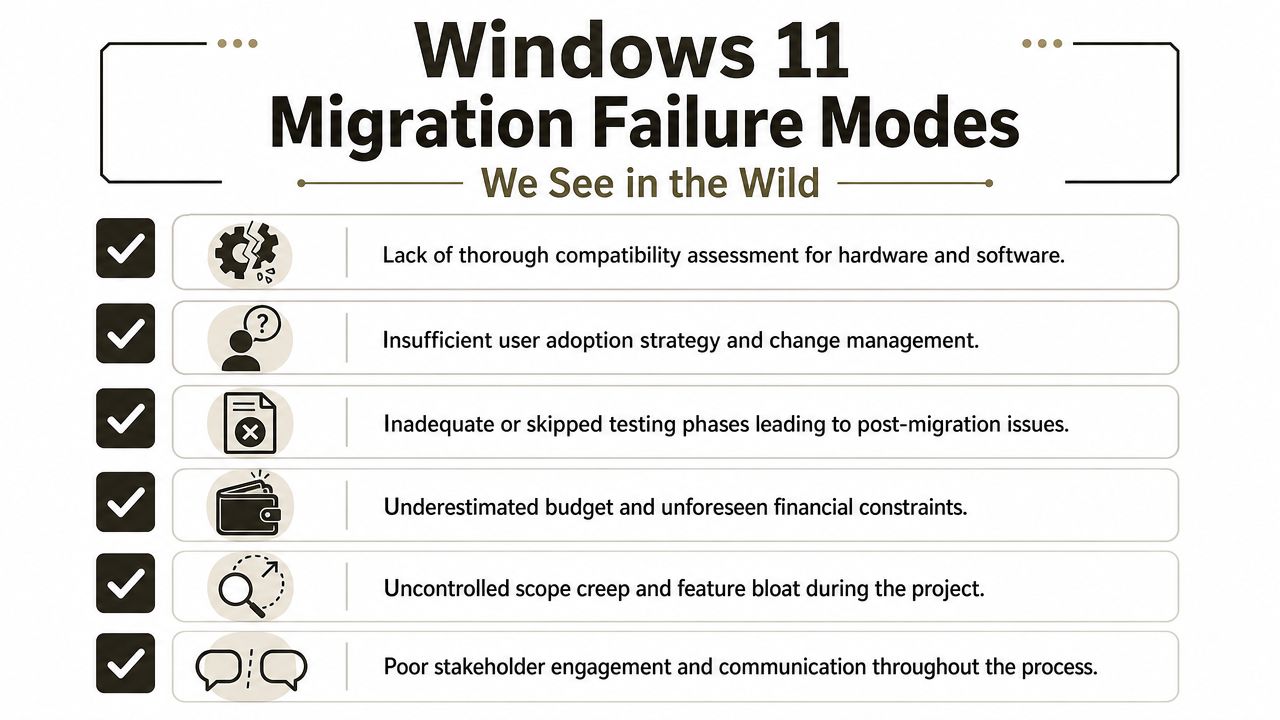
We often get called after an internal team has already run discovery, approved the device list, and built a rollout plan. On paper, everything looks controlled. Then the failure modes show up.
The hardware readiness lie
The first failure is nearly always inventory confidence.
A team runs a device readiness sweep and assumes the results are enough. Then machines start failing the actual cutover because the scan didn't capture the nuance that mattered. Firmware settings differ. TPM state isn't consistent. BIOS versions vary. Remote users haven't connected recently enough for current posture data. Some devices technically qualify but become unstable once security baselines and encryption policies are enforced together.
A “mostly ready” estate becomes a support nightmare.
The policy collision nobody tested properly
The second failure comes from Group Policy and security baseline assumptions.
An internal team tests core logon, Office apps, and VPN. Everything appears fine. Then they migrate a business unit with older local exceptions, delegated admin habits, odd startup scripts, mapped drives nobody documented, or policies that interacted differently under the newer security posture. Users lose access, line managers escalate, and the project team starts issuing exceptions just to keep operations alive.
That isn't a migration. It's controlled drift.
Legacy apps pass UAT and fail in production
This one appears constantly.
A line-of-business application works in a basic test. It launches. It authenticates. It saves a record. The app owner signs off. Then the deployment reaches a real user group and the application starts failing under actual workflow conditions because of an old runtime dependency, a browser control assumption, a printer mapping issue, or a security context the test pack never simulated.
DIY teams love light-touch UAT because it keeps the plan moving. The documentation may say the app is compatible. Reality shows up under load.
For teams worried about hidden cost in application remediation, this piece on budgeting for Windows 11 applications is worth reading before you lock the business case.
A short explainer can help frame the operational side before rollout governance gets serious:
The people problem dressed up as a technical problem
Then there's adoption.
An architect can build a clean deployment model and still lose the programme because user cohorts weren't prepared properly. Shared device users, clinicians, executives, field engineers, and finance teams all behave differently. If your team doesn't map those work patterns, you'll generate self-inflicted support demand and call it “post-migration instability”.
The fix is rarely another tool. It's controlled cohort design, pilot discipline, and endpoint management that can enforce policy without breaking user productivity. That's why the quality of your Microsoft Intune setup and governance model matters so much. The endpoint platform has to carry the migration, not merely report on it.
Why DIY Migration Tools Fail at Enterprise Scale
Your team will want to solve this with familiar tooling. That instinct is understandable. It's also where enterprise programmes start to unravel.
Basic migration and deployment tools have a place. Small estates. Simple profiles. Minimal compliance pressure. Clean hardware. Few exceptions. Once you move beyond that, the tool stops being the answer and starts becoming one more source of failure.
The problem with standard tooling
Microsoft-native tooling is useful when the environment is disciplined and the requirements are narrow. The trouble starts when leaders mistake “supported by Microsoft” for “safe in a regulated enterprise”.
We often see clients fail when they rely on default tooling without wrapping it in architecture, scripting, and rollback design. The tools can move data or orchestrate deployment. They usually can't interpret your undocumented exceptions, sequence around business-critical user groups, or generate the quality of evidence your auditors expect.
Constructive cynicism on common tools
Consider the pattern:
SPMT and entry-level migration utilities: Fine for light jobs. Not fine when your estate includes complex permissions, ugly exceptions, or audit-trace requirements. In Microsoft 365 and SharePoint work, the same class of underestimation causes trouble around API throttling, broken inheritance, GUID conflicts, long path limits, and the 5,000-item list view threshold, all pain points confirmed across Microsoft Learn documentation for enterprise content platforms. That's the lesson to carry into endpoint migration too. Standard tools don't remove complexity. They hide it until go-live.
PC transfer-style tools: Attractive for speed. Risky for enterprise control. They can drag profile clutter, stale settings, and unsupported dependencies into the new state if you let them. That doesn't modernise the endpoint. It preserves the mess.
ShareGate and higher-grade tooling: Powerful, and we use that class of tool in broader Microsoft migration work for a reason. But power in untrained hands causes damage. The same operator who can move fast can also trigger tenant-wide pain through bad batching, poor sequencing, inherited permission breakage, or throttling if they don't understand platform limits.
The tool didn't fail. The operating model around the tool failed.
The Ollo Verdict
Use native tools only for small, low-risk, tightly understood jobs. If your environment includes regulated data, exception-heavy endpoints, mixed hardware readiness, or cross-platform dependencies, tooling alone won't save you.
For anything beyond a basic estate, you need architecture, custom scripting, evidence capture, and rollback discipline. Without that, DIY becomes a gamble with your compliance posture, not just your deployment schedule.
The Ollo Approach A Risk Reduction Framework for Migration
The safe approach starts before deployment. It starts with triage.
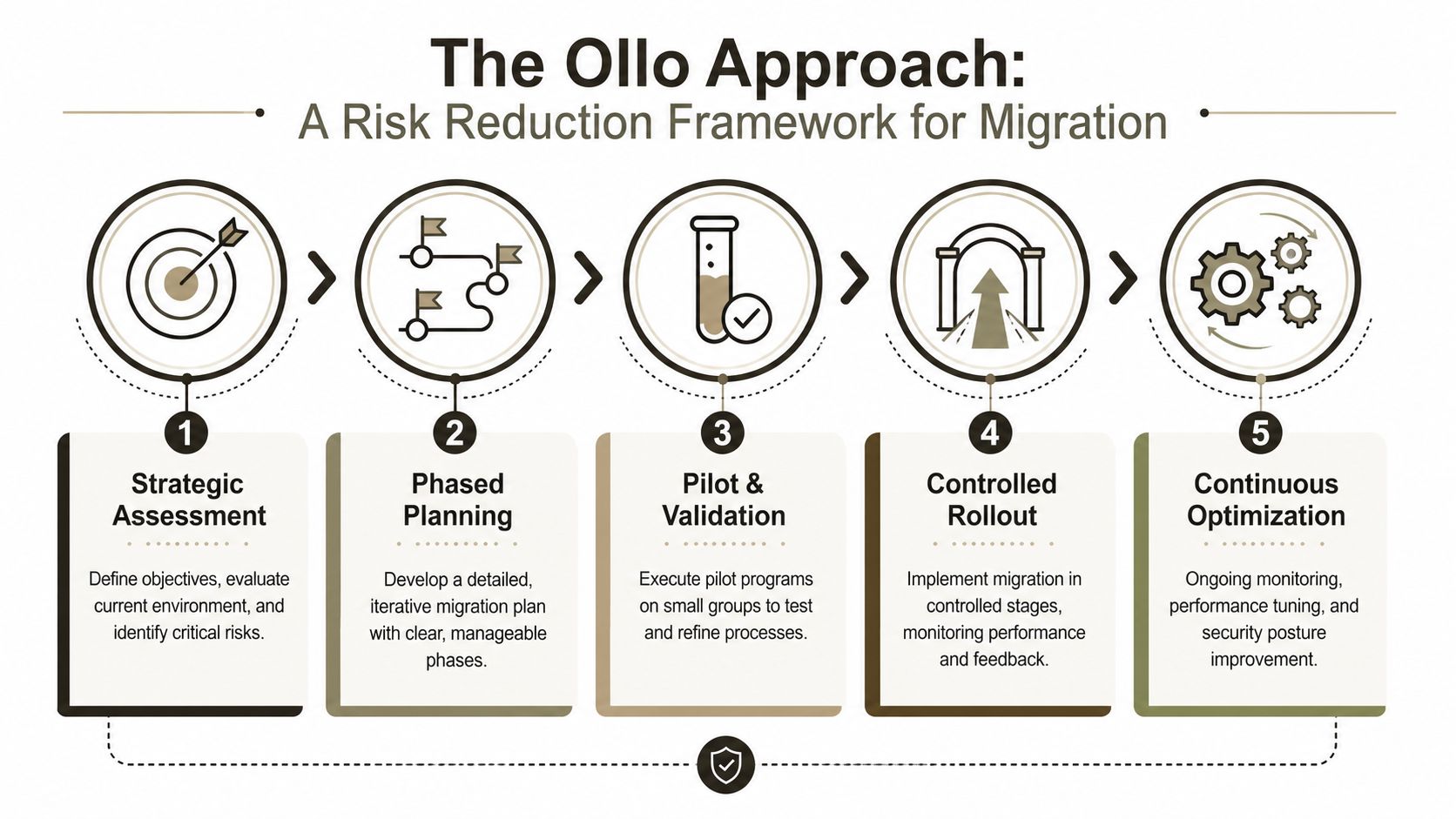
A high-stakes Windows 10 retirement plan needs three disciplines working together: endpoint discovery, compliance decision-making, and controlled execution. If one of those is weak, the programme drifts into exceptions and rescue work.
Audit and triage first
Start by identifying every device that can't move cleanly, every application with a support question, and every user cohort that would create disproportionate operational risk if mishandled.
This stage needs more than inventory exports. It needs judgement. Which systems can be remediated? Which need isolation? Which need replacement? Which should never have remained in service this long?
Pilot and remediate properly
Build a pilot that reflects reality, not a sanitised lab.
That means testing representative hardware, ugly edge cases, remote users, policy-heavy laptops, specialist business apps, and user groups that always expose hidden assumptions. A clean pilot on easy devices proves nothing.
Good pilots create bad news early. That's their job.
Roll out in controlled waves
Avoid big-bang deployment unless you enjoy incident calls and executive escalations.
Controlled waves let you tighten baselines, validate remediation, and support each cohort with enough engineering depth to contain fallout quickly. Hypercare isn't a luxury. It's what stops a migration issue becoming an operational incident.
Your board isn't asking whether Windows 11 is available. They're asking whether your team can retire Windows 10 without creating security, audit, and operational failure at the same time.
If your estate includes regulated data, exception-heavy devices, procurement delays, or a migration programme that already feels unstable, bring in a specialist before DIY turns into a rescue job. Ollo handles complex Microsoft 365 and endpoint migration scenarios for organisations that can't afford data loss, compliance drift, or another failed project.

















