



Most migration advice starts with the tool. That's backwards. A SharePoint Migration Tool job, a ShareGate project, or a carefully written PowerShell script can move files while your permissions, metadata, identity mappings, and recovery path fail. Failure mode analysis supplies the missing control layer, because it forces your team to ask how the migration can fail, how you'll detect each failure, and what you'll do before users discover it.
For regulated organisations, the cost of a bad answer isn't an untidy library. It can mean inaccessible records, broken audit evidence, missed retention obligations, and a cutover that remains in remediation long after the business expected the project to finish. The Irish engineering community treats failure investigation as a formal discipline, not an improvised troubleshooting exercise. Trinity College Dublin's forensic engineering group examines failed products and structures to determine causes across engineering failure analysis, metallurgy, and materials science, with faculty noting more than 50 years of combined experience in related fields at Trinity's forensic engineering group.
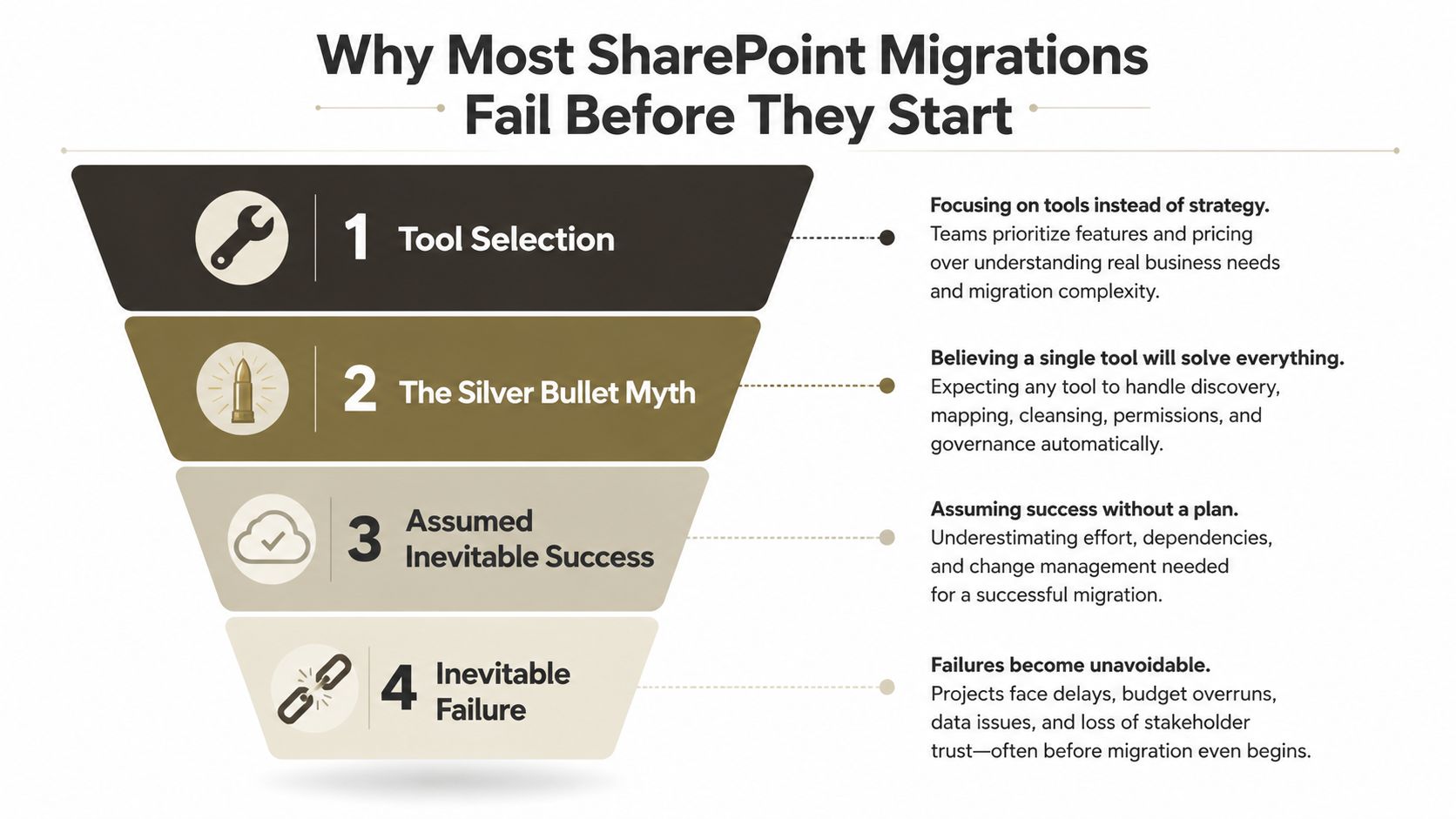
Why Most SharePoint Migrations Fail Before They Start
A migration can fail before the first file moves. The usual cause is treating the tool as the decision-maker. Microsoft's service limits, the source structure, permission design, identity mapping, and recovery plan determine whether a copy job is safe. A product can transfer content within its capabilities, but it cannot decide whether a permission model remains defensible or whether a rollback will restore business access.
The common failure pattern is a bulk-copy mindset. A job may report transferred files while orphaning permissions, breaking metadata relationships, or excluding content with paths beyond SharePoint's supported length. Throttling can extend a cutover window, and an incomplete delta pass can leave source and target out of step. The failure patterns that derail enterprise SharePoint migrations usually originate in discovery and design, not on the night of cutover.
The tool cannot define success
Create a failure register before selecting a product. For every mode, record the cause, business effect, existing control, required evidence, owner, recovery action, and rollback trigger. “The tool completed” is not acceptance. A defensible criterion states that each restricted document retains its intended identity mapping and passes access validation.
Migration errors also interact. A path-length outlier can block a legal folder. Manual permission remediation can then alter the structure expected by the delta pass. If the discrepancy appears after cutover, the source, target, and audit evidence may no longer match.
Practical rule: A migration tool moves bytes. Your risk register decides whether those bytes arrived with the controls the business depends on.
Failure mode analysis converts assumptions into go/no-go decisions. A wave should proceed only when discovery exceptions, service-limit exposure, validation results, and rollback readiness meet the agreed threshold. The change advisory board then has a record of which exceptions remained and which condition would stop the next wave.
DIY teams often skip this register because starting the copy feels faster. The shortcut transfers effort into remediation, reconciliation, and possible recovery, where access failures cost more to diagnose and control.
What Failure Mode Analysis Actually Means for IT Leaders
Failure Mode and Effects Analysis, or FMEA, is a structured way to identify how a process can fail, assess the effects, and assign controls before the failure reaches the business. For a Microsoft 365 migration, the process includes discovery, transformation, transfer, identity mapping, validation, cutover, and recovery. Each stage has different failure modes, so one generic project risk log won't provide enough operational detail.
Ireland has a credible precedent for formalising this kind of thinking. Trinity's dedicated 5-ECTS Forensic Materials Engineering module requires students to classify mechanical failure types, explain fracture surfaces, conduct investigations, and produce a report. Its assessment includes a 70% final written assignment, with laboratory failure analysis and report work forming the remaining graded components as described by Trinity College Dublin. That's evidence of an assessed discipline built around evidence, diagnosis, and documentation.
Irish higher education also adapted FMEA into Failure Mode Effects Reflective Analysis, or FMERA. The 2011 paper explains that researchers modified FMEA because the sector lacked a standardised risk-assessment strategy, creating a qualitative method for identifying potential failures, effects, and mitigations in the TU Dublin repository record. The migration lesson is direct. Informal judgement becomes useful only after you formalise it and connect it to controls.
Score the risk, not the confidence
Use three axes:
- Severity measures the consequence. A broken inheritance chain on a regulated record set carries more impact than a cosmetic URL change.
- Occurrence measures how likely the failure is within your estate, based on discovery evidence and pilot behaviour.
- Detection measures how difficult it is to identify the failure before users, auditors, or regulators encounter it.
A common FMEA model multiplies the axes into a Risk Priority Number, or RPN. For migration governance, the exact scale matters less than consistent definitions, documented evidence, and an action tied to the result. Your steering committee should reject any score that exists only because a project lead feels confident.
FMEA scoring axes applied to SharePoint migration
| Axis | Score Range | Migration Example | RPN Impact |
|---|---|---|---|
| Severity | 1 to 5 | Access loss across a restricted library has higher severity than a cosmetic naming issue | Raises priority when business, legal, or security consequences are material |
| Occurrence | 1 to 5 | Repeated path or identity exceptions in discovery indicate elevated occurrence | Raises priority when source evidence shows the failure is common |
| Detection | 1 to 5 | A failed transfer visible only through post-cutover user testing has poor detection | Raises priority when existing validation won't expose the issue |
Keep the register alive through every migration wave. Your risk assessment framework for Microsoft 365 should connect each entry to an owner, a pre-flight test, a monitoring signal, and a rollback decision. A static FMEA document creates the same false confidence as a static checklist.
The Microsoft 365 Service Limits That Break Migration Projects
Microsoft 365 doesn't offer an override for poor migration planning. Official Microsoft Learn documentation confirms that background applications, including migration, DLP, and backup tools, face tighter throttling during weekday daytime hours. Evening and weekend windows provide more permissive conditions for the region, but throttling cannot be disabled or suspended, and opening a support ticket doesn't lift it according to Microsoft's SharePoint Online migration speed guidance.
Throttling changes the cutover equation
Your test lab may show attractive throughput under light load. Production traffic, concurrent jobs, and service protection can produce HTTP 429-style backpressure. Build retry logic around the service response, schedule background work outside the busiest periods, and control concurrency at the application level. Otherwise, you risk stalled cutovers and incomplete delta passes rather than merely slower transfers.
Microsoft also documents per-app-per-tenant resource quotas ranging from 1,200,000 to 3,600,000 resource units per 24 hours, depending on the licensing band, alongside 400 GB hourly ingress and egress limits for a single app in the documented SharePoint migration performance limits. Your runbook must treat these as hard operating conditions.
Content structure creates hidden blockers
The decoded path, including the folder path and file name, cannot exceed 400 characters in OneDrive and SharePoint as Microsoft documents for long OneDrive URLs. Inventory path outliers before transfer and flatten structures where the business can accept the change. Don't wait for a copy job to expose the problem.
The List View Threshold is 5,000 items by default, and Microsoft states that operations exceeding it can be blocked in SharePoint Online in its list view threshold guidance. A library can contain up to 30 million items, files, and folders, but storage capacity doesn't make every query usable as Microsoft explains in its SharePoint limits documentation. Large validation queries, cleanup scripts, and user views can still fail.
Libraries and folders over 100,000 items lose the ability to break permission inheritance, another documented structural condition that can undermine your target design in Microsoft 365 migration performance guidance. Large List Resource Throttling drives the threshold error, so indexing and data-model changes belong in the migration plan, not a post-cutover support queue as Microsoft explains in its troubleshooting guidance.
Critical Microsoft 365 service limits for migration planning
| Service Limit | Threshold | Trigger Condition | Failure Mode |
|---|---|---|---|
| Background service protection | Non-negotiable throttling | High daytime or concurrent application demand | 429 responses, delayed jobs, incomplete deltas |
| Decoded file path | 400 characters | Combined folder path and file name exceeds the limit | Content rejected during assessment or transfer |
| List View Threshold | 5,000 items by default | Query or operation exceeds the threshold | Views, validation queries, or scripts blocked |
| Large list or library scale | 30 million items, files, and folders | Repository reaches documented capacity | Storage remains available, but queryability still fails |
| Permission inheritance structure | Over 100,000 items | Team needs to break inheritance at that scale | Permission design changes become unavailable |
The SharePoint 5,000-item limit isn't a trivia question. It's a go/no-go condition for your information architecture, validation approach, and remediation scripts. If your discovery report doesn't identify these outliers, your team hasn't completed discovery.
Choosing the Right Migration Tool for Your Risk Profile
No migration tool removes failure modes. Each one shifts responsibility among the product, your engineers, and migration governance. Choose against the estate you must control, not the demonstration dataset.
Microsoft's SharePoint Migration Tool suits a simple, clean lift-and-shift. It has no licence cost, but your team still owns discovery, exception handling, identity validation, throttling response, and rollback. Its logs may show that an item failed without providing an audit-ready explanation of the permission or metadata cause. For regulated workloads, that gap can block a defensible go-live decision.
ShareGate provides pre-checks, reporting, and operational controls that reduce manual effort for conventional moves. It does not resolve complex inheritance, unusual document sets, identity relationships, or large-estate design decisions. Better reporting improves triage. It does not make an unsafe target structure acceptable.
Custom PnP PowerShell scripts give precise control over batching, retry behaviour, transformation, and identity mapping. They also create software that your team must test, secure, monitor, document, and maintain. A script that succeeds in one wave can fail when the next source contains different permissions, longer paths, or unfamiliar metadata.
Migration tool failure mode resilience comparison
| Failure Mode | SPMT | ShareGate | Custom PnP Scripts |
|---|---|---|---|
| API throttling | Service limits remain your responsibility | Better operational handling, but limits still apply | Custom retry and concurrency logic, with engineering overhead |
| Path-length handling | Requires external discovery and remediation | Useful checks, but exceptions still need decisions | Can inventory and transform paths precisely |
| Permission fidelity | Depends heavily on source and target mapping | Stronger reporting, complex inheritance still needs review | Detailed mapping possible, validation must be built |
| Rollback capability | Requires a separate recovery plan | Requires a separate recovery plan | Can support tailored rollback, but only if designed and tested |
Set go/no-go criteria before selecting a product. A regulated enterprise handling tenant consolidation, Entra ID redesign, complex permissions, or legal records should use ShareGate with custom PnP PowerShell controls and specialist governance, rather than SPMT alone. Define rollback triggers for unresolved identity mappings, repeated throttling, rejected paths, and validation gaps. The tool can report these conditions, but governance must decide whether to pause, remediate, or revert.
For a mid-market team with clean source data and limited exceptions, ShareGate offers a practical control surface after discovery and a scoped pilot. A lean IT team running a simple lift-and-shift can use SPMT after that same pilot, provided it funds separate monitoring, exception handling, and recovery planning.
The SharePoint Migration Tool overview explains where SPMT fits in the stack. It does not replace failure analysis, service-limit checks, or a tested rollback plan.
Identity and Permission Failures That Surface After Cutover
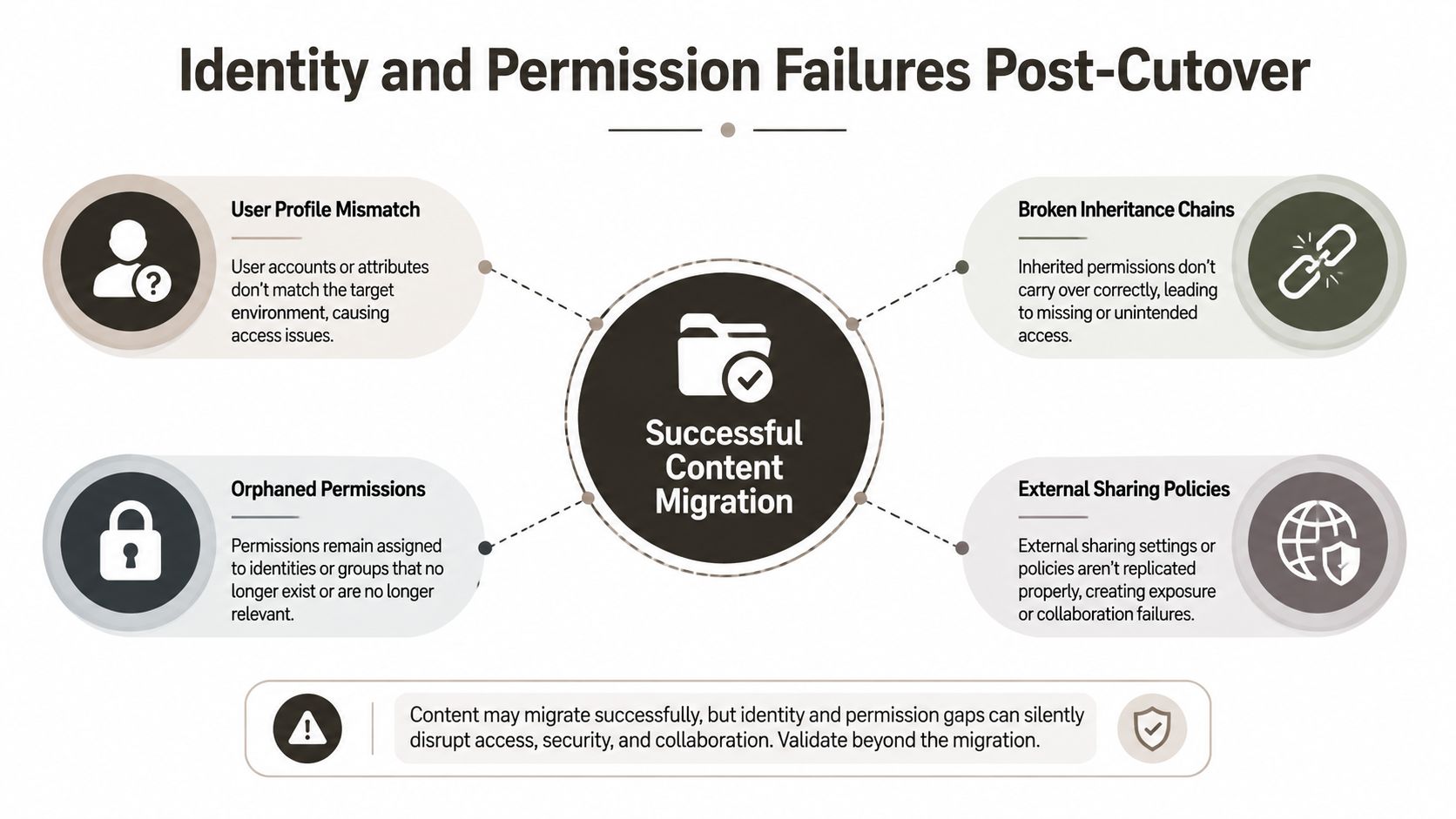
Content validation doesn't prove that people can access the content they're authorised to use. We often see teams validate file counts, sample a few documents, and declare success before users encounter broken inheritance, orphaned permissions, or identity mismatches.
The hidden problem sits in the relationship between source identities and target identities. Decommissioned Active Directory accounts can leave orphaned security identifiers. A tenant-to-tenant move can create GUID conflicts or UPN collisions when the target assigns different object identifiers. A copied permission may look syntactically valid while pointing at the wrong person or group.
Diagnose access failure as a chain
Start with identity mapping. Reconcile source SIDs, UPNs, groups, and service accounts against the target directory before cutover. Then validate the permission model, including unique scopes and inheritance breaks. Finally, test access against a representative sample of documents through Microsoft Graph queries and controlled user scenarios.
This flow matters because each failure masks the next:
- User mismatch: the target object doesn't match the source identity.
- Permission orphaning: the copied ACL references an unavailable or incorrect principal.
- Inheritance break: the target structure prevents the intended permission model from propagating.
- Access validation gap: no automated test detects the problem before users report it.
Microsoft's official orchestration guidance treats identity mapping failures as a first-class migration error, which supports making identity reconciliation part of your FMEA rather than leaving it to helpdesk triage in Microsoft's orchestrated migration error guidance. Your identity consolidation plan should include ownership for every unresolved principal and evidence that the target identity received the intended access.
The 5,000-item default List View Threshold also affects permission operations and validation queries. Large, heavily permissioned libraries need segmentation and structural remediation before your team attempts to change inheritance at scale. If the target design depends on thousands of item-level exceptions, your migration has an architecture problem, not just a transfer problem.
Use this video as a supplementary visual reference for the identity and permission risks that can appear during migration:
A successful copy job doesn't close this risk. Your go-live decision should require passing identity mapping, permission inheritance, external sharing, and recovery tests. If any one remains unknown, the cutover remains a controlled gamble.
Building a Migration Risk Scoring Matrix and Runbook
A useful FMEA register ends in action. Score each failure mode for severity, probability, and detection difficulty on a 1 to 5 scale, then multiply the values into an RPN. Use the score to determine what your team fixes before the wave, what it monitors during execution, and what condition stops the cutover.
The matrix should include evidence, not just opinions. Discovery scans support occurrence ratings. Pilot results support detection ratings. Business owners and compliance teams determine severity. Your runbook then assigns a named owner to each control.
Migration risk priority number scoring matrix
| Failure Mode | Severity (1-5) | Probability (1-5) | Detection (1-5) | RPN | Action Tier |
|---|---|---|---|---|---|
| Long decoded paths | 4 | 3 | 3 | 36 | Accept with monitoring if remediated exceptions have owners |
| List View Threshold failure | 4 | 3 | 4 | 48 | Accept only with indexed views and validation evidence |
| Identity mapping mismatch | 5 | 3 | 4 | 60 | Document mitigation and rollback before cutover |
| Broken permission inheritance | 5 | 4 | 5 | 100 | Document mitigation, access tests, and rollback |
| Throttling during delta sync | 4 | 4 | 4 | 64 | Document scheduling, retry, and halt controls |
Use the following governance tiers:
- RPN above 100: Remediate before migration. Don't approve the wave while the control remains theoretical.
- RPN from 60 to 100: Document mitigation, monitoring, ownership, and rollback.
- RPN below 60: Accept with monitoring, provided the evidence supports the rating.
The runbook needs three operational checkpoints. Before transfer, inventory paths, item counts, permissions, identities, metadata, and dependencies. During transfer, watch service responses, job exceptions, delta completeness, and access-control changes. Before cutover, require reconciliation reports and business-owner sign-off.
Do not copy arbitrary halt thresholds from another estate. Define them with your change authority and document the evidence behind them. A regulated migration can use triggers such as an agreed throttling error rate within a defined observation window or a permitted rate of inheritance exceptions, but those values must reflect your service baseline, business tolerance, and recovery capacity.
For broader governance context, these insights for CTOs on data migration are useful when you're translating technical controls into executive decisions. The critical point remains practical: every high-risk entry needs a test, an owner, and a stop condition.
The Real Cost of Skipping Failure Mode Analysis
The cheapest migration is not the one with the lowest software bill. It's the one that avoids paying twice for discovery, remediation, access reconstruction, extended parallel operations, and emergency specialist support.
A failed cutover can force your organisation to keep source and target environments running together. Your team may need to rebuild permissions manually, investigate missing metadata, recover broken links, and explain incomplete audit trails to compliance stakeholders. In energy, finance, and healthcare, inaccessible or poorly evidenced records can create consequences that exceed the technical repair itself.
Don't invent a false precision for that exposure. The actual cost depends on your estate, staffing model, licensing position, regulatory duties, and recovery requirements. What you can quantify before approval is the work each failure creates, the people who must perform it, the time they need, and the business process that waits.
Cost comparison for FMEA and reactive remediation
| Failure Scenario | With FMEA, Proactive | Without FMEA, Reactive | Cost Multiplier |
|---|---|---|---|
| Long paths and unsupported structures | Discover, transform, and approve exceptions before transfer | Re-run waves and manually locate missing content | Compounds through repeated migration effort |
| Permission and identity failures | Reconcile mappings and test access before cutover | Rebuild access while users and auditors report failures | Multiplies across every affected site and principal |
| Throttling and incomplete deltas | Schedule, batch, monitor, and stop safely | Extend cutover, retain parallel systems, and repeat syncs | Grows with every missed maintenance window |
| Weak audit evidence | Capture decisions, exceptions, and validation results | Reconstruct what moved and who could access it | Raises compliance and investigation exposure |
FMEA isn't paperwork added to a migration. It's how you price risk before risk prices the project for you. If your team is moving regulated content without a scored register, evidence-based controls, and tested rollback, you're choosing the rescue operation in advance.
Ollo helps regulated organisations plan and execute complex Microsoft 365 migrations with failure mode analysis, ShareGate, custom PowerShell PnP controls, identity mapping, permission validation, and recovery planning. Visit Ollo to discuss your source estate, service-limit risks, and the controls your next cutover needs before your data moves.

















